PHASR MITRE grouping
PHASR MITRE Grouping is a GravityZone feature that organizes attack vectors using the MITRE ATT&CK framework. It provides a structured, top-down view of security coverage, mapping user activity and detections to attacker tactics, techniques, and sub-techniques.
This approach enables better visibility into how threats are detected and helps streamline investigation workflows by aligning security insights with industry-standard attack methodologies.
Page layout
You can access the PHASR MITRE grouping page by navigating to Policies → PHASR MITRE grouping.
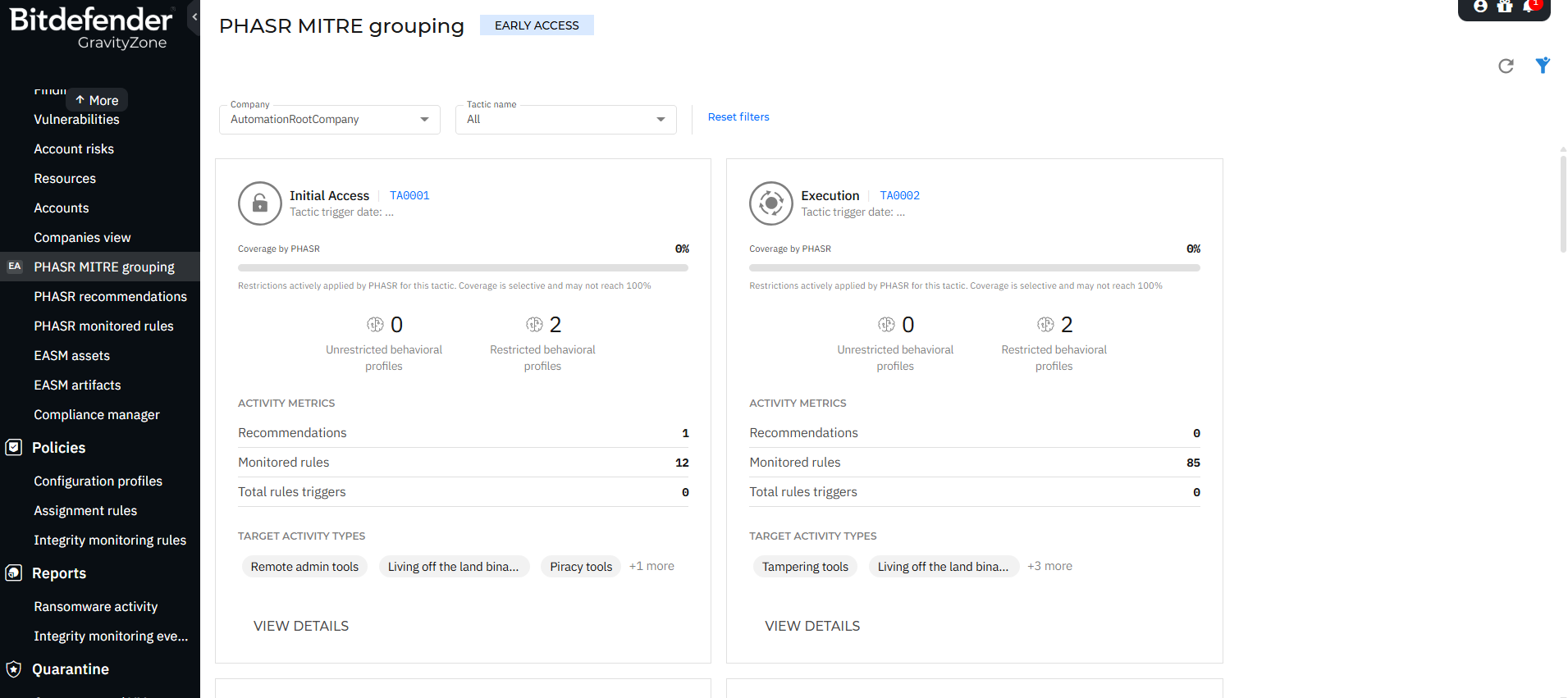
Filters
At the top of the page, you can refine the displayed data using:
Company selector - Choose the company you want to view information for.
Tactic name filter - Filter by specific MITRE tactics.
Vector name filter - Filter by specific attack vectors.
Reset filters - Clear all applied filters.
Overview
The PHASR MITRE Grouping page displays attack vectors grouped hierarchically:
Tactics – High-level attacker objectives (for example, Initial Access, Execution)
Techniques – Methods used to achieve a tactic
Sub-techniques – More specific implementations of techniques
Attack vectors – Detection logic tied to behaviors
This structure allows you to:
Understand how detections map to real-world attack patterns.
Evaluate PHASR coverage across MITRE ATT&CK.
Drill down from high-level tactics to specific vector-level insights.
Identify gaps in detection and enforcement.
Tactics view
The main page displays a grid of MITRE tactics.
Each tactic card includes:
Tactic name and ID (for example, Initial Access – TA0001)
Coverage by PHASR (%) - Indicates how much of the tactic is covered by behavioral restrictions
Behavioral profiles - can be restricted or unrestricted.
Activity metrics - Number of recommendations, attack vectors, attack vector triggers.
Target activity types - e.g. Remote admin tools, Living off the land binaries, Piracy tools.
View details action.
Note
Coverage is selective and may not reach 100%.
Tactics details panel
Selecting View details on a tactic opens a side panel with detailed information about the selected tactic.
Key information:
Coverage by PHASR (%)
Tactic ID
Targeted activity types
Platform support (Windows, macOS)
Attack vector count
Recommendations count
Behavioral profiles distribution
Incidents involving attack vector triggers.
Observed activity
Displays behavioral profile usage in your environment, containing the percentage of activities using attack vectors and insights into whether tools are fully or partially controlled.
Description
A contextual explanation of the tactic, including how attackers typically use it.
Techniques view
Within a tactic, techniques are listed.
Each technique includes:
Technique name and ID (for example, Drive-by Compromise – T1189)
Coverage by PHASR (%)
Attack vector count
Recommendations
Vector triggers
Platform applicability
Actions
View attack vectors
View details
Technique details panel
Provides deeper insight into a selected technique.
The information that is displayed in this panel:
Technique ID
Targeted activity types
Platforms
Attack vectors
Recommendations
Vector triggers
Behavioral profile distribution
Incidents involving attack vector triggers
Description
Includes a detailed explanation of the technique, often aligned with MITRE ATT&CK definitions, describing how adversaries use it.
Sub-techniques and Attack vectors
At the lowest level, you can inspect attack vectors associated with a technique.
Each attack vector entry displays:
Vector name (for example, Chflags.HiddenFile)
Target activity type
Platform
Recommendations
Vector triggers
Attack vector details panel
Selecting an attack vector opens a side panel with:
Vector description - explains what behavior is monitored or restricted.
Targeted activity type
Platform
Vector trigger date
Recommendations
Behavioral profile usage
Incidents involving the attack vector
Key concepts
Coverage by PHASR
Represents how effectively PHASR restrictions address behaviors associated with a tactic or technique.
0% coverage – No active restrictions applied.
Partial coverage – Some behaviors are restricted.
Full coverage (rare) – All relevant behaviors are restricted.
Behavioral profiles
Unrestricted profiles - Behaviors allowed without enforcement
Restricted profiles - Behaviors actively controlled by PHASR
Activity metrics
Provide insight into how attack vectors behave in your environment:
Recommendations – Suggested actions to improve security posture
Attack vector – Detection vectors tracking activity
Vector triggers – Number of times attack vectors were activated
Navigation flow
You can investigate security insights in a structured way:
Start at Tactic level.
Drill down into Techniques.
Explore Sub-techniques.
Analyze Attack vectors.
This top-down navigation mirrors attacker behavior and helps prioritize investigations.
Benefits
PHASR MITRE Grouping enhances visibility and investigation by:
Aligning detections with the MITRE ATT&CK framework
Providing end-to-end visibility from tactic to attack vector
Highlighting coverage gaps
Enabling faster root cause analysis
Improving contextual understanding of alerts and incidents.