Bitdefender PHASR standalone for MSP FAQ
What is Bitdefender PHASR standalone?
Bitdefender PHASR standalone is a security product available for managed service providers (MSP). This solution can be used even if MSPs have an endpoint security solution from a different vendor.
What functionality is included with Bitdefender PHASR for MSP?
Bitdefender PHASR (Proactive Hardening and Attack Surface Reduction) analyzes user and system behavior to reduce an organization’s internal attack surface. Based on observed behavior per user-device pair, PHASR delivers targeted hardening recommendations to mitigate risks such as Living off the Land Binaries, Crypto miners, Piracy tools, Tampering tools, and Remote admin utilities based on observed behavior per user-device pair.
Note
The Bitdefender PHASR for MSP also supports the Compliance Manager, Patch Management, and EASM add-ons.
As a Bitdefender distributor, how do I start offering Bitdefender PHASR standalone to my customers?
In the GravityZone Control Center, go to the Companies page and edit the product type in the company's licensing details.
Enable Bitdefender PHASR for existing MSPs:
Existing MSPs that already use the full MSP Suite, referred to as Endpoint Security product type in GravityZone Control Center, need to be granted access by the distributor to an additional product type, Bitdefender PHASR, to extend their MSP portfolio.
The options for granting access are available in the Licensing section of the MSP's company account. Under Products for reselling, select Bitdefender PHASR and click Save.
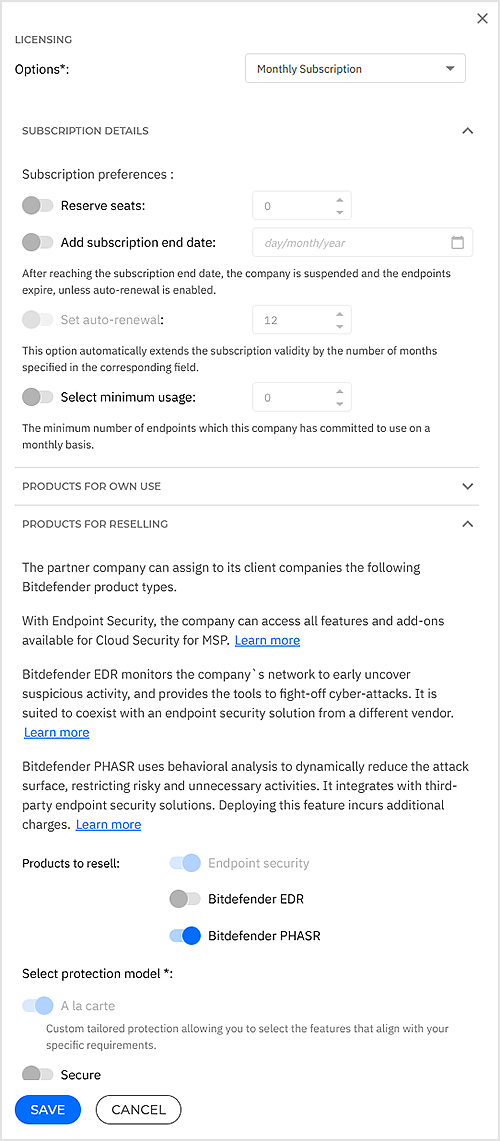
Once this step is completed, MSPs will be able to license Bitdefender PHASR to its managed customers.
Enable PHASR for new MSPs:
Create a new Partner company account.
In the Licensing > Products for own use section, for the Select product type field, select Bitdefender PHASR from the drop-down menu.
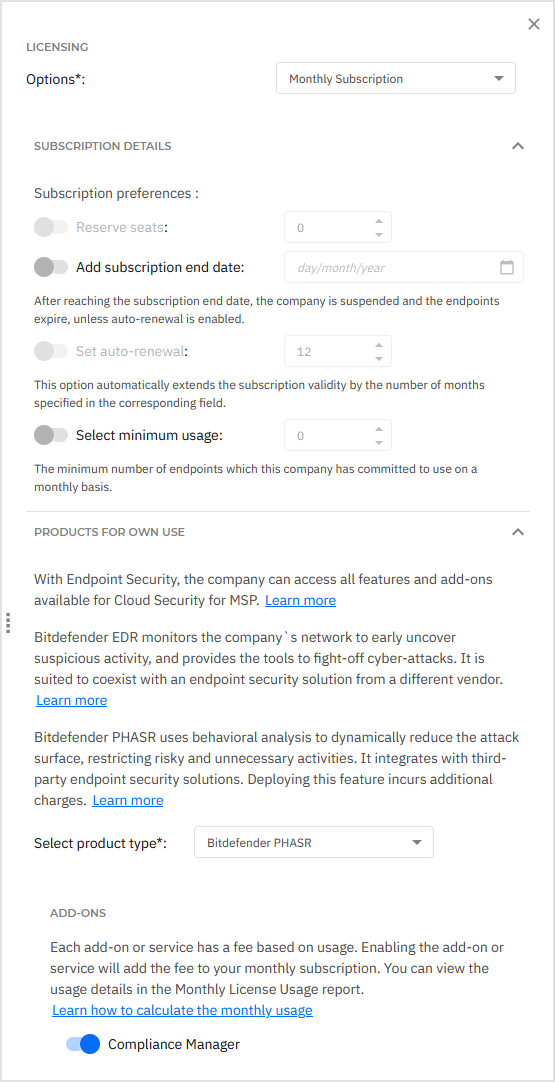
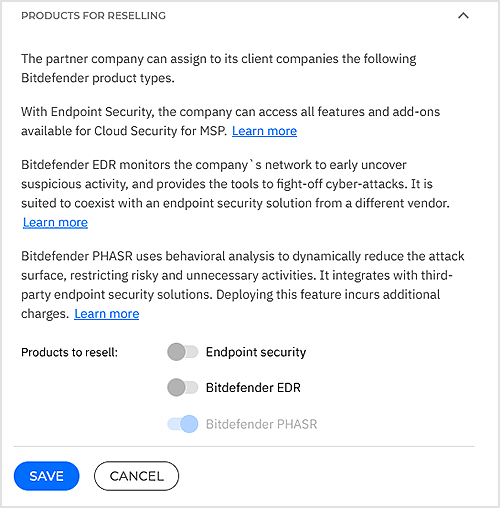
Under Products for reselling, make sure only Bitdefender PHASR is selected.
This option is available for companies that will be created under the MSP company, which means child companies will be able to use the Bitdefender PHASR standalone solution.
As a Bitdefender RMM partner, how do I start offering Bitdefender PHASR standalone to my customers?
In the GravityZone Control Center, go to the Companies page and edit the product type in the company's licensing details.
Enable Bitdefender PHASR for existing MSP:
Existing MSPs that already use the full MSP Suite, referred to as Endpoint Security product type in GravityZone Control Center, need to be granted access by the Distributor to an additional product type Bitdefender PHASR to extend their MSP portfolio.
The options for granting access are available in the Licensing section of the MSP's company account. Under Products for reselling, select Bitdefender PHASR and click Save.
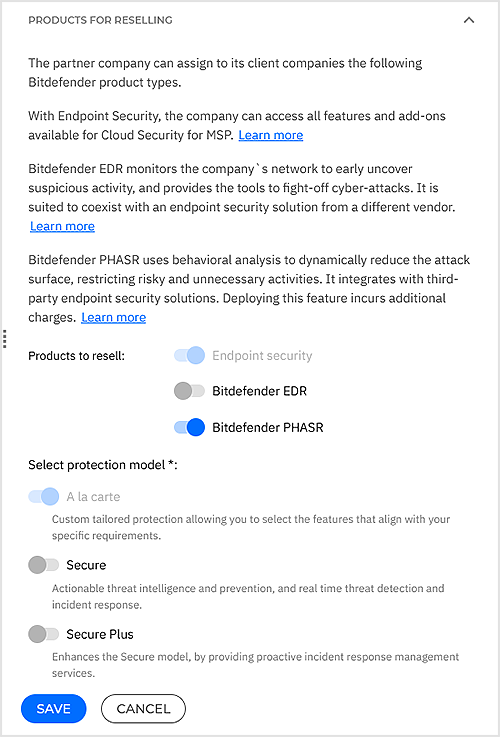
Once this step is completed, MSP will be able to license Bitdefender PHASR to their managed customers.
Enable Bitdefender PHASR for new MSP:
Create a new Partner company account.
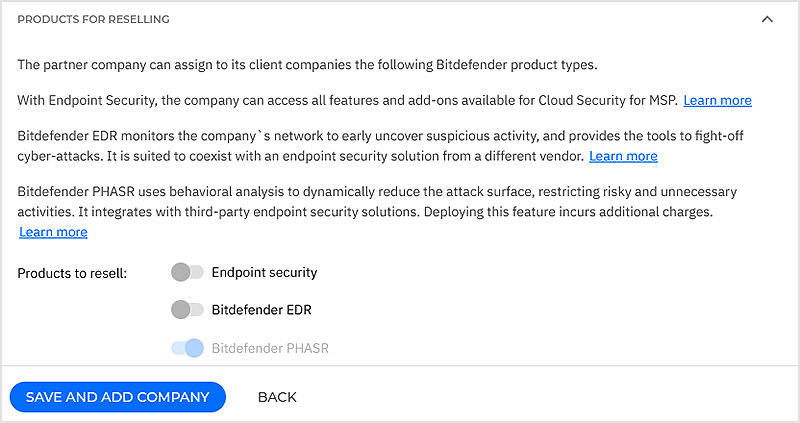
In the Licensing section, next to Select product type, select Bitdefender PHASR.
Under Products for reselling, make sure only Bitdefender PHASR is selected.
This option is available for companies that will be created under the MSP company, which means child companies will be able to use the Bitdefender PHASR standalone solution.
As an MSP, how do I start using Bitdefender PHASR with a 3rd party antivirus/endpoint security solution?
Request your Bitdefender distributor/RMM to grant you access to the product.
Add your customer companies in GravityZone and select Bitdefender PHASR as product type. For details, refer to the Company accounts section.
When should MSPs use Bitdefender PHASR standalone?
The standalone Bitdefender PHASR product should be employed when customers or MSPs do not want to uninstall their existing 3rd party antivirus or endpoint security solution for the moment, but are looking for a quick way to reduce an organization’s internal attack surface and to mitigate risks such as Living off the Land Binaries, Crypto miners, Piracy tools, Tampering tools, and Remote admin utilities based on observed behavior per user-device pair.
The lightweight Bitdefender PHASR product can also be installed alongside the 3rd party security platform to see the threats that are being missed by other solutions.
For both new and existing Bitdefender MSP partners, it is recommended to use detection and response capabilities together with the Bitdefender hardening and next-gen AV prevention features, as part of the Bitdefender MSP Suite. The unified layered suite stops most threats automatically before execution, minimizes data breach risks, and streamlines security management.
What is different about the Bitdefender PHASR standalone endpoint agent?
If the customer is using a competitor’s endpoint solution, he can also use the Bitdefender PHASR standalone next to it. The PHASR layer is also included as an add-on in the Bitdefender GravityZone Cloud Security for MSP Suite (full product).
Upgrading to use Bitdefender add-on with Bitdefender hardening and next-gen AV as part of the MSP suite is recommended to automatically stop most threats before execution, minimize data breach risks, and streamline security management.
How do I upgrade from Bitdefender PHASR standalone to the full MSP Suite?
When MSPs want to upgrade from Bitdefender PHASR standalone to the full MSP Suite, the best practice is to request access from their Distributor/RMM to extend their portfolio with the full MSP Suite and start migrating each managed customer one by one.
In order to grant access to the full MSP Suite, the Distributor or RMM need to select the Endpoint Security option next to Products to resell in the configuration page of the MSP’s company account.
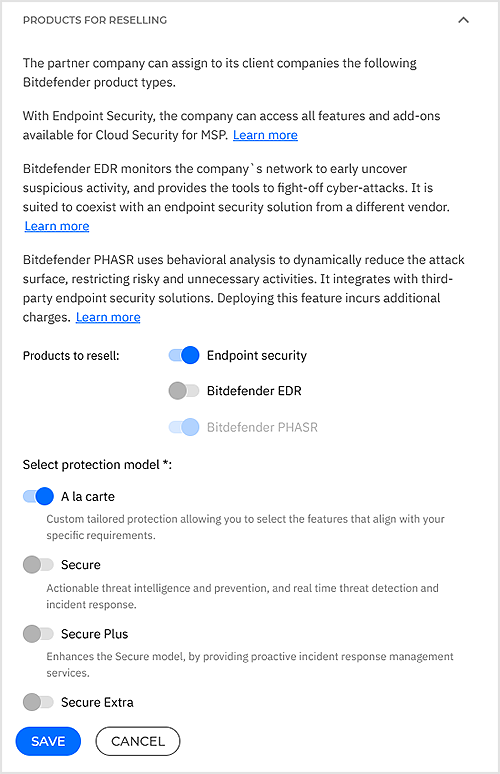
Once the access to the full MSP Suite (referred to as Endpoint Security product in GravityZone Control Center) is granted, MSPs can simply migrate their managed customers. To do this, they must change the option Select product type, in the Licensing section of its managed customers’ company account, to Endpoint Security.

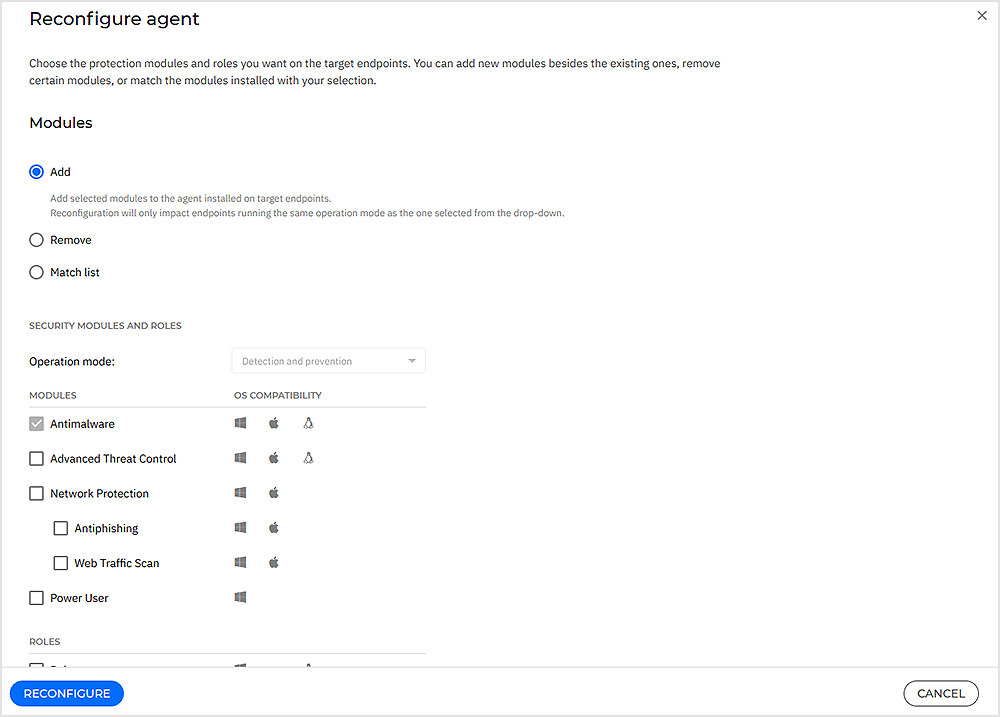
Changing the product type to Endpoint Security will start the migration window for the managed customer, which lasts 7 days. In the meantime, MSPs simply need to use the Reconfigure agent task to add on endpoints all the features available in the full MSP Suite.
Note
Once the migration window is over, endpoints that have not been reconfigured will expire. MSPs can still proceed with the Reconfigure agent task at any time, after which the expired endpoints will be licensed with Endpoint Security.
As a Distributor where do I see the Bitdefender PHASR standalone usage?
You have to generate the Monthly License Usage report in GravityZone Control Center. When doing so, select Bitdefender PHASR as product type.