Extended Email Security
Version 1.8.1
New features
Link Rewrite Protection: Link Rewrite Protection is no longer in beta and is now available to all partners. This feature provides post-delivery, real-time protection against emerging threats in URLs that were not identified as suspicious or malicious when the email was originally scanned. For more information, refer to Link rewrite protection.
Outbound DLP rules: You can now create outbound DLP rules to prevent sensitive customer data from unintentionally leaving the organization. Mesh Gateway and Mesh Unified partners who use the outbound smarthost can create rules that quarantine emails based on specific subject lines, URLs, email body content, and common PII patterns.
Improvements
Customer-level scheduled reports: Report scheduling is now available at the customer level. Customer-level administrators can automate recurring report generation without needing a partner-level team member.
Bug fixes
Fixed an issue that prevented the API documentation page from loading.
Fixed a URL encoding issue in Link Rewrite Protection.
Fixed an issue related to Microsoft 365 safe sender validation.
Fixed an issue where the Threat-Scanning verdict was not updated after the scan completed.
Fixed an issue related to deactivating or deleting DKIM keys from the smarthost settings.
Version 1.8.0
New features
Link rewrite protection - This feature adds post-delivery, real-time protection against emerging threats found in URLs that were not detected as suspicious or malicious during the original email scan. For more information, see Link Rewrite Protection.
Note
This feature is currently in beta. Contact Technical Support if you would like access.
Improvements
Improved subject line searching. You can now search for exact matches by using quotation marks.
The Microsoft Verdict column now appears in Live Email Tracker export CSV files.
When signing in, all users are now prompted to review the Access Agreement and Privacy Policy.
The gradient has been removed from Mesh as we continue to expand the available native integrations.
The Tickets page will be removed in the next release. Tickets can be raised by email or phone through Technical Support.
Bug fixes
Removed extra text that appeared on the quarantine digest release page.
Fixed an issue where the defer status did not update in Live Email Tracker after the email was delivered.
Fixed an issue where custom rules did not activate under certain conditions for alias addresses.
Fixed an issue where the targeted mailboxes list on the Analytics page overflowed in certain cases.
Fixed an issue where large Live Email Tracker exports did not include all entries.
Version 1.7.16
New features
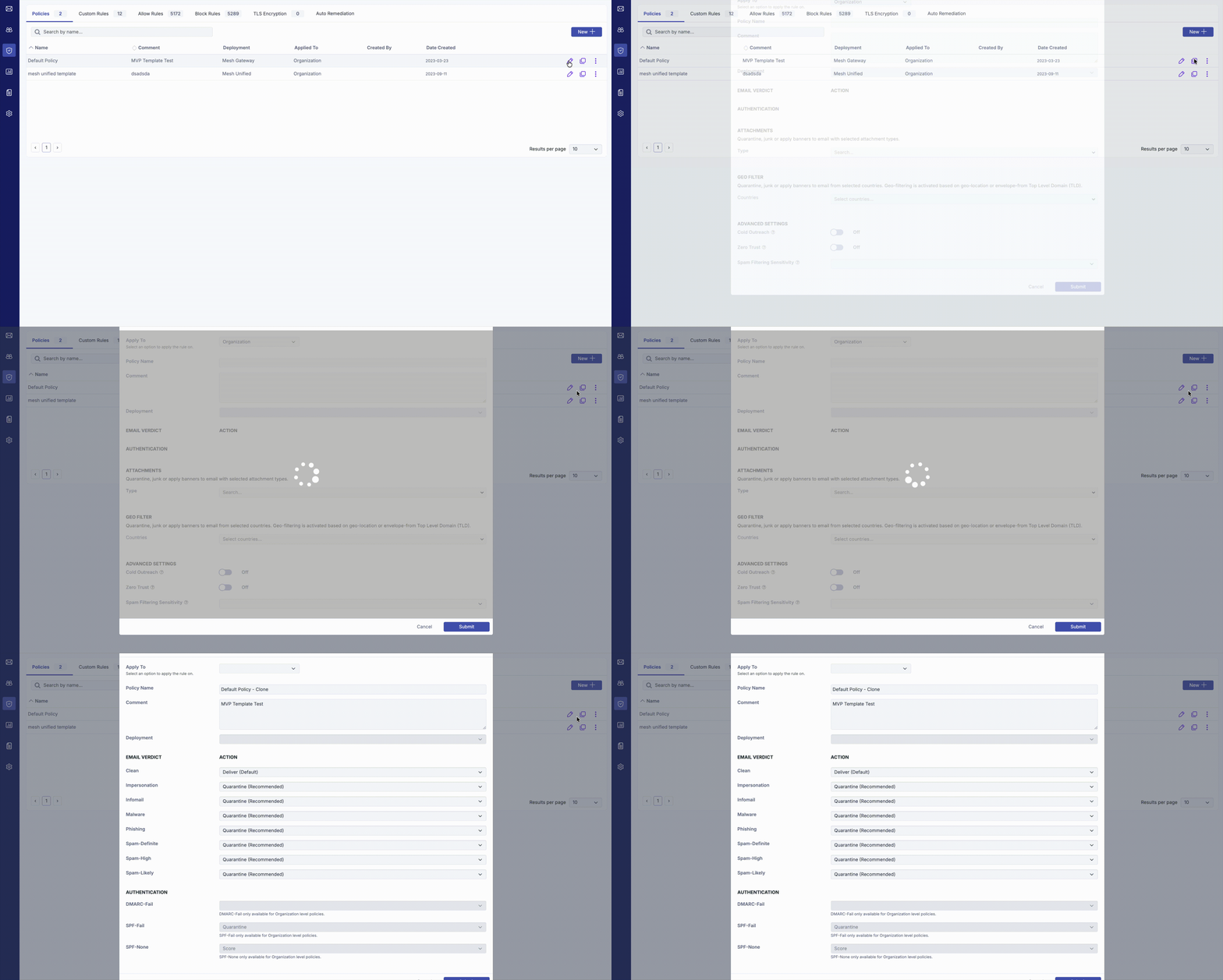
Clone policy - Existing policies can now be duplicated, simplifying the creation of new templates or user-specific policies.
Improvements
License information for Bitdefender partners and customers is now hidden in the Mesh console. Total license counts can instead be found in the GravityZone Control Center.
Minor cosmetic changes have been made to certain UI elements.
Bug fixes
Fixed an issue where custom rules did not activate under certain conditions.
Fixed an issue where Live Email Tracker export results were truncated.
Fixed an issue where Live Email Tracker country data did not display under certain conditions.
Fixed an issue where release request notifications were not sent if the subject line was empty.
Fixed a permissions issue when attempting to enable customer-level banners.
Version 1.7.15
New features
Microsoft Defender verdicts: Microsoft Defender verdicts are now displayed for both Mesh 365 and Mesh Unified. They appear on the Live Email Tracker and Analytics pages, allowing you to view verdicts from both systems without switching between portals. You can search for Microsoft Defender verdicts using advanced search in Live Email Tracker.

Per-customer banners: Certain organisations may require specific or unique banners. This update adds the ability to customise banners on a per-customer basis. For more information, see Banners.
Improvements
Further deployment of the Bitdefender detection engine.
Allow, block, and custom rules can now be exported in CSV or JSON format.
Allow, block, and custom rules can now be filtered by recipient.
Bug fixes
Fixed an issue where sandboxed emails with a spam verdict did not appear in the quarantine digest.
Fixed an issue where Azure authorisation failed under certain conditions.
Fixed an issue where scheduled reports were duplicated.
Fixed an issue where the Mesh Phish Protect engine did not trigger a quarantine action.
Version 1.7.14
New features
DMARC policy control: The new DMARC policy option allows you to choose whether to honour the sender’s DMARC policy in their DNS record or quarantine the email if DMARC validation fails.
Control custom rule verdicts: You can now control which verdicts are triggered by a custom rule. Previously, custom rules were all or nothing. The new controls provide greater granularity, allowing you to choose which verdicts to bypass.
Switch services: You can now switch between Mesh Gateway, Mesh 365, and Mesh Unified in the UI without raising a ticket with our team.
Improvements
A new advanced detection engine from Bitdefender has been integrated. It will be monitored over the coming weeks and rolled out gradually.
The full email headers for quarantined messages can now be viewed in Live Email Tracker.
Improved log handling and feedback in Live Email Tracker for bounced and deferred emails.
Bug fixes
Fixed a 500 error that occurred in edge cases when creating a new customer.
Fixed a 500 error that occurred in edge cases when resetting a password.
Fixed an issue with special characters in the customisation menu.
Version 1.7.13
New features
You can now enforce TLS encryption. If the sender’s or recipient’s server does not support TLS, the email will be rejected or bounced. This setting can be applied to all external domains for both inbound and outbound traffic in the policy settings. For more information, see TLS Encryption.
Bitdefender customers can now log in through GravityZone. For more information, see GravityZone authentication.
Improvements
Adjusted the assignment of the VIP flag based on job titles in Entra ID. This change improves the detection of emails that impersonate users.
Added support for generating 2048-bit DKIM keys.
Improved the customer termination modal.
Based on partner feedback and to reduce latency, Live Email Tracker no longer displays results automatically. You must now select the search button to display results.
Bug fixes
Fixed an issue that prevented rules from being created in Live Email Tracker when a customer was in Monitor Mode.
Fixed an issue that prevented certain strings from being entered in the header field of the custom rule modal.
Fixed an issue with the error message displayed when attempting to view a day outside the retention period.
Fixed a Live Email Tracker UI issue that occurred when modifying columns.
Version 1.7.12
Tweaks
Two Factor Authentication is now mandatory. Upon login, all users using Mesh credentials will be forced to configure 2FA via an authenticator app. This will not impact users using SSO via Azure.
Password requirements have been modified. Changes will apply to new users and when resetting passwords.
Enhancements
User 2FA tokens can be reset by partners/administrators.
Bug Fixes
Fixed bug related to custom rule validation.
Fixed bug where certain edge rules would not apply.
Fixed UI bug where blocking multiple domains while remediating email was not possible.
Fixed bug where certain character sets were not support in order forms.
Version 1.7.11
New features
REST API: Our REST API is now out of beta and available to all partners. You can use the API to read and write Mesh data without using the web interface, making it ideal for integrating automation tools into your technology stack. For more information, see REST API.
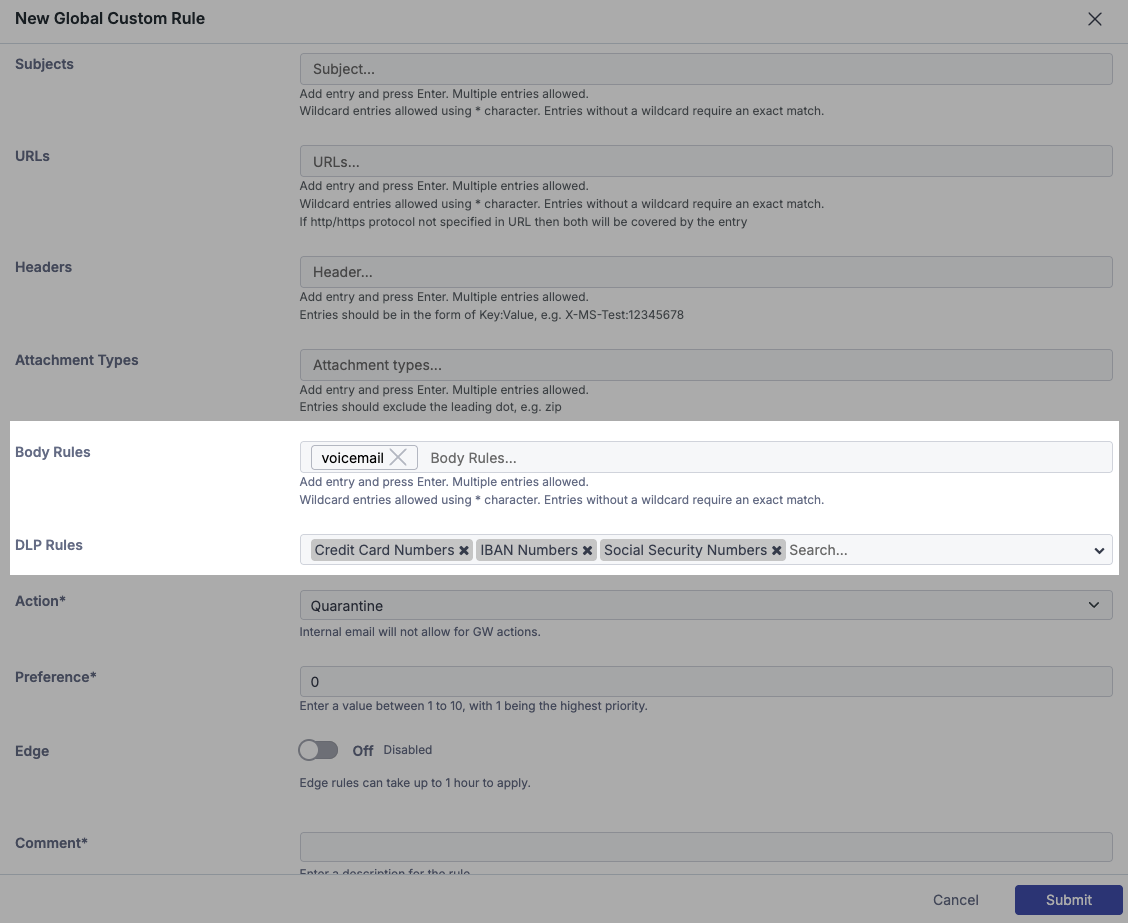
Two new custom rule options:
Keyword and email body detection: You can now create custom rules based on keywords or wildcard entries, providing greater granularity.
Data loss prevention (DLP): You can now perform actions on emails containing credit card numbers, IBANs, or social security numbers (SSNs). This feature currently applies only to inbound emails.
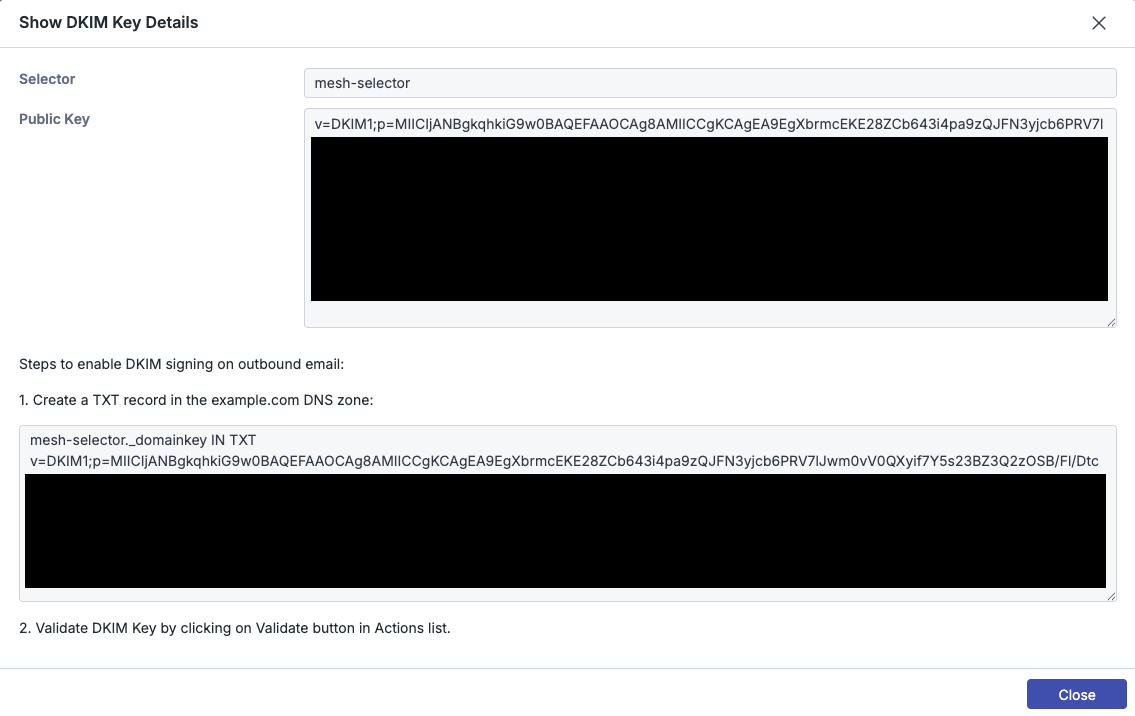
Outbound smarthost DKIM signing: Mesh Gateway and Mesh Unified customers can now generate DKIM keys.
Improvements
Updated the front end of the Outbound Smarthost page.
Increased the frequency of outbound quarantine alerts to once every 30 minutes per sender, from once per hour per domain.
The Analytics page and reports are now available in the customer-level view.
Adjusted Penpal/Known Contact processing.
Added API endpoints.
Made general adjustments to UI elements and validation.
Bug fixes
Fixed an issue with the recipient verification front end.
Fixed an issue that prevented rules from being created through Live Email Tracker at the customer level.
Fixed an issue where previews of quarantined emails sometimes did not appear in Live Email Tracker.
Version 1.7.10
New features
Automated executive reporting: You can now automate reports by creating weekly or monthly schedules. Reports can be sent directly to customers or routed to a dedicated mailbox.
Allow and block domains in Live Email Tracker: Live Email Tracker now allows you to create domain allow and block rules directly from the UI.
Improvements
Updated the front-end framework to improve responsiveness.
Geo-Block no longer requires an administrator or partner member to release an email and can be bypassed using a standard allow rule.
Improved error handling for the API (beta).
Made various adjustments to UI elements.
Bug fixes
Fixed an issue with the recipient verification front end.
Fixed an issue where changes to auto-remediation policies were not applied.
Fixed an issue where the domain status on the Settings page did not show the most recent status.
Fixed an issue that prevented Gradient from being disabled through the UI.
Version 1.7.9
New Features
Automatic Remediation is now available on Mesh 365.
Enhancements
RBL data now shown in the Live Email Tracker analysis tab.
Adjustments to some Live Email Tracker rejection messages.
Improvements to Azure Sync.
Improvements to API.
Bug Fixes
Fixed bug relating to custom rule subject line wildcard handling.
Fixed bug relating to custom rule user name address handling
Fixed UI bug where “Zero Trust” appears as a reason within Live Email Tracker when not enabled.
Fixed bug where Gradient tab did not work as intended.
Version 1.7.8
New features
New policy options:
Cold outreach: The Cold Outreach toggle allows you to filter unsolicited marketing and sales emails more aggressively. When enabled, these emails receive a higher spam score.
Zero trust: The Zero Trust toggle allows you to apply a quarantine-by-default approach to email. Clean and Infomail verdicts are reclassified as Spam-Likely unless the email is sent by a known contact or allowed sender.
Custom rule overhaul: Custom rules have been redesigned to provide a better experience and more flexible options. You can now:
Add multiple sender addresses or domains to a single rule.
Add multiple IP ranges or static IP addresses to a single rule.
Add multiple subject lines to a single rule.
Use wildcard matching for subject lines.
Match custom attachment types.
Match email headers.
Report button: End users can use the native Outlook report button to share potential false negatives and false positives with your helpdesk and the Mesh detection team.
Open API (beta): You can now use the Mesh API to read and write data without using the web interface, making it ideal for integrating automation tools into your technology stack. Contact us if you would like to opt in.
Improvements
Optimised front-end and back-end components.
Updated some error messages.
Bug fixes
Fixed an issue when updating outbound sources in the smarthost settings.
Fixed an issue with the mobile view of Live Email Tracker.
Fixed an issue with logo image file validation.
Version 1.7.7
Video:
New Features:
Contextual Banners: Mesh Unified and Mesh 365 customers now have access to our new “Contextual Banners”. These will be automatically enabled for policies that have the Clean verdict set to “Deliver + Banner”. If an email contains a display name match or payroll/invoice/financial content, we will display a warning.
Refreshed Dashboard: The dashboard has been re-designed and upgraded to provide more useful information at a glance.
On Trial Summary: We now show customers that you have on trial from the dashboard. We have also added helpful warnings of steps yet to be completed such as MX record changes and O365 Authorization.
Enhancements:
Addition of “Clear Cache and Sync” button to our Azure Sync feature.
Adjustments to licence count and disabled users.
Bug Fixes:
Bug fix linked to Analytics permission.
Bug fix relating to updating mail platform from Exchange to O365/Google Workspace.
Bug fix relating to custom rules.
Various UI/UX fixes.
Various Analytics report updates.
Version 1.7.6
Video
New Features:
Auto Remediation / Continuous Scanning: Mesh Unified and Mesh 365 customers can now avail of our new continuous scanning feature, which enhances email security by scanning the inbox for a period of time post-delivery. This feature allows for the automatic removal of emails that become weaponized after their initial delivery.
Revamped Reporting: The Executive Summary reports have been redesigned with an enhanced layout and additional data points.
Email Security Assessment Report (Prospecting Tool): In monitor mode, these updated reports now provide extra data, specifically aimed at demonstrating the ROI of Mesh. This feature is available as part of the free trial offering.
Enhancements:
The VIP tag is now enabled automatically for certain users (based on their job title in Azure) when a sync from Azure AD is completed.
Various UI and text changes.
Azure sync / role adjustments.
Bug Fixes:
Bug Fix related to custom logo images not loading correctly.
Bug Fix related to display / actions within the Live Email Tracker.
Version 1.7.5
New Features:
Post Delivery Threat Protection (Continuous Scanning) beta: Mesh Unified and Mesh 365 customers can now opt-in to this new beta feature, which enhances email security by enabling continuous inbox scanning post-delivery. This allows for the automatic removal of emails that become weaponized after their initial delivery.
Live Email Tracker Export: You can now export search results from the Live Email Tracker.
Audit Logs: Audit logs are now available, recording all actions taken in the UI.
Enhancements:
Further enhancements to homoglyph detection.
Adjustments to UI elements and descriptions.
Geo Filter common TLD warning.
Bug Fixes:
Various Azure sync / role adjustments.
Version 1.7.4
New Features:
Geo-Filter: You can now perform quarantine, junk, or banner actions on emails from different regions and countries.
Enhancements:
Enhancements to homoglyph detection.
Improvements to remediate feature.
Bug Fixes:
Various LET fixes.
SSO bug fixes.
Custom rule adjustments.
Version 1.7.3
Enhancements:
Enhancements to detection of Homograph URLs.
Improvements to Audit Log (beta).
Improvements to Azure Sync.
Bug Fixes:
Fixes to executive summary missing certain fields.
Fixes to client-side cached data shown in Live Email Tracker.
Fixes to Live Email Tracker verdict search options.
Fixed instances where Team Members created before NFR did not sync to NFR account.
Adjustment to displayed email addresses in Quarantine Digest.
Version 1.7.2
New Features:
Global Policies - Deploy policies centrally to all tenants.
Enhancements:
Enforce Azure SSO.
UI/UX enhancements / optimisation.
Mesh Unified added to Gradient.
Bug Fixes:
Various UI fixes.
SSO IP restriction fix.
Adjustments to licenses for Azure Sync.
Version 1.7.1
New Features:
Single Sign On (SSO) now available. Users can now authenticate with their Microsoft credentials.
Audit log (beta) now available. Partners can now access history of portal changes, and interactions.
Enhancements:
Improvements to sender country of origin accuracy.
Additional column added to Live Email Tracker that shows if traffic is internal or external (Mesh 365 / Mesh Unified).
Addition of new tooltips throughout portal.
Further improvements and continued work on portal speed/optimisation.
Bug Fixes:
Azure Sync license detection fixes.
Azure Sync role detection fixes.
Live Email Tracker number of pages limit fix.
Other general bugs fixes.
Version 1.7.0
New Features:
Mesh Unified FULL RELEASE. Mesh Unified is now available for all customers.
QR Decode Detection Suite
Bug Fixes:
Multiple Mesh Unified bug fixes.
Live Email tracker bug fixes relating to statuses and release requests.
Azure Sync alias creation fix.
Policy creation bug.
Mesh 365 - Custom rule validation fix
Version 1.6.3
Enhancements:
Further improvements/enhancements to Mesh Unified (beta).
Performance Enhancements to Live Email Tracker.
Mesh 365/Mesh Unified policy adjustments.
Bug Fixes:
Fixes to Mesh Unified (beta)
Custom rule action fixes.
General UI fixes.
Version 1.6.2
New Features:
Mesh Unified - beta access.
Enhancements:
Enhancements to Live Email Tracker.
Sending country added to email details within Live Email Tracker.
Mesh 365 improvements.
Bug Fixes:
Executive reports fix.
Alias/role change validation fix.
Custom rule validation fixes.
Live Email tracker bug fix.
Disable digest not applying fix.
Version 1.6.1
New Features:
Executive Summary Reports
Enhancements:
Global Rule Management Enhancement
Shortcut to create new customer or rule
Monitor Mode available on the order form
Outlook Allow/Block rules honored by Mesh365 / displayed in LET
Bug Fixes:
Multi-select bug fix.
Disabling Gradient bug fix.
Threat Scanning Status not clearing.
Various bug fixes to Mesh 365.
Version 1.6.0
New Features:
Enhancements:
“Penpal” feature expanded to Mesh 365.
Enhanced accuracy for user/functional-address license mapping.
Improvements to UI, descriptions, and tooltips.
Bug Fixes:
Improvements around down selection.
Fixed an Azure Sync related display bug.
Fixed minor context display issues.
Various bug fixes to Mesh 365 (beta).
Version 1.5.8
Enhancements:
Further improvements to Mesh 365 (beta).
Live Email Tracker UI updates.
Number of Digests on Demand increased from 3 to 10.
Improvements to Gradient Sync.
Bug Fixes:
Live Email Tracker search fixes.
Azure Sync fix relating to user modifications in AD.
Various bug fixes to Mesh 365 (beta).
Version 1.5.7
New Features:
Integration with Gradient MSP to sync licensing from Mesh into 9 PSA platforms.
2FA user management settings.
Functional Addresses added using Azure Sync can now login to the UI
Enhancements:
Phish protect engine.
Improvements to force 2FA option.
Minor aesthetic improvements to the LET.
Further updates to Mesh 365 (beta).
Improved email banner design.
Bug Fixes:
Malware URLs not being correctly “defanged” in Live Email Tracker analysis tab.
Issue around the application of Global Rules when creating a new order
Azure Sync bug whereby aliases of groups were not being synced correctly.
Various bug fixes to Mesh 365 (beta)
Version 1.5.6
New Features:
-
Enhancements:
Aesthetic changes to Quarantine Digest.
Bug Fixes:
Various bug fixes for Gradient PSA (beta).
Version 1.5.5
New Features:
Mesh 365 - beta access
Integration with Gradient MSP – beta access
Enhancements:
User level Quarantine digest settings
LET visual/field enhancements
Show attachment type as part of Banned policy reason
Status / Alerts page integration with Mesh Hub
Outbound Event Logs
Bug Fixes:
Minor bug around Partner image size for upload
LET filtering fix for bounced message status
Fix for outbound rate limiting issue
Version 1.5.4
New Features:
Status page with alerting
SPF None policy block
Enhancements:
LET: Modal view reorganization with additional data points
LET: Improved terminology / aesthetics
Enhanced scanning of html attachments – url extraction and analysis
Customisable Application Name
Google Workspace as built in source for outbound relay
Bug Fixes:
Minor bug around Partner image size for upload
LET filtering fix for bounced message status
Fix for outbound rate limiting issue
Version 1.5.3
Live Email Tracker Improvements
Table view modifications
Modal view reorganization with additional data points
Detection Enhancements
Enhanced HTML Attachment URL Analysis
Additional Threat Intel Data Sources
MSP Hub Improvements
Wildcard Rule Handling
SPF Fail Quarantine Policy Option Handling
Expandable/Collapsible Side Menu
Minor Visual Enhancements
Bug Fixes
LET Search & Display Fixes
Rule Import Error Handling
User Disabling with manual Azure Sync under Delta Sync
Custom Rule Handling with Reject Action
End User SPF Fail Quarantine Handling
Version 1.5.2
New Features
Custom Rules can now handle IP ranges and various requested new file types
Enhancements
Allow for the mass update of User Roles
Improvements made to Impersonation Detection
Deployment of new threat feeds
Cosmetic improvements to the UI
Rules Table enhancements – functionality / performance
Bug Fixes
Digest time not updating
ORG level mass rule upload validation
License count update
Version 1.5.1
New Features
Outbound communication patterns are utilized to improve accuracy on inbound scanning (Penpal Feature)
Manage what email categories are shown in quarantine digests
Enhancements
Azure Sync Improvements
Spam Filtering Level granularity improvements
Various styling updates on Order Form / Overview page
Improved visibility over licensing – billable/non-billable
Improved Email Request Notifications
Phishing Classification Improvements
LET search improvement for users
Bug Fixes
Issue resolved around the Pending Release Queue
Various cosmetic bug fixes
Version 1.5.0
New Features
Outbound Filtering – General Release
Recipient Verification Management
Improved logging visibility in the LET Modal
Dynamic licensing for Microsoft 365 customers
Release request notification management options
Enhancements
Additional configuration options on the Order Form
Digest preview improvements
Improvements on Rule Modals / Tables
User modal improvements
Azure Authorization verification improvements
Azure Sync alias validation improvements
Bug Fixes
Channel Partner creation field requirements
Specific From Header parsing bug
Auto enable edge flag for block rules
Global rules applied to column showing n/a
Rule icon not showing when multiple rules applied to a message
Version 1.4.9
New Features
HTML Attachment Filter
Visibility within the LET for Allow/Block rule application
Outbound - Auto Forwarding
Outbound - Sender Based Routing
Allow Partners to apply existing global rules when creating a new order
Allow Download of emails from the LET
Enhancements
Add 'Applied To' column to the policy table
Org level rules can now be imported via csv
Restriction on end users creating a same domain allow rule
Button linking directly to new order form at the top of the MSP hub
Can update Mail Platform directly in the UI e.g changing from GSuite to O365
General Visual Improvements to User & Team member Tables
Apply 2fa directly on the Order Form
Improvements on Azure Delta Sync Queries - name changes for shared Mailboxes
Bug Fixes
Allow/Block rule TLD limits
Order Form company name parsing
Admin time resetting to 00:00 on the dashboard
Reject logs parsing error for recipient domains that contain hyphens