Restricting Partner Access to Customer Domain or MSP Domain
Some customers may require a higher level of confidentiality and restrict access so that only local administrators can view their domain. You can also apply this restriction to the MSP tenant to prevent support engineers from managing the account.
These changes:
Prevent partner team members from using the Login As button for the restricted customer account.
Prevent the customer account from appearing in Global Live Email Tracker, Global Policy, and Global Rules at MSP level.
 |
Note
Disabling Partner Access on the MSP domain prevents partner team members from viewing or accessing internal email logs in Live Email Tracker.
For customers using the GravityZone integration, the ability to disable Login As is controlled by the Manage from above checkbox in GravityZone.
Restrict access to a domain
Note
Warning: Disabling partner access limits access to users on the customer domain.
Team members with the Partner role cannot access the account.
A Built-In administrator is required to prevent the account from becoming inaccessible.
For NFR accounts, ensure that an administrator exists on the customer-level domain.
Open the Customers page
Select Customers from the sidebar.
Locate the customer
Locate the customer you want to modify.
Log in as the customer
Select Login As to access the customer domain.
Disable MSP Management
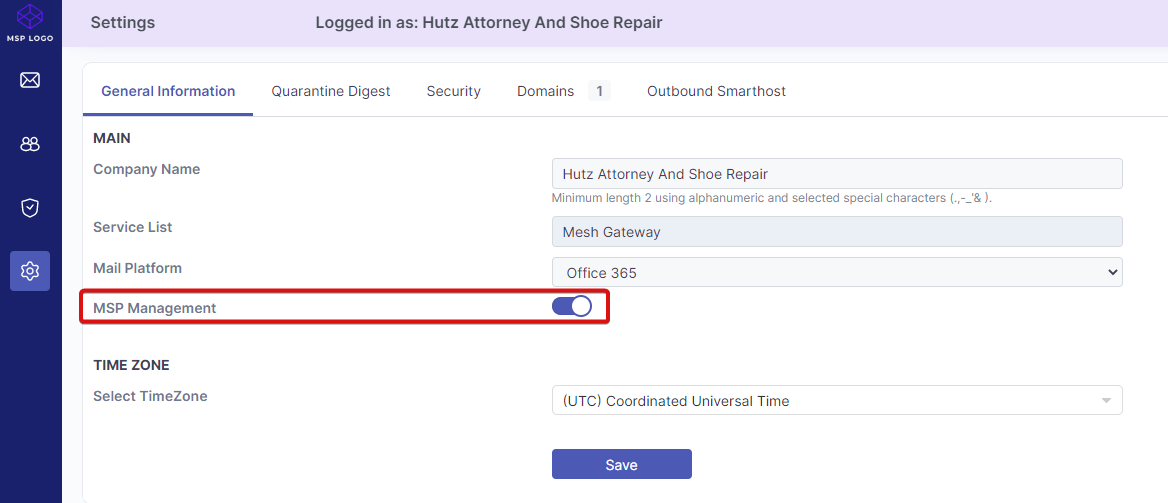
Open the Settings page, and then disable the MSP Management slider.
Save the changes
Select Save to apply the changes.
Access the MSP domain when partner access is disabled
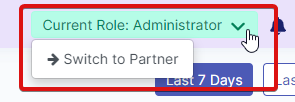
If partner access is disabled on the MSP customer-level domain, only users with the administrator role, rather than the partner role, can access the internal account.
When a partner administrator signs in to the domain, they can switch between the partner view and the MSP domain by selecting Switch to Partner/Customer.
 |
Disabling partner access on the MSP domain also prevents team members from viewing or accessing internal MSP email logs in Live Email Tracker.