Logging in as a Customer
To log in as a customer:
Open the Customers page
Go to the Customers page in the sidebar.
Locate the customer
Locate the customer you want to log in as.
Log in as the customer
Select Login as from the menu.

After logging in, you can manage the customer account locally.
Note
Partner access must be enabled to use this feature. If partner access is disabled, the button displays Not Allowed. For more information, see Restricting Partner Access to Customer Domain or MSP Domain.

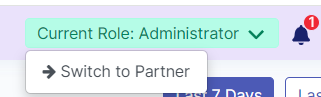
Switch back to your partner account
Open the Current Role menu
Select the Current Role drop-down menu in the upper-right corner of the page.
Switch to the partner account
Select Switch to Partner.