Configuring single sign-on for Bitdefender services using a 3rd party identity provider
GravityZone supports single sign-on (SSO) for Bitdefender services outside GravityZone Control Center, such as MDR portal, through the GravityZone IdP Proxy. The IdP Proxy uses SAML 2.0 as authentication standard and acts as a centralized authentication gateway between your external identity provider and Bitdefender services.
The authentication flow works as follows:
The user navigates to a Bitdefender service (for example, MDR portal).
The service redirects the user to the GravityZone IdP Proxy for authentication.
GravityZone IdP Proxy identifies the user's corporate identity provider and redirects them there.
The user signs in through their familiar corporate login page (with their organization's MFA, conditional access policies etc.).
The corporate IdP confirms the user's identity back to GravityZone IdP Proxy.
GravityZone IdP Proxy translates the identity confirmation and forwards it to the Bitdefender service.
The user is granted access.
This entire flow happens transparently within the browser in a matter of seconds.
Important
This configuration is separate from GravityZone Control Center SSO. You must configure GravityZone Control Center SSO first, as users must already be using a 3rd party identity provider to log into GravityZone before they can use GravityZone IdP Proxy for other Bitdefender services.
The GravityZone IdP Proxy only supports service provider initiated login. IdP-initiated login is not supported.
Supported Bitdefender services
The following Bitdefender services support SSO through the GravityZone IdP Proxy:
MDR portal
Tested identity providers
The following identity providers have been tested with the GravityZone IdP Proxy:
AD FS (2016 or later)
Okta
Microsoft Entra ID (formerly Azure AD)
If you decide to configure other identity providers that use SAML 2.0, it can work, but the functionality is not guaranteed.
Prerequisites
A GravityZone Cloud company account with administrative privileges.
An account with a supported identity provider.
GravityZone Control Center SSO already configured with the same identity provider. Refer to Configuring GravityZone Control Center single sign-on using a 3rd party identity provider.
Users configured with the Login using your Identity Provider authentication method in GravityZone account settings.
Note
This option is available after GravityZone Control Center SSO with an external identity provider has been configured at the company level.
Users must have matching email addresses in both GravityZone and the 3rd party identity provider.
Configure the identity provider
To enable SSO for Bitdefender services through the IdP Proxy, you need to create a separate SAML application in your identity provider specifically for the IdP Proxy. This is in addition to the existing application used for GravityZone Control Center SSO.
Obtain the GravityZone IdP Proxy SAML metadata
Log in to Bitdefender GravityZone as an administrator.
Click your user name in the upper-right side of the screen and select My Company or go to the company for which you want to configure the IdP SSO.
Go to the Authentication tab.
Under the Bitdefender services single sign-on section, copy the GravityZone IdP Proxy SAML metadata URL (read-only field) and paste it in the address field in new tab in your internet browser.
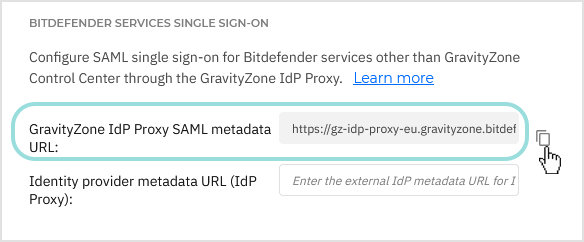
The metadata URL will be saved as a
metadata.xmlfile.
Open the
metadata.xmlfile and use the data to configure a new SAML application in your identity provider.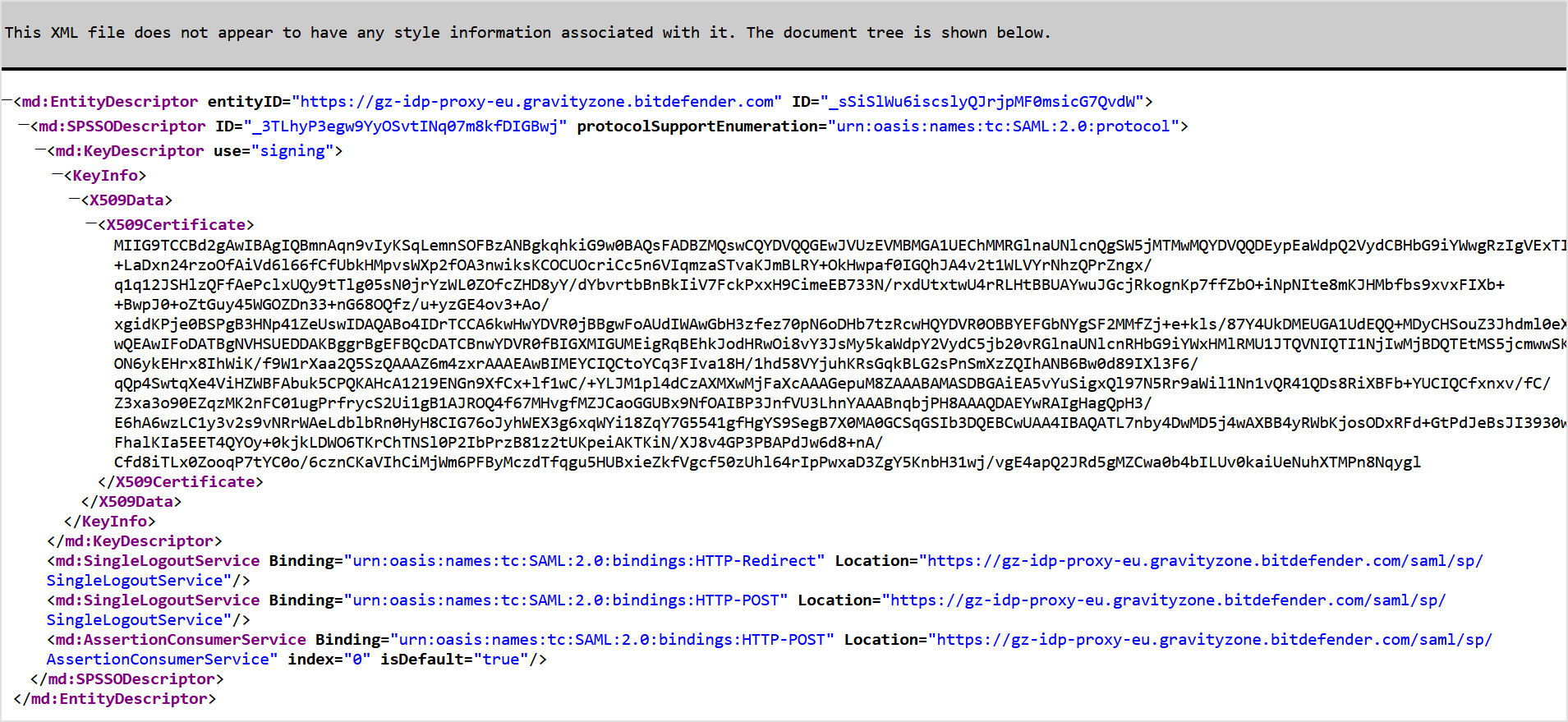
Use the metadata to configure your identity provider
Configuring single sign-on may vary from one identity provider to another. However, identity providers require almost the same elements to integrate with GravityZone IdP Proxy:
Single Sign-on URL - the location where the SAML assertion is sent with an HTTP POST. Also known as Assertion Consumer Service (ACS) URL. This is where your identity provider sends the authentication response after the user successfully signs in. The IdP Proxy single sign-on URL has the following format:
https://gz-idp-proxy-<region>.gravityzone.bitdefender.com/saml/sp/AssertionConsumerService
Service Provider Entity ID - the application unique identifier that is the intended audience of the SAML assertion. Also known as Audience URI or Audience Restriction. Your identity provider uses this value to ensure the SAML response is intended for the correct service. The Entity ID for the IdP Proxy has the following format:
https://gz-idp-proxy-<region>.gravityzone.bitdefender.com
Name ID format - refers to the format supported by the identity provider. Service and identity providers communicate with each other using a name identifier related to a user. For the IdP Proxy, the Name ID format is
emailAddress. The email address sent by your identity provider must exactly match the user's email in GravityZone.Single Logout URL - the location where the logout request or response is sent when a user signs out. Configuring this enables seamless logout across Bitdefender services. The IdP Proxy single logout URL has the following format:
https://gz-idp-proxy-<region>.gravityzone.bitdefender.com/saml/sp/SingleLogoutService
Signature Verification Certificate - the public certificate the IdP Proxy uses to sign SAML requests. Your identity provider uses it to verify that authentication requests genuinely come from the IdP Proxy. This certificate is included in the metadata file.
Important
Ensure all users who will authenticate via GravityZone IdP Proxy have a valid email address configured in your identity provider. Users without an email attribute will not be able to sign in.
For step-by-step instructions specific to your identity provider, refer to:
Enable SSO for your company
In the upper-right corner of Control Center, click the user icon and then select My Company.
In the Authentication tab, under Bitdefender services single sign-on, enter the identity provider metadata URL in the Identity provider metadata URL (IdP Proxy) field.
The other field, reserved for the GravityZone IdP Proxy SAML metadata URL, is non-editable.
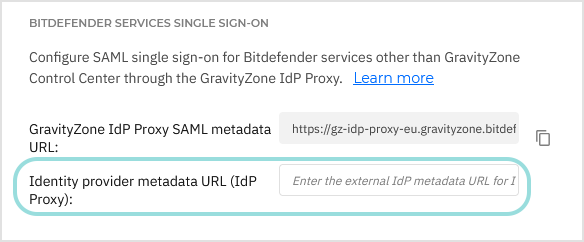
Click Save.
Enable SSO for managed companies
Log in to GravityZone Control Center.
Go to the Companies page from the left side menu.
In the table, click the company's name.
Under Bitdefender services single sign-on, enter the identity provider metadata URL in the Identity provider metadata URL (IdP Proxy) field.
The other field, reserved for the GravityZone IdP Proxy SAML metadata URL, is non-editable.
Click Save.
Verify the authentication method for users
Users must have their authentication method set to Login using your Identity Provider in GravityZone account settings. If GravityZone Control Center SSO is already configured and users are already logging in with your Identity Provider, no additional changes are needed.
If any users still use GravityZone credentials:
Log in to GravityZone Control Center.
Go to the Accounts page from the left side menu.
In the table, click the user's name.
Under Login Security, go to Authentication method and select Login using your Identity Provider.
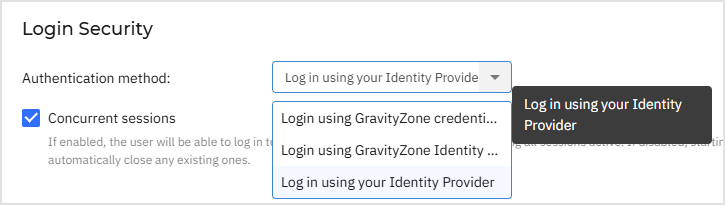
Click Save.
Test Bitdefender services SSO
After configuring both the identity provider and GravityZone, you can test single sign-on as follows:
Open a supported Bitdefender service (for example, MDR portal) in a browser where you are not currently authenticated.
You should be redirected to the IdP Proxy, which will redirect you to your corporate identity provider's login page.
After successful authentication, you are redirected back to the Bitdefender service and granted access.
If the authentication fails, verify:
The IdP Proxy SAML application is correctly configured in your identity provider.
The metadata URL entered in the Identity provider metadata URL (IdP Proxy) field is correct and accessible.
The user's authentication method is set to Login using your Identity Provider in GravityZone account settings.
The user's email address in GravityZone matches the email in the identity provider.
The Name ID format is set to
emailAddressin the IdP application.
Disable Bitdefender services SSO
To disable single sign-on for Bitdefender services:
Delete the Identity Provider metadata URL from the Identity provider metadata URL (IdP Proxy) field in the configuration page of the company.
Click Save and confirm the action.
This does not affect GravityZone Control Center SSO, which remains configured separately.
To re-enable SSO for Bitdefender services, enter again the identity provider metadata URL in the Identity provider metadata URL (IdP Proxy) field and click Save.