PHASR MITRE grouping
PHASR MITRE Grouping organizes attack vectors using the MITRE ATT&CK framework. It provides a structured, top-down view of PHASR coverage across tactics, techniques, and sub-techniques, helping administrators identify exposure and apply mitigation decisions to related attack vectors.
This approach provides better visibility into how PHASR helps mitigate attack techniques defined by the MITRE ATT&CK framework. You can also use the page to manage access for multiple attack vectors associated with a tactic, technique, or sub-technique in the same flow.
Note
You do not need to wait for the PHASR learning period to complete before restricting attack vectors. You can use PHASR MITRE Grouping to proactively restrict multiple attack vectors while PHASR continues monitoring and learning.
How to enroll in the Early Access program
The MITRE grouping in PHASR is available through an Early Access program. To enroll:
Log in to GravityZone.
Go to the Early Access tab.
Locate the PHASR MITRE grouping program and click Enroll below the table.
Select Enroll to confirm.
Note
After enrolling, all GravityZone users must log out and log back in for the changes to take effect.
Page layout
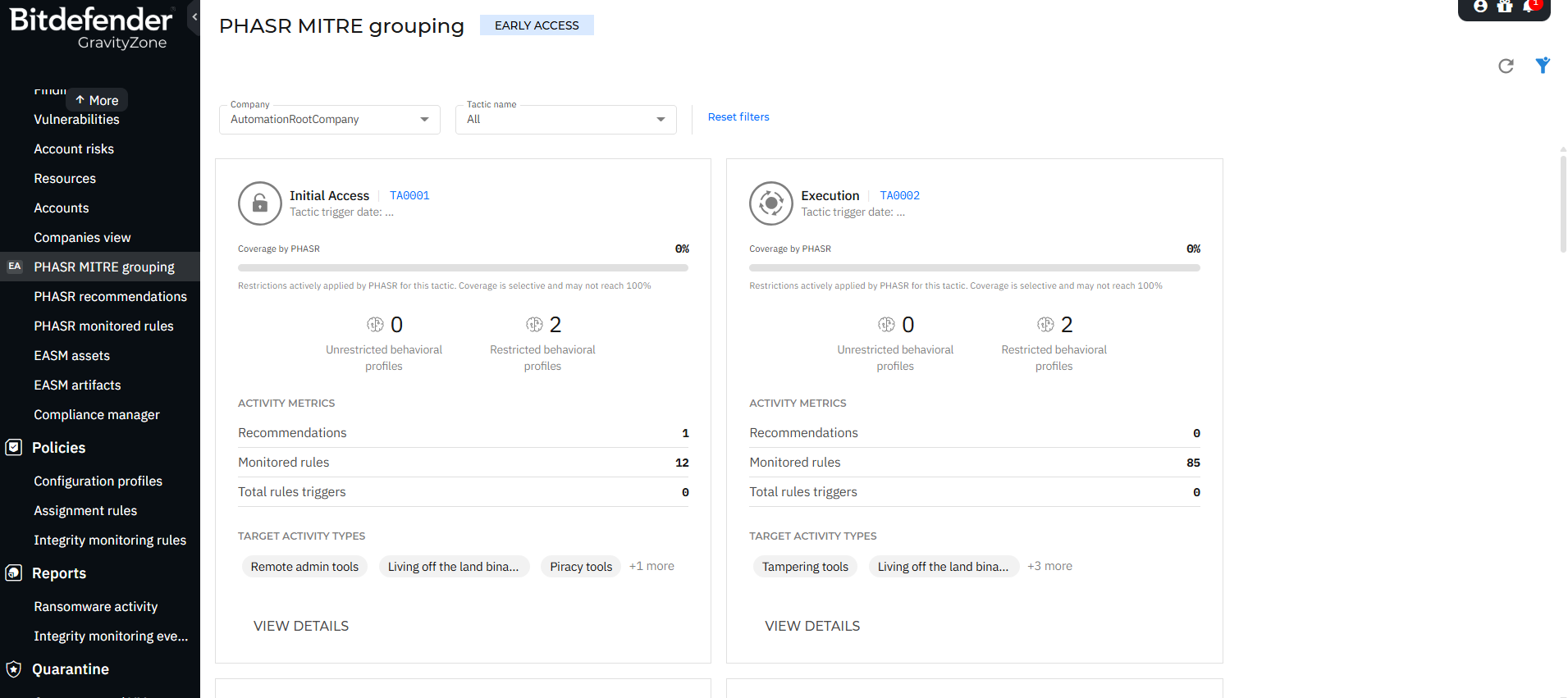
You can access the PHASR MITRE Grouping page by navigating to Policies > PHASR MITRE Grouping.
Filters
At the top of the page, you can refine the displayed data using:
Company selector - Choose the company you want to view information for.
Tactic name filter - Filter by specific MITRE tactics.
Vector name filter - Filter by specific attack vectors.
Reset filters - Clear all applied filters.
Overview
The PHASR MITRE Grouping page organizes PHASR attack vectors hierarchically according to the MITRE ATT&CK framework:
Tactics - High-level objectives an attacker may try to achieve (for example, Initial Access or Execution).
Techniques - Methods attackers may use to achieve those objectives.
Sub-techniques - More specific implementations of techniques.
Attack vectors - PHASR-monitored behaviours and tools mapped to the corresponding MITRE ATT&CK techniques and sub-techniques.
This structure allows you to:
Understand how PHASR attack vectors map to MITRE ATT&CK tactics, techniques, and sub-techniques.
Evaluate PHASR coverage across MITRE ATT&CK.
Drill down from high-level tactics to specific vector-level insights.
Identify areas where PHASR can help reduce the attack surface.
Manage access for multiple attack vectors associated with the same tactic, technique, or sub-technique in a single flow.
Reducing the attack surface for a MITRE tactic, technique, or sub-technique
Use PHASR MITRE Grouping when you want to reduce the attack surface associated with a MITRE tactic, technique, or sub-technique by managing multiple related attack vectors in a single flow. You can start from a MITRE tactic, narrow the scope to a technique or sub-technique, and then select the attack vectors for which you want to change access.
Note
If you want to be proactive, you can start applying restrictions without having to wait for the PHASR learning period to be completed.
To reduce the attack surface for a tactic, technique, or sub-technique:
Go to the PHASR MITRE Grouping page.
Locate the MITRE tactic you want to reduce the attack surface for.
Open the access-editing flow.
Optional: You can drill down if you want to reduce the attack surface against a certain technique or sub-technique.
Before starting the editing flow you can review the attack vectors associated with a MITRE tactic, technique or sub-technique by clicking the details button.
Select the attack vectors for which you want to manage access.
Note
Some attack vectors may be associated with multiple MITRE tactics. Restricting these vectors also reduces the attack surface for the other associated tactics.
In the Details step, review the selected attack vectors and their context. The list reflects your previous selection and can be filtered using the available filters. For each attack vector, you can review its triggers, targeted activity type, unrestricted and restricted behavioral profiles, and the MITRE tactics, techniques, and sub-techniques it is mapped to.
Select Next.
In the Finalize step, use Target type to select the level at which you want to apply the access decision:
Departments - Groups the behavioral profiles monitored by PHASR by department.
Users - Groups the behavioral profiles monitored by PHASR by user.
Behavioral profiles - Displays each behavioral profile monitored by PHASR individually.
Use the available filters to find the departments, users, or behavioral profiles you want to manage.
Review the current restriction status (Restricted, Unrestricted, or Custom) and select Restrict or Do not restrict for the required targets. Custom indicates that the selected target contains behavioral profiles with different restriction statuses.
You can apply the decision to individual rows or use Apply to all. When you filter the grid, this control changes to Apply to filtered and applies the decision only to the filtered results. Use Revert changes to discard your changes and restore the previous restriction settings.
Select Save.
In the Apply changes? dialog, review the number of behavioral profiles that will be restricted, unrestricted, or left unchanged, together with the number of affected departments and users.
Select Apply.
To manage access for only one attack vector, use the PHASR attack vectors page instead.
Tactics view
The main page displays a grid of MITRE tactics.
Each tactic card includes:
Tactic name and ID (for example, Initial Access - TA0001).
Coverage by PHASR (%) - Indicates how much of the tactic is covered by behavioral restrictions.
Behavioral profiles - Can be restricted or unrestricted.
Activity metrics - Number of recommendations, attack vectors, and attack vector triggers.
Target activity types - For example, Remote admin tools, Living off the land binaries, and Piracy tools.
View details action.
Note
Coverage is selective and may not reach 100%.
Tactics details panel
Selecting View details on a tactic opens a side panel with detailed information about the selected tactic.
Key information:
Coverage by PHASR (%)
Tactic ID
Targeted activity types
Platform support (Windows, macOS)
Attack vector count
Recommendations count
Behavioral profiles distribution
Incidents involving attack vector triggers.
Observed activity
Displays behavioral profile usage in your environment, containing the percentage of activities using attack vectors and insights into whether tools are fully or partially controlled.
Description
A contextual explanation of the tactic, including how attackers typically use it.
Techniques view
Within a tactic, techniques are listed.
Each technique includes:
Technique name and ID (for example, Drive-by Compromise - T1189)
Coverage by PHASR (%)
Attack vector count
Recommendations
Vector triggers
Platform applicability
Actions
View attack vectors
View details
Technique details panel
Provides deeper insight into a selected technique.
The information that is displayed in this panel:
Technique ID
Targeted activity types
Platforms
Attack vectors
Recommendations
Vector triggers
Behavioral profile distribution
Incidents involving attack vector triggers
Description
Includes a detailed explanation of the technique, often aligned with MITRE ATT&CK definitions, describing how adversaries use it.
Sub-techniques and attack vectors
At the lowest level, you can inspect attack vectors associated with a technique or sub-technique. You can select multiple attack vectors from this view and manage their access decisions in the same flow.
Each attack vector entry displays:
Vector name (for example, Chflags.HiddenFile)
Target activity type
Platform
Recommendations
Vector triggers
Attack vector details panel
Selecting an attack vector opens a side panel with:
Vector description - Explains what behavior is monitored or restricted.
Targeted activity type
Platform
Vector trigger date
Recommendations
Behavioral profile usage
Incidents involving the attack vector
Key concepts
Coverage by PHASR
Represents how effectively PHASR restrictions address behaviors associated with a tactic or technique.
0% coverage - No active restrictions applied.
Partial coverage - Some behaviors are restricted.
Full coverage (rare) - All relevant behaviors are restricted.
Behavioral profiles
Unrestricted profiles - Behaviors allowed without enforcement.
Restricted profiles - Behaviors actively controlled by PHASR.
Activity metrics
Provide insight into how attack vectors behave in your environment:
Recommendations - Suggested actions to improve security posture.
Attack vector - Detection vectors tracking activity.
Vector triggers - Number of times attack vectors were activated.
Navigation flow
You can investigate security insights in a structured way:
Start at Tactic level.
Drill down into Techniques.
Explore Sub-techniques.
Analyze Attack vectors.
This top-down navigation mirrors attacker behavior and helps you identify related attack vectors that can be managed together to reduce the attack surface.
Benefits
PHASR MITRE Grouping enhances visibility and investigation by:
PHASR maps attack vectors to MITRE ATT&CK tactics, techniques, and sub-techniques to help reduce the attack surface associated with them.
Providing end-to-end visibility from tactic to attack vector.
Highlighting attack surface exposure against certain MITRE tactics.
Managing access for multiple related attack vectors in a single flow.