BEST for Windows legacy endpoints
For more information about the availability of the GravityZone - Support for Windows Legacy Systems (W 7, 8, 8.1) add-on, refer to this announcement.
Supported operating systems
The GravityZone - Support for Windows Legacy Systems (W 7, 8, 8.1) add-on applies to the following platforms:
Workstations:
Windows 7
Windows 8
Windows 8.1
Servers:
Windows Server 2008 R2
Windows Server 2012
Windows Server 2012 R2
Note
The add-on is available to all listed platforms running Intel and AMD 32-bit and 64-bit CPUs.
Note
Support coverage for these systems is limited to maintenance, security updates, and core protection modules. Bitdefender no longer introduces new features or architectural changes for these operating systems.
Support lifecycle
Phase | Description | Availability |
|---|---|---|
Mainstream support | Full functionality, all modules, and new feature releases. | Until January 2025 |
Limited support | Security and maintenance updates only; no new features. | January 2025 - January 2026 |
Extended support (Add-on) | Optional paid add-on for customers requiring continued protection beyond end of support. | After January 2026 |
Supported modules and features
The table below outlines which modules and features remain supported when using the GravityZone - Support for Windows Legacy Systems (W 7, 8, 8.1) add-on.
Note
Yes indicates continued support. No indicates the module or feature is removed or unavailable with the extended support add-on.
Module or feature | Supported | |
|---|---|---|
Antimalware | Yes | - |
Advanced Threat Control | Yes | - |
Anti-tampering (vulnerable drivers) | Yes | - |
Anti-tampering (callback evasion) | Yes | - |
HyperDetect | Yes | - |
Advanced Anti-Exploit | Yes | - |
Ransomware Mitigation | Yes | - |
Full Disk Encryption | Yes | - |
Security for Exchange | Yes | - |
Tamper Protection (self-protect) | Yes | - |
Power User CLI | Yes | - |
Firewall | Yes | - |
Content control (Web Access Control, Data Protection, Application blacklisting) | Yes | - |
Antiphishing | Yes | - |
Web Traffic Scan and Email Traffic Scan | Yes | - |
Network Attack Defense | Yes | - |
Device Control | - | No |
Application Control (Whitelisting) | - | No |
Patch Management | - | No |
Patch Management Cache Server | - | No |
Endpoint Detection and Response (EDR) | - | No |
Blocklist | Yes | - |
eXtended Detection and Response (XDR) | - | No |
Risk Management | - | No |
PHASR | - | No |
Sandbox Analyzer | - | No |
Integrity Monitoring | - | No |
Live Search | - | No |
Remote Shell | - | No |
Available actions in Network
The table below outlines which actions on the Network page in GravityZone Control Center remain available for endpoints under extended support.
Note
Yes indicates the action is available for legacy Windows endpoints. No indicates the action has no effect on these endpoints.
Action | Available for legacy systems | |
|---|---|---|
Malware scan | Yes | - |
IOC scan | - | No |
Risk scan | - | No |
Patch scan | - | No |
Exchange scan | Yes | - |
Install agent | - | No |
Install patches | - | No |
Uninstall agent | Yes | - |
Update agent | Yes | - |
Reconfigure agent | Yes | - |
Repair agent* | - | No |
Restart endpoint | Yes | - |
Isolate endpoint | Yes | - |
Remove from isolation | Yes | - |
Submit to Sandbox Analyzer | - | No |
Run network discovery | - | No |
Update Security Server | - | No |
Suspend protection | Yes | - |
Resume protection | Yes | - |
Assign policy | Yes | - |
Assign tags | Yes | - |
Move | Yes | - |
Resume integrity monitoring | - | No |
Suspend integrity monitoring | - | No |
Unassign tags | Yes | - |
Remote Shell | - | No |
Set as AD Integrator | - | No |
Mark as Golden Image | - | No |
Unmark as Golden Image | - | No |
Assign vCenter Integrator | - | No |
Unassign vCenter Integrator | - | No |
* If a Repair agent task includes a legacy endpoint, the "Task failed" error is displayed for that endpoint.
Licensing
Once you have purchased the GravityZone - Support for Windows Legacy Systems (W 7, 8, 8.1) license you need to add it in GravityZone, using the following steps
Click the
 user icon in the upper-right corner of the console and select My company.
Go to the Licensing tab.
Under the License usage details section, click Add product.
Enter your GravityZone - Support for Windows Legacy Systems (W 7, 8, 8.1) license key in the Add new product window.
Click the Check validity button.
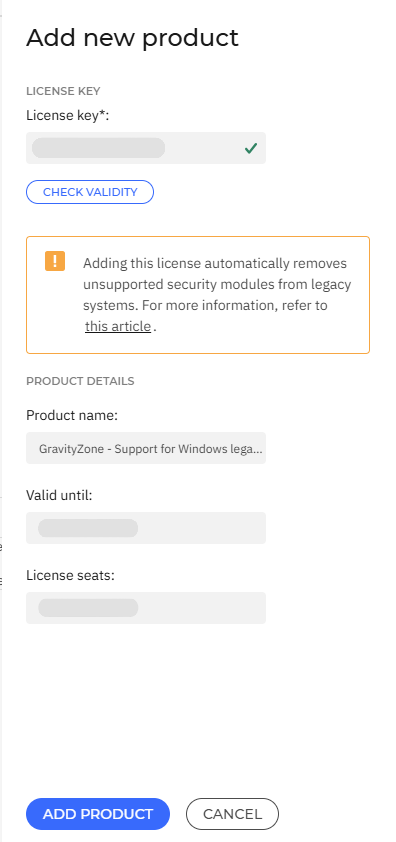
Click the Add product button.
Note
After you add the license, refresh the page to apply the changes.
Installation
If BEST is already installed on an unsupported endpoint, the security agent starts updating after you add the GravityZone - Support for Windows Legacy Systems (W 7, 8, 8.1) license key.
Important
Once the license key is added, the security agent removes only the features that cannot be migrated, except for the Update Server role. If an endpoint is currently used as an Update Server, the role must be removed.
To do so, you must first install and configure a new Update Server, on a fully supported operating system and modify all policies to use it.
Afterwards, you must create and run a Reconfigure agent task to remove the Update Server role from the legacy endpoint.
To install the security agent, follow the steps listed in Install security agents - standard procedure.
Note
When you download the installation package, you must select the Legacy Kit.
Only the supported modules and features listed here are going to be installed.