HaloPSA integration cannot update tickets after reassignment
This article explains how to resolve a permissions issue that prevents the HaloPSA integration with Bitdefender GravityZone from updating tickets after they are reassigned.
Issue
The integration creates tickets successfully in HaloPSA, but it cannot update those tickets after they are assigned to another team or agent.
Cause
The HaloPSA integration account does not have sufficient permissions to view and modify tickets across departments or when assigned to other agents.
Solution
Update the permissions of the Bitdefender Agent used for the integration (typically named Bitdefender Integration).
In HaloPSA, go to Configuration > Teams & Agents > Agents.
Open the agent named Bitdefender Integration.
Select Departments & Teams.
Under Departments, go to Membership level to all Departments and
Set the value to:
Modify all (Can view/modify all Tickets in all Departments)
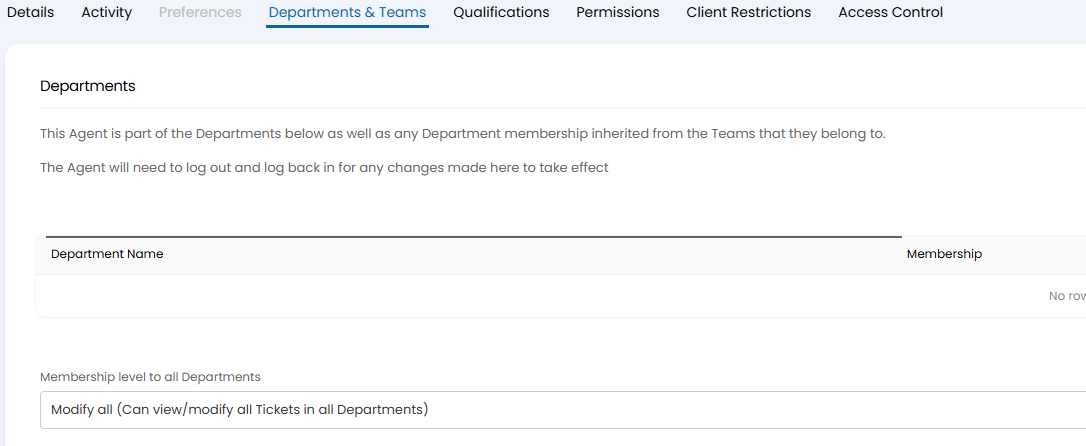
While still editing the Bitdefender Integration Agent, go to Permissions.
Under Tickets Permissions, go to Can view Tickets that are assigned to other Agents and set the value to Yes.
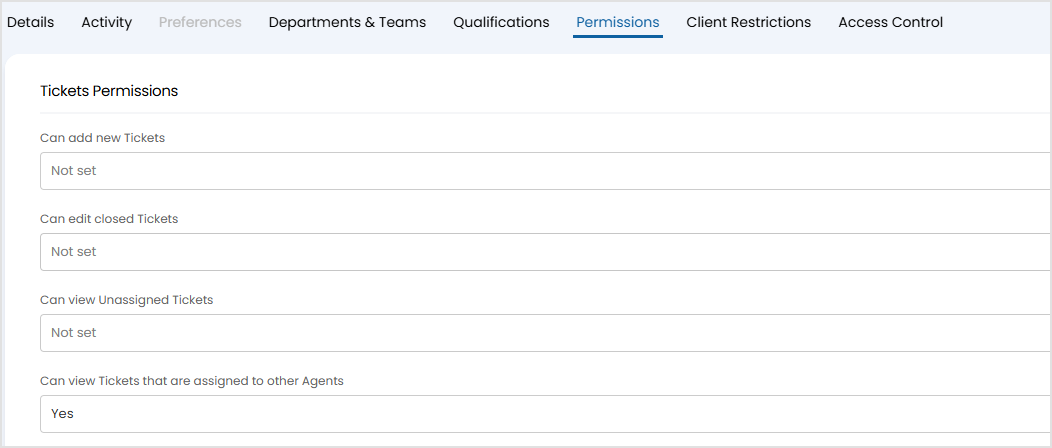
Save the changes.