Running Bitdefender Security Containers on AWS ECS
To run a Bitdefender Security Container instance on AWS ECS, you need to:
Create an Amazon ECS task definition
Run the previously created task
Prerequisites
You must have an ECS cluster already created in the Amazon Elastic Container Service console. In the Infrastructure section of the Clusters > Create cluster page:
Select Fargate and Self-managed instances.

Important
Bitdefender Security Container can not be deployed on an ECS cluster that uses Fargate only.
Select an EC2 instance type that provides at least 2 vCPUs and 6 GiB of memory.
Retrieve the required values for the
BSC_SERVER,BSC_CSRTOKEN, andBSC_COMPANYvariables by following these steps:In GravityZone Control Center, go to Network > Installation packages.
Select a package with the Container Protection module enabled.

Click Download and select Security Container.
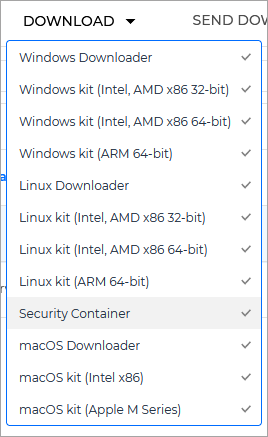
This opens the Download Security Container screen.
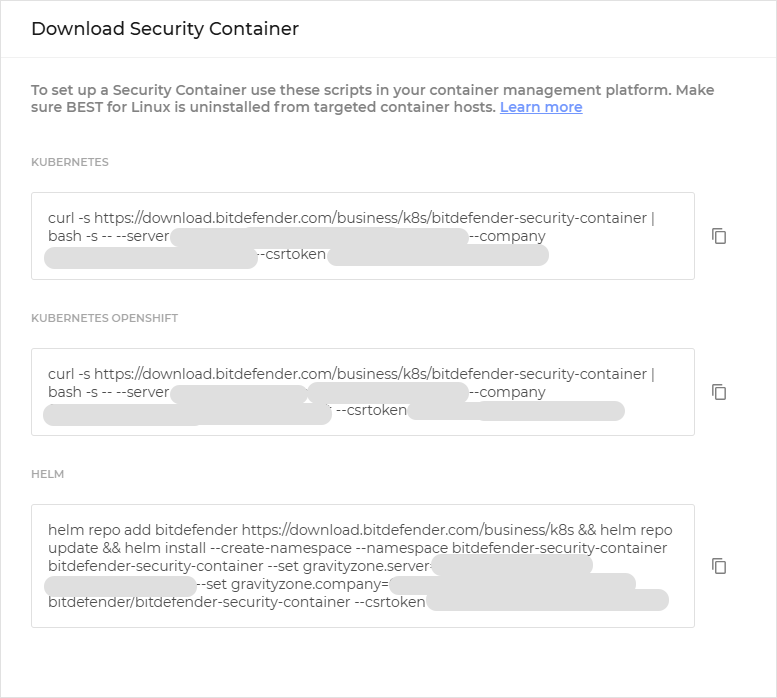
Note the values of the
--server,--company, and--csrtokenparameters from the scripts provided. These are the values of theBSC_SERVER,BSC_COMPANY, andBSC_CSRTOKENvariables, which you will need later.
Create an Amazon ECS task definition
To create the required Amazon ECS task definition, follow these steps:
In the Amazon Elastic Container Service console, select Task definitions from the menu on the left.
From the Create new task definition drop-down menu, select Create new task definition with JSON.
You will be redirected to the Create new task definition page.
In the JSON editor box, delete the default JSON.
Copy the JSON below and paste it into the JSON editor box.
{
    "containerDefinitions": [{
            "environment": [{
                    "name": "BSC_LOGLEVEL",
                    "value": "<log_level>"
                }, {
                    "name": "BSC_COMPANY",
                    "value": "<customer_company>"
                }, {
                    "name": "BSC_SERVER",
                    "value": "<customer_ecs>"
                }, {
                    "name": "BSC_CSRTOKEN",
                    "value": "<customer_cst_token>"
                }, {
                    "name": "BSC_GID",
                    "value": "<gid>"
                }
            ],
            "essential": true,
            "image": "docker.io/bdfbusiness/bitdefender-security-container:7.0",
            "memory": 4096,
            "mountPoints": [{
                    "containerPath": "/mnt/host-proc",
                    "readOnly": false,
                    "sourceVolume": "proc"
                }, {
                    "containerPath": "/mnt/host-sys",
                    "readOnly": false,
                    "sourceVolume": "sys"
                }, {
                    "containerPath": "/mnt/host-os-release",
                    "readOnly": false,
                    "sourceVolume": "os-release"
                }, {
                    "containerPath": "/mnt/host",
                    "readOnly": false,
                    "sourceVolume": "root"
                }, {
                    "containerPath": "/data",
                    "readOnly": false,
                    "sourceVolume": "data"
                }
            ],
            "name": "bitdefender-security-container",
            "portMappings": [],
            "privileged": true,
            "systemControls": [],
            "volumesFrom": []
        }
    ],
    "enableFaultInjection": false,
    "executionRoleArn": "arn:aws:iam::<ACCOUNT_ID>:role/ecsTaskExecutionRole",
    "family": "<customer_bsc_task_definition>",
    "networkMode": "host",
    "pidMode": "host",
    "placementConstraints": [],
    "requiresCompatibilities": [
        "EC2"
    ],
    "taskRoleArn": "arn:aws:iam::<ACCOUNT_ID>:role/ecsTaskExecutionRole",
    "volumes": [{
            "host": {
                "sourcePath": "/proc"
            },
            "name": "proc"
        }, {
            "host": {
                "sourcePath": "/sys"
            },
            "name": "sys"
        }, {
            "host": {
                "sourcePath": "/etc/os-release"
            },
            "name": "os-release"
        }, {
            "host": {
                "sourcePath": "/"
            },
            "name": "root"
        }, {
            "host": {
                "sourcePath": "/mnt/data"
            },
            "name": "data"
        }
    ]
}
Replace the
<log_level>placeholder from the JSON with the desired log level which will be configured in/log/level/bdsecd.json.Important
The log level can take only the following values:
info,debug, andtrace.This parameter is optional. If you prefer not to use it, delete the full name–value entry from the JSON.
Replace the
<customer_company>,<customer_cst_token>, and<customer_ecs>placeholders from the JSON with the previously retrieved values of theBSC_COMPANY,BSC_CSRTOKEN, andBSC_SERVERvariables, respectively.Replace the
<gid>placeholder from the JSON with the group ID under which the product services will run.Important
This parameter is optional. If you prefer not to use it, delete the full name–value entry from the JSON.
The group ID must be previously unused and in the interval greater than 999 and up to 60000.
Replace the
<ACCOUNT_ID>placeholder from the JSON with your Account ID from the top-right corner of the Amazon Elastic Container Service console.Replace the
<customer_bsc_task_definition>placeholder from the JSON with a descriptive name for the task definition.This task definition JSON uses the latest version of Bitdefender Security Container. If you need to run an older version, change the version number in the
imagefield.Click Create.
If the JSON successfully passes validation, the new task definition will be displayed on the Task definitions page.
Run the Amazon ECS task
To run the previously created task:
In the Amazon Elastic Container Service console, select Clusters from the menu on the left.
Click the name of the previously created cluster.
Select the Tasks tab.
Click Run new task.
In the Task details section, under Task definition family, select the previously created task definition.
In the Environment section, under Compute configuration > Compute options, select Launch type.
Select the EC2 launch type.
Click Create.
The Bitdefender Security Container will run on the ECS cluster.