

What Is Privileged Access Management (PAM)?
Privileged access management (PAM) is a cybersecurity framework that refers to the controls used to manage and secure access to systems through accounts, credentials, and commands that have elevated permissions. These are permissions that go beyond standard user access and allow changes to configurations, identities, or core infrastructure.
The impact of an attack is greatly influenced by the differences between standard and privileged access. Although a compromised account can provide entry, without elevated rights, the attacker is limited. That is not the case with privileged access, as in this case, systems can be modified, access can be extended, and controls can be bypassed. This is why privileged credentials are a consistent target in identity-based attacks, including credential theft, lateral movement, and ransomware operations.
PAM is used to control how that level of access is granted and used. It controls which accounts can reach privileged systems and on what terms. For most organizations that starts with cutting back on standing administrative rights and tightening up how privilege elevation works in practice.
These requirements come up across remote administrative access, DevOps pipelines, third-party vendor access, and cloud infrastructure. The technical details differ across these environments, but what they share is that privileged access in all of them operates outside the boundaries that apply to standard users, which is what makes it a governance problem in the first place.
What Is a Privileged Account?
A privileged account is any account with permissions beyond standard user access. What defines it is not the identity behind it, but the level of control it provides over systems, configurations, or data.
Common examples include:
- Local administrator accounts give control over a single workstation or server
- Domain administrator accounts are the highest level of control across environments, such as Active Directory
- Root accounts (Unix/Linux) provide full access to the operating system
- Service accounts are used by applications to interact with the system and run processes
- Application accounts are used to access databases, APIs, or other applications
- Emergency (break-glass) accounts exist so that they can be used when normal controls are unavailable
- Shared accounts are used by multiple users, with no clear ownership of activity
- Machine identities are used by scripts, pipelines, and automated processes
These accounts exist across both human users and automated systems. In larger environments, they tend to accumulate quickly, which makes them harder to track and manage.
How Does Privileged Access Management Work?
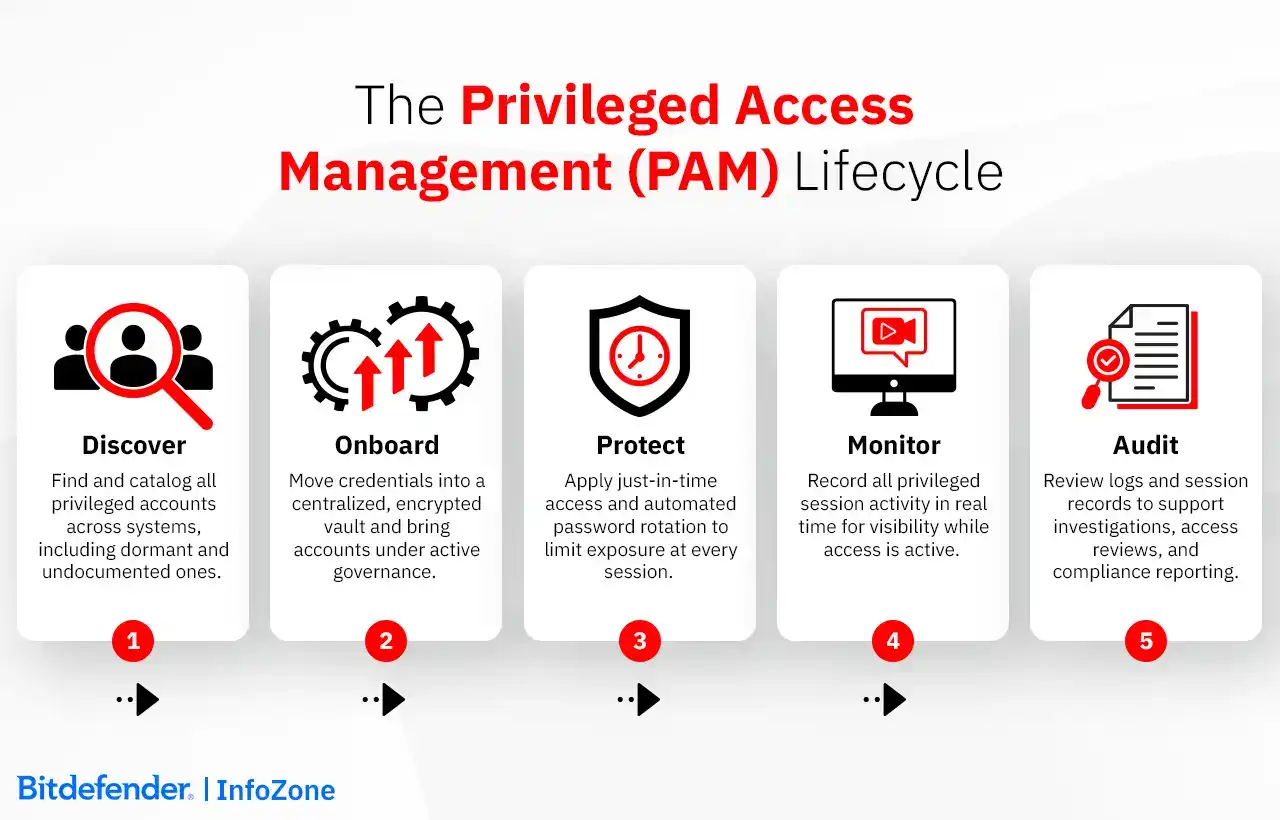
Privileged access management (PAM) operates as a continuous lifecycle that governs how privileged access is identified, granted, used, and reviewed. This lifecycle is typically described as discover, onboard, protect, monitor, and audit, with each phase addressing a different point in the attack chain.
The process starts with discovery and onboarding. Organizations identify privileged accounts across systems, applications, and infrastructure and bring them under centralized control. This step routinely turns up accounts that nobody was actively tracking, or accounts that are no longer in use but still have access.
Once accounts are onboarded, credentials get moved into a centralized, encrypted vault rather than left on endpoints or embedded in scripts. Access follows a check-out and check-in model, and in many cases the credential is injected directly into the session without the user ever seeing it.
Access is not permanent. Users request just-in-time access (JIT) for specific tasks, with approval and a time limit attached. When the task is done, the access expires.
While access is active, sessions are monitored and recorded, with a full record of activity available for review. These session recordings are what investigators rely on when reviewing privileged account activity after an incident.
Credentials do not stay the same for long. PAM systems enforce automated password management and rotation, either on a schedule or immediately after use.
The audit data generated across these steps supports ongoing review as environments change. Taken together, these controls form a single system that governs how privileged access is used and contained.
Key PAM Capabilities
A complete set of privileged access management tools is built around a small number of core capabilities. Rather than standalone features, these support the lifecycle described earlier.
Foundation layer
- Privileged account discovery
Finds and tracks privileged accounts across systems, including ones that were never formally documented - Credential vaulting
Stores credentials centrally in a secure vault instead of leaving them exposed on endpoints or in scripts - Password management and rotation
Handles credential updates automatically, either on schedule or after use
Enforcement layer
- Just-in-time access (JIT)
Grants access only when needed, for a limited time - Least privilege enforcement
Permissions as narrow as possible (even for privileged users) - Session monitoring and recording
Activity is captured during privileged sessions, with recordings being available for review afterwards
Verification and detection layer
- Multi-factor authentication (MFA)
Before privileged access, an extra step of verification - Secrets management
Secures application credentials, API keys, and automation tokens - Threat analytics and alerting
Detects unusual behavior by comparing activity against normal patterns
Together, these capabilities define what privileged access management solutions must provide to maintain control over privileged access across modern environments.
Common PAM Challenges
In most environments, the difficulty is not defining privileged access, but keeping track of it once things start changing.
Privilege creep is when access granted for a task stays and some accounts end up with more permissions than was intended or normal for them.
Shadow admin is another issue, as some users who are not formally admins get elevated rights through accumulated access. These accounts often sit outside normal access governance.
Credential sprawl is hard to avoid. Credentials end up in scripts, shared tools, and configuration files, especially across cloud environments. Even when there is a credential vault, not everything is consistently brought into it.
Non-human identities create a different kind of blind spot. Service accounts, API keys, and automated processes don’t follow the same controls as users, and privileged account discovery doesn’t always cover them fully.
Operational friction comes up in day-to-day work. When access takes too long to get, people reuse what they already have or find a way around the process.
Integration is another area where things don’t always line up. PAM has to connect with identity and access management systems and logging tools, and in practice that alignment is rarely clean.
Types of Privileged Access Management Solutions
Privileged access management solutions are delivered through on-premises deployments, cloud-based SaaS models, or hybrid setups that combine both. As environments have expanded, the market has shifted from isolated tools toward broader platforms that bring multiple controls together around privileged accounts and access control.
At the same time, privileged access management tools are commonly grouped as standalone credential vault solutions, unified PAM platforms, remote access PAM, endpoint privilege management, and DevOps or secrets management tools. These labels reflect how the technology is packaged, rather than how it works.
Gartner PAM Tool Categories
Gartner groups privileged access management software into five main categories. The key distinction is between PASM and PEDM: one governs who can access a privileged account, the other governs what happens after access is granted.
|
Category |
What it covers |
Primary use case |
|---|---|---|
|
Privileged Account and Session Management (PASM) |
Focuses on access to privileged accounts and the sessions that follow |
Managing administrative access and session visibility |
|
Privilege Elevation and Delegation Management (PEDM) |
Focuses on actions at the endpoint, including command and application control |
Limiting what users can do once inside a system |
|
Secrets Management |
Covers credentials used by applications, APIs, and automation, including non-human identities (NHI) |
Securing machine-driven access in DevSecOps and cloud environments |
|
Covers permissions and entitlements across cloud environments |
Managing access in distributed cloud security environments |
|
|
Remote PAM (RPAM) |
Covers remote privileged access without exposing credentials directly |
Managing external or remote administrative access |
PAM tools are available as software, SaaS, and hardware appliances.
Privileged Access Management Best Practices
- Conduct a full privileged account inventory.
Start by identifying all privileged accounts across systems, including dormant and service accounts. In most environments, there are always a few that no one is actively tracking. - Apply least privilege.
Move away from broad access and reduce permissions wherever possible. Many accounts end up with more access than they actually use. - Implement just-in-time access (JIT).
Limit access to when it is needed, and avoid keeping elevated privileges active longer than necessary. - Enforce multi-factor authentication (MFA).
For all privileged access paths, including resets. There are repeated cases where attackers target help desks to gain access. - Monitor and record privileged sessions.
Configure retention periods so that compliance requirements are met. Most frameworks expect at least 90 days. Also, verify that recordings are searchable by user, timestamp, and command, as you need quick queries during an audit or an active insider threat investigation - Automate password rotation.
Static passwords are easy to leave behind. They show up in scripts or old processes and stay there longer than expected. - Secure non-human identities and secrets.
Service accounts and API keys don’t always go through the same controls as users. Some are created for a task and then left running without much visibility. - Align with zero trust security.
In practice, this means checking access every time, not assuming anything based on network location or prior access, as outlined in NIST SP 800-207. - Conduct regular access reviews.
Reviews happen, but they don’t always match how systems are actually used. Some permissions remain simply because no one revisits them. - Integrate with SIEM, Identity Governance and Administration (IGA), and IAM platforms.
Integration is rarely complete. PAM connects to some systems, while other activity stays elsewhere, which makes it harder to follow what is happening end to end.
PAM and Compliance: Regulatory Requirements
Privileged access management supports compliance without being built specifically for it. The same audit trails, access control, and session recording used to manage privileged accounts are what regulators expect to see when reviewing how access is handled in practice.
|
Framework |
Control requirement |
PAM capability |
|---|---|---|
|
Restrict and track access to personal data |
Access control and privileged user monitoring with audit trails of data access |
|
|
Control and audit access to ePHI |
Session recording keeps a detailed log of who accessed what and when |
|
|
PCI DSS (Req. 7.1.2) |
Limit privileged access to business need-to-know and monitor usage |
Role-based access control and continuous session recording of administrative actions |
|
Ensure controlled access and traceability across critical systems |
Centralized access control and monitoring of privileged activity, including third-party access |
|
|
ISO/IEC 27001 (Annex A 8.2) |
Manage and restrict privileged access rights |
Covers how privileged access rights are assigned, reviewed, and kept to the minimum necessary |
|
NIST SP 800-53 (AC-2, AC-3, AC-6, AC-17) |
Enforce access policies and session accountability |
Policy-based access control and logging of privileged sessions |
A PAM program that is properly instrumented produces the audit trails, access logs, and session records that regulators ask for as part of how it runs day to day, without any separate compliance-specific effort.
How Privileged Access Management Fits into Modern Identity Security
PAM and Zero Trust Security
Privileged access management is the control layer that enforces zero trust security for privileged accounts. Within a Zero Trust architecture, access is not assumed based on role or network location. It is evaluated each time, especially when elevated permissions are involved.
This becomes critical at the point where access turns into control. Privileged accounts can bypass many of the checks applied to standard users, which is why Zero Trust depends on how these identities are handled in practice.
PAM applies these principles directly to privileged access. Least privilege reduces how much any one account can reach, but that alone is not enough. Access still needs to be verified each time it is used, and limited in duration, on the assumption that breaches will happen and trust cannot be carried forward from a previous session.
Just-in-time access and MFA limit when and how access can be used. Session monitoring keeps actions visible while it is active. Zero Trust PAM (ZTPAM) is what this looks like at full maturity. The goal is zero standing privileges (ZSP), that is, no persistent elevation, no always-on administrative rights. JIT is the mechanism that gets you there; ZSP is the state you are maintaining.
Without this layer, Zero Trust does not extend cleanly to privileged identities. That is usually where credential theft turns into lateral movement.
PAM for Cloud and Hybrid Environments
On-premises PAM was designed around a stable set of known systems. Cloud environments break that assumption at the infrastructure level. Servers spin up and disappear within minutes.
Access tends to drift in cloud environments. A role created for one task stays in place long after that task is done. Another permission gets added later, then another. Over time, it becomes unclear what is still needed and what is not.
A credential vault depends on things staying stable enough to manage centrally. In cloud environments, that condition does not hold for long. According to an industry survey, PAM remains predominantly on-premises, with more than 60% of respondents reporting on-prem deployments. Cloud PAM governance is still catching up to where workloads actually are. CIEM addresses the entitlement layer specifically, analyzing and enforcing least-privilege access across cloud infrastructure where permission sprawl is hard to see and harder to clean up.
In DevSecOps environments, the exposure shows up differently. API keys, tokens, and certificates end up hardcoded in Terraform or Ansible scripts, or committed to repositories where they sit until something goes wrong. Secrets management keeps these credentials out of the code entirely, fetching them dynamically from a credential vault at runtime.
Third-party vendor access is the third pressure point. Vendor access creates a different kind of risk. Access is often granted for a specific task, but it is not always removed when the work is done. In some cases, the same credentials are reused across systems or projects.
When that happens, a single compromised account can reach further than expected. Limiting access to a defined window, and keeping those sessions visible, reduces how much damage that account can actually cause.
PAM for Non-Human Identities and Machine Accounts
Non-human identities cover a wide range of account types: service accounts, application credentials, API keys, certificates, including ephemeral certificates, bots, CI/CD pipeline tokens, and increasingly, AI agent identities.
The issue is not just their number, but how they accumulate. A credential is created for an integration or a piece of automation. The project moves on, but the account remains, often with the same level of access it had on day one, whether it is still needed or not. There is no offboarding process, no user behind it, and no MFA challenge to interrupt its use. Over time, these accounts blend into the environment and become difficult to track or evaluate, even though many of them still hold privileged access.
Unlike human users, these accounts rarely have clear ownership. They operate with system-level access, often across multiple services, but without anyone reviewing how that access is used or whether it should still exist. This creates a form of identity sprawl made up of persistent, low-visibility credentials that sit outside normal access governance and admin account security controls.
PAM applies the same controls used for human accounts to these identities. Credential vaulting removes hardcoded credentials from scripts and applications, secrets management enables automated privileged credential rotation, and integration with DevSecOps workflows ensures credentials are issued and revoked as part of the deployment process rather than left behind.
AI agent identities are the current edge of this problem. Agentic systems are being granted privileged access to APIs, data stores, and internal tools to act autonomously, so they accumulate access in the same way service accounts do. The problem is that they do it with no natural offboarding trigger, and there is the added risk of autonomous action. PAM still applies the same controls here: limiting access to a specific task, keeping it short-lived, and avoiding persistent permissions.
PAM vs. IAM: What Is the Difference?
Identity and access management (IAM) is the broad framework for managing all identities and access rights, while privileged access management (PAM) focuses specifically on privileged accounts and elevated access within that framework.
|
IAM |
PAM |
|
|---|---|---|
|
Scope |
Covers identities across the entire organization |
Focused only on privileged accounts and the access paths that can affect critical systems |
|
Access level |
General, applications and business systems |
Administrative / system-level, often able to change configurations or extend access |
|
Purpose |
Manages identity lifecycle and access policies for users |
Contain and control high-risk access, especially where misuse can escalate quickly |
|
Risk focus |
Broad identity risk across users, applications, and systems |
Credential theft, lateral movement, privilege escalation |
|
Controls |
Manages access ar scale through uses authentication, provisioning, role-based access control (RBAC) |
Applies stricter controls around privileged sessions, including monitoring, approval workflows, and time-bound access |
|
Users |
Employees, partners, customers, and applications |
Administrators, service accounts, and other identities with elevated permissions |
PAM vs. PIM vs. PASM vs. PEDM — Identity Security Acronyms Explained
The following terms describe different layers within identity and access management (IAM) and privileged access management.
|
Term |
What it covers |
Scope |
Relationship to PAM |
|---|---|---|---|
|
IAM |
Identity lifecycle and access control across all users and systems |
Enterprise-wide |
Parent framework (includes PAM) |
|
PAM |
Governance and protection of privileged access |
Privileged accounts and access paths |
Umbrella framework |
|
PIM |
Just-in-time role activation (commonly used in Microsoft environments) |
Identity roles & entitlements |
A subset of PAM with focus on role activation |
|
PASM |
Privileged accounts and sessions management; it governs who logs in & how sessions are handled |
Accounts and sessions |
Core PAM component |
|
PEDM |
Control over commands and applications; governs what can be executed once access is granted |
Endpoints and systems |
Complements PAM by controlling post-access actions |
|
CIEM |
Management of cloud entitlements and permissions |
Multi-cloud environments |
Extends PAM into cloud access control |
|
ZTPAM |
Approach that removes standing access and relies on temporary, context-based permissions |
Dynamic privileged access |
Modern extension of PAM aligned with zero trust security |
PAM Trends and Future
AI is changing how privileged access is evaluated. PAM systems that use machine learning can establish behavioral baselines for privileged identities and trigger step-up authentication when activity drifts from normal patterns, without waiting for a human to notice something is wrong.
Passwordless administration is on the rise. Biometrics, hardware security keys, and cryptographic passkeys are replacing stored passwords for administrative accounts, removing the credential as an attackable surface rather than just protecting it better.
Zero standing privileges is where just-in-time access (JIT) leads when taken to full maturity. No persistent elevation, no always-on administrative rights. Access is for the task and expires with the task.
AI agent identity governance is where the non-human identity problem gets harder. These systems act autonomously across multiple privileged surfaces, and the challenge is less in the credential storage and more in constraining what they can reach and for how long.
PAM, identity governance and administration (IGA), and access management are consolidating. Vendors are building unified identity security platforms rather than selling separate tools that organizations have to wire together.
Cloud-native delivery continues to replace on-premises hardware, with SaaS-first PAM designed around dynamic infrastructure rather than fixed systems.
OT PAM is an expanding use case as IT and operational technology networks converge, bringing industrial control systems and critical infrastructure into the privileged access governance scope.
How to Choose a PAM Solution
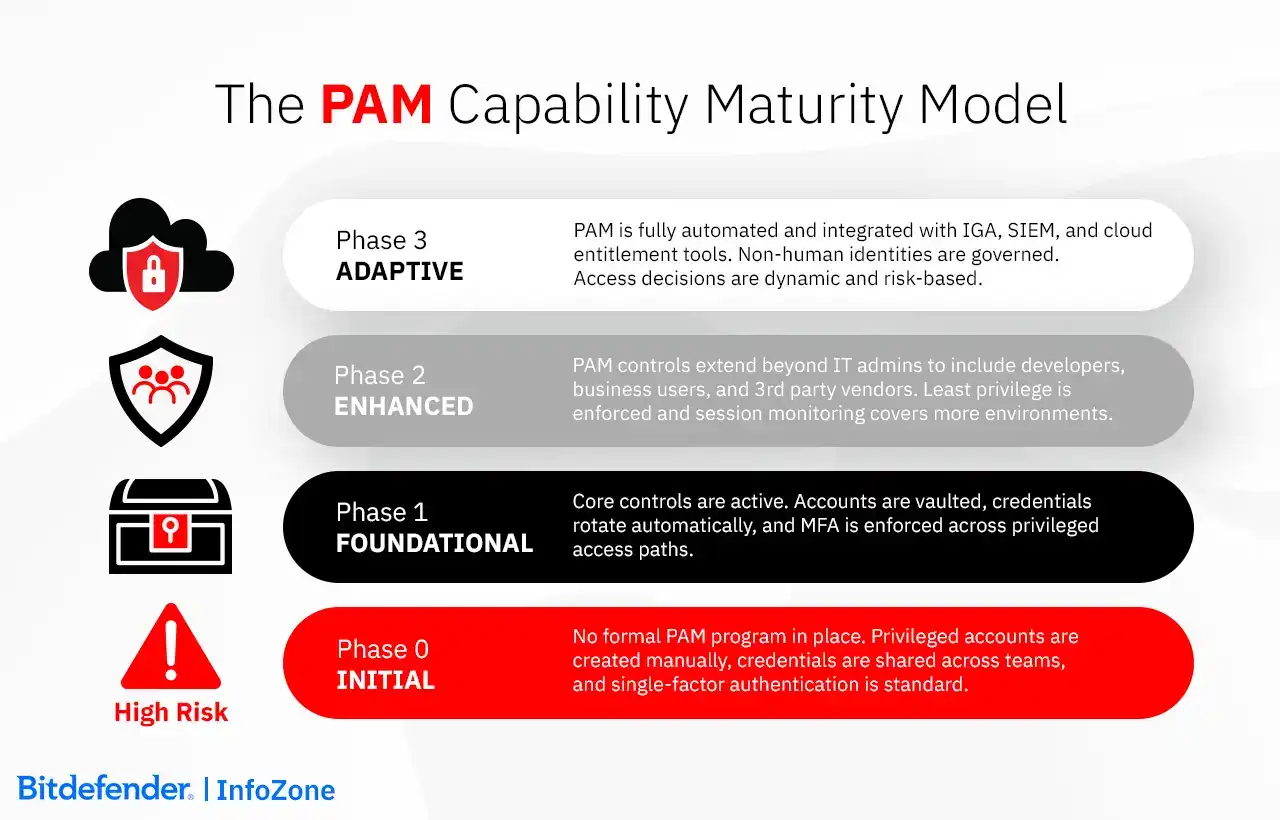
Choosing a privileged access management solution depends on where your environment actually is. Some organizations are still trying to get basic visibility over privileged accounts. Others are already dealing with automation, cloud sprawl, and non-human identities at scale. The criteria shift depending on that starting point.
Step 1: Deployment model. SaaS is the default for most organizations. If there is a necessity for air-gapped systems or there are regulations that prohibit storing admin credentials on third-party servers, on-premises or hybrid becomes a non-negotiable requirement. Another piece of advice is to plan ahead and test against projected account volume, not your current pilot size.
Step 2: The fundamentals first. When these are weak: privileged account discovery, a working credential vault, and enforced MFA, everything built on top is unreliable.
Step 3: What identities does it cover? Many privileged access management solutions still focus on human administrators. Service accounts, API keys, and non-human identities that run through separate controls (or none at all) are the usual place for a breach to start.
Step 4: Session recording quality. Ask to see recordings from a real incident investigation, not a demo. Keystroke logs that are incomplete or video that cannot be searched are not useful when you actually need them.
Step 5: How JIT access is revoked. Granting temporary access is straightforward. Ask how it gets removed, is it automatically, on a timer, or manually by someone, which might become a problem if that someone is busy.
Step 6: Integration with existing systems. Active Directory, Entra ID, your SIEM, your ITSM platform. PAM layer must connect to these cleanly, or you end up with fragmented audit trails that become a headache during an audit.
Step 7: Secrets management. API keys and pipeline tokens will end up hardcoded in scripts if the tool does not handle them. Better check ahead that rotation works and doesn't break your dependent services.
Step 8: Compliance reporting. Are the required reports (for example, GDPR, HIPAA, PCI DSS) built in and accurate? If you need to configure them manually before each audit, that's a hassle you should have prevented.
Step 9: Total cost. It can be per-seat, per-vault, according to a subscription model, and each of these can give very different numbers at scale. Include implementation time and in case your team is small, make sure that managed privileged access management services are available to you.
Step 10: Advanced capabilities. CIEM, zero standing privileges, NHI governance add value once foundational controls are stable. Before that, they add cost and complexity without reducing the risks that are actually present.
How Bitdefender Can Help
Bitdefender GravityZone consolidates endpoint, identity, cloud, and network telemetry into a unified platform allowing privileged activity to be evaluated in context rather than in isolation.
Especially in cloud environments, permissions tend to grow faster than anyone can review them. GravityZone CSPM+ applies CIEM to surface and reduce excessive entitlements across multi-cloud infrastructure on a continuous basis. Also, GravityZone ITDR monitors authentication flows and privilege changes across on-premises and cloud identity systems, picking up cases where a session is still technically valid but the activity behind it has shifted.
GravityZone PHASR limits access to administrative tools based on how each system is actually used, removing many of the paths attackers depend on for escalation. GravityZone XDR connects identity signals with endpoint and network telemetry, giving analysts a way to follow how access moves across the environment when something looks wrong.
GravityZone Integrity Monitoring provides security teams with the ability to monitor and prevent unauthorized changes across entire systems, not just files. This helps organizations limit access to critical data and identify when that access has been compromised.
GravityZone Compliance Manager generates access control mapping and audit documentation from activity that is already being tracked. For organizations that need continuous coverage, Bitdefender MDR monitors privileged account activity around the clock and acts on confirmed anomalies before they develop further.
Frequently Asked Questions
How does PAM prevent ransomware?
Ransomware usually does not start with encryption. It starts with a compromised account, then moves through the environment until it reaches systems where it can do real damage. PAM limits that progression. Privileged access is not always available, so there is less to take over. When access is granted, it is temporary and monitored, which reduces how long it can be used. Credentials are rotated, so reused passwords stop working quickly. In practice, this makes it harder for an attacker to move from initial access to full control.
What is the difference between PAM and a VPN?
A VPN gives access to the network. Once connected, a user is effectively inside, often with broad visibility across systems. PAM works at a different layer. It controls access to specific systems and actions, especially where privileged accounts are involved. It also limits how that access is used and records what happens during the session. A VPN without PAM increases exposure if credentials are compromised. PAM reduces that exposure by restricting what can be done after connection.
Is Active Directory a PAM solution?
No. Active Directory manages identities and access at a general level. It defines users, groups, and permissions across the environment. PAM focuses on how privileged access is used. It controls administrator accounts, rotates credentials, and records sessions. In most environments, PAM is added on top of Active Directory to manage the accounts that carry the highest risk.
Do I need MFA if I already have a PAM solution?
Yes. PAM controls access, but it still needs to verify who is requesting it. MFA provides that verification step. Without it, a stolen credential can still be used to request or obtain privileged access. In practice, MFA is applied before access is granted and sometimes again during sensitive actions. The two work together. One does not replace the other.
What industries need PAM the most?
The need for PAM depends on how much damage a privileged account can cause. In finance and healthcare, that risk is tied to sensitive data and regulatory exposure. In infrastructure and industrial environments, it is tied to system availability and operational impact. In cloud and software environments, it often comes from large numbers of automated accounts and access paths. The pattern is the same across all of them: where privileged access can affect critical systems or data, it becomes a primary control point