
What is Multi-Factor Authentication (MFA)?
Multi-factor authentication (MFA) is a system that makes necessary two or more distinct factors in order to verify identity for access to be granted to a user, and it is widely used across consumer services (email, social media, personal cloud accounts, etc.), enterprise systems, and cloud environments where passwords alone are not considered sufficient protection. A simple password is a single point of failure; in other words, once compromised, there is no additional verification step left. MFA removes that dependency by introducing independent checks, so possession of one credential no longer determines the outcome. Two-factor authentication (2FA) is the most common implementation (exactly two factors) while MFA also covers scenarios where higher assurance calls for more.
The scope of MFA is intentionally broad. We can find MFA on simple things like personal email, but it's also used on administrator accounts in enterprise systems, cloud platforms used to manage applications and infrastructure, and remote infrastructure. Early forms of two-factor authentication appeared in the 1990s with hardware tokens used in high-security enterprise and government environments. Wider adoption began in the late 2000s and early 2010s, driven by large-scale password breaches and the rise of cloud services, when SMS codes and authenticator apps made MFA accessible to everyday users, as reflected in modern digital identity guidelines.
Once identity became the main access point, MFA stopped being optional in most environments. In simple terms, an attacker has to get past more than one check instead of relying on a single stolen password. That extra step is often enough to stop common account takeovers.
Most environments no longer rely on passwords alone. Many started with 2FA, moved to broader MFA, and are now testing phishing-resistant or passwordless options introduced after 2018 with standards like FIDO2/WebAuthn, and layered with risk-based checks that adapt authentication requirements based on context.
Common Methods of Multi-Factor Authentication
In practice, MFA and 2FA are often used interchangeably. You’ll also see terms like two-step verification in consumer services or strong customer authentication in payment flows, all aimed at moving beyond password-only access.
- Text messages and one-time passwords (OTP). SMS and email-based sign-ins typically rely on an OTP, a short-lived numeric code. The code itself isn't the factor, it's really about access to the phone number or inbox that receives it. That's also where the problems start. SMS can be intercepted through SIM swaps or carrier account recovery, and email OTP falls apart if the inbox isn't well protected.
- Authenticator apps: TOTP (Time-based One-Time Password) and push notifications. Authenticator apps provide a phone-based possession factor without depending on text delivery. TOTP codes are generated on the device and don't depend on SMS delivery. Push notifications take a different approach, replacing code entry with an approve or deny action on the phone. Both approaches still have edges. TOTP codes can be captured and relayed during real-time phishing. Push prompts can be worn down through repeated approval requests until someone clicks through out of habit or frustration. Number matching helps here: users enter a displayed code instead of blindly tapping approve.
- Biometric verification: fingerprints and facial recognition. Biometrics are usually checked on the device itself. A fingerprint or face scan unlocks the device, and that trust is then reused during sign-in. In practice, there are limits. Sensors aren't perfect, and some users are uncomfortable relying on biometric data for account access. Because of that, biometrics are usually combined with device possession instead of being treated as a standalone factor.
- Hardware security keys and smart cards (FIDO2/WebAuthn). Security keys and smart cards act as physical possession factors and rely on cryptography rather than shared secrets. FIDO2/WebAuthn keys only respond to the legitimate site, which makes traditional phishing attempts fail. Smart cards work in a similar way in environments that already rely on certificates. The downside is mostly practical - keys have to be replaced when lost.
- SSO, passwordless, and adaptive policies. With SSO, authentication happens in one place instead of being repeated across every application. That makes MFA at the identity provider far more effective. Passwordless approaches go further by dropping passwords altogether and using device-bound credentials unlocked locally by the user. Adaptive MFA adds a policy layer that adjusts requirements based on context such as device, location, or risk signals.
Comparison of MFA implementations
|
Implementation |
Security level |
User convenience |
Cost |
|---|---|---|---|
|
SMS OTP |
Low–Medium |
High |
Low (plus message fees) |
|
TOTP app |
Medium |
Medium |
Low |
|
Push notification |
Medium–High (higher with number matching) |
High |
Low |
|
Biometrics |
Medium–High |
Very High |
Medium |
|
FIDO2/WebAuthn key |
High |
Medium |
Medium–High |
|
Smart card |
High |
Medium |
High |
How Multi-Factor Authentication Works
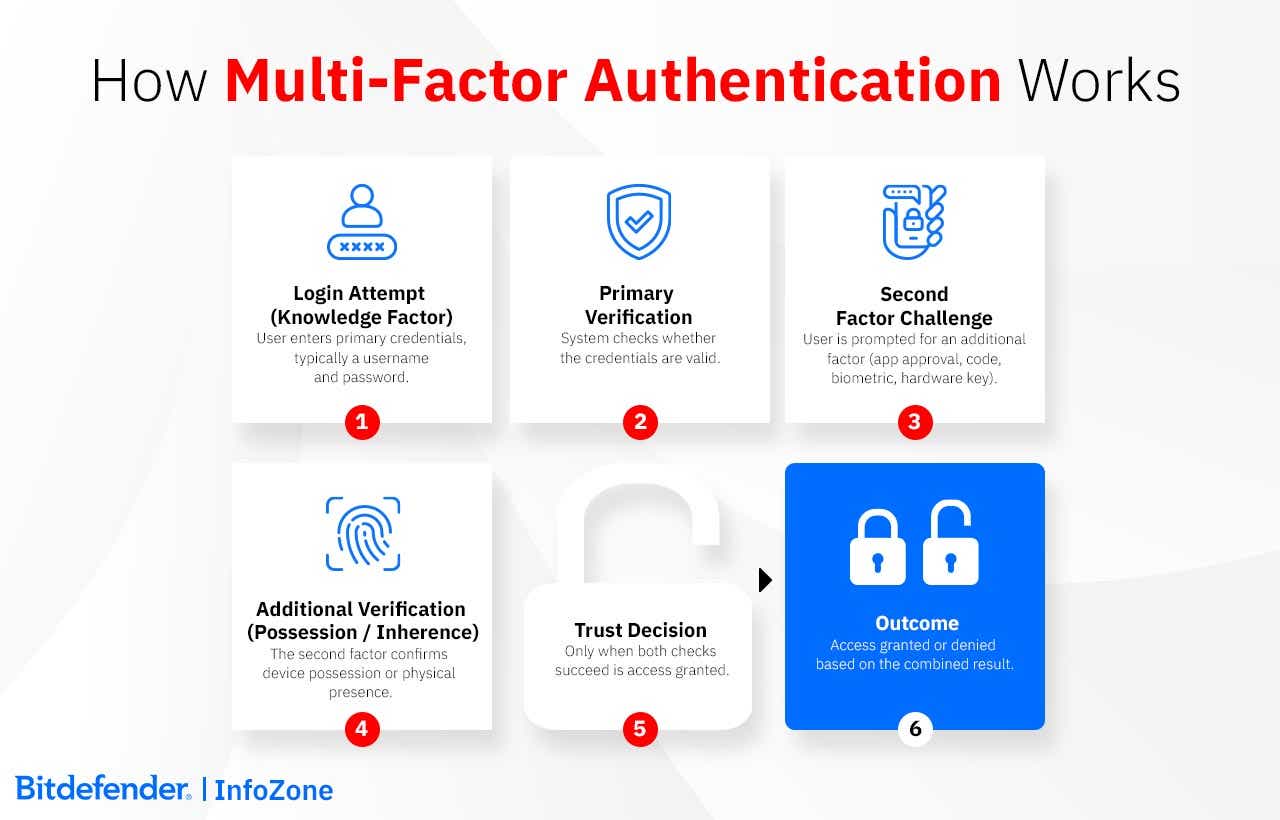
MFA focuses on a single decision: whether a sign-in attempt should be trusted. The logic behind MFA is straightforward: different types of credentials serve different purposes. Passwords prove you know something. A phone or hardware token proves you possess something. Biometrics verify you're physically present. Keeping these separate means an attacker can't get in by stealing just one thing.
The authentication process
A user enters their primary credential, usually a password, then provides additional verification from whatever factors they've enrolled. Only after clearing both checks does the login complete.
Worth noting: MFA handles the authentication moment itself. What comes after, that is, how long sessions last, how tokens are protected, whether the application stays secure - those are separate concerns handled by other controls.
Implementation architectures
Where factors are generated makes a real difference. SMS codes are created server-side and sent over cellular networks, which exposes them to interception risks like SIM swapping. With app-based MFA, the code is produced on the device itself rather than sent over the network. Hardware keys take a different approach altogether. They don't pass codes back and forth; instead, the device handles the check internally and responds only if the request is legitimate.
Most organizations end up with a hybrid MFA setup. Cloud identity platforms manage user sign-ins for SaaS applications, while internal systems continue to handle authentication on the inside. How that's divided varies by environment. Most users rely on app-based authenticators; hardware keys are added where the risk is higher.
Why MFA Matters – Benefits & Security Impact
Credential theft sits at the center of most real-world breaches. In many cases, attackers never touch an exploit, they get in by tricking someone into handing over a login or by stealing it from an infected device. Once that happens, a password on its own is often enough to move further into the environment, reach higher-privilege accounts, and eventually deploy ransomware. MFA breaks that sequence by forcing an extra check that a stolen password can't clear on its own.
Microsoft reports that MFA blocks 99.9% of automated attacks across its cloud services, based on hundreds of millions of observed sign-in attempts. MFA doesn’t eliminate every risk (session hijacking and advanced phishing still matter), but it removes the scale that makes credential abuse effective.
The impact is clear simply by looking at the numbers, as an average breach cost can reach almost $4.5 million globally in 2025, which means that it is enough to prevent just one incident in order to justify the investment. There's also a quieter payoff: fewer password resets, fewer lockouts, and less time spent on avoidable access issues. For many organizations, MFA ends up supporting Zero Trust efforts by shifting access decisions away from where someone connects from and toward who they actually are.
Regulatory pressure reinforces this shift. PCI DSS 4.0 mandates MFA for all cardholder-data access starting March 2025. HIPAA lists MFA as “addressable,” meaning organizations must evaluate it and either implement it or clearly justify why they haven't. But in practice, auditors increasingly expect it for systems that handle sensitive patient data, and proposed updates are moving in that direction.
In many services, MFA isn't something users turn on later. It's introduced during the first login or account setup. By 2024, adoption in large organizations had reached 78% and this could be attributed in large part to logging in from home networks, cloud services, and personal devices. Once access moved outside the office, MFA stopped being treated as optional.
Key Questions and Concerns
Adoption barriers
User resistance is the most common challenge. Many employees find extra authentication steps inconvenient, especially when they are asked to approve sign-ins multiple times a day. Cost is another factor. Hardware tokens usually cost between $25 and $50 per user, and early deployments often increase the number of support requests.
Managing devices adds further complexity. In BYOD environments, users sign in from many different personal devices. Phones get lost, devices are replaced, and access has to be restored securely. When several authentication options are allowed, it becomes harder to enforce the same security rules across the organization.
How MFA gets bypassed
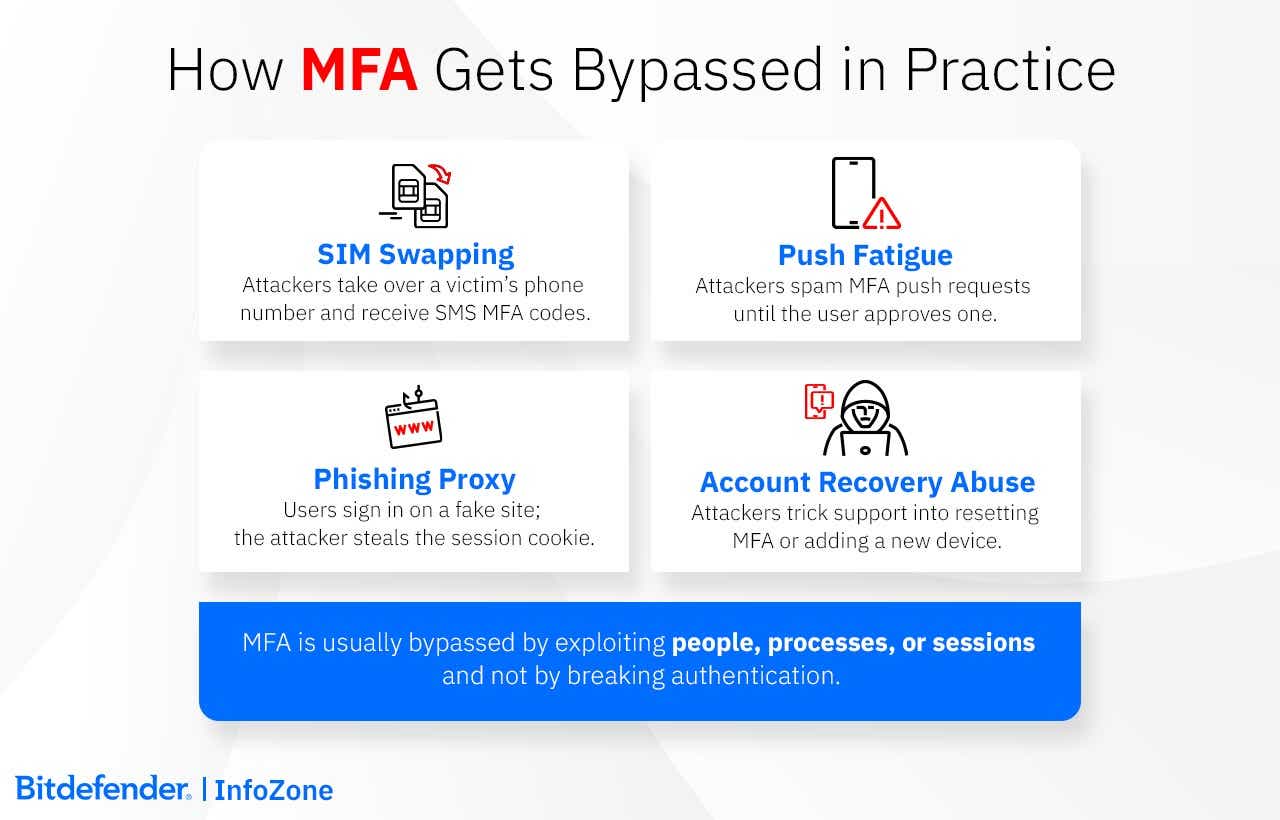
MFA usually isn't defeated head-on. Most of the time, attackers find a softer path around it.
SMS-based MFA is a common example. Phone numbers can be moved between SIM cards, and once that happens, text messages go to the wrong place. Push notifications can fail in a different way. If someone already has a password, they may keep triggering login prompts until the user approves one just to make them stop. That's how the Uber incident in 2022 started.
Some attacks don't rely on user mistakes at all. Fake sign-in pages can sit between the user and the real service. The login looks normal, MFA is completed, and the session that comes back is reused by the attacker. Microsoft reported seeing this pattern widely in 2023 and 2024.
In practice, configuration issues cause just as many problems. Older access methods are often still enabled somewhere and allow password-only logins. Account recovery can undo MFA as well if it depends only on email access. Support teams get caught in the middle, too. Calls about "lost phones" or urgent access requests are a common way MFA protections get bypassed when identity checks are weak.
What makes MFA harder to bypass
Some MFA attacks work because the authentication method doesn't check where a login request comes from. FIDO2 keys won't authenticate to fake domains. The cryptographic handshake ties the authentication request to the real website through a domain-specific challenge and response. Fake sites can’t complete it, so phishing pages get nothing back.
Number matching solves a real problem with push notifications. Without it, people tap “approve” reflexively. With it, they have to look at the screen and enter a code, which is a small friction, but it stops attackers spamming requests hoping someone clicks through.
Gaps in coverage are one of the most common ways MFA is bypassed. If MFA protects a VPN or a main application but not password recovery, attackers will use the weakest path left open. Email-based resets are a frequent example. When account recovery relies only on email access, and that inbox is not protected with MFA, the additional factor no longer provides protection.
Legacy access paths create similar exposure. Older protocols such as IMAP, POP3, or SMTP Basic Authentication were designed for username-and-password logins only. If they remain enabled, they allow attackers to sign in without triggering MFA at all. Attackers tend to look specifically for these older entry points because they are often overlooked.
MFA behavior itself can also reveal abuse. Repeated authentication attempts that are denied, followed by a single approval, are not typical user behavior and often indicate push fatigue or social engineering. These patterns are useful to watch. A lot of rejected prompts followed by one approval usually means something went wrong, not that a user simply mistyped a code a few times.
People are part of the problem, too. MFA prompts get approved because they look routine or because someone assumes the request must be legitimate. Help desks see this often. Someone calls in, says they lost their phone or can't sign in, and asks for MFA to be reset or a new device added. If that request isn't checked carefully, MFA gets bypassed without any technical attack at all. Recovery is necessary, but it needs more than easy questions or basic information.
Older systems cause their own issues. Some applications were built to accept only a username and password and can't handle modern authentication methods. Since MFA can't be added directly, teams usually put something in front of them, like an authentication proxy or an SSO gateway, to force MFA before access. When that isn't possible, the only option is to limit where those systems can be reached from and keep a closer eye on how they're used. When integration is not possible, compensating controls, such as limiting network access and applying closer monitoring, are used to reduce risk.
Future of Authentication
Passkeys and WebAuthn are mainstream. Over a billion activations exist globally, and most mobile devices support them natively. These rely on device-bound credentials that cryptographically verify the domain - they simply won't authenticate to the wrong site, which makes phishing fail at the protocol level. Risk-based MFA is no longer an edge case. Most systems now check device trust and location before deciding what to ask for. A known laptop on familiar network gets through faster than a new phone from another country.
Passwordless works the same way: unlock the device, unlock the credential. No password gets typed or stored anywhere that an attacker can reach it. There's no reusable secret to steal, and no password store worth breaking into.
AI plays a quiet role behind this. It can flag compromised sessions earlier than rule-based checks ever could. At the same time, tools for faking voices and faces are no longer exotic. Any single check can be faked or eventually stops being reliable.
Iris scanning, voice authentication, and blockchain-based identity still sit at the margins. Hardware constraints, recovery problems, and integration overhead keep them confined to narrow deployments. Hardware requirements, recovery challenges, and integration costs keep them out of general use.
Quantum-resistant algorithms are starting to replace current cryptographic methods. Most systems will probably need post-quantum support by 2030.
Choosing the Right MFA Solution – Criteria & Comparison
A useful way to choose MFA is to look at where it fails, not where it works. Consumer platforms, like personal email services, social media accounts, and consumer-facing cloud applications, need authentication that survives lost phones and users who skip instructions. At scale, self-service recovery isn't a feature, it's the only option. Enterprise environments face a different problem. In enterprise environments, enforcing MFA isn't the hard part. Making it work across existing access paths is. If some systems fall outside the flow, those gaps get abused.
Consumers tend to face broad, automated attacks. Enterprises are usually targeted through the accounts that matter most.
Small businesses usually land in between. They need stronger controls, but without the staff to run complex infrastructure, which often pushes them toward identity and access cloud-based solutions.
Recovery deserves the most scrutiny. MFA is rarely bypassed by breaking encryption. It's bypassed through resets, lost devices, fallback options, or support workflows that allow re-enrollment without much friction.
When MFA is compromised, the solution should support revoking active access, removing questionable enrollments, reviewing access history, and restoring access only after the entry path is addressed.
How to Protect Yourself from Hacking
Most attacks don’t start because someone "forgot" security. They usually begin with small things that teams overlook. Maybe an old integration that nobody has reviewed in a long time. Maybe a service left running after a project wrapped up. Or permissions that kept growing as people moved around.
It is these easy openings that hackers will use; therefore, protection can begin with simple checks, but not stop there. Look at what your systems run on today and make sure those choices still hold up, something that professional teams check often. The downside to not doing this is that you find out only when something goes wrong. That is why routine checks and people who know the environment count for more than any single guideline.
The main things to focus on are reducing what is visible from the outside, improving what you can see on the inside, and knowing how the organization responds when something looks wrong. Small improvements in these three areas do more for protection than any new tool on its own.
Multi-Factor Authentication implementation
Successful MFA implementation starts with a basic inventory. Organizations need to know which applications are in scope, which users access them, and how authentication is handled today. This includes cloud services, internal systems, VPNs, and any external access paths. That inventory should be used in order to make a decision on the systems that require MFA and see how it connects to the identity provider already in use.
Define enforcement rules early. Decide which accounts require MFA, starting with administrative and external access. Document allowed factors and any exceptions, then apply those rules through the identity platform rather than per application.
Rollout is easier to manage in phases, and this can start with a pilot group (often IT staff or a small set of users from different roles) that tests enrollment, authentication flows, recovery processes, etc., without affecting the wider organization. Issues uncovered during the pilot can be corrected before enforcement expands.
High-risk users and critical access paths should be prioritized for the initial rollout, gradually expanding to the broader workforce. The staff's expectations regarding enrollment and login changes need clear, proactive communication in order to avoid an unsustainable spike in support tickets.
Treat recovery as a core component of the lifecycle, not a safety net to build later. Users need a predefined, secure way to register backup devices or regain access if a primary factor fails. This requires strict identity verification protocols—especially for remote staff using personal devices—to ensure that a reset request is legitimate and not an attacker trying to bypass security.
Enforcement at the identity provider level is a centralized solution that proves to be far more effective than managing individual applications and their different settings. This approach can ensure consistent security rules across the entire environment. Also, authentication logs automatically generate the audit trail needed to prove enforcement and factor usage. Access patterns will change, and these logs can better reflect new enrollments and factor removals, so that the security posture remains visible and audit-ready.
How Bitdefender Can Help
Bitdefender GravityZone supports MFA by focusing on what happens around authentication. Many MFA-related incidents start before login, with stolen credentials, or continue after login, when abnormal activity is not noticed.
At the endpoint level, GravityZone blocks phishing, infostealers, and malicious scripts commonly used to capture passwords, MFA codes, or session data. This reduces the chances that attackers reach the login step with valid credentials in hand.
GravityZone includes EDR and XDR capabilities that connect what happens on the endpoint with identity activity. This helps detect situations where access looks valid on the surface, but the session or behavior doesn't line up with how the account is normally used.
MDR adds ongoing monitoring and investigation, with analysts looking specifically at post-login activity where MFA has already been passed.
Frequently Asked Questions
How can an organization onboard users for MFA smoothly?
A smooth onboarding process prioritizes communication and minimizes friction—objectives that can be achieved through a phased approach that begins before MFA enforcement at the organizational level.
- Timeline: It is recommended to start communicating about MFA approximately two months before enforcement. First, explain why and when the organization is making the change. You can follow with registration instructions (about one month in advance), step-by-step guides (two weeks out), and final information with support contact details (roughly a week prior).
- Rollout: MFA should not be deployed to everyone at once. Most organizations begin with a pilot group, typically IT staff and a small number of tech-savvy users, to test enrollment and authentication flows in real conditions. Once initial issues are resolved, enforcement can expand in stages—often starting with IT and security teams, followed by executive leadership, then rolling out department by department until the remaining users and external collaborators are covered.
- Training: Brief video explainers, just two to three minutes long, can easily explain why MFA matters and the registration process in practice. Easy-to-understand walkthroughs for enrollment and lockout recovery can reduce the innevitable initial confusion. Note: Users should be told explicitly that one-time passcodes are never shared, including with IT support.
- Support: During the first weeks of enforcement, help desk ticket volume often increases sharply. It's a good idea to document common issues in advance. Also, have escalation paths defined and self-service reset options made available for better handling of routine cases.
- Enrollment Logistics: Enable self-service enrollment portals where users can set up their factors upon their next login. Enforce mandatory backup code generation during this setup to prevent future lockouts.
How do you monitor MFA usage and effectiveness?
Monitoring MFA is done through logs, and its effectiveness is determined by interpreting them in context. At a minimum, organizations track enrollment rates to confirm that required users are actually covered, and authentication failures to identify usability or configuration issues.
Beyond basic adoption, monitoring focuses on patterns. Friction or abuse can be best deduced from repeated MFA prompts or frequent recovery requests, as well as sudden changes in enrolled devices. Authentication events are easier to analyze when fed into existing monitoring tools, so that they can be reviewed together with other security signals.
Records help answer practical questions like "Which factors are actually used?", "Where do users struggle?", "Is MFA reducing account compromise attempts?" etc.
How can MFA be enforced by policy?
In organizations, MFA enforcement is a policy decision backed by technical controls. The policy defines who must use MFA, for which systems, and under what conditions. Administrative accounts and remote access are usually enforced first, followed by other sensitive applications.
Enforcement is typically applied through the identity platform rather than individual applications. This makes MFA a mandatory part of the login process instead of an optional setting users can bypass. Once enforced centrally, the same rules apply consistently across connected systems.
Organizationally speaking, MFA can be required as a condition of accessing corporate systems, and this is an expectation that should be documented and communicated clearly. Finally, remember that strong policies are those that have no easy workarounds. Therefore, legacy authentication paths or informal reset procedures should be addressed honestly and preferably eliminated in order to make sure that the policy is enforced.