

What Is Privilege Escalation?
Privilege escalation is the term used in cybersecurity to describe a situation in which an account or running process starts to operate with permissions that it was never intended to have. Most systems separate ordinary user activity from administrative control and when that separation breaks, a low-privileged account may begin to execute commands meant only for administrators or core system components. That transition from limited access to elevated control is what security teams call privilege escalation.
A privilege escalation attack usually exploits a flaw in software, operating system components, or access control configurations. These weaknesses (known as privilege escalation vulnerabilities) allow an attacker who already has some form of access to increase their privileges inside the system. Initial access may come from phishing, stolen credentials, or a compromised application. Escalation is what converts that foothold into real control.
This is different from general access control issues. Misconfigured permissions might accidentally expose data to the wrong user, but a privilege escalation attack actively breaks a permission boundary. Instead of simply encountering an open door, the attacker finds a way to climb the hierarchy of trust built into the system.
Within the MITRE ATT&CK framework, this activity is categorized as TA0004: Privilege Escalation. Once elevated permissions are obtained, attackers can:
- access restricted data and system resources
- execute administrative commands
- disable or tamper with security controls
- pivot deeper into the network through lateral movement
Why Privilege Escalation Matters in Cybersecurity
Most attacks begin with limited access. An intruder who compromises a basic user account is constrained by the same restrictions that apply to legitimate users. That situation changes quickly if the attacker manages to elevate those privileges, for example, by exploiting a vulnerable service to obtain administrator rights.
Once administrative or root-level permissions are obtained, malware can be placed on the system to maintain persistence, but this is only one possible negative outcome. Credentials stored in memory also become accessible and system configurations may start to change in ways that administrators did not intend. Security monitoring tools are not immune either, as processes running with elevated privileges can interfere with logging or alter settings.
In large environments, everyday operations usually run under privileged identities such as application service accounts, automated background jobs, cloud IAM roles. Once one of those boundaries is crossed, the compromise rarely stays confined to a single machine and can quickly spread to other systems across the network.
Types of Privilege Escalation
Privilege escalation does not always occur in the same way. Security practitioners usually distinguish between three main patterns based on how the attacker expands their permissions: moving upward in the privilege hierarchy, moving sideways between accounts, or escaping the environment in which code is running.
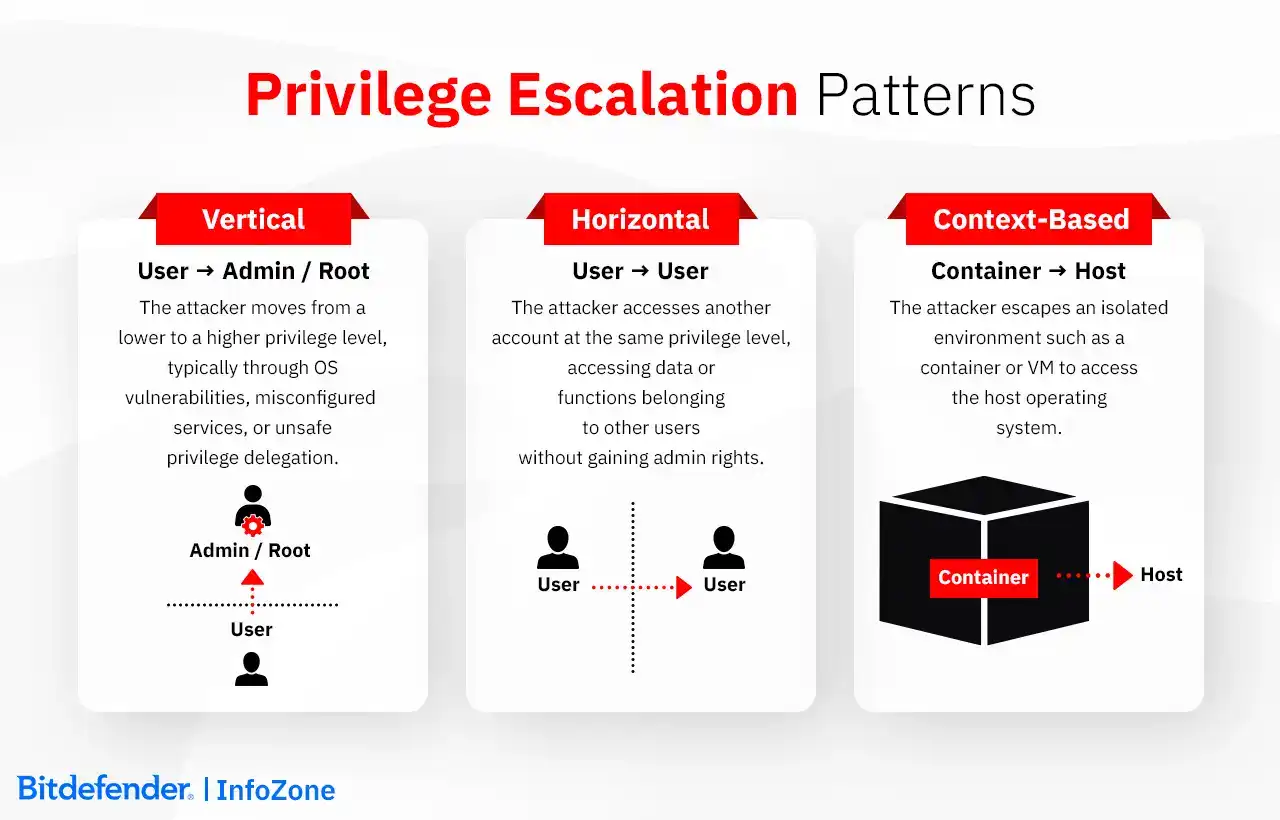
Vertical Privilege Escalation
Vertical privilege escalation occurs when an attacker moves from a lower privilege level to a higher one. A standard user account gaining administrator or root access is the most common example. This often happens through operating system vulnerabilities, misconfigured services, or unsafe privilege delegation.
Horizontal Privilege Escalation
Horizontal privilege escalation occurs when an attacker accesses another account operating at the same privilege level. The attacker does not gain administrator rights but can interact with data or functionality belonging to other users. This frequently appears in web applications with broken access control, such as IDOR vulnerabilities.
Context-Based Privilege Escalation
Context-based escalation refers to attackers breaking out of the environment where an application is running. Containerized systems offer a good example: a compromised container escapes its isolation and begins interacting with the host operating system. Similar situations can occur in virtualization environments, where weaknesses allow a virtual machine to reach resources on the underlying host.
At A Glance
|
Type |
Direction |
Example |
Impact |
|
Vertical |
User → Admin / Root |
Kernel vulnerability or misconfigured sudo rule |
Full system control |
|
Horizontal |
User A → User B |
IDOR in web application |
Unauthorized data access |
|
Context-Based |
Container → Host |
Container escape or VM breakout |
Infrastructure compromise |
Common Privilege Escalation Techniques
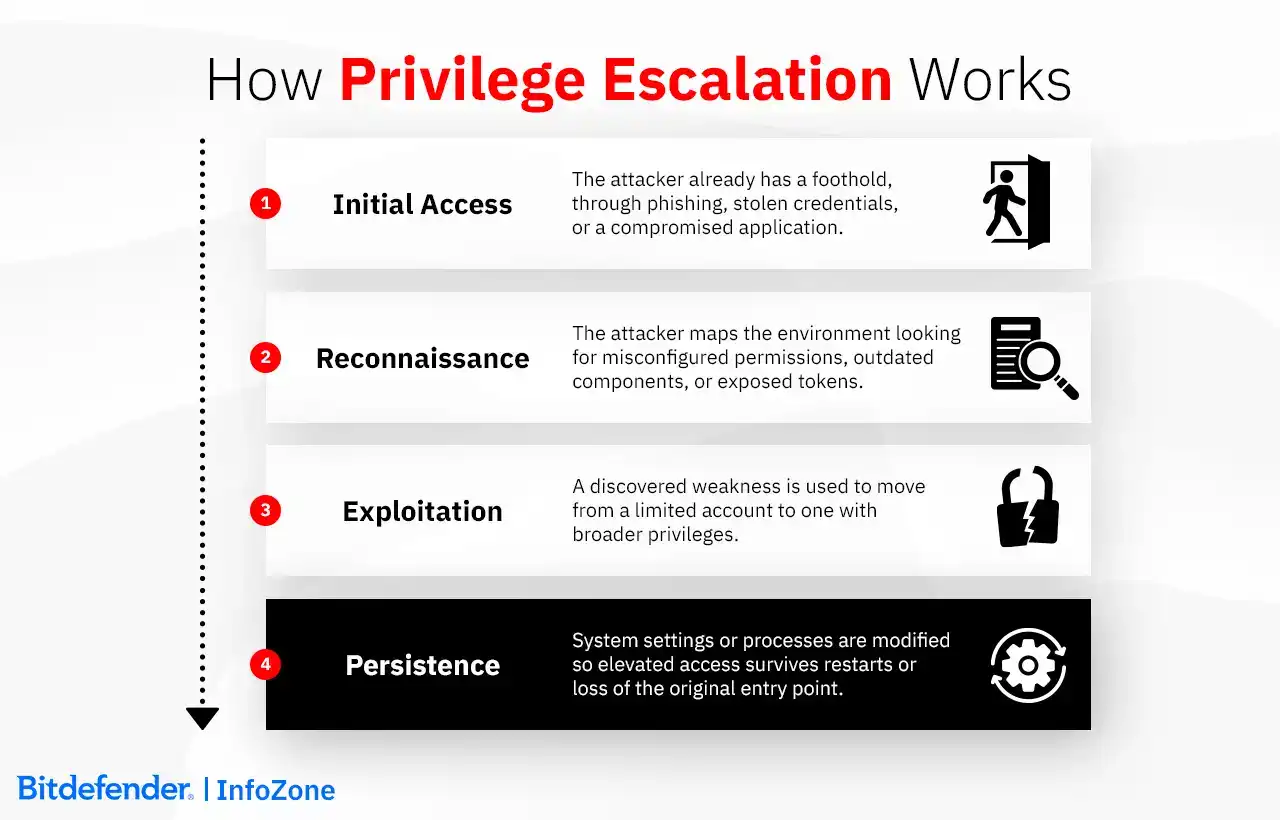
Attackers usually work through a series of steps while examining the environment for opportunities to increase their privileges.
- Initial access – The attacker already has a foothold. Maybe someone clicked a phishing link, maybe credentials were reused from a previous breach, maybe an exposed application was the way in.
- Enumeration – Before making any moves, the attacker takes stock of the environment. Misconfigured permissions, outdated components, exposed tokens - any of these could be the opening.
- Exploitation – A discovered weakness is used to move from a limited account to one with broader privileges.
- Persistence – System settings or processes are changed so that the elevated access survives service restarts or the loss of the original entry point.
Misconfiguration is probably the most common way this plays out. A program running with elevated privileges pulls in a script or references a file and that script or file is writable by ordinary users. Weak permissions, an unsafe service configuration, a missing authorization check: any of these can turn a routine system process into a vehicle for attacker-controlled code.
When there's no obvious configuration weakness to exploit, attackers go deeper. Software vulnerabilities such as kernel bugs, driver vulnerabilities, memory corruption are harder to find, but they achieve the same result: code that started life under a standard user account ends up running with administrator or root privileges.
Credentials are another frequent path upward. Password reuse across systems, credentials left in plaintext configuration files, or authentication tokens exposed in memory can give an attacker the ability to operate as a more privileged account.
After privileges are elevated, attackers often modify system components to maintain control. Services, scheduled tasks, startup processes, or web shells are frequently used to ensure that privileged access persists.
The exact techniques used vary widely across operating systems, applications, and cloud environments, which is why privilege escalation must be examined separately for each platform.
Platform-Specific Use Cases
Windows Privilege Escalation Explained
Windows privilege escalation is largely found in the gap between what a standard user session can do and what administrative control unlocks. Attackers start by mapping that gap in services, registry keys, scheduled tasks, installed drivers, whatever privileges happen to be attached to the current access token. WinPEAS does most of the legwork here, which is why the enumeration phase rarely takes long.
The vectors that show up most often in real environments are fairly predictable once you know what to look for. Unquoted service paths are a classic example; Windows has to guess where the binary lives, and an attacker who can write to one of the directories it checks first gets to answer that question on their behalf.
Weak service permissions can expose a service executable running as SYSTEM to direct modification. Similar doors can be opened through registry misconfigurations around service configuration or startup entries.
Policy settings are also worth examining. When AlwaysInstallElevated is enabled across both required registry locations, any MSI a standard user launches runs with SYSTEM privileges. SeImpersonatePrivilege is another reliable path. Attackers who hold that privilege can impersonate a higher-privileged process and use that position to obtain SYSTEM access.
Kernel vulnerabilities cut through most of this complexity. PrintNightmare-style attacks showed what driver flaws and privilege boundary errors look like in practice: local users walking away with full system control.
Hardening focuses on limiting standing privileges. Users operating as standard accounts by default and requesting elevation only when necessary reduces exposure. Just-in-time privilege models implemented through tools such as Microsoft Intune Endpoint Privilege Management and Entra Privileged Identity Management support this approach.
Linux Privilege Escalation Explained
On Linux, the target is almost always root. Enumeration follows from that: file permissions, scheduled tasks, installed binaries, sudo configuration, anything that might have been set up with more trust than it deserves.
SUID and SGID binaries are a frequent starting point. They execute with the privileges of the file owner, so if one of them permits command execution in any form, a standard user can use it to spawn a root shell.
Sudo misconfigurations follow the same logic. A permissive sudo rule, especially one covering a command that can launch a shell, effectively hands over root access without requiring any exploitation at all.
Cron jobs owned by root but pointing at scripts in writable directories are another version of the same problem. The attacker doesn't touch the job itself, just the script it runs. Path hijacking and LD_PRELOAD injection work similarly, redirecting which binary or shared library a privileged process actually loads.
Kernel vulnerabilities create a different kind of escalation path. Instead of relying on configuration mistakes, attackers take advantage of flaws in the operating system itself. Dirty COW is a well-known example: a race condition in the Linux memory subsystem allowed unprivileged users to modify files that were supposed to be read-only.
Containerized environments add another place where the boundary can fail. If a vulnerability allows code inside a container to escape the runtime, that process may start interacting with the host system itself. At that point the container is no longer an isolated environment but simply another entry point into the host.
On the defensive side, most of the work is straightforward system hygiene. Sudo rules need to stay tightly scoped, SUID binaries should be reviewed periodically, and scripts executed by privileged processes should never sit in writable directories. Regular kernel updates close known escalation flaws, while controls such as SELinux or AppArmor restrict what processes can do even if privileges are obtained.
Application Layer Privilege Escalation
Privilege escalation often occurs inside applications rather than at the operating system level. The most common cause is broken access control, where authorization checks fail to properly enforce user roles.
Insecure Direct Object Reference (IDOR) is the most common example. The application retrieves a resource using an identifier the client supplies, skips the ownership check on the server side, and this leads to one user being able now to reach another user's data / functions. Hiding a button is not the same as restricting access, which means that the same gap can appear when administrative actions are gated at the interface level but left unprotected on the server.
Code-Level Vulnerabilities
Some escalation paths originate directly in software defects. Input validation failures can allow attacker-controlled data to reach privileged processes. Race conditions, including time-of-check to time-of-use (TOCTOU) flaws, occur when a program checks a condition but the resource changes before the operation completes. Memory corruption vulnerabilities such as buffer overflows may also redirect execution within privileged services.
Privilege Escalation in Cloud Environments
In cloud infrastructure, IAM is where privilege boundaries live. Escalation usually comes down to policy misconfigurations that let users or services assume roles with broader permissions than they should have.
In AWS environments, attackers may abuse permissions such as iam:PassRole to attach privileged roles to instances and retrieve credentials from the instance metadata service. In Azure, privilege escalation often comes from overly broad RBAC assignments or service principals that can assume permissions beyond their intended scope. In Google Cloud, a compromised workload may pull access tokens from the metadata service and use them to call APIs that the original account was never meant to control.
Role of AI in Automated Privilege Escalation
AI-assisted tools have made enumeration faster and more systematic. Workflows built around LinPEAS or WinPEAS-style tooling can sweep through a system configuration and surface misconfigurations or vulnerable components in far less time than manual analysis.
The other side of this is that AI systems themselves have become an escalation surface. Automated agents run under service accounts or API tokens, often with permissions that were never carefully scoped. An attacker who can work within that trusted context can perform actions that go well beyond what the original user was ever authorized to do.
Real-World Privilege Escalation Attack Examples
Privilege escalation usually appears somewhere in the middle of an intrusion. The attacker already has a foothold, often through stolen credentials or a compromised application, but the permissions attached to that account are limited. Escalation is what changes the situation. Once administrative or root-level access is obtained, the scope of what can be done on the system expands quickly.
Windows environments provide many examples of this pattern. In several enterprise breaches, attackers who initially gained access as ordinary domain users were able to escalate privileges by abusing service account permissions or authentication flows between local processes. When a privileged service can be induced to authenticate to a controlled process, its security token can sometimes be reused to start a new process running as NT AUTHORITY\SYSTEM. At that point the machine is effectively under full control. Credential material stored in memory becomes accessible and the system can be used as a stepping stone to reach other hosts in the network.
Something similar happened on Linux systems when the CVE-2023-4911 “Looney Tunables” vulnerability was disclosed in the GNU C Library. The issue sat in a component that nearly every distribution relies on. A local user could pass manipulated environment variables to a privileged process and end up with a root shell. The scale of the exposure was less about the complexity of the bug and more about where it lived: glibc is present on most Linux servers, which meant unpatched systems across data centers and cloud environments were vulnerable at the same time.
Ransomware operations frequently rely on the same escalation step before the visible damage begins. An attacker may start with access to a single workstation but will usually try to obtain higher privileges before encrypting files across a network. Vulnerabilities affecting Windows kernel components have repeatedly been used in that role. Several ransomware campaigns have taken advantage of flaws in the Windows Common Log File System (CLFS) driver. One example is CVE-2024-49138, which allowed an attacker with limited access to gain SYSTEM privileges and interfere with security controls before launching ransomware. Once elevated privileges are obtained, security services can be terminated, recovery mechanisms such as shadow copies removed, and malicious payloads deployed more broadly.
Detection & Response Strategies
Privilege escalation rarely shows up as a single event and it appears as a short sequence: a privilege change, a process starting under a different context, or an administrative action that follows an ordinary user login.
Step 1: Use Security Monitoring and Logging
The main difficulty of detecting privilege escalation is that if there is only one odd event, such as an after-hours login, it is impossible to establish a pattern. But a recorded privilege request ten minutes later could become a pattern worth examining. Privilege assignments, authentication events, process creation, and administrative actions should be logged and collected in the same place. When those records sit on separate machines, they are difficult to review together. Centralizing them in a SIEM allows analysts to examine activity across systems and see how events relate to each other.
Reconstructing a privilege escalation after the fact is largely a matter of reading the right logs in the right order. On Windows, the story often starts with Event ID 4672. It fires when an account receives sensitive privileges at logon, which is a reliable indicator that an administrative session has opened. The process trail can be followed through Event ID 4688 (it records what was launched and under which security context). Group membership changes show up in events like 4728 and 4732, worth reviewing when the question is whether an account was quietly added to a privileged group. Sysmon fills in the gaps that native Windows logging tends to leave, particularly around detailed process activity. Linux investigations follow a similar logic. They lean on auditd and sudo history to establish when elevated commands ran and whether sensitive permissions were touched.
Step 2: Employ Behavioral Analytics and Anomaly Detection
Behavioral monitoring is about getting a good understanding of what normal activity looks like and keeping an eye out for changes. The “normal,” however, is in a constant flux, as accounts gain new tasks, developers receive temporary access, infrastructure evolves, etc. If the baseline is not adjusted over time, alerts begin reflecting an older version of the environment.
Step 3: Consult EDR/XDR
The authentication trail might not explain how privileges changed, and this is where endpoint telemetry becomes useful for investigators. The process history on the affected machine can thus be reviewed, looking at what started before the escalation, which program launched it, and what permissions were attached to that process. EDR tools keep this kind of execution history. XDR platforms add context from identity and network activity so the sequence leading to the escalation can be reconstructed more easily.
How to Prevent Privilege Escalation Attacks: Best Practices
Privilege escalation usually becomes possible because of accumulated permissions, outdated software, or configurations that were never properly locked down. Preventing it means reducing those conditions before they can be exploited — keeping access tight, systems current, and controls reviewed regularly.
Step 1: Apply the Principle of Least Privilege (PoLP)
This important principle states that the only permissions an account should have are the ones required by the role. Also, when temporary elevated access is needed, use just-in-time administration to limit exposure. In other words, grant rights for the duration of a task and revoke them automatically.
Step 2: Maintain Patch and Vulnerability Management
A lot of escalation paths come from flaws that already have patches available. The problem appears when weren't applied in time. To close the most dangerous gaps, it is recommended to prioritize updates by active exploitation risk rather than just severity scores that can be found in CISA's Known Exploited Vulnerabilities catalog. Maybe patching isn't immediately possible. Compensate with controls at the network or endpoint level to reduce exposure.
Step 3: Harden System Configurations
Escalation often runs on what's already there and not properly set up, like unused services, loose file permissions, admin tools that nobody locked down. CIS Benchmarks are a good starting point for fixing this. Keeping those changes in place is the harder part; infrastructure automation helps with that.
Step 4: Strengthen Access Control and Authentication
A stolen password shouldn't open a privileged account on its own. That's what MFA is for. Privileged Access Management adds on top of it credential vaulting, session approvals, logs of what those accounts actually did. Session timeouts and rotation help too, mostly by shrinking the window if something does get compromised.
Step 5: Apply Zero Trust Principles
For a long time, being inside the network was treated as a reason to trust a request. Zero Trust doesn't do that. Every request gets checked (who's asking, what device, what context, etc.), no matter where it comes from. This matters a lot in cloud and hybrid setups, where there isn't really a perimeter anymore. Microsegmentation helps too, mostly by limiting how far a compromised account can actually reach.
Step 6: Lock Down Applications and Workloads
Applications should not rely on information coming from the client when making authorization decisions as anything sent by the browser can be modified. Access checks therefore need to be enforced on the server, regardless of what the front end shows or hides. Similar issues appear in container environments. A container that runs as root and has access to the host filesystem is not really isolated from the underlying system. Limiting container privileges, restricting host access, and avoiding privileged container modes reduces the chance that a compromised workload can escape its boundary.
Step 7: Regularly Test and Assess
Security controls tend to drift over time. Accounts remain active long after they should have been removed. Temporary permissions granted for a project are never revoked. Configuration changes made during troubleshooting sometimes remain in place indefinitely. Penetration testing and red team exercises help surface these issues because they examine the environment as it currently operates, not how it was originally configured. Automated scanners help maintain coverage between these assessments by identifying outdated software, weak permissions, and configuration problems. Reviewing findings against can help security teams focus on remediation that reflects how escalation is actually performed in real environments.
Compliance Implications and Testing Tools
Regulatory and compliance frameworks all touch privilege management in some way, though they approach it differently. NIST SP 800-53 AC-6 is reference guidance rather than a regulation - voluntary, but widely used as a baseline for least privilege requirements across both users and system processes.
Many security standards approach privilege escalation indirectly, by requiring strict control over privileged access. The common expectation is that organizations define who can obtain elevated permissions, limit those permissions to what is necessary, and review them regularly.
PCI DSS v4.0 Requirement 7 ties access to cardholder data directly to business need - meaning any account that ends up with broader permissions than its role justifies is a compliance problem, full stop, regardless of whether the escalation was intentional or the result of a misconfiguration. ISO/IEC 27001 Annex A 8.2 takes a lifecycle view, looking at how privileged access rights are granted in the first place, whether they get reviewed periodically, and whether they're actually revoked when no longer needed. SOC 2 auditors tend to focus on the operational side: are privileged accounts provisioned correctly, is someone watching what they do, and are the controls in place actually being followed day to day.
Privacy regulations add another dimension worth keeping in mind. GDPR doesn't call out privilege escalation by name, but Article 32 requires security measures proportionate to the risk involved in processing personal data. An escalation that exposes personal data can become a breach notification situation under Article 33, with the reporting clock starting from the moment the organization becomes aware.
There are certain tools used by penetration testers and red teams to find escalation paths in environments they have permission to test. Using them elsewhere is illegal.
WinPEAS and LinPEAS are where most local assessments start. They scan for misconfigured services, weak permissions, unquoted paths, and SUID binaries faster than any manual process. BloodHound does something different, it maps Active Directory relationships and finds paths to Domain Admin that nobody documented because nobody realized they existed. For exploitation, Metasploit has a Local Exploit Suggester that checks what’s applicable on a compromised host without running anything automatically. PowerShell Empire is used in red team work to simulate post-access behavior on Windows, mostly because it relies on built-in tooling rather than dropped binaries.
Cloud testing has its own set. Pacu covers IAM privilege escalation in AWS. ScoutSuite pulls configuration data across providers and flags what’s permissive. For Kubernetes, kube-bench checks deployments against CIS benchmarks and surfaces what doesn’t meet them.
Frequently Asked Questions
Can privilege escalation happen without a password?
Yes, and it happens more often than many people assume. A large share of privilege escalation attacks never involve stealing credentials at all. Instead, attackers take advantage of weaknesses in how systems handle permissions. On Linux, for example, a poorly configured SUID binary can allow a regular user to run a program with root privileges, even without knowing the root password. On Windows, privileges such as SeImpersonatePrivilege can sometimes be abused to impersonate a more powerful account through token manipulation.
Kernel vulnerabilities can push this even further. If an attacker already has limited access to a machine, a flaw in the operating system itself may allow them to jump directly to administrator or system-level privileges.
These attacks are difficult to catch with simple login monitoring because no credentials are actually used. That’s why defending against them relies heavily on system hardening, timely patching, and monitoring for unusual privilege activity, not just protecting passwords.
How is privilege escalation different from lateral movement?
They’re closely related, and in real intrusions attackers often use both, but they solve different problems. Privilege escalation is about increasing control on a system that is already compromised. A user account that initially has limited rights may be pushed up to administrator or root, giving the attacker far more freedom to execute commands, install tools, or disable protections.
Lateral movement comes into play once that stronger position has been achieved. Instead of focusing on a single machine, the attacker begins expanding their reach inside the environment, attempting to access other servers, workstations, or cloud resources.
Security frameworks treat the two stages separately for this reason. In the MITRE ATT&CK framework, privilege escalation falls under TA0004, while lateral movement is categorized as TA0008. In practice, escalation often happens first, and the newly gained privileges are then used to move deeper into the network.
Is privilege escalation always illegal?
Not necessarily. The techniques themselves are not illegal. What matters is who is performing them and under what conditions. Security teams often try this themselves during penetration tests or red-team exercises. They may start with a normal user account and see whether it’s possible to reach administrator or root access. If they succeed, it shows the organization exactly where its defenses break down and what an attacker could control.
What makes the difference is permission. When this kind of testing is done with the organization’s approval and within an agreed scope, it’s a standard security practice. Trying the same thing on systems you don’t have authorization to test can quickly cross into illegal activity. Without that authorization, trying to bypass access controls or elevate privileges on a system can quickly cross into violations of computer misuse laws, even if the intent was only to “see if it works.”
How do I check my own account privileges?
On Windows, run whoami /priv in a command prompt to see the security privileges assigned to the current session. Also, whoami /groups shows things such as whether the account belongs to local Administrators or domain-level privileged groups.
On Linux, the id command displays the current user's UID, GID, and group memberships. Running sudo -l shows which commands can be executed with elevated privileges. If the output includes something like (ALL) NOPASSWD: ALL, that account has unrestricted root access and should be tightened immediately.
These checks take seconds but many escalation paths exist precisely because accounts accumulate privileges over time and nobody reviews them.
Can MFA stop privilege escalation?
MFA makes the initial compromise harder. If an attacker steals a password but can't pass the second factor, the account stays out of reach. For that first step of getting in, it is one of the most effective controls available.
Where it stops helping is after the attacker already has a session. Exploiting a kernel vulnerability, abusing a misconfigured service, or manipulating an access token all happen within an existing session where MFA has already been satisfied. The system doesn't ask for a second factor when a SUID binary runs or a process impersonates a higher-privileged token.
Remember that MFA can reduce the chance of intrusion, but that will not limit what an attacker might do once inside. MFA cannot cover what only hardened configurations, least privilege enforcement, and endpoint monitoring do.