
What is Credential Compromise?
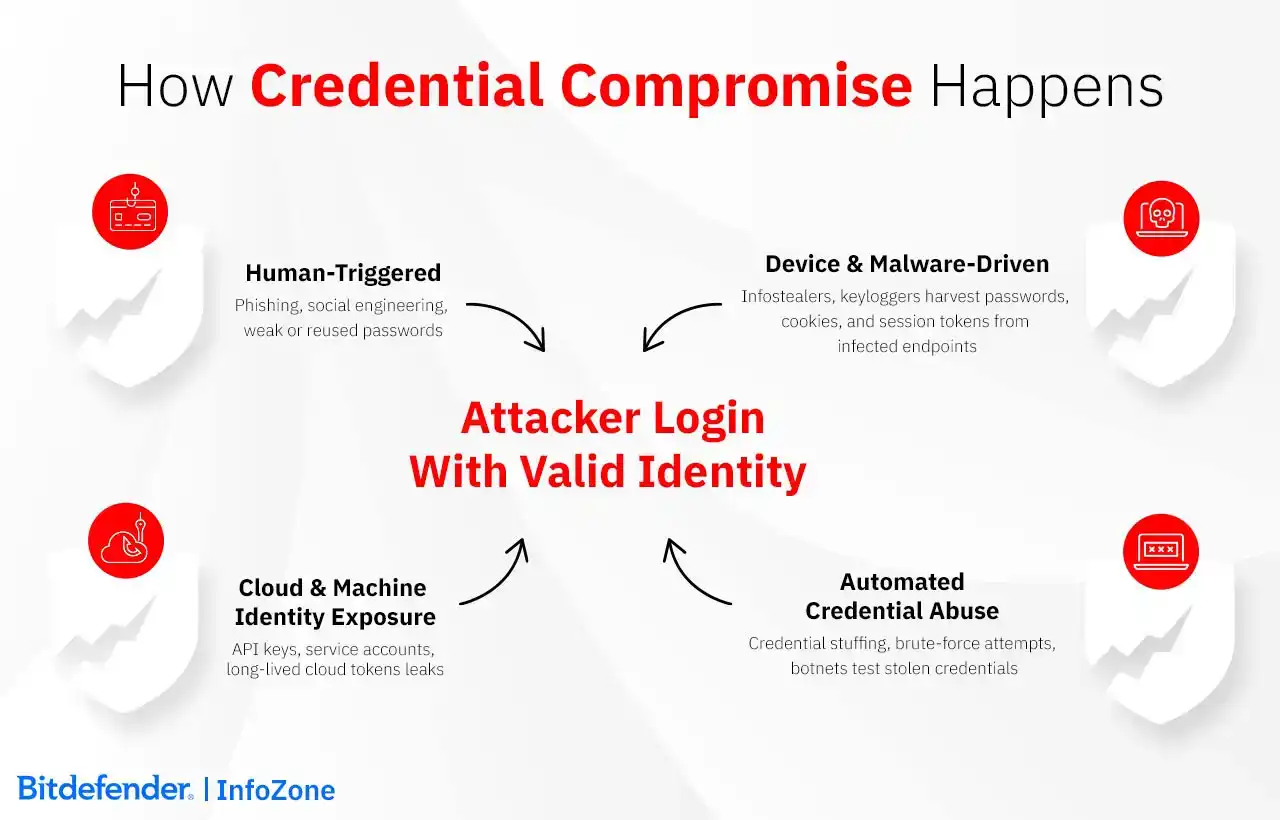
Credential compromise is a security failure that occurs when unauthorized parties obtain authentication details that were meant to identify a legitimate user or system, things like passwords, API keys, session cookies, or other identity data. If those pieces of identity fall into someone else's hands, they can sign in without hitting any security guardrails. The system checks the token or key, decides it's valid, and lets them proceed. The weak spot isn't the mechanism itself but how much access is tied to it.
And what gets taken isn't limited to passwords. Session tokens, browser cookies, cloud keys used by background services - anything that stands in for a user's identity can be reused if it leaks. These can quietly provide far more access than a basic login, and in many cases, they persist longer than anyone realizes.
It’s also helpful to distinguish between leaked credentials and compromised ones. Leaked credentials are simply exposed, perhaps found in a breach dataset or inadvertently published. Compromised credentials are those that have been validated and used by an attacker. The moment an adversary successfully authenticates with exposed material, a passive vulnerability becomes an active intrusion.
What gets compromised has expanded well beyond usernames and passwords. Session cookies, API keys, cloud access tokens, service account credentials, all of these now show up regularly in breaches. The common thread is that attackers don't need malware anymore. Over a third of breaches now start with valid credentials, and many of those attacks never touch malware at all. They log in as anyone else would.
This works because the supply side is enormous. Infostealer operations run at an industrial scale, and billions of leaked credentials are already in circulation.
How Credentials Become Compromised: Attack Techniques and Vectors
When discussing credential compromise, sophisticated hacking is mentioned less often than mundane methods such as infostealer malware on someone's personal laptop they also use for work or a password recycled from a breach three years ago. Other times, it's an API key accidentally pushed to a public GitHub repo. When things like passwords, session cookies, OAuth tokens, cloud access keys leak, the systems that accept them usually have no way to know the person using them shouldn't be there.
Service accounts and automation have made this worse. A service account key created for a one-time migration project often has more access than most employees, and nobody remembers to rotate it. These credentials can sit valid for months or years. By the time someone notices the key in an old Docker image or a contractor's archived laptop, it's been quietly working the whole time.
At A Glance: Attack Techniques
|
Attack Vector |
How It Typically Unfolds |
What Attackers Gain |
|
An attacker pretends to be someone legitimate, and the user is convinced to use a look-alike login page or simply give out their credentials. |
Real user credentials or session tokens provided directly by the victim. |
|
|
Brute Force Attempts |
The attacker keeps trying password variations until one finally works — often relying on simple or common patterns. |
Access to accounts whose passwords don’t provide much resistance. |
|
Passwords exposed in unrelated breaches are tested across many different services, assuming someone reused them. |
Entry into accounts that share credentials with older leaks. |
|
|
Infostealers / Keyloggers |
Malware is installed on a device that while running can collect stored passwords, cookies, keystrokes, other authentication data. |
Enough information is gathered in order to act as the user or reopen active sessions. |
|
The attacker can see the credentials moving across the connection by interposing themselves. |
Usable authentication data taken directly from network traffic. |
|
|
Cloud Credential Exposure |
API keys / other access tokens are unintentionally in the wrong repositories, logs, or configuration files. |
Access to cloud resources with the same permissions that the key was meant to give to a service or application. |
|
Weak or Reused Passwords |
Attackers know that there are passwords that follow a predictable pattern or are recycled, so they have success by guessing or through automated testing. |
The account is taken over once the password is obtained. |
How Automation Amplifies the Impact of Credential Leaks
Automation has turned credential abuse into something closer to mass testing than individual guessing. Botnets chew through massive lists of leaked credentials, swapping IPs and slowing their pace so the traffic blends in. When one pair works, the attacker doesn't have to force anything, they just sign in.
Not everything an attacker wants is a password. Tokens, cloud keys, and other bits that keep users or services logged in can grant wide access without going through the usual login checks. The same goes for service accounts and API keys: they're often set up once and left alone. If one of those lands in the wrong hands, it may keep working unnoticed for a long time.
Phishing often sets off a chain of other problems. An infostealer lands, scoops up cookies and saved passwords, and those credentials get fed into automated tools that try them elsewhere. A stray API key in code or logs gets pulled into the mix as well. From the outside, the resulting activity can pass for a regular, logged-in session.
The Role of the Dark Web and Threat Actors
Behind the scenes, stolen credentials move through a well-organized market. Infostealer logs, combolists, and full browser captures are bought and sold in bulk. Initial Access Brokers specialize in validating working identities and reselling that access to ransomware groups or data-theft crews. Before those sales happen, automated checkers verify which credentials still work, so by the time they change hands, they’re already confirmed entry points.
Risks & Consequences of Credential Compromise
The impact of compromised credentials varies depending on who the identity belongs to and what that identity normally has access to. For an individual, the immediate issues tend to be account takeover, financial fraud, or long-term problems tied to identity misuse. Once inside a company environment, that stolen identity carries all its usual permissions with it, and some of those reach farther than people realize.
Even an ordinary user account can be enough for an attacker to get started and see what other doors it opens. Once inside, attackers can attempt lateral movement to access additional systems and escalate privileges. Some accounts (administrator/cloud role) link into several parts of the environment due to their wide permissions, which makes a credential compromise in their case extremely dangerous. For cloud identities, one exposed key may grant access to storage, workloads, or configuration settings that were designed for automated use rather than close supervision, which greatly amplifies the risk.
In the beginning, what they do looks like any other login. They stick to what the account already has permission to open. The serious trouble only surfaces after they've mapped things out and given themselves a bit more room to move.
Industries absorb this differently: in healthcare, even small disruptions hit patient-facing systems; in finance, the ripple shows up in regulatory scrutiny and financial losses. Retail, manufacturing, education, and others have their own weak points, but the pattern is consistent: once attackers operate under a valid identity, the potential reach of the incident expands far beyond a single compromised account.
Security teams usually sort these incidents by how much damage the compromised identity could cause.
- Admin or root access goes straight to the urgent pile.
- Accounts holding customer or patient data get bumped up as well because of the compliance angle.
- Regular user accounts don't sit at the top unless the attacker managed to move beyond them.
This breakdown isn't formal, but it helps teams decide what needs attention first.
How Do I Know If My Credentials Have Been Compromised?
Although credential compromise is possible, users rarely think about it on a daily basis, so people often stumble onto credential compromise by accident. It is usually a login history entry they don’t recognize or a setting that changed, maybe an unrecognized device, more generally speaking, things that raise an eyebrow.
Inside the account, the earliest signs tend to be small things - a reset email you didn't request, a setting out of place, activity appearing while you were doing something else. In other cases, it's the browser or password manager complaining that a saved password has shown up in a breach.
For administrators, the hints don't look especially urgent at first, either. An account may start connecting from networks the person doesn't normally use, or it may touch permissions that aren't part of their day-to-day work. Occasionally, the same session appears from two unrelated places, which is odd enough to raise the question of whether the token was copied.
None of this forms a neat checklist. These issues show up when the account behaves in a way that doesn’t match the person behind it, and that’s often the earliest point where compromise becomes visible.
Prevention: Practical Measures and Best Practices to Reduce Credential Compromise
There’s no single measure that stops credential compromise outright. The goal is to stack controls so that a stolen password or misplaced token doesn’t immediately turn into a breach. Part of this is about people—what they choose, what they click—and part of it is about tightening the systems that rely on identities far more than they used to.
Good password practices still matter, but not in the old “symbols and rotation every 90 days” sense. Longer passphrases help, and people usually keep using them. A password manager handles the unique-password side of things. And training has to acknowledge that phishing has changed; attackers now use polished, fast-moving lures instead of obvious fakes.
Multi-Factor Authentication (MFA): Benefits and Limitations
MFA helps, especially against the simple stuff. Some forms are tougher than others; hardware keys and certificate methods tie the sign-in to the right place, so relaying the login is harder. The usual push or text codes still have value, but people can be tricked or nagged into approving things they shouldn't. It's an important layer, just not the whole defense.
Access Controls and Zero Trust Principles
Zero Trust and least-privilege approaches keep compromised identities from roaming freely. Access gets checked each time instead of being granted once and forgotten. Admin-level accounts shouldn't stay open all the time; they should appear only when needed. If a credential doesn't open many doors in the first place, losing it does much less harm.
Securing Cloud and Machine Identities
Old machine credentials can linger for ages and a forgotten API key, a service account with broad access, or a token that never expires can all become permanent logins for an attacker. Shorter-lived tokens and secret checks in the build process help keep that in check. Contractor accounts deserve the same review, since they often connect straight into internal systems.
If a credential tied to your project turns up in a leak, treat it the same way: retire it before anyone else gets a chance to use it.
Policy and Governance Frameworks
Identities must be controlled, logged, and reviewed. This is a core idea that most established frameworks, such as NIST, PCI DSS, HIPAA, GDPR, and SOX, push toward. These rules don't stop compromise by themselves, but they do keep organizations from slipping into bad patterns, things like broad, lingering permissions or gaps in audit logs. With a bit of structure in place, the technical controls have something to anchor to. Most of these frameworks also expect detailed access logs and, in some cases, timely breach notifications, so organizations need reliable records showing who accessed what and when.
Detection and Indicators
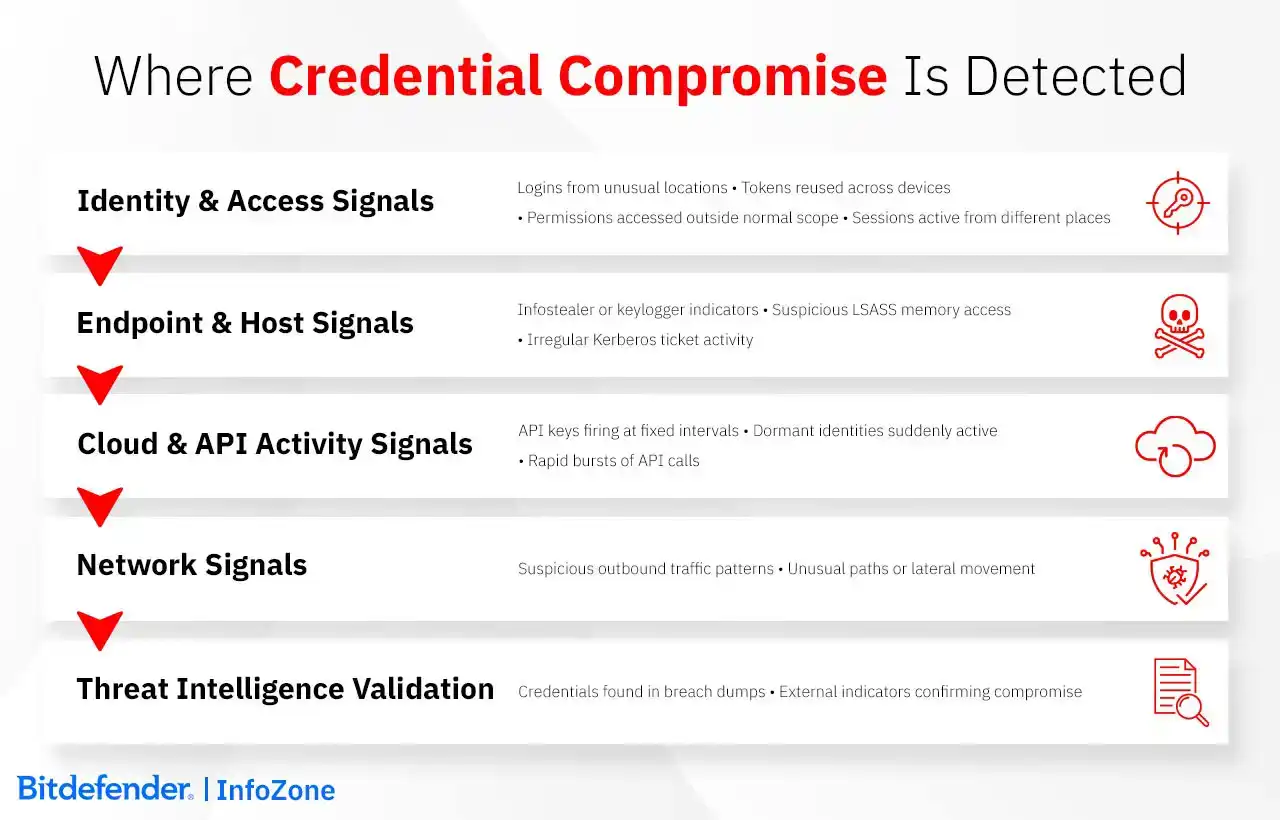
The login event itself is far less important than the context is: what is the source location, target system, does the behavior matches established patterns, etc. What can provide that context is identity logs, endpoint telemetry, cloud activity records, among others.
ITDR tools monitor the identity infrastructure directly. Anomalous Kerberos ticket requests in Active Directory, replication traffic from endpoints that shouldn't generate it, privilege escalations without corresponding change tickets... These are patterns that warrant investigation. In the cloud environments different indicators should be on the watchlist, like a token reused beyond its expected lifetime or an authentication from an unfamiliar device ID. It can also be an identity that is assuming permissions outside its normal scope. Temporary credentials appearing out of sequence typically indicate session material being replayed.
UEBA is useful for its ability to establish behavioral baselines for human and machine identities and in these cases deviations really matter. Deviations like accessing previously untouched systems, transferring atypical data volumes, unusual execution paths. The behavior shift raises the risk score, not the access event itself.
SIEMs provide correlated visibility and a login becomes suspicious when timeline analysis reveals things like a concurrent endpoint alert (perhaps LSASS memory access) or network traffic indicating that the session comes from an atypical workstation. So, the contradictions between data sources is what exposes compromises.
Cloud logs contain timing signatures humans miss during initial review. API keys firing with millisecond precision on exact hourly intervals aren't human-driven or legitimate automation. An identity dormant on a service suddenly issuing five rapid calls before going silent again—that's often your first concrete evidence of hijacked credentials.
Threat intelligence feeds add external validation. Credentials appearing in recent breach dumps transform suspicious patterns into confirmed incidents.
Mitigation and Response
There isn't a single “credential compromise playbook” that fits every environment. Some teams already have response routines for other security incidents, and credential misuse tends to get slotted into those. What changes here is the focus: the intruder shows up as a legitimate user, so the work gravitates toward accounts, roles, and tokens rather than the usual host clean-up.
Teams with a formal IR plan slot these steps into whatever process they already follow. Others take a more stripped-down approach and work through a short list of must-do items.
If nothing structured exists, the basics usually include:
- End any active sessions tied to the account
- Disable the identity temporarily so no new logins occur
- Rotate whatever secrets were in play (passwords, keys, tokens)
- Look at the logs around the same period to see what the account touched
- Put back anything that was changed and watch the account a bit more closely afterward
These aren't a full response plan, just the bare minimum to take the identity back and stop it from being reused.
Real-World Incidents and Their Implications
Recent breaches show that attackers increasingly rely on working credentials rather than exploitation. The Snowflake campaign made this clear in a painful way: infostealer-harvested logins (some from old contractor devices) was all it took to open customer environments at scale. Ticketmaster and AT&T were pulled into the fallout when attackers used those same identities to extract large batches of data.
Okta had its own issue: a session token tucked into a diagnostic export ended up in the wrong hands, and that was enough for someone to act under a staff identity. Several customers later noticed spillover activity, hinting that the token circulated beyond the first intrusion.
Password reuse created its own problems for others. Both 23andMe and PayPal saw login attempts based on older breach dumps. In 23andMe's case, only a small set of accounts was accessed directly, but the attacker scraped additional profiles through features that expose data between connected users.
Change Healthcare sits in the same family of problems, even though the outcome was far more visible. An older remote-access login, still active, gave the attacker room to navigate internally and prepare a ransomware deployment, an incident that ultimately affected pharmacies and hospitals when systems went offline.
Across these incidents, the common thread isn't how the attackers got in but what the stolen identity could reach once it was accepted. Missing MFA, old tokens still in use, and accounts on unmanaged devices all played a part. The deeper problem is that, after a login succeeds, many systems extend trust automatically. That built-in assumption often causes more trouble than the compromised password itself.
How Bitdefender Can Help
Bitdefender’s GravityZone Unified Security Platform consolidates endpoint, identity, cloud, and network telemetry to reduce the impact of credential misuse.
- GravityZone ITDR detects irregular authentication behavior, privilege changes, unusual role usage, and replayed tokens.
- CSPM+ with CIEM helps surface cloud issues such as stray access keys, identities that don't match their intended role, and permissions that grew wider than expected.
- Security for Email filters out phishing attempts, look-alike senders, and links designed to steal logins.
- Risk Management calls out weak passwords, loose settings, and other identity-related gaps.
- Digital Identity Protection keeps track of credentials that show up in public or dark-web leak sources.
- GravityZone XDR brings together endpoint, network, and identity activity so account misuse is easier to spot after a login succeeds.
- PHASR limits what a taken-over account can operate by locking down sensitive tools when behavior shifts.
- Bitdefender MDR provides 24/7 monitoring, investigation, and response support for credential-driven attacks.
Frequently Asked Questions
How much does a credential compromise typically cost businesses?
Most recent industry reports put the price tag for a credential-driven breach at around $4.44 million on average (2025), but that's the global figure and costs swing widely depending on what the stolen identity manages to reach. With often close to $10 million per incident, at the top of the chart is the healthcare sector, as even short outages can ripple into patient care and bring regulatory trouble.
The number isn’t made up of one giant bill; it’s a stack of smaller ones: legal work, cleanup, downtime, customer notification, fines, the whole aftershock period. And those are just the parts that can be measured. Although it rarely appears per se on the accounting paperwork, reputational damage tends to have an impact that lasts longer.
How long does it take to detect credential compromise on average?
It usually takes much longer than anyone would hope. For breaches that involve stolen or misused logins, the average window from intrusion to discovery is about 241 days (in 2025). That’s because the attacker isn’t breaking anything on the way in, the system sees a normal sign-in and carries on. Only later, when the activity stops resembling the account’s usual routine, do the signals start to line up. Meanwhile, attacker “breakout time” (the moment they start moving beyond the first system) can be under an hour. Those two timelines don’t match, and that’s why credential misuse continues to be such a costly vector.
How quickly should compromised credentials be revoked once detected?
When you confirm that a credential has been misused, the response has to be quick. Minutes, not hours. Many IR teams try to begin containment within roughly 10 minutes because cloud keys and tokens can be used almost immediately after they're stolen.
The sequence matters. First, shut down whatever sessions are already running and revoke tokens tied to the identity. That removes the attacker from any live access. Only then do you rotate the password, key, or token involved. Doing it in the opposite order can leave the intruder inside while you change the locks.
Most teams aim to wrap up both steps within an hour, but the key action is ending the live sessions. If those aren't cut off, the attacker can stay logged in even after the password or key has been changed.