The Security section in Bitdefender SecurePass helps you identify passwords and accounts that may put your online security at risk. It scans the credentials stored in your vault and organizes potential issues into easy-to-understand categories, allowing you to review affected accounts and improve their security.
Run a Security Scan
Follow the steps below to check whether the passwords stored in your SecurePass vault have any security vulnerabilities.
- Open the Bitdefender SecurePass app or web browser version.
- Select Security from the navigation menu.
- Tap or click Run security scan.
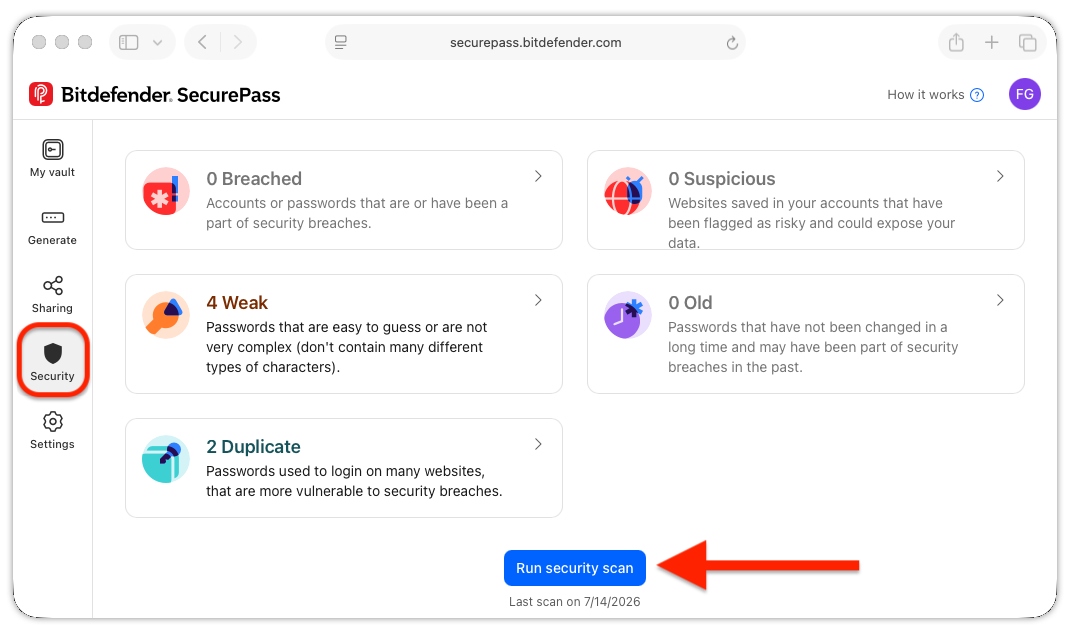
SecurePass analyzes the credentials stored in your vault and groups any detected issues into 5 categories: breached, suspicious, weak, old, and duplicate. When the scan is complete, each category shows the number of affected accounts.
Review Affected Accounts
After the scan finishes, select any category to view the affected accounts. Select an account to open its details and review the saved credentials.
Breached
Suspicious
Weak
Old
Duplicate
Tips for Improving Password Security
- Regularly run the security scan to check for breaches and update any compromised credentials immediately.
- Use Bitdefender SecurePass to generate strong passwords that are long, include a mix of characters, and avoid using common words or patterns.
- Update old passwords every few months for enhanced security.
- Avoid reusing passwords across different accounts to minimize the risk of a widespread security breach.
By using these features in Bitdefender SecurePass, you can keep your passwords secure and reduce the risk of unauthorized access to your accounts.