

What is Cyber Hygiene?
Cyber hygiene refers to the regular, practical steps organizations and individuals take to keep their digital environments secure. This includes applying updates, managing who has access to what, removing software that no longer needs to be there, and checking for signs that something’s wrong.
None of these measures are particularly advanced, but that’s not the point. The concept is similar to personal health habits: simple, regular practices that prevent problems. Routine, low-effort practices, when done consistently, reduce exposure to known threats. They don’t make systems unbreakable, but they do make a difference, and often that’s enough.
Most breaches don’t happen because of novel exploits. They happen because something simple was overlooked: a server left unpatched, a password reused, a set of admin credentials never reviewed. In many cases, these aren’t sophisticated attacks. They’re just the result of a door left open.
This connection hasn’t been lost on regulators. Laws like GDPR and HIPAA may focus on protecting data, but fundamentally, they encourage a baseline of hygiene. If an incident occurs and the basics weren’t in place, organizations will be expected to justify that oversight. In short, the cost of neglect is no longer limited to technical fallout - it can also be legal.
Cyber hygiene also plays a central role in how well systems perform under pressure. Clean environments help expose issues sooner, support faster responses, and (when necessary) make recovery more manageable. It’s easier to defend infrastructure you understand and maintain regularly.
Even so, many organizations still treat hygiene as optional. Some haven’t formalized the process at all. What’s often forgotten is that hygiene isn’t a one-time task. Systems evolve, risks shift, teams change. It’s not a fix - it’s an ongoing discipline. And the longer it’s put off, the harder it is to regain control.
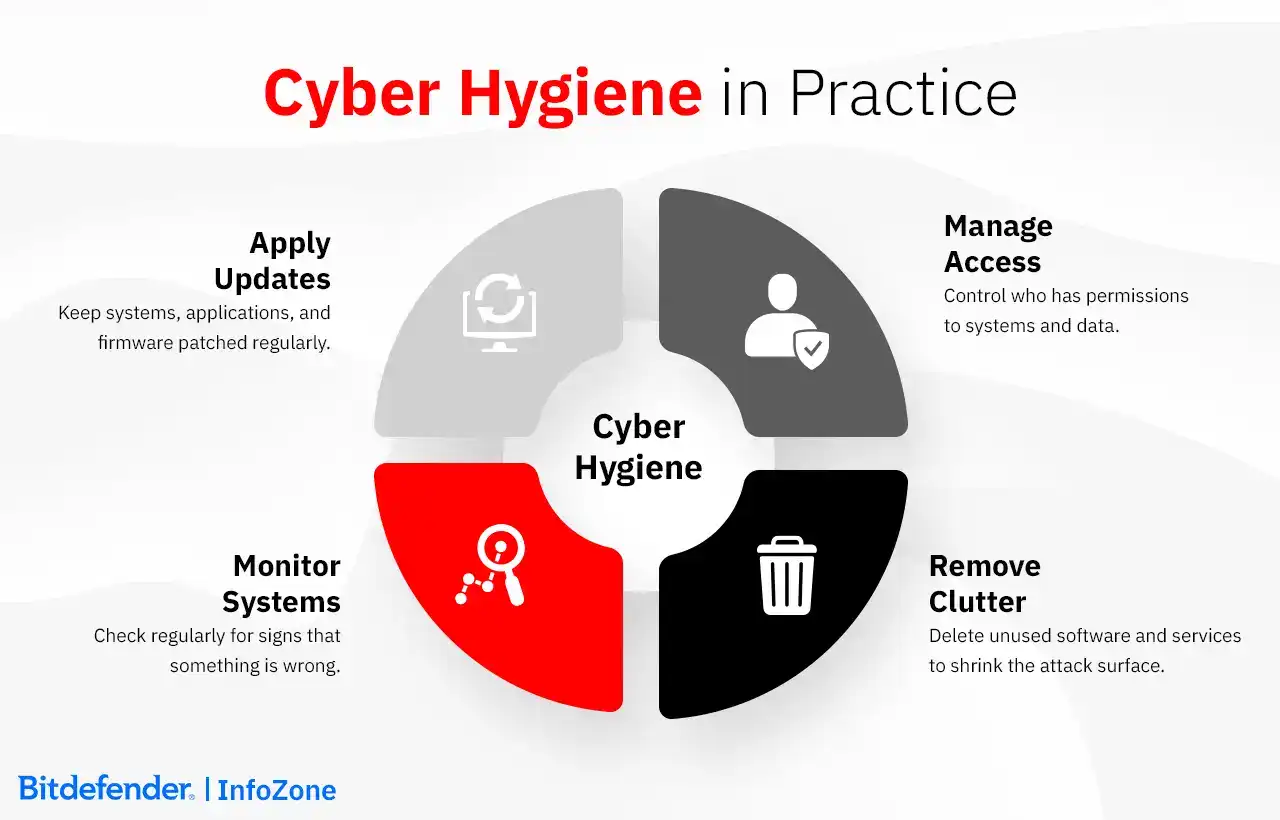
9 Core Cyber Hygiene Best Practices
Good cyber hygiene isn’t about chasing the next big threat. It’s about doing the fundamentals consistently, across the organization, at a level that matches the scale and complexity of your environment. These core practices don’t usually require advanced tools or elaborate frameworks, but they do require follow-through.
Enforce strong authentication from the start.
Passwords remain a target, and weak ones are still common. Good hygiene starts by requiring strong credentials - but doesn’t stop there. Organizations should enforce complexity rules, block known weak passwords, and support password managers to help users create and maintain unique logins.
When possible, consider moving beyond passwords entirely. Options like passkeys, hardware tokens, or biometric logins offer stronger protection and fewer usability pitfalls. The aim is to make secure access the default—easy to manage, hard to bypass, and reliable over time.
Layer in multi-factor authentication.
Even the best password can be stolen. That’s why multi-factor authentication (MFA) is critical. As cybersecurity specialists would say, it adds a check based on “something you have” or “something you are.” That could be a device like your phone or a hardware token, or a biometric factor like a fingerprint or facial recognition. It’s not foolproof, but it’s highly effective - especially when applied to admin accounts, remote access, and systems that can’t afford weak links.
It’s not foolproof, but it’s effective. Roll it out where it counts: admin accounts, remote access, critical systems. And don’t settle for the simplest version. As phishing tactics evolve, so should your MFA strategy.
Keep systems updated. Always.
Most exploited vulnerabilities aren’t zero-days (security flaws unknown to the software vendor). They’re old, known, and already patched. Which means the problem isn’t complexity: it’s delay.
Apply updates regularly and without exception. That includes operating systems, applications, plugins, and firmware. Patching can be disruptive in large environments, which is why it needs structure: an inventory, a schedule, a fallback plan. Missed updates don’t just cause problems; they reveal them.
Treat backup as part of your security posture.
Backups aren’t just for hardware failures or accidental deletions. They’re your last line of defense when containment fails - against ransomware, corruption, or operational disruption. Follow the 3-2-1 rule: three copies of your data, two types of storage, one kept offline or in a different location. And test recovery regularly. A backup that hasn’t been tested becomes a liability, not a plan.
Control what connects to your environment.
Every device is a potential entry point. Workstations, laptops, servers, phones - they all need to be covered by endpoint protection. That includes anti-malware software, firewalls, and behavioral monitoring. But it also includes basics like removing unused software, disabling unnecessary services, and ensuring encryption is in place on anything portable. For mobile and BYOD devices, set clear boundaries (technical and policy-based) and enforce them.
Segment and secure your network.
Divide your infrastructure by function, risk level, or business unit. That way, if something breaks, it doesn’t take everything with it. Secure wireless networks properly, close down open ports, and limit external exposure. Internal visibility matters just as much as perimeter defense.
Harden your communication layer.
Phishing works because it's simple and scalable. Train employees to recognize it, but don't stop there. Use email filtering, block known bad domains, and scan attachments before they reach inboxes. Configure domain protections (like SPF and DKIM) so attackers can’t impersonate your organization.
For sensitive discussions, use secure messaging platforms (not email) and make sure people know when not to click, reply, or forward.
Be deliberate with access control.
Access should be based on what someone needs to do their job - nothing more. That’s the principle of Least Privilege, and it’s often honored in theory but overlooked in practice. Therefore, automate provisioning and deprovisioning where you can. Review high-level permissions regularly. And wherever possible, separate duties so that no one person has unchecked control over critical systems or processes.
Keep people trained and involved.
Most incidents still involve human error. This doesn't mean users are the problem; it means they need proper preparation. Training should be relevant, current, and repeatable. Not just once a year, not just the basics.
Different teams face different risks, so tailor the content accordingly. Make reporting easy. Respond constructively. Security works better when people don’t feel punished for being honest.
Cyber Hygiene Challenges and Solutions
Getting cyber hygiene right doesn’t mean solving everything at once. It’s about building systems that hold up under pressure and habits that stick when things shift. Below are some of the common challenges organizations face - and what it takes to address them effectively.
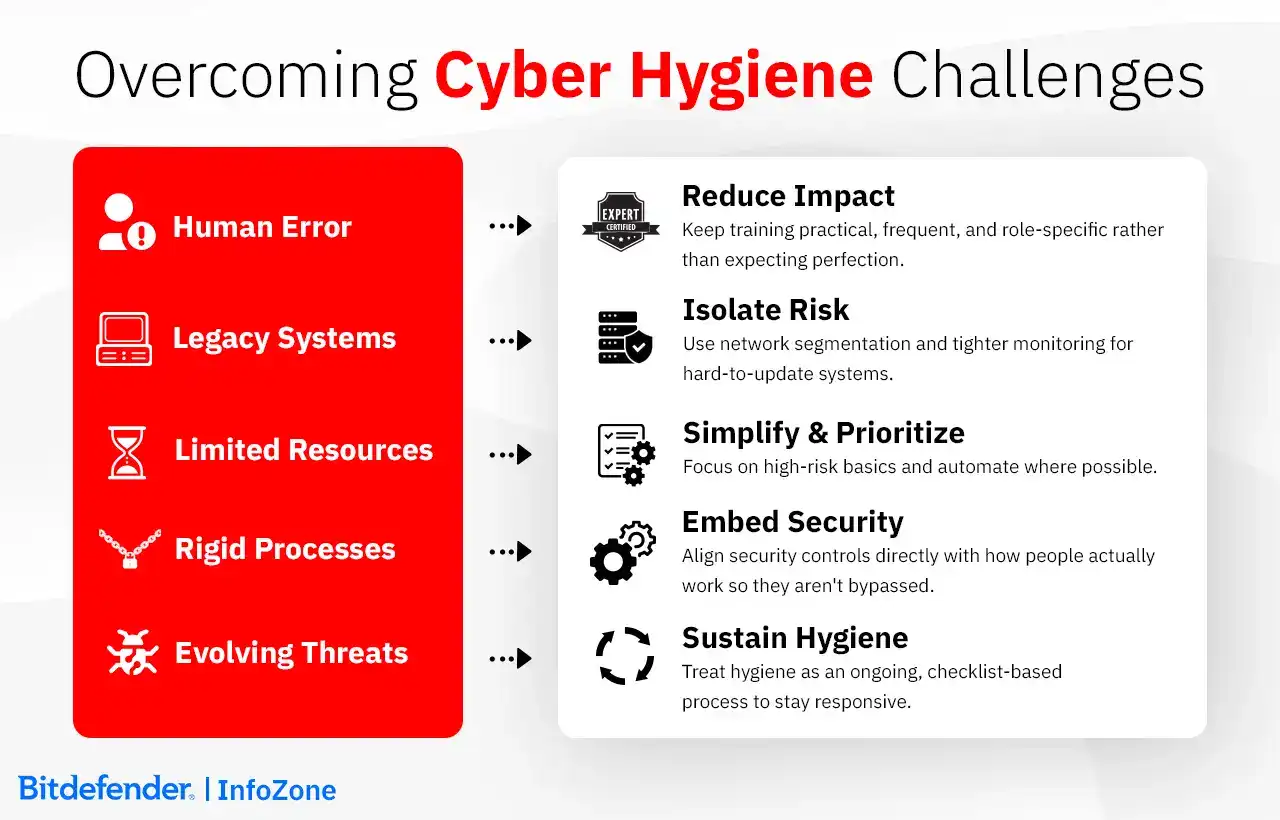
|
Challenge |
Solution |
|
Human error remains a constant. A missed update, a reused password, a click on the wrong link - these are still the most common failure points. |
Reduce the impact, not the human. Keep training practical, frequent, and role-specific. Aim for fewer mistakes and quicker recognition, rather than perfection. |
|
Legacy systems and patching delays create security gaps. Some systems can't be updated easily, but they still connect to the network. |
Isolate the risk. Use segmentation, restrict access, and apply tighter monitoring to keep these systems from becoming open doors. |
|
Limited resources overwhelm small teams. The list of "should-dos" often exceeds what small teams can manage. |
Prioritize and simplify. Focus on the high-risk basics, automate where possible, and use checklists to keep routines on track. Done consistently beats done perfectly. |
|
Rigid processes invite workarounds. When security slows people down, they find ways around it, sometimes dangerous ones. |
Build security measures directly into how work is done. Good controls don't get bypassed because they don't need to. Align protection with how people actually work. |
|
The threat landscape doesn’t wait. New tactics appear faster than static policies can adapt. |
Keep hygiene alive. Treat it as an ongoing process. Small, regular improvements and checklist-based habits help teams stay responsive. |
Implementing a Cyber Hygiene Program
Cyber hygiene isn’t just something organizations do - it’s something individuals take part in, whether they realize it or not. A single unprotected device or outdated account can create a way in. So whether you’re managing your own security at home or rolling out policy across hundreds of endpoints, implementation needs to match your environment: its risks, its complexity, and its capacity for change.
For Individuals
What should be daily? Keep devices updated. Pay attention to the URLs you click. Lock your screen when you step away. These small, repeated actions can immensely reduce exposure.
Weekly to monthly? Back up what matters - photos, financial documents, anything that would hurt to lose. Run a manual scan if your device allows it. And check your accounts: not just for transactions, but for logins or changes you didn’t make.
Once or twice a year? Do a security audit. List your key accounts. Check that passwords are strong and unique. Make sure MFA is turned on. Close what you no longer use. And wipe any old phones or laptops before you recycle them.
Security decluttering isn’t just about apps and files - it’s about reducing the number of things you’d have to worry about if something went wrong. Fewer points of failure means fewer surprises.
For Small Businesses
Smaller teams are often easier for attackers to exploit - not because they’re careless, but because they’re stretched. That’s why implementation needs to be realistic and focused.
Start by anchoring your efforts in a well-tested framework. The CIS Controls IG1 or NIST’s SMB Cybersecurity Guide are both realistic starting points. Think of them as checklists with context, focused not on ticking boxes, but on reducing risk in manageable steps.
- Assign a responsible person, even if security isn’t their only role.
- Prioritize basics: strong authentication, system updates, endpoint protection, and regular backups.
- Document what you have: hardware, software, access rights.
- Automate where possible: use tools that update automatically or flag problems early.
- Phase your implementation: start with what’s urgent, then work through the rest over time.
Outsourcing makes sense for certain tasks, like security monitoring or incident response, especially when resources are tight. But keep core routines close. Backups, access controls, and internal awareness are more effective when owned internally.
Consider check-ins every quarter: what’s working, what’s not, and what’s changing. That rhythm helps you improve without having to stop everything else.
For Enterprises
At scale, the challenge isn’t knowing what to do - it’s keeping it done. Hygiene is a moving target in a landscape with shifting users, systems, and dependencies.
A strong program starts with governance: not just policies, but someone to maintain them, and leadership willing to reinforce them. Hygiene should be built into existing structures – GRC (Governance, Risk, and Compliance) platforms, IT service management systems, compliance dashboards, not bolted on as an afterthought.
Key Areas to Embed Hygiene
Endpoint and identity controls: deployed consistently across regions and business units.
Vendor access: tracked, limited, and revisited regularly.
Policy adherence: monitored with reporting, not assumed.
Training: role-based and updated as risks evolve.
For departments that operate differently, like R&D, legal, or those managing industrial systems, security standards may need to be adapted. But accountability shouldn’t be. Tailor the approach where needed, but make expectations explicit. That’s where documentation comes in. Defining role ownership prevents the “we thought someone else was doing it” issue. This can be done in a shared responsibility assignment matrix like RACI (showing who is Responsible, Accountable, Consulted, and Informed) or using another format. And when leadership supports the process, change happens faster than memos alone ever could.
Automation plays a critical role, but only if it’s monitored. Dashboards give visibility; operational follow-through makes them useful.
Vendor hygiene needs to meet the same baseline you’d expect internally. Require patching, access controls, and incident reporting - and make sure those requirements aren’t just on paper.
In large environments, controls that slow people down often get bypassed. Design with this in mind. Security should work in step with operations, not against it.
Ultimately, implementing a hygiene program isn’t about deploying everything at once. It’s about knowing where to start, how to improve, and who’s responsible for keeping it alive.
Use Cases
The principles of cyber hygiene don’t change much, but how they’re enforced, maintained, or even defined can shift based on context. Here are some common environments where hygiene takes on a specific shape.
Remote and Hybrid Work brings obvious challenges. The environment is unpredictable: different devices, unsecured networks, shared spaces. Hygiene here is about reducing risk without relying on perfect conditions. That means ensuring devices used for work (company-owned or personal) meet a baseline: updates applied, connections encrypted, access controlled. It also means helping users recognize phishing and social engineering that targets them outside traditional office boundaries.
Cloud Security - whether SaaS, PaaS, or IaaS - requires a configuration mindset. You’re not managing hardware, but how services are set up and accessed. That includes managing permissions, securing access keys, and understanding what’s exposed to the internet (intentionally or not). In PaaS and DevOps environments, hygiene needs to be implemented from the beginning of the development process: scanning dependencies, securing containers, and controlling what gets pushed to production. IaaS environments demand visibility across accounts and assets - misconfigurations are the hygiene failure that attackers bet on.
Network Security still matters, even as environments decentralize. Networks without proper divisions, containing many special permission rules added over time, are a common issue. Segmentation (separating systems by function or sensitivity) limits exposure. Hygiene also means keeping firmware current, pruning firewall rules, and logging enough activity to catch what matters. A healthy network reduces both noise (irrelevant alerts) and risk.
Mobile Devices complicate things. They move, they mix work and personal use, and they’re often less visible to IT. Hygiene here involves enforcing encryption, strictly controlling who can access data, and making it easy to wipe lost or compromised devices. Policies help - especially for BYOD - but they have to respect privacy while protecting business data. That balance takes more than a policy template.
Employees aren’t just endpoints - they’re decision-makers. Most hygiene failures start with someone clicking, skipping, or making dangerous assumptions. That’s why training matters, but so does feedback. People need to know how to report something odd, and what happens when they do. The goal isn’t perfection - it’s reducing preventable mistakes through clarity and repetition.
Cyber Hygiene Frameworks like NIST and ISO 27001 help turn intent into process. NIST’s functions (Identify, Protect, Detect, Respond, Recover) offer a structure for applying hygiene across teams. ISO emphasizes continuous improvement, not just annual compliance. Regulatory frameworks like GDPR, HIPAA, and PCI DSS also embed hygiene into their requirements: know what data you hold, control access, keep systems updated, respond quickly.
In healthcare, the stakes are higher. Systems can’t always be taken offline to patch, and medical devices may not support modern security controls. That’s where segmentation and monitoring step in. Hygiene is also tied to clinical workflow - you can’t add difficulties that delay care. HIPAA requires protection of patient data, but real-world implementation means balancing uptime with safeguards.
In education, openness is the norm. That makes hygiene harder. Campuses often run decentralized IT with limited budgets and broad access needs. Here, strong central policies - like network segmentation, user authentication standards, and minimum protections for shared devices - can help bring consistency. Schools also face phishing and ransomware more than ever, so basic controls, even if not perfect, go a long way.
Each of these environments introduces its own constraints. However, the goal stays the same: apply the basics consistently in a way that fits the structure and reality of the setting. Hygiene isn't about locking everything down - it’s about reducing the easy wins for attackers without breaking how people work.
How Bitdefender Can Help
Bitdefender GravityZone unified platform simplifies the ongoing work of cyber hygiene by centralizing core security capabilities into a single, integrated system. It allows security teams to monitor endpoints, manage risks, apply consistent policies, and respond to incidents without the complexity of managing disconnected tools.
With native patch management and risk analytics, GravityZone helps you keep systems up to date, prioritize vulnerabilities based on real-world exposure, and align operations with frameworks like NIST, ISO 27001, and GDPR. For environments where visibility is fragmented - cloud-based workloads, distributed teams, or hybrid networks - Extended Detection and Response (XDR) and Integrity Monitoring add deeper insight into how systems are behaving and whether anything has drifted from baseline.
PHASR (Proactive Hardening and Attack Surface Reduction) takes this a step further by reducing the attack surface dynamically, using behavioral signals and real-time threat context to lock down assets as needed. Combined with full disk encryption and cloud workload protection, it supports both prevention and regulatory requirements.
Organizations that don't have dedicated security analysts can still benefit from expert oversight through Bitdefender's Managed Detection and Response (MDR) service. It adds seasoned threat analysts into your workflow - monitoring activity, helping you understand what matters, and guiding your response when something goes wrong.
These tools aren't about adding more complexity to your environment. They're about making everyday cyber hygiene easier to maintain, with better visibility, tighter control, and faster action when needed.
Frequently Asked Questions
What do I do with old devices I’m no longer using?
Retiring old devices (phones, laptops, external drives, etc.) isn’t just about clearing desk space. It’s about closing off forgotten access points that might still contain your data.
First, copy anything you still need. Old photos, saved logins, work files - get them off the device and into secure storage. Then clean up.
Deleting files isn’t enough. A factory reset is better, but even that can leave traces. For computers, use secure wiping tools that overwrite data multiple times. For mobile devices, enable encryption (if it’s not already on), then reset to factory defaults. This makes recovery attempts significantly harder.
If the device holds sensitive material, or if you simply want to be certain, consider removing and destroying the drive. For organizations, this is often standard procedure, especially for laptops and portable drives with client data.
Once wiped, don’t throw electronics in the trash. Look for certified e-waste recyclers. They’ll handle the environmental aspect, and many also issue proof-of-destruction documents if needed.
One last step, often missed: update your asset inventory. If the device was part of a managed fleet, mark it as retired. It shouldn’t show up in audits or patch reports.
What cyber hygiene practices are most effective against ransomware?
The most effective defense against ransomware isn’t a single tactic - it’s the combination of several.
Start with backups. Not just one copy, but the 3-2-1 rule: three copies, two formats, one offline. And test them. A backup that fails during recovery isn’t a backup.
Patch regularly. Most ransomware strains exploit known vulnerabilities. The faster you apply updates, the fewer opportunities attackers have.
Limit exposure. Segment your network to contain infections. Limit administrative privileges. Use multi-factor authentication, especially for critical systems and sensitive data.The legality depends on where you are, as some places have stricter rules about user consent and data privacy. But in general, adware that operates transparently and respects user choices is usually allowed.
Monitor email closely. Many attacks still begin with a click. Use filters to block threats early, and train users to spot suspicious messages.
Finally, have a plan. If ransomware strikes, you’ll need to isolate, respond, and recover quickly. Practiced steps make a real difference.
What are the most common cyber hygiene mistakes that lead to breaches?
Reused passwords. Missed patches. Administrative access left in place longer than necessary. These small gaps account for many successful breaches.
Another common mistake: backups that don’t restore. Or systems still exposed to the internet after their use has ended.
Then there’s human error - clicking on a phishing link, dismissing a security alert, skipping an update. Individually, they might seem minor, but together they add up.