This guide explains how to install the Bitdefender Anti-Tracker browser extension using your Bitdefender security solution for Windows.
Bitdefender Anti-Tracker helps protect your online privacy by blocking trackers that collect your data. It also lets you view and manage tracking activity on each website you visit, keeps your browsing data private, and can improve browsing performance by helping webpages load faster. Bitdefender Anti-Tracker supports the following Windows browsers:
- Microsoft Edge
- Internet Explorer
- Mozilla Firefox
- Google Chrome
After installing Bitdefender on your Windows computer, follow these steps to add the Anti-Tracker extension to your browser.
Install the Anti-Tracker Extension
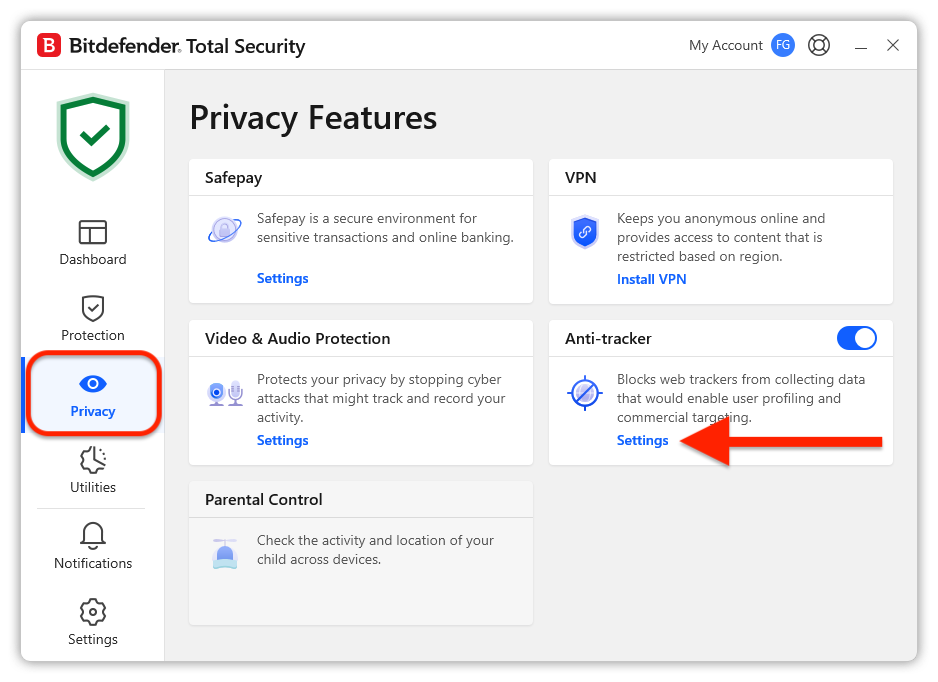
- Open the Bitdefender interface and click Privacy in the left-hand menu.
- In the Anti-tracker pane, click Settings.

- Click Install Anti-tracker on this browser next to each supported browser installed on your computer.
- You will be redirected to your browser’s extension store or installation page. Follow the instructions below for your browser.

 opens the
  .
. opens the
  opens the