Email has become one of the most important communication tools in both personal and professional life. Yet for many people, managing inboxes can feel overwhelming. Messages pile up quickly, important emails get buried, and responding thoughtfully takes time and attention. To address this challenge, technology companies have introduced a new category of tools known as AI email assistants.

These tools are becoming increasingly common in modern email platforms and productivity suites. They promise to save time, improve writing quality, organize communication, and automate repetitive tasks. However, as with many AI-powered technologies, they also introduce new security and privacy concerns that users may not immediately recognize.
This article explains what AI email assistants are, how they work, their advantages and disadvantages, and why email security has become even more important in the age of artificial intelligence. It also explores how Bitdefender’s Email Protection feature helps defend users against emerging threats that specifically target AI-assisted email workflows.
What Are AI Email Assistants?
AI email assistants are software tools powered by artificial intelligence that help users manage, write, summarize, and organize email communications. These assistants are designed to reduce the manual effort involved in handling email while improving speed and productivity.
Most AI email assistants use large language models and machine learning systems to understand the content and intent of messages. They can analyze incoming emails, identify patterns, and generate helpful suggestions based on context.
Some common capabilities include:
- Writing draft replies automatically
- Summarizing long email threads
- Correcting grammar and tone
- Prioritizing important messages
- Scheduling meetings from email conversations
- Detecting spam or phishing attempts
- Translating messages into other languages
- Extracting action items from conversations
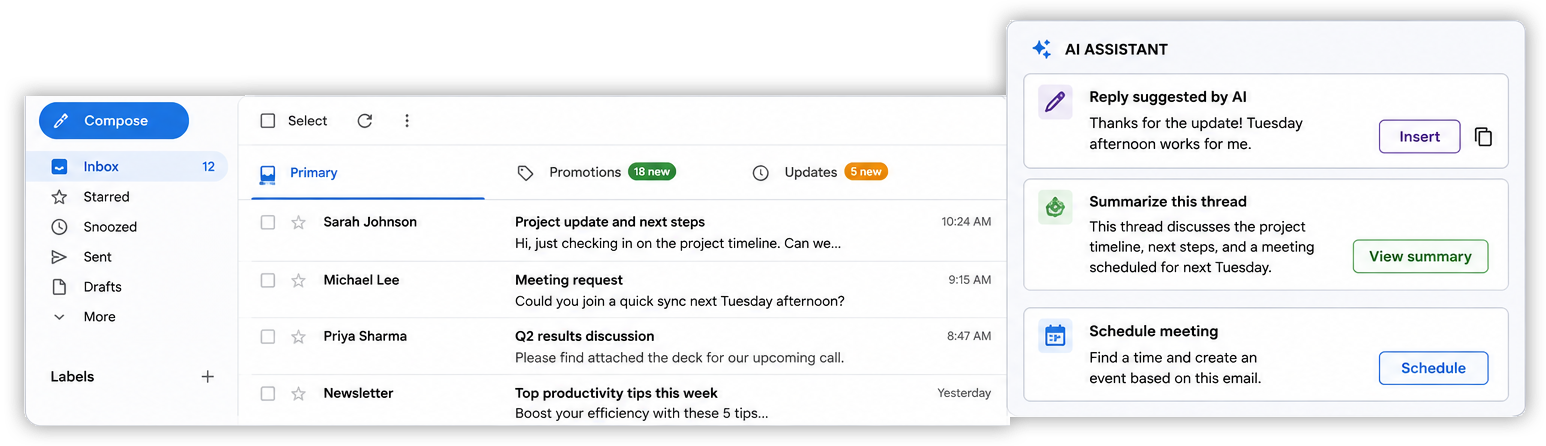
Many users encounter AI email assistants through services integrated into popular email platforms such as Microsoft 365 and Gmail. For example, modern email systems may suggest quick responses such as “Sounds good” or “I’ll get back to you soon.” More advanced assistants can compose full replies based on the content of an email thread.
As these technologies improve, AI email assistants are evolving from simple productivity tools into digital collaborators that actively participate in communication workflows.
How AI Email Assistants Work
To understand why these tools are both useful and potentially risky, it helps to understand how they function behind the scenes.
AI email assistants analyze the text within emails to identify meaning, context, tone, and intent. They rely on machine learning models trained on large datasets containing examples of human communication. These systems learn patterns in language and use those patterns to predict what a user may want to say or do next.

For example, if someone receives an email asking for a meeting next Tuesday, the assistant may recognize the scheduling intent and suggest a response such as:
“Tuesday afternoon works for me. Please send a calendar invitation.”
More advanced assistants may also connect with calendars, task managers, and contact lists to automate actions.
This level of automation can be extremely convenient, but it also means the AI system must process sensitive information, including email content, contact details, attachments, and communication history. Because of this, security and trust become critical concerns.
Advantages of AI Email Assistants
AI email assistants offer several important benefits, especially for users who manage large volumes of communication.
Increased Productivity
One of the biggest advantages is time savings. Writing repetitive responses manually can consume a significant portion of the workday. AI assistants help automate routine communication tasks so users can focus on more meaningful work.
For example, customer support teams may use AI-generated drafts to answer frequently asked questions more efficiently. Professionals who receive dozens or hundreds of emails daily can quickly review summaries instead of reading every message in full.
Improved Writing Quality
AI assistants can help users write more clearly and professionally. They often suggest grammar corrections, improve sentence structure, and adjust tone depending on the audience.
This is especially helpful for:
- Non-native English speakers
- Busy professionals
- Users who struggle with formal communication
- Teams communicating across multiple regions
The AI can also help make emails sound more polite, concise, or confident depending on the situation.
Better Organization
Modern inboxes are crowded and difficult to manage. AI systems can prioritize messages, separate important emails from promotional content, and highlight urgent conversations that require attention. Over time, this helps users maintain a cleaner and more manageable inbox.
Reduced Cognitive Load
Constantly monitoring and responding to email can be mentally exhausting. AI assistants reduce decision fatigue by helping users process information faster.
Summaries of long email chains are especially useful in workplace environments where conversations may involve many participants and multiple discussion topics.
Disadvantages and Limitations of AI Email Assistants
Despite their benefits, AI email assistants are not perfect. Users should understand their limitations and potential risks before relying on them too heavily.
Privacy Concerns
AI email assistants often require access to email content in order to function effectively. This means sensitive information may be analyzed by cloud-based systems.
Depending on the provider, user data could potentially be:
- Stored temporarily
- Processed externally
- Used to improve AI models
- Shared across integrated services
Organizations handling confidential or regulated information must carefully evaluate how these tools process data.
Inaccurate or Misleading Responses
AI systems do not truly understand information in the human sense. They predict likely outputs based on patterns. This means AI systems can occasionally misunderstand context or generate incorrect information. An assistant may produce replies that sound convincing but contain factual errors or inappropriate assumptions.
For example, an AI assistant might:
- Misinterpret sarcasm
- Suggest an incorrect meeting time
- Summarize an email inaccurately
- Generate overly confident responses
This is why human review remains essential.
Overreliance on Automation
As users become accustomed to AI-generated responses, they may stop carefully reviewing outgoing emails. This can lead to embarrassing mistakes, misunderstandings, or accidental sharing of sensitive information.
Automation should support human decision-making, not replace it entirely.
Security Risks
Perhaps the most important concern involves cybersecurity. As AI email assistants become more capable, attackers are developing new methods specifically designed to manipulate them. This emerging category of attacks represents one of the newest challenges in email security.
Traditional phishing attacks target humans directly. Attackers attempt to trick users into clicking malicious links, downloading malware, or sharing credentials.
However, AI-powered workflows create a new attack surface. Hackers are now experimenting with hidden instructions embedded inside emails that are designed not for humans, but for AI systems themselves.
These hidden prompts may attempt to manipulate AI email assistants into performing unsafe actions such as:
- Prioritizing malicious emails
- Hiding security warnings
- Generating misleading summaries
- Encouraging dangerous replies
- Exposing confidential information
- Bypassing normal user caution
This type of manipulation is called prompt injection or AI hijacking.
The danger comes from the fact that AI systems interpret text differently than humans do. Hidden instructions may not be obvious to the user viewing the email, but the AI assistant could still process and act on them.
As AI tools become more integrated into email workflows, attackers are increasingly exploring ways to exploit these systems.
How Bitdefender Protects Against AI Email Threats
To address emerging risks in AI-powered email workflows, Bitdefender Email Protection now detects a new type of threat called prompt injection. These are hidden instructions embedded inside emails that are invisible to people but still readable by AI email assistants. Attackers use them to manipulate AI systems into unsafe actions such as forwarding messages, exposing sensitive data, or generating misleading replies without the user’s approval.
To prevent this, Bitdefender automatically scans incoming emails before they are processed by any AI assistant. When suspicious patterns are found, the email is flagged as “Dangerous,” using the same label already applied to phishing and other threats. This keeps protection consistent and easy to understand while adding a new layer of defense for AI-based email use.
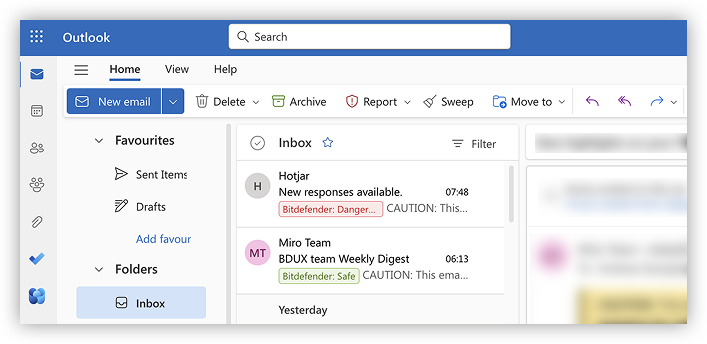
Email Protection looks for several common techniques used to hide or disguise AI-targeted attacks:
- Suspicious AI instructions – Phrases that try to control AI behavior, such as “ignore previous instructions”, “you are now” or text mimicking system-level commands.
- Hidden text from human view – Content designed to be invisible to people but readable by AI, including white-on-white text, extremely small fonts, off-screen positioning, and zero-width characters.
- Fake system messages – Emails that impersonate email providers or system notifications and include fake procedural instructions meant to influence AI behavior.
- Data exfiltration attempts – Instructions designed to trick AI into revealing sensitive information, replying with credentials, or forwarding messages to unauthorized recipients, sometimes including malicious links.
- Obfuscated instructions – Hidden or scrambled prompts using techniques such as base64 encoding, Unicode homoglyphs, or fragmented text spread across invisible parts of the email.
Together, these detection methods allow Bitdefender to identify manipulation attempts that a real person would not notice, but an AI assistant could otherwise interpret and act on.
As hackers begin targeting AI email assistants with hidden instructions and manipulation techniques, security solutions must adapt. Bitdefender’s Email Protection feature is an important step in this direction by detecting emails that attempt to trick AI email assistants into unsafe behavior.