Configuration
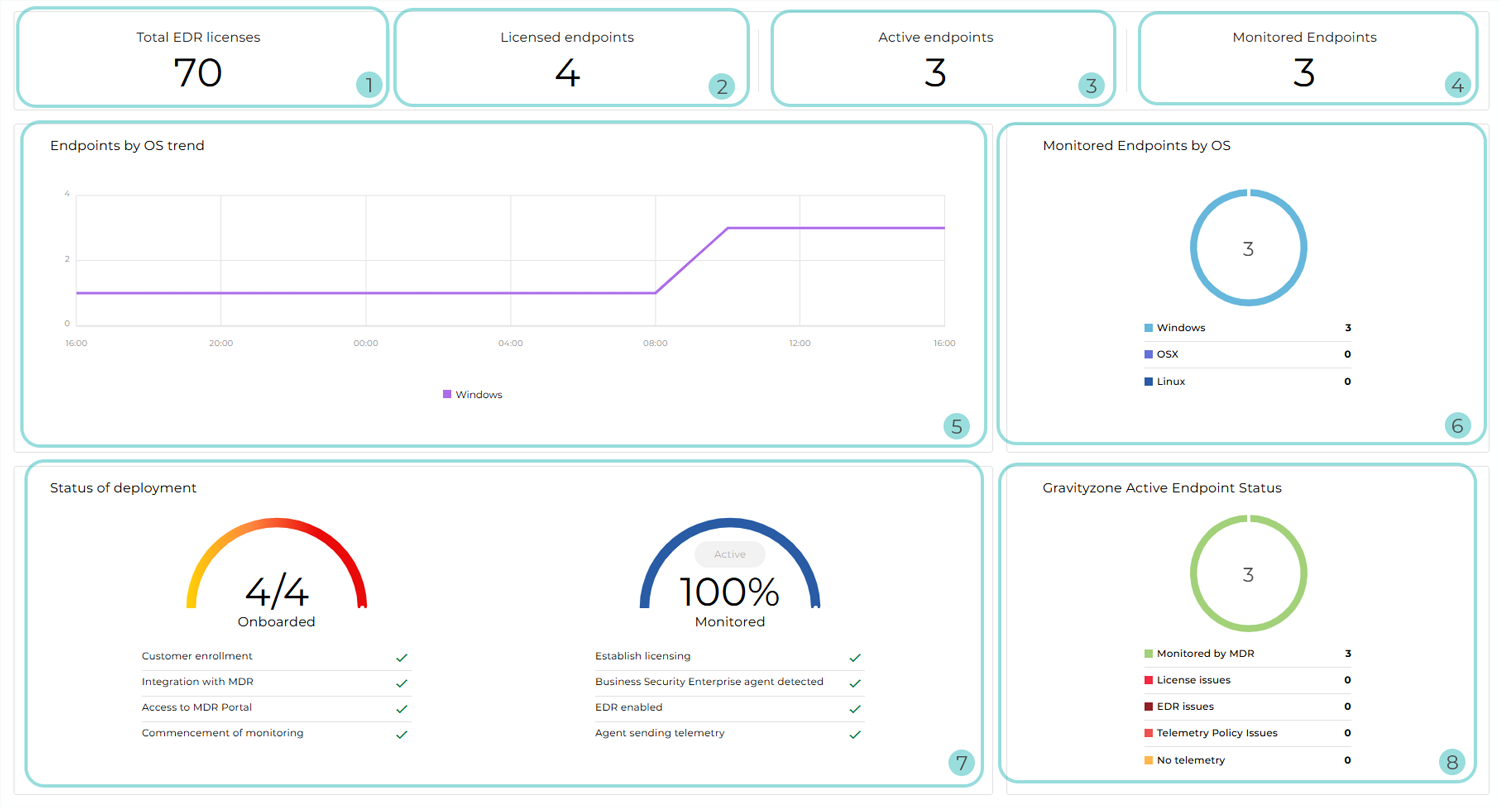
The following Configuration layout applies to:
Non-MSP Partners without Customers with an advanced service model, such as: Bitdefender MDR Plus, Bitdefender MXDR Plus, MDR Premium, or MDR Enterprise
Customers on an annual standard MDR plan, such as Bitdefender MDR or Bitdefender MXDR
The following Configuration layout applies to:
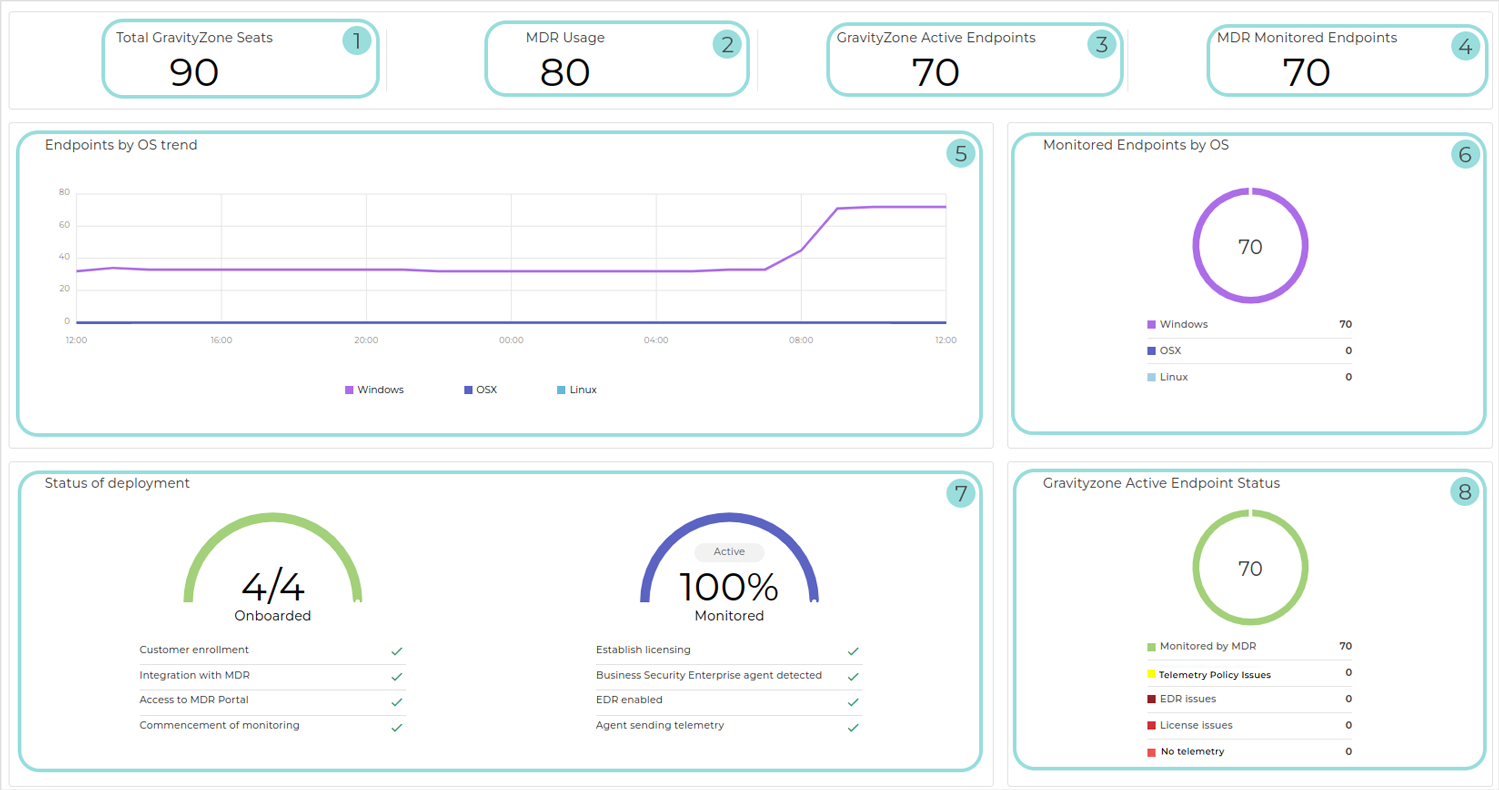
MSP Partners
Customers with a monthly subscription
The following Configuration layout applies to:
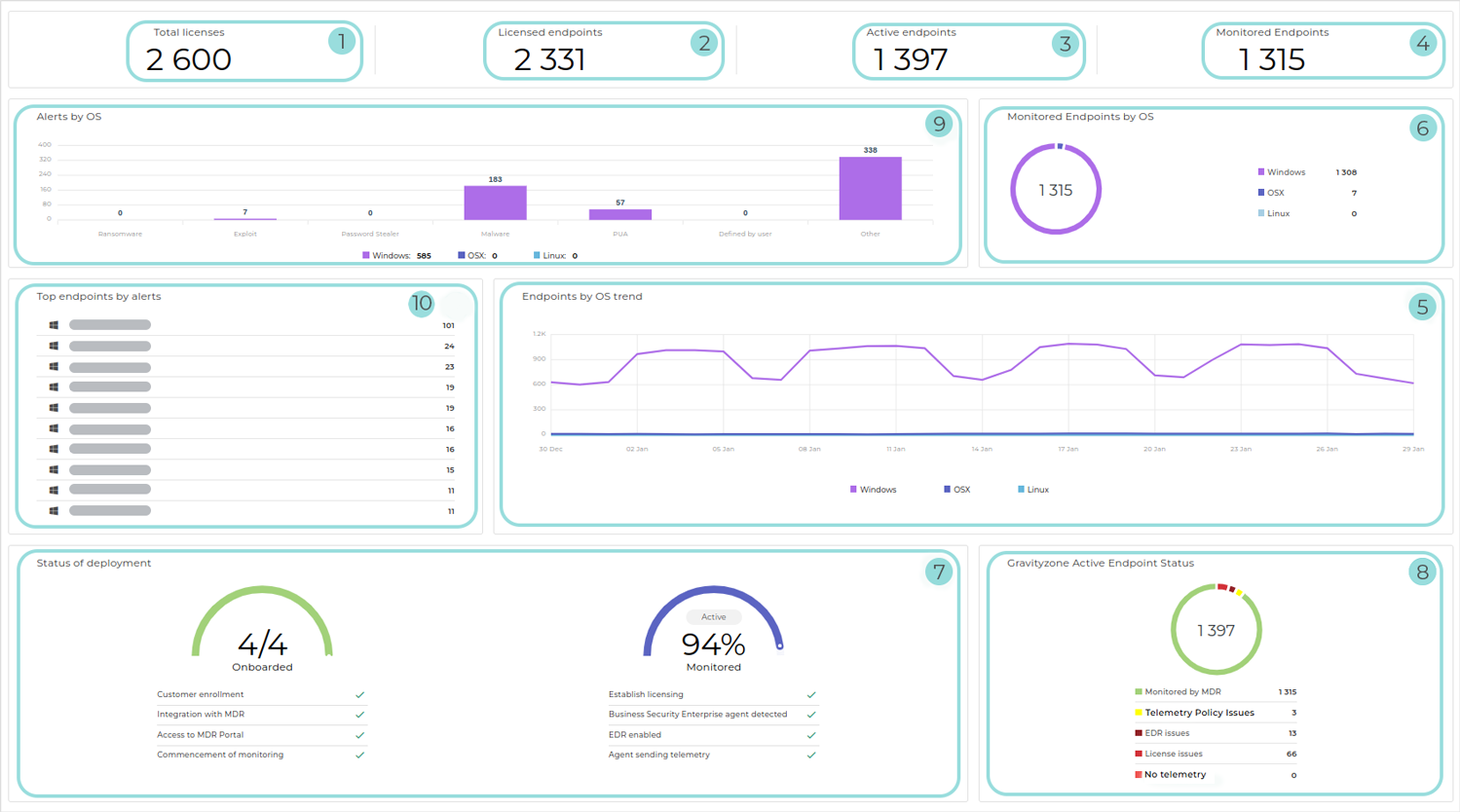
Non-MSP Partners with at least one Customer with an advanced service model, such as: Bitdefender MDR Plus, Bitdefender MXDR Plus, MDR Premium, or MDR Enterprise
Customers on an annual advanced MDR plan, such as: Bitdefender MDR Plus, Bitdefender MXDR Plus, MDR Premium, or MDR Enterprise
The following Configuration layout applies to hybrid Partners without Customers with an advanced service model:
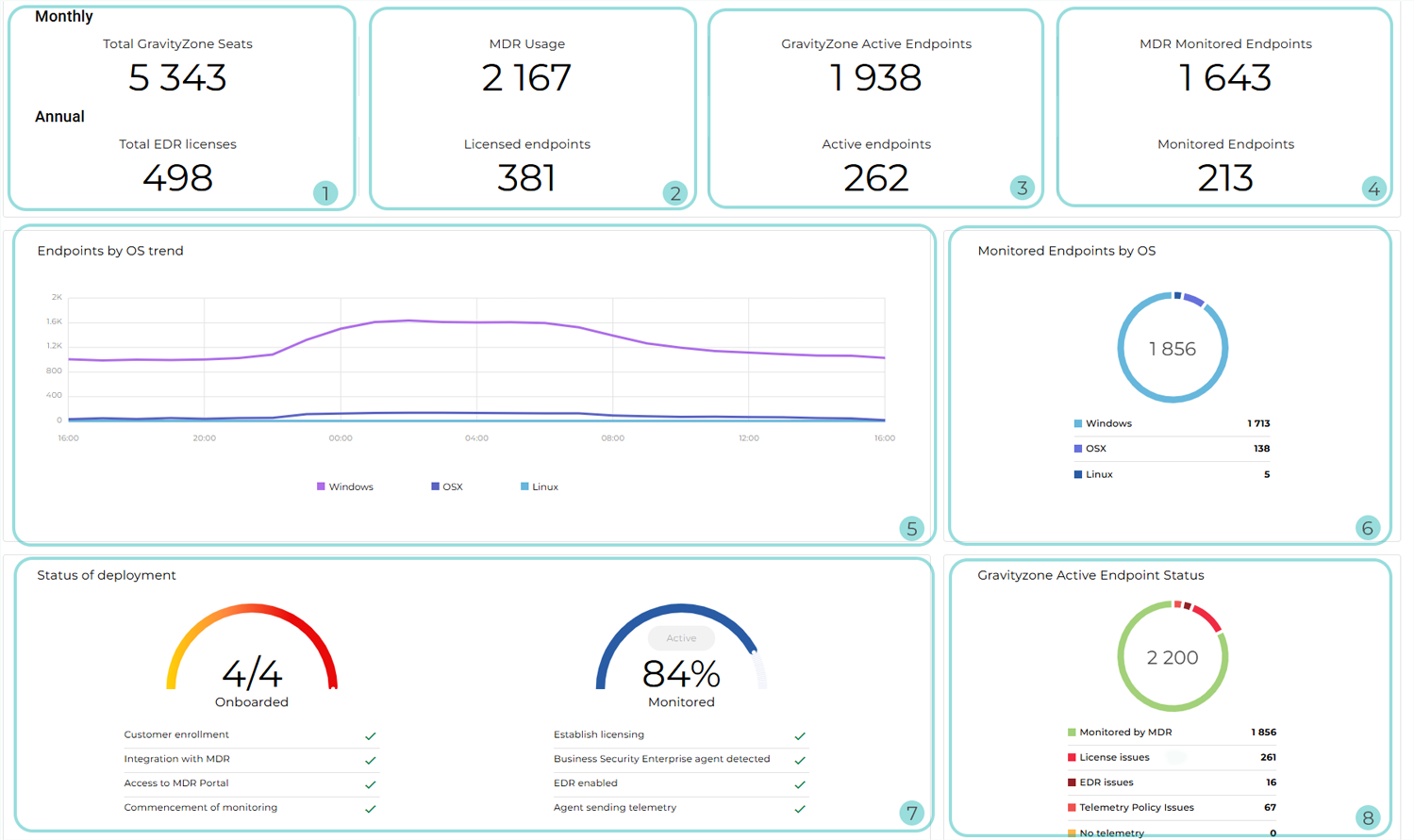
The following Configuration layout applies to hybrid Partners with at least one Customer with an advanced service model:
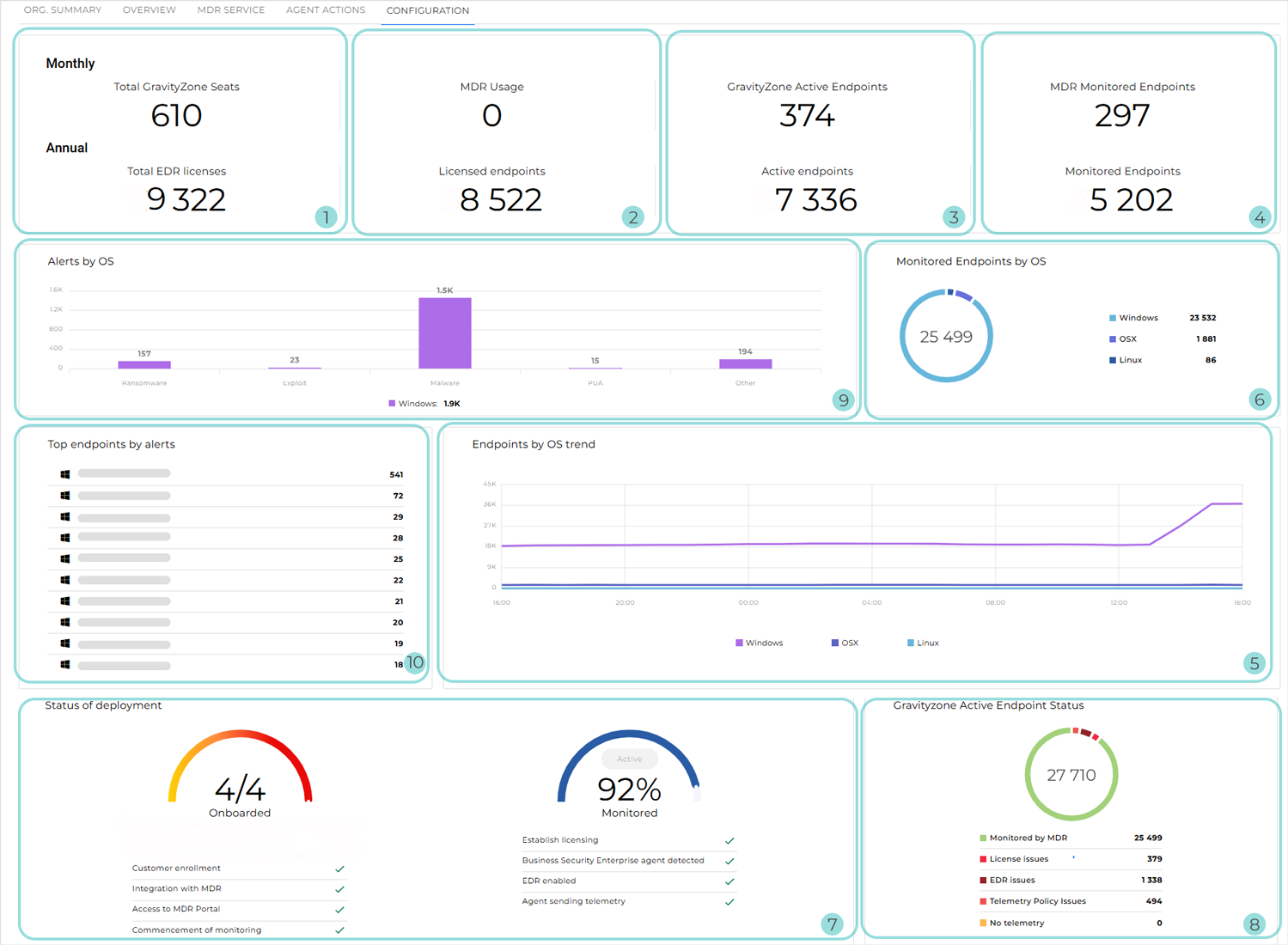
Total EDR licenses or Total GravityZone Seats, or both: The total number of endpoints covered by the MDR licensing capacity, calculated as follows:
Yearly licenses: The total count of MDR-licensed endpoints across all managed companies
Monthly subscriptions: The number of reserved endpoints. If no seats are reserved, it is the endpoint usage recorded for the current month.
For hybrid Partners, this information is displayed separately for Customers with a yearly license and Customers with a monthly subscription.
MDR Usage or Licensed endpoints, or both: The number of endpoints that count towards MDR usage across all managed companies, calculated as follows:
Yearly licenses: The number of endpoints that are actively using an MDR license
Monthly subscriptions: The number of endpoints that have contributed to MDR usage during the current month. These are endpoints that:
Belong to companies with both EDR and MDR enabled
Have had Incidents Sensor enabled in the applied policy during the current month
Have been active at least once during the current month
For hybrid Partners, this information is displayed separately for Customers with a yearly license and Customers with a monthly subscription.
Active endpoints, GravityZone Active Endpoints, or both: The number of endpoints from managed companies that have been online at least once in GravityZone within the selected time frame
For hybrid Partners, this information is displayed separately for Customers with a yearly license and Customers with a monthly subscription.
MDR Monitored Endpoints, Monitored Endpoints, or both: The total number of endpoints actively monitored by MDR
Note
Endpoints are considered monitored if they have sent telemetry to the MDR service at least once during the current month.
For hybrid Partners, this information is displayed separately for Customers with a yearly license and Customers with a monthly subscription.
Endpoints by OS trend: Widget displaying the number of active endpoints across managed companies over the selected time range, grouped by operating system
Monitored Endpoints by OS: Circular graphic displaying the distribution of monitored endpoints by operating system, including Windows, Linux, and macOS
Status of deployment: Displays the overall progress of:
Onboarding: Setting up and configuring infrastructure within the Bitdefender environment so that endpoints can be monitored
There are four phases, which are displayed as either complete or incomplete:
Customer enrollment
Integration with MDR
Access to the MDR portal
Commencement of monitoring
Deployment: Establishing a telemetry pipeline by following these four milestones for at least one endpoint in your company:
Establish licensing
Business Security Enterprise agent detected
EDR enabled
Agent sending telemetry
The displayed percentage indicates how many of the managed companies' endpoints that are currently active in GravityZone Control Center are also monitored by the MDR SOC.
GravityZone Active Endpoint Status: A detailed breakdown of all active endpoints in GravityZone Control Center, based on whether or not they are monitored by MDR.
The widget displays the following information:
The total number of endpoints that are currently active in GravityZone Control Center
Monitored by MDR: The total number of endpoints for which telemetry is successfully received and that do not have EDR, licensing, or telemetry issues
EDR issues: The total number of endpoints that do not have EDR deployed or enabled
License issues: The total number of endpoints that are not licensed, or the assigned license has expired
Telemetry policy issues: The total number of endpoints for which telemetry is blocked by the applied security policy configuration
No telemetry: The total number of endpoints that are not sending any telemetry data, usually due to connectivity or agent issues
Tip
Clicking any category in the widget downloads a list containing detailed information about all endpoints included in that category.
Alerts by OS: The total number of alerts detected during the time interval selected in the dashboard, grouped by operating system
Top endpoints by alerts: The endpoints that have generated the highest number of alerts during the time interval selected in the dashboard. The following information is included:
Operating system icon
Hostname
Number of alerts