MDR service
The following MDR service layout applies to:
Non-MSP or hybrid Partners with at least one Customer with an advanced MDR service model, such as Bitdefender MDR Plus, Bitdefender MXDR Plus, MDR Premium, or MDR Enterprise
Customers on an annual advanced MDR plan
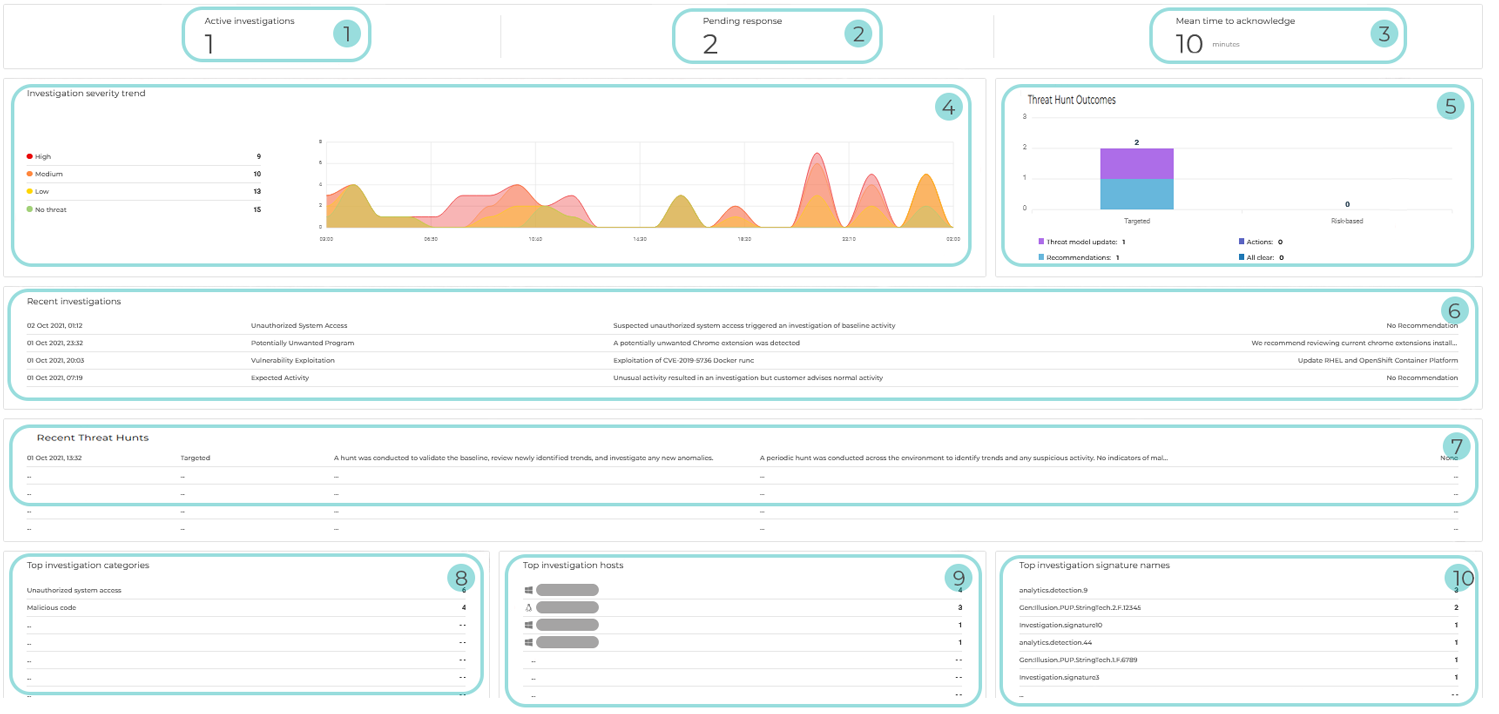
Active investigations: The number of currently ongoing investigations
Pending response: The total number of recommendations and verification requests awaiting response
Mean time to acknowledge: The average response initiation time following an alert
Investigation severity trend: Chart displaying the evolution of investigations over time, grouped by severity level (High, Medium, Low, and No threat). It provides a visual overview of activity spikes and severity distribution within the selected time range. This helps identify periods of increased risk and overall investigation trends at a glance.
Threat Hunt Outcomes: Chart summarizing the results of threat hunting activities within the selected time range. It displays the number of outcomes by Threat Hunt type (Targeted or Risk-based) and categorizes them by result, including:
Threat model updates
Recommendations
Actions taken
All clear findings
This provides a clear view of the impact and effectiveness of conducted hunts.
Recent investigations: A summary of the latest investigations conducted within the selected time range. For each investigation, the following information is included:
Date and time when it was initiated
Type
Description
Recommendation
Tip
Clicking Recent investigations redirects you to the Investigations page.
Recent Threat Hunts: The latest threat hunting activities performed within the selected time range. For each Threat Hunt, the following information is included:
Date and time when it was completed
Type
Summary
Analysis result
Recommendation
Tip
Clicking Recent Threat Hunts redirects you to the Threat Hunts page.
Top investigation categories: The categories with the highest number of investigations across all managed companies, including the category name and the corresponding investigation count
Tip
Clicking Top investigation categories redirects you to the Investigations page.
Top investigation hosts: The hosts most frequently involved in investigations. Each entry includes:
Operating system icon
Hostname
Number of associated investigations
Top investigation signature names: The most common detections that led to investigations. Each entry includes:
Detection name
Number of associated investigations