Why is my phone overheating? Top causes and fixes in 2026

December 04, 2025

An overheating phone isn’t just uncomfortable, as it can signal deeper issues affecting performance, battery life, and even security. From heavy app usage to hidden malware, excessive heat is often a warning sign your device is under strain. Understanding the causes of phone overheating is key to fixing the problem before it leads to permanent damage.
Key Takeaways
- Phone overheating is usually caused by excessive workload. Power-intensive apps like gaming, video streaming, or GPS push the CPU and GPU to their limits, generating significant heat.
- Environmental and charging factors play a major role. Direct sunlight, hot surroundings, faulty chargers, or wireless charging inefficiencies can quickly raise device temperature.
- Background activity and poor connectivity increase strain. Too many apps running or weak Wi-Fi/cellular signals force the phone to work harder, leading to overheating and battery drain.
- Persistent overheating may indicate malware. Spyware, cryptojackers, or malicious apps can hijack your phone’s resources, causing constant heat even when the device is idle.
Why Your Phone Is Overheating and How to Fix It
Your phone has a safe operating range, typically between 0°C and 35°C (32°F to 95°F). When your cell phone feels hot to the touch, especially when idle, that's a warning sign. You are right to ask, "Why is my phone overheating?"
This excessive heat can permanently degrade your battery life and force your phone's processor to slow down. Worse, it is a primary red flag for malicious apps. Spyware or cryptojackers can hijack your phone's resources to run intense background processes.
This guide will help you diagnose the reasons behind an overheated phone. We will cover the top causes, from mundane software bugs to malicious apps, and provide you with the expert steps to cool down your phone safely.
Why is my phone so hot? The 7 most common causes
Your phone is a powerful computer But, like any computer, its internal components generate heat when they work hard. Extended periods of overheating usually point to one of these seven culprits.
1. You're using power-intensive apps
Your phone's processor (CPU) and graphics processing unit (GPU) are its engines. When you run power-intensive apps like 3D games, stream 4K video, or use continuous GPS navigation, these components work at maximum capacity.
This intense work adds to your phone's temperature, which is the most common reason a phone heats up. Research shows demanding apps like video chat can raise a phone's surface temperature to over 50°C (122°F) in just 10 minutes. This heat is normal during prolonged heavy use. The problem is when your phone feels hot long after you've closed apps.
How to check:
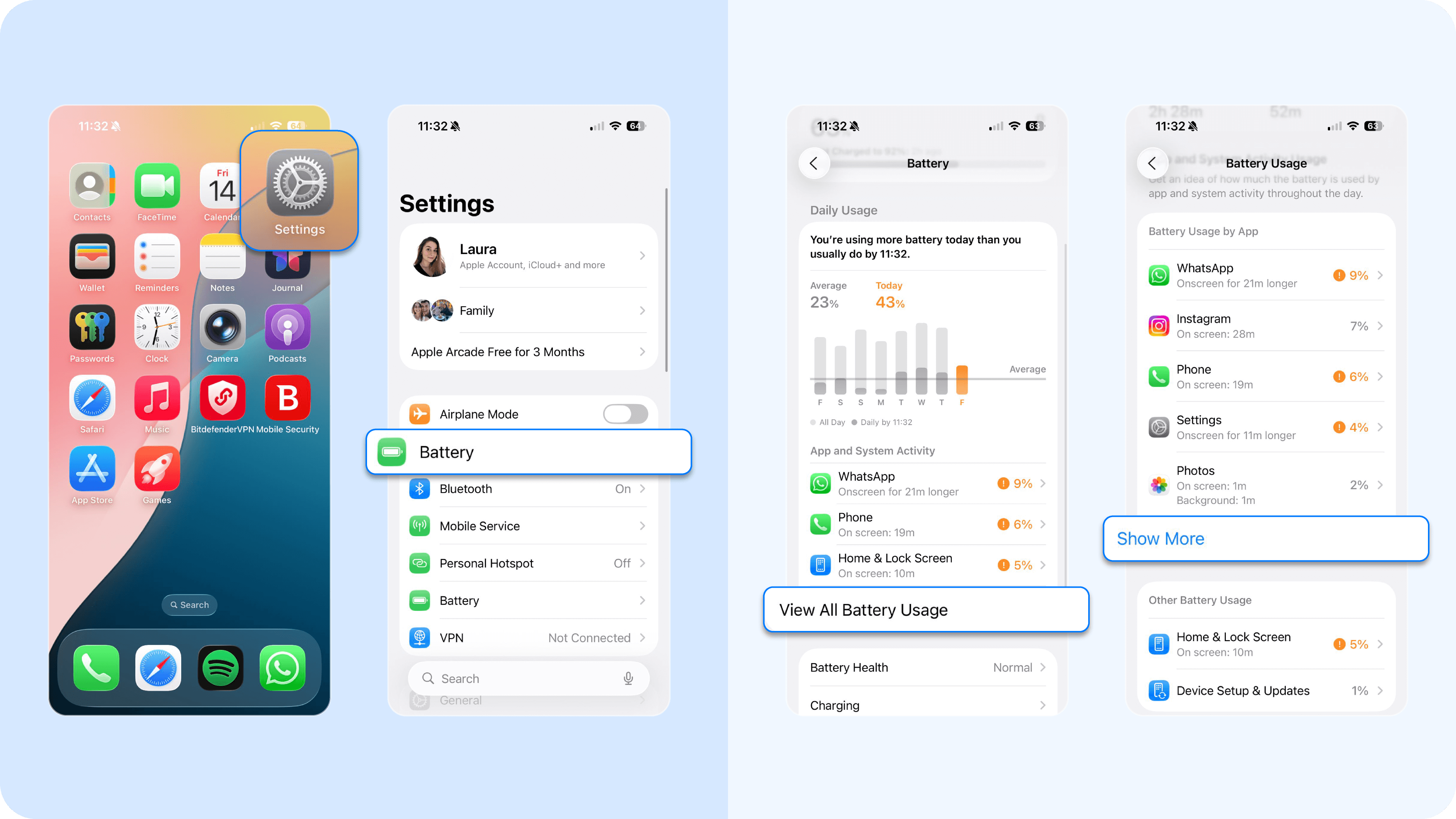
- On iPhone: Go to Settings > Battery. Scroll down to see the list of apps sorted by "Battery Usage." An app you have not used recently should not be at the top of this list.
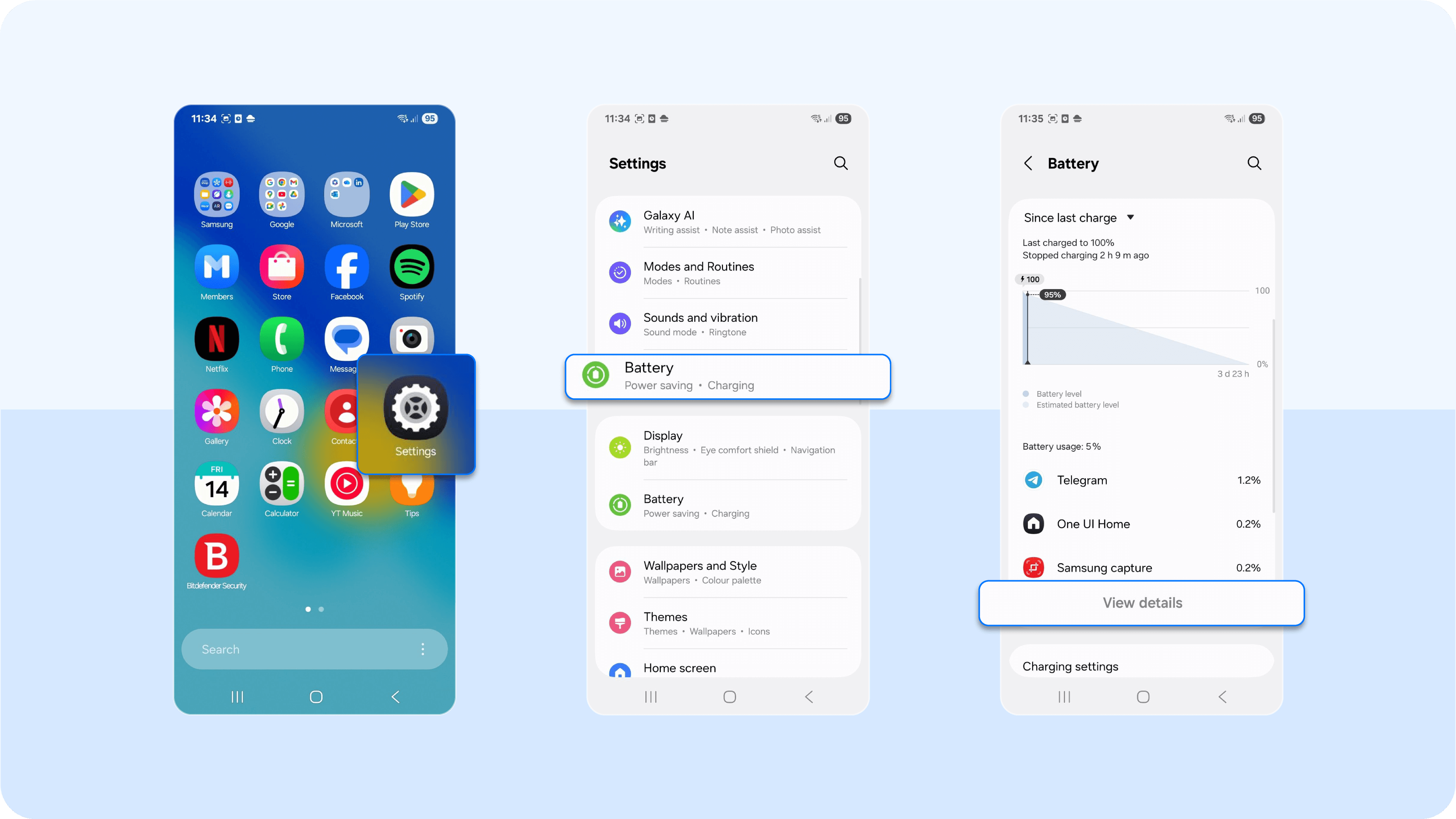
- On Android: Go to Settings > Battery > View Details. Look for apps with high background usage.
2. You're in a hot environment
Leaving your phone in direct sunlight is one of the fastest ways to make it overheat. Think of a car dashboard, a windowsill, or just lying out in the heat. Your phone's internal components work best within a specific normal temperature range, which is usually between 0°C to 35°C (32°F to 95°F). A hot environment pushes it far past that safe limit, which leads to a faulty battery with permanent damage and potentially some other damaged parts, such as your phone's CPU (central processing unit).
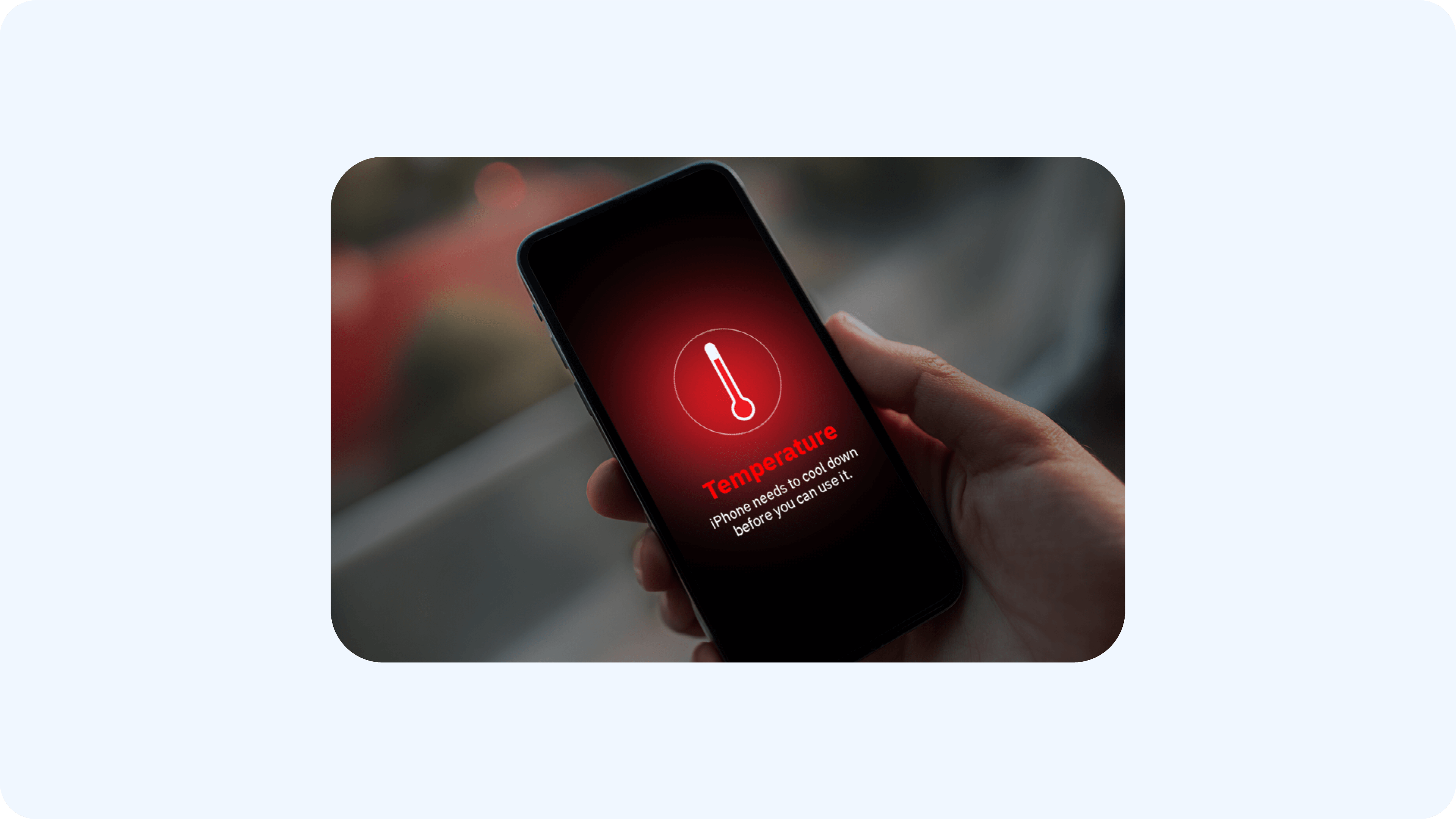
PS: Your phone will display a temperature warning and shut down to protect itself. If this happens, move it to a cool, shady spot immediately.
3. You have too many apps running
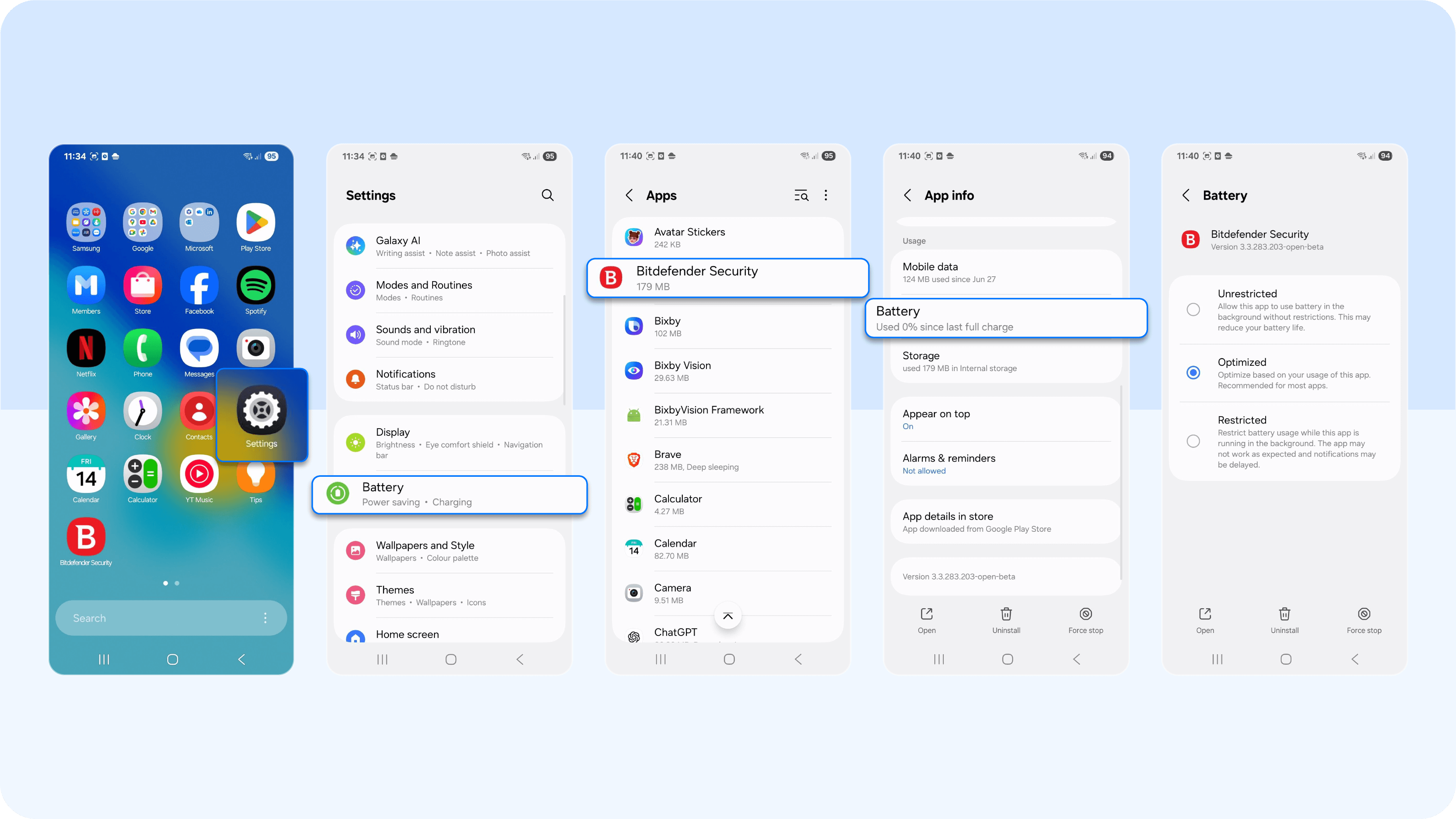
When you swipe an app away, it can continue to run. Many apps use background processes to refresh feeds (like social media), fetch messages, or check your location (such as weather apps). Having too many open apps, or even just a few aggressive ones, forces your phone's processor to multitask constantly. This constant activity strains your phone's resources and battery life, thus causing a hot phone.
How to check and fix:
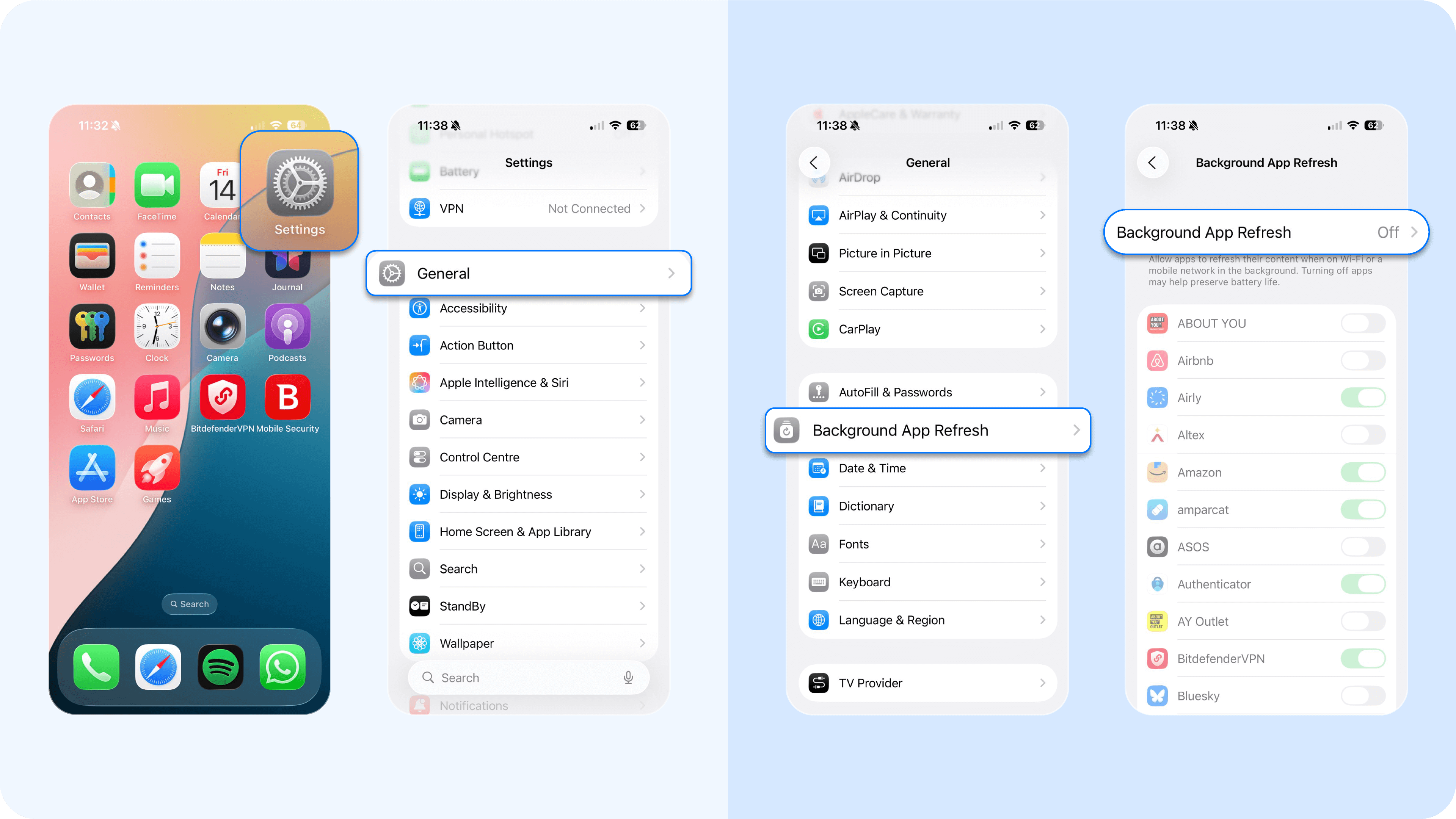
- On iPhone: Go to Settings > General > Background App Refresh. Toggle this off for any app that does not need to be constantly updated.
- On an Android phone: Go to Settings > Apps > [Select App] > Battery and select "Restricted" to prevent background activity.
4. You have charging issues
Charging generates some heat. This process becomes a problem when you use a faulty or uncertified charger or have problems with your charging port, all of which can fail to regulate power. Using wireless charging also generates more heat than a cable due to inefficiency.
Our advice is to never charge your phone on a soft surface like a bed or sofa. These surfaces trap heat and get in the way of dissipating heat. Always charge on a hard, flat surface where heat can escape, preferably with your original form of charging, not a wireless charger.
5. Your software is out of date
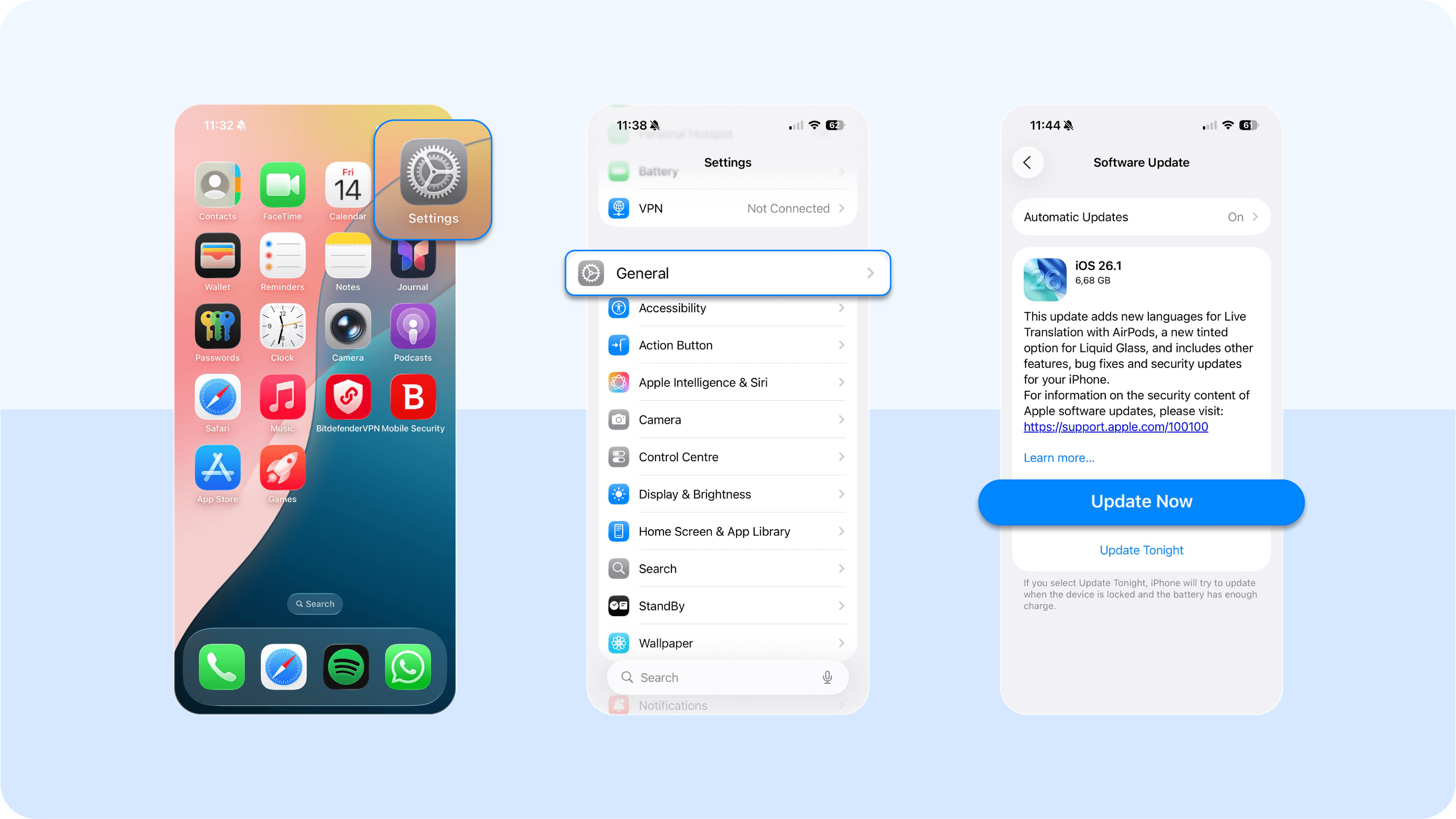
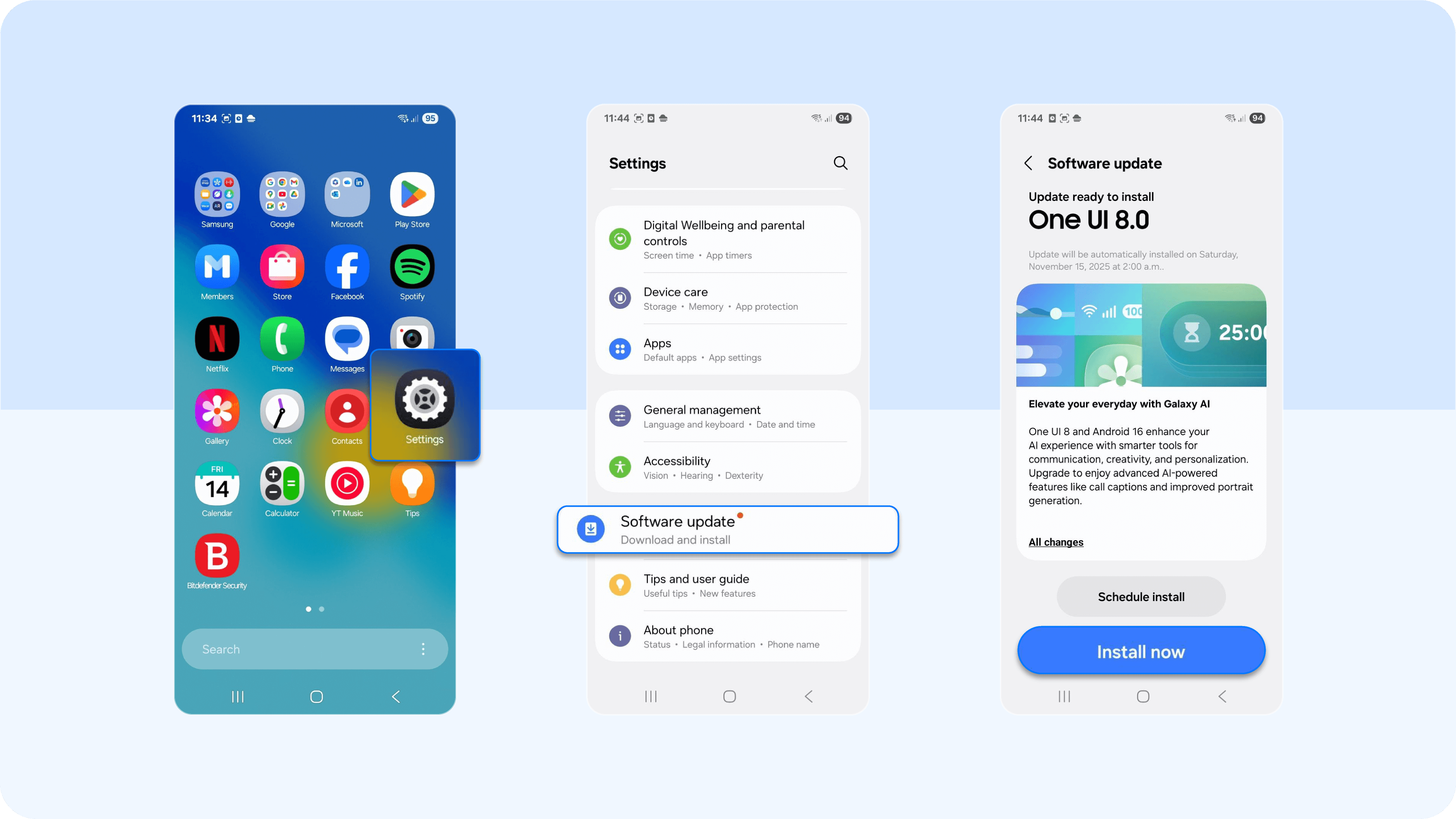
Ignoring that "Update Available" notification can cause your phone to overheat. Outdated apps or a pending operating system software update can contain software bugs. These bugs can cause an app to get stuck in a loop or use far more of the phone's CPU than necessary. This unnecessary work generates excess heat and drains your battery.
How to check and fix:
- On iPhone: Go to Settings > General > Software Update.
- On Android: Go to Settings > System > Software Update.
6. You have a poor signal (Wi-Fi or cellular)
When your Wi-Fi or cellular signal is weak, your phone's antenna works significantly harder to find and hold a stable connection. This constant, high-powered search for a network generates a surprising amount of heat. It is also a major drain on your battery life as the phone boosts power to its radios.
If you are in a low-signal area and don't expect a connection anytime soon, but your phone gets hot, turn on airplane mode. This stops the antenna from searching and will help cool down your phone.
7. The hidden causes behind malicious apps (malware)
This is a critical one. If your phone overheats for no clear reason and the battery drains fast, you must investigate malware. Malicious apps like spyware, adware, or cryptojackers are designed to hijack your phone's processor. They run intense background processes, which force your phone's CPU to work overtime for tasks like mining cryptocurrency or stealing your data. This abuse causes persistent overheating.
This threat operates in a few specific ways:
- Cryptojacking – This is when an attacker uses your phone's processor (CPU) and graphics processing unit (GPU) to "mine" cryptocurrency. These attacks, which saw a 659% surge in 2023, run silently. The only signs are a device that is hot to the touch and has poor performance. On Android devices, this intense load can even cause the battery to swell and physically damage the phone.
- Spyware – Spyware constantly records your activity, tracks your GPS, and transmits this data to an attacker. This constant background activity and data transmission forces the phone's processor to work overtime, generating heat.
- Aggressive Adware – Adware repeatedly loads and displays intrusive pop-ups. This consumes phone's resources and contributes to overheating.
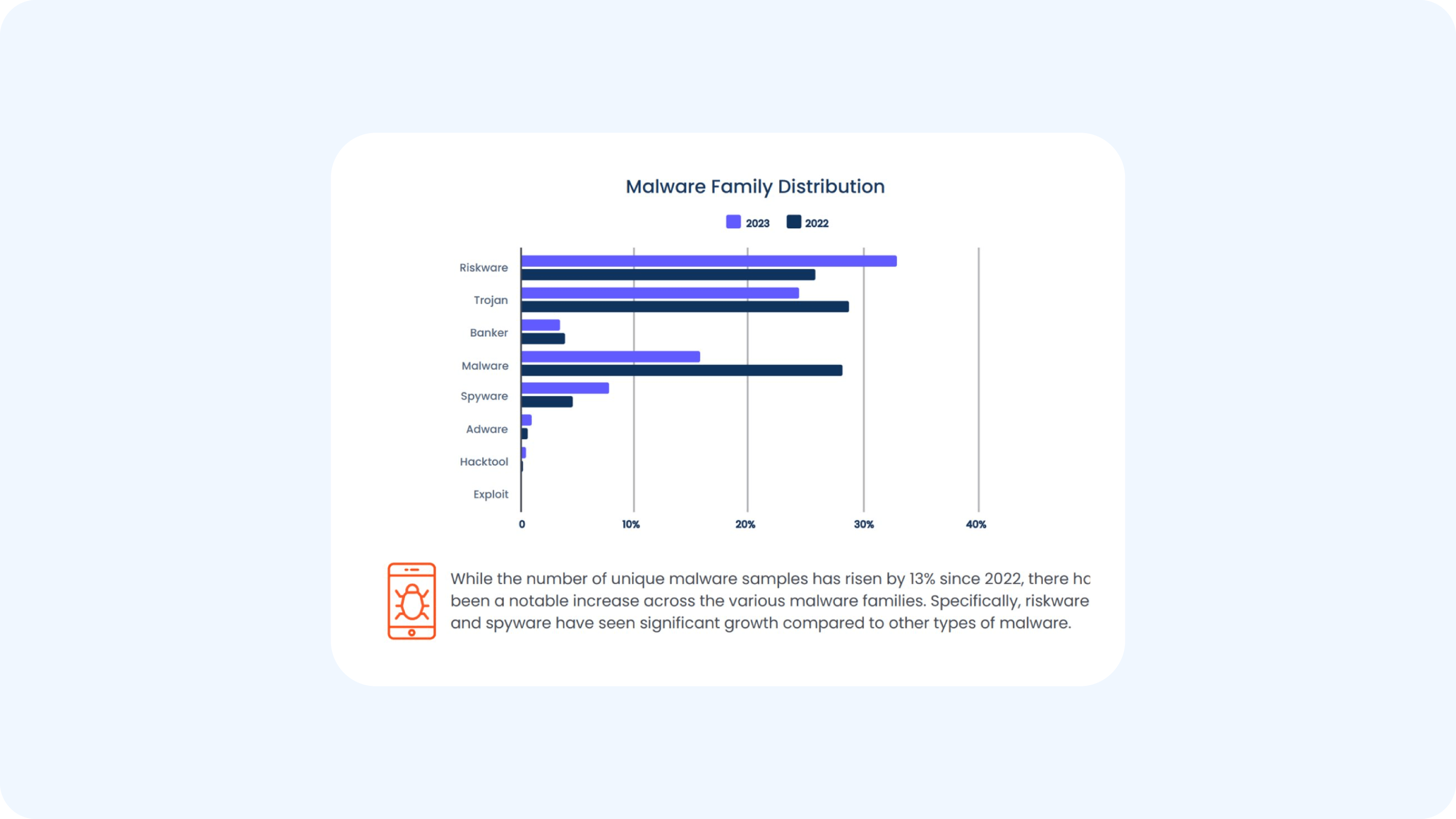
- Trojans – These are malicious apps disguised as legitimate tools. A modular trojan like Loapi, for example, was found to be so aggressive that it could max out the phone's processor to the point of causing the battery to bulge and physically break the phone. In fact, "riskware" and trojans together represent 80% of observed mobile malware threats:
- Ransomware – While many think of ransomware as a PC threat, mobile ransomware is a growing category. The process of encrypting all your personal files (photos, documents, contacts) is an extremely intense task for the phone's processor. This sudden, massive CPU load generates a significant amount of heat coming into your phone very quickly, often leading to a hot phone before the ransom note even appears.
- Botnets – Your phone can be infected and forced to become part of a "botnet" (a network of zombie devices). Hackers then use your phone's resources without your knowledge to perform other crimes, such as participating in Distributed Denial of Service (DDoS) attacks or sending out massive volumes of spam. This constant network and CPU activity runs in the background, causing persistent overheating and battery drain.
How to cool down your phone with 5 simple fixes
If your phone feels hot, follow these steps to speed up the cooling of your phone quickly and safely:
- Move your phone out of direct sunlight or a hot car immediately. Place it on a cool, flat surface in the shade. You can gently fan your phone to help it cool.
- Your phone case can trap heat. Taking it off is the fastest way to let the phone "breathe", dissipating heat and getting it to a cool state.
- Unplug the phone if it is charging. Close apps that are running, especially power-intensive apps like games, video streaming, or GPS navigation that heavily use the phone's processor.
- This is a quick way to shut down all non-essential, heat-generating radios. Turn on airplane mode to disable Wi-Fi, Bluetooth, GPS, and cellular data as they search for a signal.
- The screen is one of the biggest power consumers on your phone. Go to your phone's settings and dim your screen's brightness manually to reduce its power usage and make your phone cool.
Three mistakes to avoid when your phone is hot
When your phone feels hot, your first instinct might be to cool it down fast with unvetted tips from the web. But the following quick fixes can cause permanent damage.
1. The refrigerator or freezer myth
You must avoid putting your overheated phone in the refrigerator or freezer. The excessive cold creates a rapid temperature change that strains all of your phone's internal components. This thermal shock can cause condensation and moisture to form inside the device, which can short-circuit the logic board and destroy your phone.
2. Blasting the air conditioner
Pointing your car's AC vent directly at your hot phone is also risky. While the cool air seems helpful, the direct, intense cold can cause the same internal condensation as a freezer.
3. Trusting "phone cooler" apps
You will come across apps that claim to cool down your phone. Most of these apps are ineffective at best and harmful at worst. They do not address the root cause, nor prevent your phone from overheating. At best, they provide a placebo effect by closing apps open in the background, which your operating system already does. At worst, these apps are a form of adware or malware themselves. They run in the background, drain your battery, serve intrusive ads, and collect your personal data, adding to the problem and producing more heat.
How to stop your phone from overheating with long-term prevention
You can prevent most overheating issues by building smart habits into how you use and manage your device.
1. Better manage your apps and settings
- Install all updates – This is one of the most important preventive steps. Developers release these patches to fix the software bugs that can cause outdated apps to overwork your phone's processor, so make sure to update your phone, but also enable app updates.
- Clean up your apps – Delete unused apps and unnecessary files. Even apps you never open can run background processes that consume resources. Regularly closing apps you are finished with also helps.
- Optimize your settings – Use your phone's settings to reduce its daily workload. Enable Battery Saver Mode (Android) or Low Power Mode (iPhone) to automatically reduce background activity. Manually lowering your screen's brightness also helps reduce power usage.
2. Manage your environment
- Avoid direct sunlight – Make this a firm rule to never leave your phone in a hot car or on a sunny windowsill. Little heat is fine, but these surfaces get burning hot and will damage your mobile phone if you keep them around them for a prolonged period.
- Charge on a flat surface – Always charge your phone on a hard, flat surface like a desk. Charging on a bed or sofa traps heat, keeps your phone hot, and also creates a fire risk as your phone is overheating.
3. Remove the malware that is draining your phone's resources
If your phone overheats for no reason, you must check for malicious apps. This is the only way to fix overheating caused by hidden software.
- For Android users, we strongly recommend Bitdefender Mobile Security for Android. The Malware Scanner will find and remove the existing threat. More importantly, its App Anomaly Detection feature (an industry-first) monitors app behavior in real-time. It catches new, disguised malicious apps or junk files that cause overheating after installation, protecting you from future threats.
- For iPhone users, the risk is different. Your main threat comes from browser-based scripts (like cryptojacking) or phishing links in texts and calendar invites. Try using Bitdefender Mobile Security for iOS. Its Web Protection feature blocks these malicious websites and scripts before they can load and hijack your phone's processor. Its Scam Alert feature also filters malicious links sent via text message, stopping the infection before it starts.
Keep your phone cool and secure

A hot phone is a problematic symptom. Sometimes, the fix is simple, as you just need to close apps, get out of direct sunlight, or avoid charging on a soft flat surface.
But persistent overheating, especially when paired with a fast-draining battery, can signal a deeper problem about your phone and app security. It could be a faulty battery or, more likely, malicious apps hijacking your phone's processor.
Do not just treat the symptom. Fix the cause. Bitdefender Mobile Security gives you the tools to secure your device. It scans for and removes the malicious apps and web threats that cause overheating, protecting your battery life and keeping your data safe. Try it today - for your iOS or Android!
Frequently asked questions (FAQ)
How do I stop my phone from overheating?
To stop your phone from overheating, close unused apps, avoid heavy tasks like gaming while charging, and keep your device out of direct sunlight. Update your OS, remove suspicious apps, and check battery usage for abnormal activity. Using a trusted mobile security app can also help detect hidden processes causing heat
Does a hot phone indicate a virus?
A hot phone doesn’t always mean a virus, but persistent overheating—especially when the device is idle—can indicate malware. Malicious apps may run in the background, using CPU and network resources continuously. If overheating is combined with battery drain or high data usage, it’s worth investigating further.
Should I be worried about my phone overheating?
Occasional overheating during heavy use is normal, but frequent or unexplained heat can signal deeper issues like faulty apps, battery problems, or malware. If your phone overheats regularly without clear reason, you should take steps to diagnose and fix the problem to avoid long-term damage.
Does spyware make your phone hot?
Yes, spyware can make your phone hot because it runs continuously in the background, recording data and transmitting it to attackers. This constant activity strains your device’s processor and battery, leading to overheating, faster battery drain, and increased data usage.
tags
Author

The meaning of Bitdefender’s mascot, the Dacian Draco, a symbol that depicts a mythical animal with a wolf’s head and a dragon’s body, is “to watch” and to “guard with a sharp eye.”
View all postsYou might also like
Bookmarks
