If a Hacker Stole Your Digital Life Tomorrow, Would You Notice?

November 04, 2026
What if someone had access to your email, social media, or personal files right now, and you had absolutely no idea? Usually, when we think about a hacked account, we imagine something obvious: a password that suddenly stops working, money disappearing from a bank account, or friends receiving strange messages in our name.
But unauthorized access isn't always easy to spot. Sometimes the first clues are small changes we dismiss, overlook, or don't even think to check.
In this article, we look beyond the obvious signs of an account takeover to explore subtle clues that someone may have gained access to your digital life without you noticing.
Key takeaways
- A hacked account may continue working normally, even when someone else has access
- Missing emails, unfamiliar devices, unexpected account activity, and changes to security settings can be early warning signs
- Some signs are easy to overlook, such as unfamiliar search history, new connected apps, or small unauthorized payments
- The warning signs may differ depending on how you use the internet, whether you're a parent, employee, senior, veteran, or content creator
- Not every unusual notification means you've been hacked, but unexplained changes deserve attention
The small warning signs you shouldn't ignore
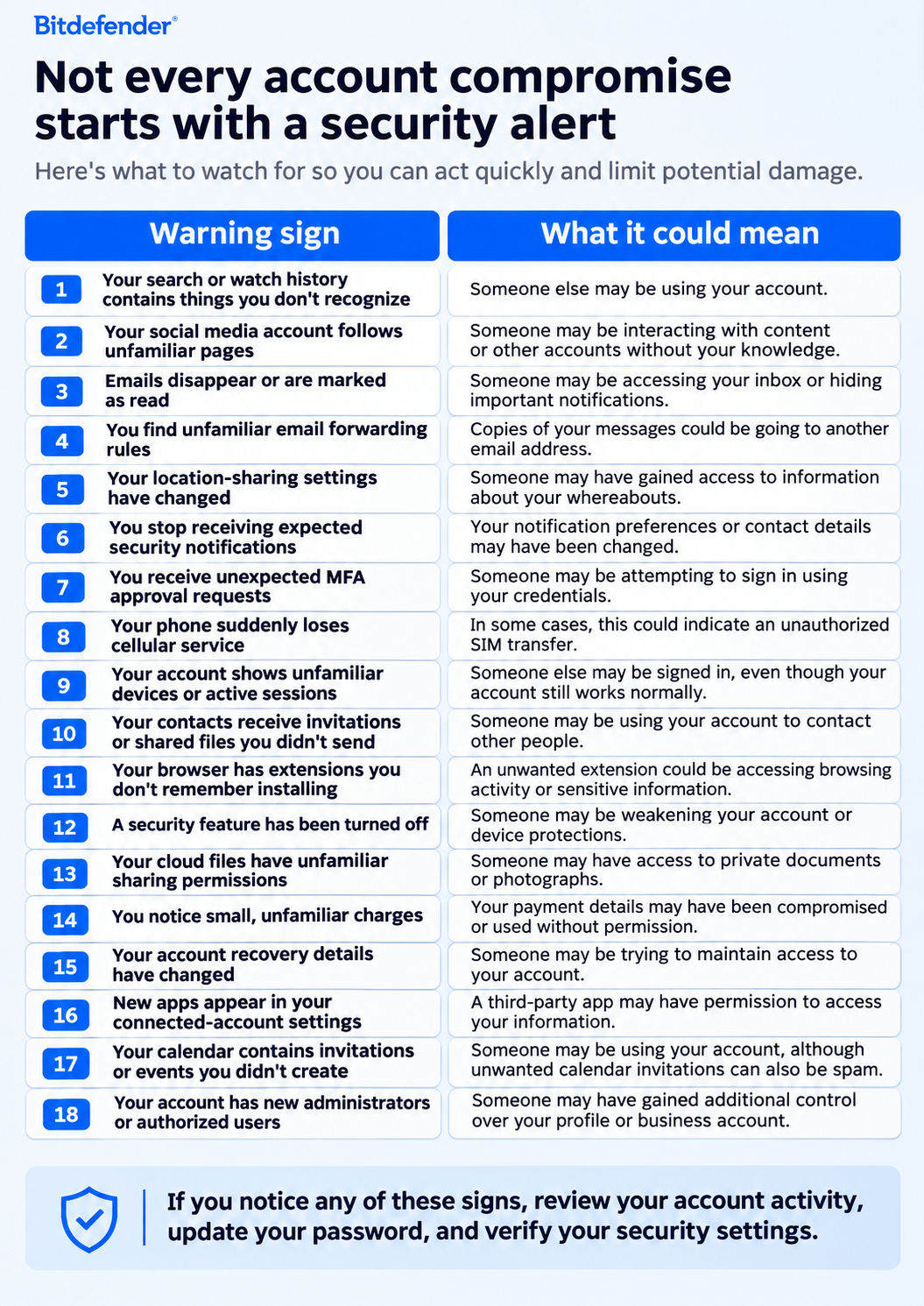
One strange notification or unfamiliar entry doesn't automatically mean someone has hacked your account. However, if you notice several warning signs, or anything involving your security settings, recovery information, or financial accounts, stop and investigate.
Some signs deserve a closer look
A few of the warning signs above are particularly important because they can allow someone to maintain access to your information without interrupting your normal activity.
- Someone could be reading your emails without changing your password
Someone with access to your inbox could quietly read messages, collect personal information, or set up forwarding rules to receive copies of your emails. They could also hide important security notifications by moving or deleting them automatically.
What to check: Review email forwarding rules, filters, recovery information, and recent account activity, especially settings you don't remember changing.
- An unfamiliar app may have more access than you realize
Apps connected to your Google, Microsoft, Apple, or social media accounts may have permission to access emails, contacts, calendars, or files. A malicious app could misuse these permissions, while forgotten apps may retain access long after you've stopped using them.
What to check: Review connected apps and their permissions. Remove anything unfamiliar or no longer needed.
- Your account recovery settings may have changed
Someone with access to your account could add a recovery email, register another authentication method, or authorize a trusted device to maintain access without locking you out.
What to check: Review recovery email addresses, phone numbers, passkeys, authentication methods, and trusted devices.
- Someone may be accessing your files without deleting anything
Cloud accounts often contain identity documents, financial records, family photos, and work files. Someone could access or copy this information without making obvious changes.
What to check: Review shared folders, public links, connected devices, and available activity logs. Remember that not all services record every file view or download.
The warning signs may look different depending on who you are
Depending on how you use your accounts, some unusual activity may be easier to overlook than others.
If you're a senior, retiree, or veteran:
Missing notifications about pensions, healthcare appointments, or benefits, unexpected changes to payment details, or verification codes you didn't request could indicate unauthorized access.
What to do: Check important accounts through official websites or apps, review your contact and payment details, and report unauthorized changes to the organization.
If you're an employee:
Documents shared with unfamiliar people, unexpected changes to folder permissions, or meetings and emails you didn't create could signal a compromised work account.
What to do: Report suspicious activity to your IT or security team promptly. Don't delete suspicious messages or try to investigate the account yourself.
If you're a content creator:
Unfamiliar account administrators, advertising campaigns you didn't create, changes to payout information, or messages sent to brands without your knowledge could mean someone has gained access.
What to do: Review account roles, connected apps, advertising permissions, and payout settings. Remove unauthorized access and secure affected accounts.
Check out the dedicated blogpost on how content creators can create an account recovery plan in case of compromise.
If you're a parent:
Unfamiliar devices on shared accounts, changes to parental controls or location sharing, unexpected purchases, or photos shared without permission deserve attention.
What to do: Review family account settings, remove unfamiliar devices, and check sharing permissions. Encourage children to tell you if they notice something unusual.
What about the obvious signs of a hacked account?
Some signs are hard to miss: being locked out of an account, unexpected password changes, unauthorized payments, or suspicious messages sent from your profile. Malware alerts and unexplained changes to your device's security settings also deserve immediate attention.
What to do: Use the platform's official recovery process if you're locked out, change compromised passwords from a trusted device, and enable multifactor authentication. Contact your bank immediately about unauthorized payments, warn contacts if someone has sent suspicious messages from your account, and run a reputable security scan if you suspect malware.
What to do if you notice something suspicious
- Check your primary email account first. Review forwarding rules, filters, connected apps, active sessions, and recovery settings. Your email account is often used to recover access to other services.
- Look for unfamiliar devices and sessions. Review recent account activity and sign out devices you don't recognize. If you suspect an active compromise, use a trusted device to secure the account.
- Review your security settings. Check whether recovery phone numbers, email addresses, passkeys, or MFA methods have changed.
- Change affected passwords. Use strong, unique passwords and enable multifactor authentication wherever possible. If a password was reused, change it on other accounts too.
- Remove suspicious connected apps. Revoke permissions you don't recognize and review browser extensions or applications you don't remember installing.
- Check financial accounts and payment methods. Look for unfamiliar purchases, subscriptions, or changes to payment information. Contact your bank immediately if you find unauthorized transactions.
- Scan your devices for malware. Use a reputable security solution and investigate unexpected applications, extensions, or changes to security settings.
- Ask for help when needed. Contact the relevant platform, your bank, or your workplace security team. If someone has accessed your accounts and contacted others, warn those people too.
If your phone unexpectedly loses cellular service, contact your mobile provider promptly through a verified channel to check for an unauthorized SIM transfer.
Remember that changing a password may not be enough if someone has added a recovery method, authorized a connected app, or retained an active session.
You may also want to read:
- How to Check if Your iPhone Has Been Hacked [+5 Recovery Steps]
- Signs your phone is being tracked without spy apps
- What to Do If Your Kid’s Phone Is Hacked: A Parent’s Step-by-Step Guide
Make a digital checkup part of your routine
You don't need to monitor every account constantly, but knowing what normal activity looks like can help you recognize those times when something isn't right.
Every so often, take a few minutes to review your most important accounts, including email, banking, social media, and cloud storage. Check which devices are signed in, who has access, what apps are connected, and whether your security settings have changed.
Having the right security tools in place can also help. Bitdefender offers dedicated security solutions for different needs:
- Bitdefender Family Plans help protect family members across their devices, with multiple layers of security against malware, phishing, and online scams, alongside parental controls.
- Bitdefender Security for Creators is specifically designed to help content creators spot subtle signs of account compromise, detect suspicious activity, and protect their social media accounts and digital livelihoods against online threats.
- Bitdefender Ultimate Small Business Security helps small business owners protect their devices, sensitive information, and day-to-day operations against cyber threats.
FAQs
How do I know if someone has hacked my account?
Look for unusual activity, such as unfamiliar login sessions, missing emails, messages you didn't send, or changes to your account's recovery settings. You might also notice new connected apps, unexpected purchases, or social media activity you don't recognize. Not every unusual change means you've been hacked, but it's worth checking.
How do I check whether my account is hacked or not?
Start by reviewing your account's recent login activity, connected devices, and security settings. Check for unfamiliar sessions, changes to recovery information, or third-party apps you don't recognize. For email accounts, also review forwarding rules and filters. If you find evidence of unauthorized access, change your password, sign out unfamiliar devices, and enable multifactor authentication.
Can I be hacked without knowing?
Unfortunately, yes. Hackers or digital miscreants could access your email, social media, or cloud accounts without changing your password or locking you out. They may quietly read messages, collect personal information, or monitor your activity for days or longer. That's why you should check your account activity and security settings periodically, even when everything seems normal.
tags
Author

Alina is a history buff passionate about cybersecurity and anything sci-fi, advocating Bitdefender technologies and solutions. She spends most of her time between her two feline friends and traveling.
View all postsYou might also like
Bookmarks
