Why Every Creator Needs an Account Recovery Plan

October 21, 2026

Imagine clicking into one of your social media accounts and realizing you’re no longer in control. Your profile information has changed, you see unfamiliar content, and the recovery email is no longer yours. Meanwhile, followers receive messages that look like they came directly from you.
For a content creator, this is more than an annoying login problem. A social media account can hold years of work, business conversations, sponsorship opportunities, advertising access and the trust of an entire community.
Strong passwords and multi-factor authentication can make an account harder to compromise, but creators also need to prepare for what happens if those protections fail. An account recovery plan gives you a clear way to respond, regain control and protect your followers.
Key takeaways
- A creator account can be a portfolio, communication channel and source of income, which makes losing access especially disruptive.
- Account takeovers don’t always begin with a stolen password. Attackers may steal active sessions, send malicious brand files or manipulate recovery information.
- Your recovery plan should cover your email, devices, social accounts, team members, business tools and communication with your community.
- Recovering an account involves more than resetting the password. You also need to remove the attacker’s access and check what they changed.
- Preparing recovery information in advance can save valuable time when every minute matters.
Losing access doesn’t always begin with a stolen password
When people picture an account takeover, they often imagine someone guessing or stealing a password. That does happen, but the methods used to target creators can be much more complicated.
A message may appear to come from a brand “interested” in a paid collaboration, or it might compliment your work while mentioning a recent post and including what looks like an ordinary campaign brief. Because opening files and reviewing brand materials are normal parts of a creator’s work, such a request may not feel suspicious at all.
However, the file could contain malware designed to steal passwords, browser information or active login sessions. In some cases, attackers can take over a session without ever asking the creator to enter a password into a fake website. Fake brand deals targeting TikTok creators show how easily a routine business opportunity can become an account takeover attempt.
Creators have also been targeted through malicious ads offering verification tools or special social media features. In one campaign investigated by Bitdefender, Facebook ads promoted a fake “Meta Verified” browser extension. The extension harvested Facebook session cookies and access tokens, allowing attackers to identify valuable business accounts that could be sold or reused in further scam campaigns.
Bitdefender researchers identified at least 37 ads promoting the malicious extension.
These examples matter because they show that even a unique password and multi-factor authentication can’t protect a creator from every threat, especially if malware steals an already authenticated session.
Sometimes attackers don’t need to hack the account
Creators can lose access to content and income even when nobody has stolen their password.
Instagram creators have reported fake copyright complaints followed by demands for payment to withdraw them. One creator paid, only to receive more complaints soon afterward. In another incident, attackers allegedly abused Meta’s AI support system to change the recovery email addresses connected to selected Instagram accounts.
If something like this happens:
- Don’t pay or negotiate with the person contacting you
- Save screenshots, emails, usernames and payment demands
- Check the notice directly inside the official platform
- Use the platform’s official appeal or recovery process
- Check immediately whether your recovery email or phone number has changed
These cases show why a recovery plan should cover suspensions, false complaints and unauthorized account changes, not just stolen passwords.
What is an account recovery plan?
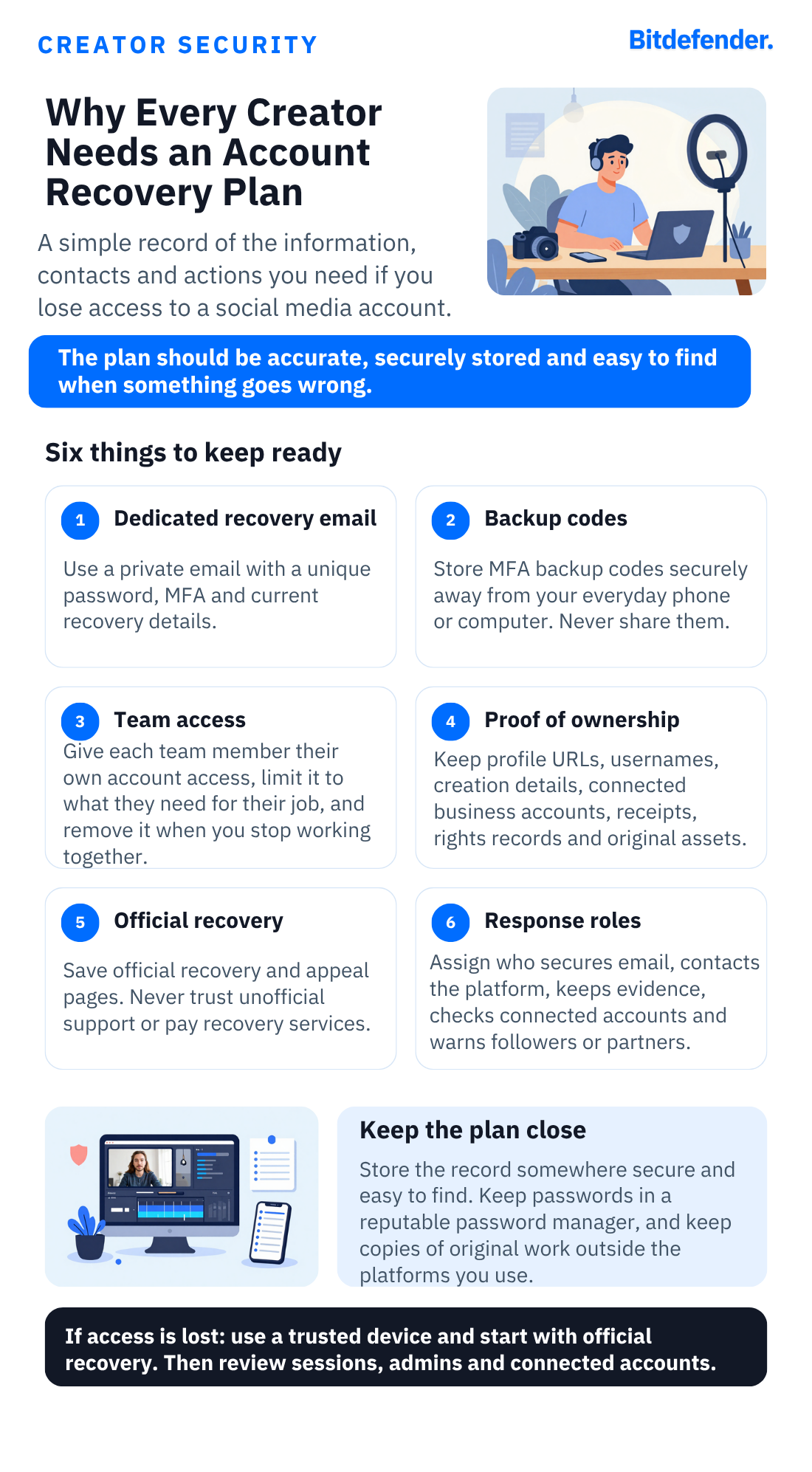
An account recovery plan is a secure record of the information, contacts and actions you’ll need if you lose access to a social media account.
It should help you answer a few urgent questions:
- Which email address and phone number are connected to the account?
- Where are the backup login codes stored?
- Who else can manage the account?
- How can you prove that it belongs to you?
- Where is the platform’s official recovery page?
- Who should warn followers and business partners?
For creators working with managers, editors, agencies or assistants, the plan should also explain who will contact the platform, who will check the account for changes and who will communicate with followers.
The plan doesn’t need to be complicated. It could be a short, securely stored document that you review regularly.
Start with the email account behind your channels
Your email account is the key to recovering everything else.
If an attacker controls your inbox, they may be able to reset your social media passwords, delete security warnings and block your attempts to regain access.
Consider creating a separate email address for managing your creator accounts. Don’t display this address publicly or use it for shopping, competitions, newsletters and unrelated online services.
Protect it with a strong password that you don’t use anywhere else. Turn on two-factor or multi-factor authentication, which means that signing in requires an additional code or approval as well as the password.
Check that the backup email address and phone number connected to it are still correct. Google also advises YouTube creators to consider using a separate email address for their channel.
Make a list of the accounts that keep your creator business running
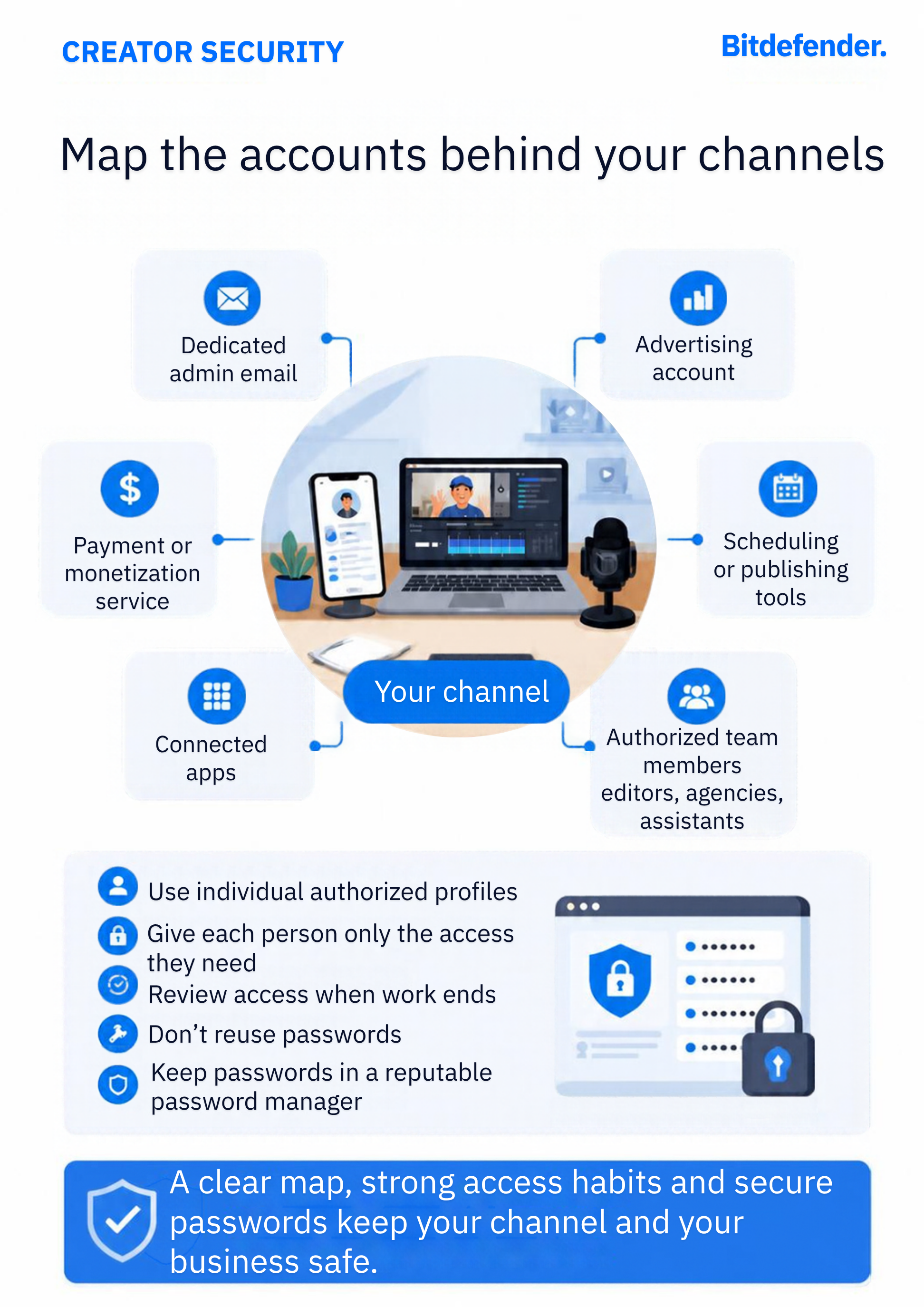
Creators rarely rely on just one account. A YouTube channel may be connected to a Google Account, advertising profile and payment service. A Facebook Page may be connected to Instagram, an advertising account and several team members.
Create a simple list containing:
- Your social media accounts and usernames
- The email address connected to each account
- The full link to each profile
- Connected advertising and payment accounts
- Content scheduling and publishing tools
- The names of people who can manage each account
Don’t add passwords to this document unless it’s stored securely inside a password manager. A password manager can create and save a different password for each account.
This list will help you understand what else needs to be checked if one account is compromised. Regaining access to your public profile won’t completely solve the problem if the attacker still controls your advertising account or has given themselves permission to manage the page.
Keep your recovery information up to date
Check that the email address and phone number listed in each account’s recovery settings still belong to you. An old work address, expired phone number or inbox you rarely open could make recovery much harder.
Pay attention to notifications saying that a password, phone number or recovery email address has been changed. If you didn’t make the change, act immediately. Don’t assume that the message is simply an error.
Many platforms also provide backup codes. These codes can help you sign in if you lose access to your phone or authentication app.
Download the codes and keep them somewhere safe. Don’t store the only copy on the same phone or computer you normally use to manage your accounts. If that device is lost, stolen or infected, you could lose both your account and your way back in.
Remember: Nobody from a legitimate platform should ask you to share a backup code or one-time login code by email, chat or phone.
Keep proof that the account and content belong to you
A social media platform may ask for information showing that you’re the legitimate owner. Collecting this information while you still have access is much easier than trying to find it during a takeover.
Useful records may include:
- Your profile link and username
- Previous usernames
- The approximate date the account was created
- Connected business and advertising accounts
- Advertising receipts
- Payment or earnings information
- The names of authorized managers
- Screenshots of important account settings
Creators should also keep contracts, licences and emails proving that they have permission to use third-party images, music, video or other material. These records can help if you need to challenge a genuine mistake or a fake copyright complaint.
Only keep the information you’re likely to need, and protect any documents containing sensitive personal or financial information.
Save the official recovery and appeal pages
When someone is locked out of an important account, their first instinct may be to search online for immediate help. Scammers understand that sense of urgency very well.
Fake support accounts, fraudulent phone numbers and supposed account-recovery specialists often target creators who are already desperate to regain access. Some ask for an upfront fee. Others request passwords, login codes or remote access to the victim’s device.
Save the official recovery page for every platform you rely on. You should also know where to appeal copyright complaints, content removals and account suspensions.
Always access these services through the official app or website. Don’t trust recovery links or phone numbers provided by strangers, even if they claim to work for Meta, YouTube, TikTok or another well-known company.
No legitimate support employee needs your password or one-time login code.
Decide who does what in the event of an account takeover
Some creator accounts are managed by more than one person. An editor may upload content, a manager may handle sponsorships and an agency may oversee advertising.
Each additional person means there’s another account, inbox and device that criminals could target. Team members should use their own approved profiles instead of sharing a single password. They should also have only the level of access they need for their work.
Your recovery plan should make it clear who will:
- Contact the social media platform
- Secure the connected email account
- Check payment and advertising information
- Take screenshots and save evidence
- Contact sponsors and collaborators
- Warn followers
Review this access whenever a working relationship ends. Former employees, freelancers and agencies shouldn’t continue to have permission to manage your accounts.
Back up content you can’t replace
Don’t let social media platforms be the only place where your original work exists.
Keep copies of videos, photographs, graphics, captions, contracts, invoices and other important files. A backup can’t restore your followers or engagement, but it can stop an account problem from erasing years of creative work.
Keep a separate record of upcoming campaigns and important business contacts as well. If your account disappears before a sponsored post is due, you’ll still be able to contact the brand and explain what happened.
Your backup should be stored somewhere separate from the device you use every day. You might use a trusted cloud service, an external drive or a combination of both.
Prepare a way to warn your audience
When attackers control a trusted creator account, followers often become their next targets.
They may publish fake giveaways, promote fraudulent investments, share malicious links or message people directly. Because the posts come from a familiar account, followers are more likely to trust them.
Decide in advance how you would warn your community. You might use another social profile, your website, a newsletter or a trusted collaborator’s channel.
You can also prepare a simple warning message:
My account has been compromised. Please don’t trust recent messages, links, giveaways or payment requests sent from it. I’ll provide updates through this channel while I work with the platform to recover access.
You should also be ready to contact sponsors and business partners if the attacker can see private conversations or has started impersonating you.
Know the early signs of an account takeover
Attackers don’t always change the password immediately. Some remain inside an account quietly while they read messages, collect information or give themselves another way to return later.
Warning signs can include:
- Login alerts from devices or locations you don’t recognize
- Password-reset emails you didn’t request
- Changes to your recovery email address or phone number
- New people with permission to manage the account
- Connected apps you don’t recognize
- Unexpected posts, livestreams or advertisements
- Messages you didn’t send
- Changes to payment or earnings information
If you notice one of these signs, don’t wait to see whether anything else happens. Change your password from a trusted device, check your email account and review who has access.
What to do if your creator account is compromised
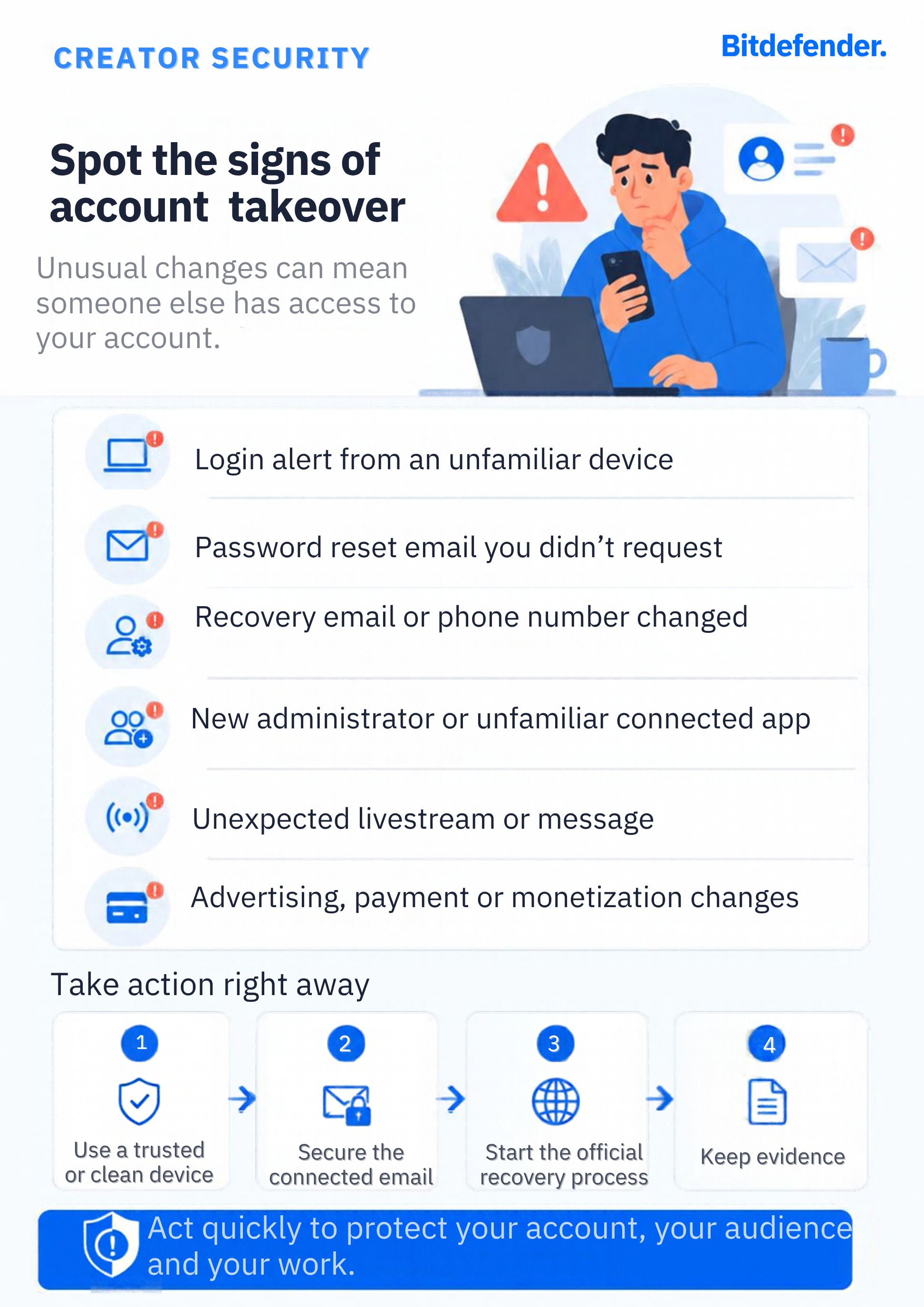
Start by securing the email account connected to the affected channel. Use a device you trust and believe is safe.
If you recently downloaded a suspicious file or browser extension, don’t enter a new password on that device yet. Disconnect it from the internet if possible, remove the suspicious software and run a security scan. Use another trusted device to begin securing your accounts.
Then go directly to the social media platform’s official recovery page. If possible, use a device and internet connection you’ve used to access the account before. This may help the platform recognize you as the legitimate owner.
After you regain access:
- Change the password and make sure it isn’t used on another account.
- Sign out of devices and locations you don’t recognize. If you’re unsure, sign out everywhere.
- Check the recovery email address and phone number.
- Review two-factor authentication and create new backup codes.
- Remove people you don’t recognize from account and Page permissions.
- Remove access for unfamiliar or unnecessary apps.
- Delete browser extensions and programs you don’t recognize.
- Check advertising, payment and earnings settings.
- Remove unauthorized posts, advertisements and messages.
- Save screenshots and other evidence of what happened.
- Scan every device used to manage the account.
- Warn followers and business partners if they may have been contacted.
If a malicious file or browser extension caused the takeover, changing your password alone won’t fix the problem. The software may simply steal the new password as well.
Check other accounts connected to the same email address. You should also change the password anywhere you reused the old one.
Don’t pay attackers or unofficial recovery services
Losing access to an income-generating account can place a creator under enormous pressure. Someone claiming that they can fix the problem immediately may sound like the quickest way out.
Paying an attacker to withdraw a copyright complaint or return an account doesn’t guarantee that they’ll keep their promise. It may simply show them that you’re willing to pay, encouraging them to make another demand.
The same caution applies to people who describe themselves as account-recovery experts. Don’t give them your password, backup codes, one-time login codes or remote access to your computer or phone.
Save screenshots, usernames, email addresses, payment demands, suspicious complaints and other evidence. Report the incident through the platform’s official channels and to the appropriate authorities.
Add another layer of protection around your creator accounts
An account recovery plan tells you what to do after something goes wrong. Security tools can also help you spot the suspicious messages, files and account changes that often come before a takeover.
Bitdefender Security for Creators monitors supported YouTube, Instagram and Facebook accounts and warns creators about unusual activity and unexpected changes.
Its anti-scam email protection can help identify fake brand deals, fraudulent sponsorships and other messages designed to steal account information. The included device protection can also detect malicious downloads and software that tries to steal passwords or take over accounts.
If an account is compromised, creators receive a step-by-step recovery guide. Creators working with a team can also extend protection to the people who help manage their content and accounts.
Bitdefender Security for Creators doesn’t replace the official recovery process provided by a social media platform. It adds monitoring, email and device protection, and practical guidance that can help you spot problems earlier and respond more confidently.
If an unexpected brand proposal or support message doesn’t feel right, you can ask Bitdefender Scamio to analyze it. You can also paste suspicious web addresses into Bitdefender Link Checker before opening them.
Review the plan before you need it
An account recovery plan can become outdated quickly. Creators change phone numbers, add new platforms, hire team members and stop working with old agencies.
Review your plan every few months and whenever something important changes. Check that the recovery information still works, create new backup codes when necessary and remove anyone who no longer needs access.
A few minutes spent checking these details now could save hours or days of confusion if you’re ever locked out.
FAQs
What happens in account recovery?
The platform asks you to prove that the account belongs to you. Depending on the service, you may need to confirm a recovery email address or phone number, enter a backup code, answer questions about the account or complete an identity check.
Once you regain access, create a new password and sign out of devices you don’t recognize. Check whether the attacker changed your recovery information, added new account managers, connected unfamiliar apps or altered your payment settings.
You should also secure the linked email account and scan your devices. Otherwise, the attacker may still have a way to return.
Which password should never be used?
Never use the password protecting your email account for social media or another online service. If one account is compromised, criminals may try the same password on your inbox, creator channels and payment services.
Avoid common passwords such as “123456,” “password,” your username, your date of birth or the name of your channel. Every important account should have its own long password, which you can create and store with a password manager.
How can I recover my social media accounts?
Go directly to the platform’s official app or website and use its hacked-account or account-recovery option. Secure the email account connected to the profile first, especially if you think it may also be compromised.
If possible, complete the recovery process from a trusted device and location you’ve used before. After regaining access, check logged-in devices, recovery details, connected apps, account permissions and payment settings.
Don’t pay strangers who promise to recover the account, and never share your password, backup codes or one-time login codes with them.
tags
Author

Alina is a history buff passionate about cybersecurity and anything sci-fi, advocating Bitdefender technologies and solutions. She spends most of her time between her two feline friends and traveling.
View all postsYou might also like
Bookmarks
