ClickFix: When the victims help the hackers

May 11, 2026
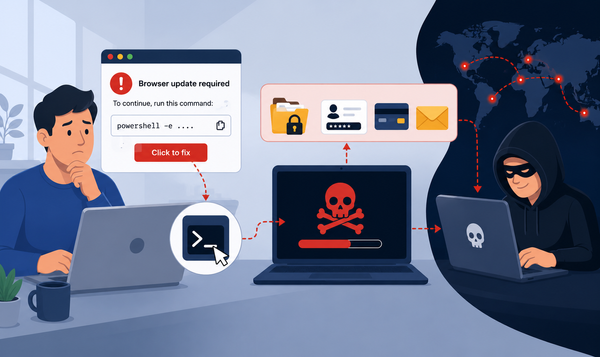
Increasingly, cyberattacks no longer rely on sophisticated malware exploits or zero-day vulnerabilities. Instead, they depend on something far more predictable and much easier to exploit: people making mistakes.
ClickFix campaigns represent one of the clearest examples of this shift. Victims don’t just open an infected attachment or click on dangerous links. Unfortunately, they actively participate in the compromise of their own systems by following the attacker’s instructions.
This tactic shouldn’t work, but that’s not how it’s playing out. The attacks blend fake error messages, fabricated security warnings, CAPTCHA-style verification prompts and social engineering techniques that eventually persuade users to run the malicious commands themselves. Victims believe they are fixing a technical issue, verifying their identity or restoring access to a service.
Instead, they hand control of their device to cybercriminals.
Key takeaways
- ClickFix attacks manipulate users into running malicious commands themselves.
- Attackers impersonate security alerts, browser errors, CAPTCHA checks, and software troubleshooting prompts.
- Victims often copy and paste PowerShell or terminal commands directly into their systems.
- The technique bypasses traditional phishing expectations because users believe they are solving a legitimate problem.
- ClickFix campaigns frequently deliver infostealers, ransomware loaders, remote access trojans, and credential theft malware.
- Education, behavioral detection, and strict execution controls reduce exposure to these attacks.
What is ClickFix?
ClickFix is a social engineering technique that tricks victims into manually running dangerous commands on their own devices.
Unlike traditional phishing attacks, which deliver malware via downloaded files or exploits, ClickFix operations rely on guided interaction. The attacker persuades the victim to follow step-by-step instructions that eventually compromise the system.
The attack usually starts with a fake browser error, a fraudulent CAPTCHA page, a malicious advertisement, or a compromised website displaying an urgent warning. In many cases, the page claims the user must complete a verification step, restore browser compatibility, or fix a security issue before continuing.
In at least one case, developers seeking Claude AI-related instructions and code were tricked into running these commands.
The instructions often direct the victim to open PowerShell, launch the Windows Run dialog, then paste a command into Terminal or temporarily disable protections. The commands themselves are typically obfuscated through techniques such as Base64 encoding, remote script execution, PowerShell download cradles or LOLBin (Living Off The Land Binaries, Scripts and Libraries - essentially software that’s already present on the device) abuse.
Why attackers love ClickFix campaigns
ClickFix attacks solve several problems for cybercriminals. Traditional malware delivery faces increasingly effective defenses. For example, email security blocks malicious attachments, browsers warn users about dangerous downloads and modern endpoint protection platforms detect suspicious executables more aggressively than ever.
ClickFix seeks to bypass many of these barriers by tricking users into becoming active participants in the compromise. The victim willingly launches the command, approves the permissions, and ignores the security warning because the process appears legitimate.
In some campaigns, attackers even persuade their victims to disable security solutions by claiming that the solutions will detect false positives.
How a typical ClickFix attack works
Although individual campaigns vary, most ClickFix attacks follow a predictable structure.
The victim first lands on a malicious or compromised webpage displaying an urgent message such as “Your browser failed verification,” “Security validation required,” or “Cloudflare check failed.” The design usually imitates trusted brands or infrastructure providers to reduce suspicion.
These are just a few examples, but the same behavior has been seen in the gaming community. There’s no limit to where this attack might pop up or to the types of messages criminals will choose to use.
Next comes the fake troubleshooting process. The user receives instructions that look technical but harmless, often telling them to press Windows + R, open PowerShell, paste a provided command, and press Enter.
Once executed, the command downloads malware that may include credential stealers, remote access trojans, ransomware loaders, persistence mechanisms or cryptocurrency wallet theft tools. Some campaigns remain largely fileless to reduce detection.
Why victims comply with malicious instructions
The effectiveness of ClickFix attacks depends on how carefully the social engineering was designed.
Attackers often create some sense of urgency by convincing users that access will remain blocked unless they act immediately. They reinforce legitimacy by imitating trusted companies such as Microsoft, Google, Cloudflare, GitHub and many others.
Victims also assume they lack the technical expertise to question complex instructions. When a page confidently presents terminal commands or browser troubleshooting steps, most users comply. This is especially true if the user finds those instructions organically by searching for a solution to a particular problem.
ClickFix campaigns also exploit a type of behavior that people are already familiar with. Users often interact with prompts asking them to restart applications, verify accounts, approve permissions or install updates.
Traditional phishing awareness training often focuses on suspicious attachments, malicious downloads, and poorly written scam emails. ClickFix campaigns avoid many of these classic indicators.
Who is most at risk from ClickFix attacks
ClickFix attacks target ordinary internet users just as aggressively as they target organizations.
Anyone who browses the web, uses online documents, installs software, accesses cryptocurrency wallets, or relies on cloud-based services can fall victim to these scams.
Cybercriminals often focus on consumers because home users typically lack enterprise-grade protections and may feel greater pressure to resolve technical problems quickly.
Here are some examples of possible victims
- People who frequently download software, stream content from unofficial platforms, or search for pirated applications often encounter malicious ads and compromised websites that deliver ClickFix prompts.
- Cryptocurrency users also remain a favorite target. Attackers commonly disguise fake wallet verification pages, browser synchronization errors or account protection checks to steal wallet credentials and session tokens.
- Remote workers and freelancers face this threat because they rely on browser-based tools, online collaboration platforms and authentication systems that attackers can imitate convincingly.
- Even technically experienced users are vulnerable. Developers, gamers, and advanced users often feel comfortable running commands in Terminal or PowerShell, which lowers suspicion when malicious pages present fake troubleshooting steps.
Which operating systems are affected?
ClickFix campaigns primarily target Windows users because PowerShell provides attackers with a powerful built-in scripting environment.
However, the technique is not limited to Windows. Attackers increasingly adapt ClickFix lures for macOS and Linux distributions.
Some campaigns adapt instructions to the visitor’s operating system.
How to stay safe
First of all, users must be wary of following instructions that advise them to run instructions in the terminal or as a RUN command.
Behavioral detection plays a critical role because traditional signature-based defenses may miss ClickFix activity. This is where Bitdefender Ultimate Security comes into play. Users need a security solution that monitors for PowerShell execution, suspicious processes, remote script downloads, unusual command chains and much more.
Also, web filtering and browser isolation technologies can help prevent users from reaching malicious infrastructure in the first place.
Finally, enforcing least privilege principles limits the impact of successful compromises. Users should avoid running commands with administrative permissions whenever possible.
What individual users should do
Consumers can greatly reduce risk by following several simple practices.
- Treat terminal instructions from websites as suspicious
- Legitimate websites rarely require users to paste commands into PowerShell or Terminal just to access content.
- Be skeptical of fake verification pages. Cloudflare-style verification pages have become a favorite tool for attackers.
- If a CAPTCHA asks you to execute commands, close the page immediately.
- Keep security software updated
- Use multi-factor authentication
- Although session theft can sometimes bypass MFA, it still reduces overall account compromise risk.
- Monitor accounts for unusual activity
- Unexpected login notifications, session resets or password changes may indicate compromise.
FAQ
What is a ClickFix attack?
Answer: A ClickFix attack tricks victims into running malicious commands on their own devices under the guise of fixing a problem or completing a verification step.
Why are ClickFix attacks dangerous?
Answer: Victims willingly perform the malicious action themselves, which helps attackers bypass traditional phishing defenses.
Which operating systems are affected?
Answer: ClickFix campaigns mainly target Windows systems, but attackers have also adapted the technique for macOS, Linux, Android and ChromeOS/browser-based environments.
What malware do ClickFix campaigns deliver?
Answer: Common payloads include infostealers, remote access trojans (RATs), ransomware loaders, credential stealers and malware that targets cryptocurrency wallets.
How can users spot a ClickFix scam?
Answer: Warning signs include websites asking users to paste commands into PowerShell or Terminal, fake CAPTCHA pages, urgent browser alerts and suspicious troubleshooting instructions.
Do legitimate websites ask users to run terminal commands?
Answer: Rarely. Most legitimate websites never require users to paste commands into PowerShell or Terminal just to access content or verify an account.
How can consumers protect themselves?
Answer: Never run commands copied from websites, avoid suspicious verification pages, keep security software updated and stay cautious with browser extensions and downloads.
tags
Author

Silviu is a seasoned writer who followed the technology world for almost two decades, covering topics ranging from software to hardware and everything in between.
View all postsYou might also like
Bookmarks
