Block the Scam: Bitdefender’s New Call Protection Feature for Android Puts You in Control

June 30, 2025
Scam calls have become more convincing than ever, with criminals using caller ID spoofing, AI-generated voices, and social engineering to pressure people into handing over money or personal information. Bitdefender’s Call Blocking feature for Android helps stop these threats before you answer by identifying suspicious callers, blocking known scam numbers, and giving you control over who can reach you. Combined with smart security habits, it’s an effective way to reduce unwanted calls and stay one step ahead of phone scammers.
Key takeaways
- Automatically block known scam and spam callers before they have a chance to deceive you.
- AI-powered detection helps identify suspicious calling patterns, including spoofed or unusual numbers.
- Customize your protection by blocking specific numbers, area codes, or unwanted callers.
- Every reported scam call helps strengthen Bitdefender’s protection for the entire community.
Scammers love phones. A lot! In fact, in 2023 alone, phone scams led to over $25.4 billion in losses, affecting 21% of Americans, or more than 56 million people, according to a report by Truecaller. FYI, the trend hasn’t slowed down.
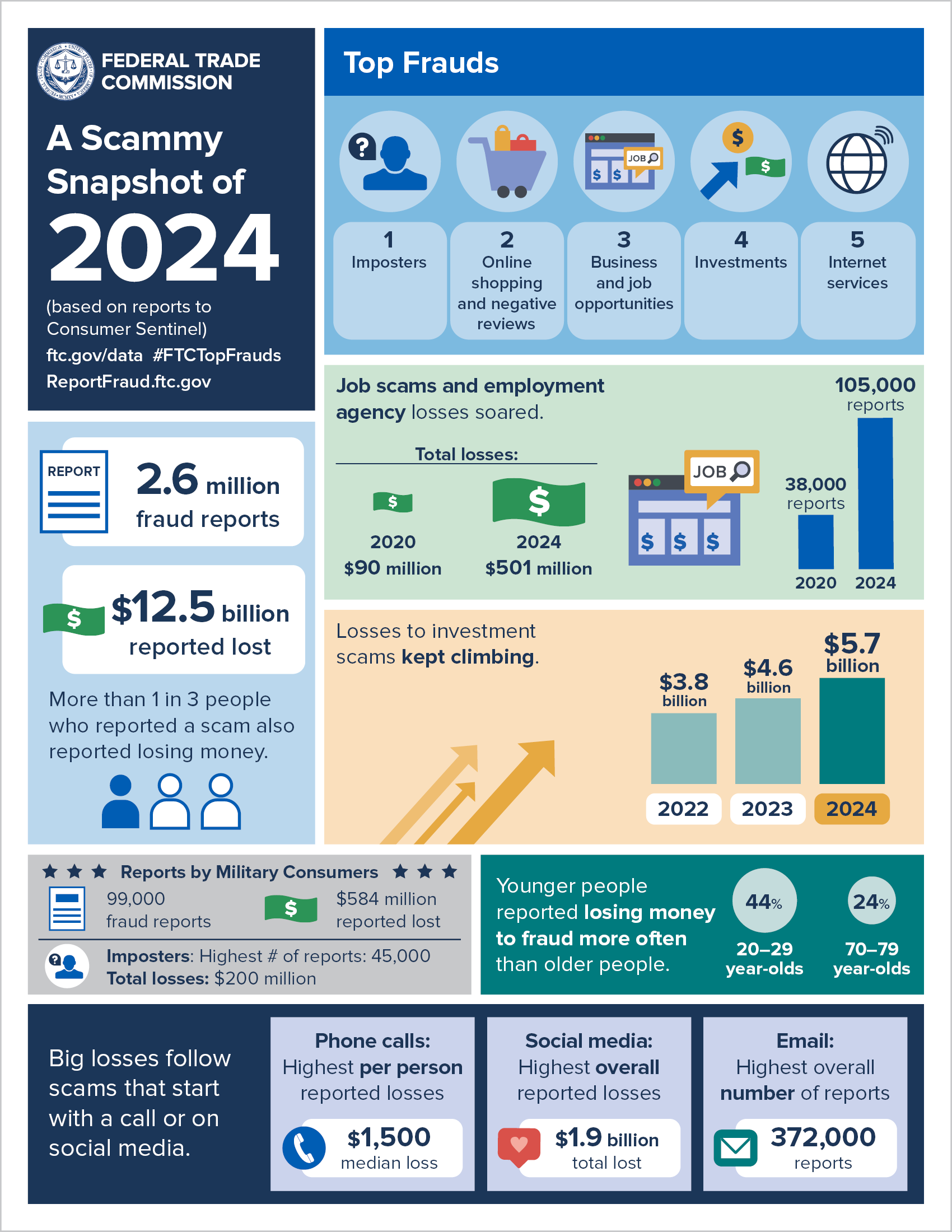
The Federal Trade Commission (FTC) ranks phone calls as the second-most-common contact method for fraud in 2024. Even worse, these scams had the highest per-person financial loss, with a median of $1,500 per victim.
At Bitdefender, we believe scam-free living starts with smarter protection—and today, we’re making a major upgrade to your mobile security arsenal by introducing the all-new Call Blocking feature in Bitdefender Mobile Security for Android.
Multi-Layered Call Protection That Works for You
We’ve built Call Blocking with multiple layers of defense, combining the best of real-time threat detection, AI, and user control—so you always know who’s calling, and you can stop unwanted calls in their tracks.
What’s included:
Blocking & Detection
Our spam call database is continuously updated—and it grows smarter every time users report and flag scam calls. When the system confirms a new threat, everyone is protected.
This means every report helps protect the entire Bitdefender community. You're not just avoiding scams—you're helping others avoid them too.
- User-Defined Blocking
Want to block specific numbers or entire area codes? You’re in control. Easily add numbers or regions to your personal block list to customize your defenses. - Suspicious Call Detection (AI-Powered)
Our AI analyzes call behavior and formatting, like odd prefixes or spoofed number patterns, and flags anything suspicious. When a call doesn’t look right, we’ll prompt you to block it on the spot.
Customization & Control
Not all unknown calls are bad. The new call blocking feature lets you create your own Custom Blacklist so you can manually curate block lists, even down to regional prefixes or specific numbers. Mark callers with tags like “scam,” “spam,” or “unwanted” to keep your call history organized and easier to manage.
And there’s more. You can easily visualize your call history log and usage stats to track down how many scam calls we’ve helped block in a given month or week, a simple yet satisfying reminder that we have your back, always.
Help Others. Stay Scam-Free. Be a Smart Netizen.
Phone scams have grown more sophisticated, with crooks thriving on your silence and confusion. They use AI-generated voices, spoof numbers, and emotionally manipulate victims to build trust fast. And with losses in the billions, affecting millions of people every year, proactive protection isn’t optional—it’s essential.
But every user who flags a number or blocks a scam call helps make the entire Bitdefender community more resilient.
With Bitdefender Mobile Security’s new Call Blocking feature, you’re not just protecting yourself—you’re contributing to a smarter, safer internet.
Try Call Blocking Today with Bitdefender Mobile Security for Android
The new Call Blocking feature is already available for Bitdefender Mobile Security's Android customers. It’s easy to activate and completely customizable, directly from your device.
If you’re new to our products and want to block unwanted calls and fend off scams while benefiting from the award-winning security that protects millions around the world, we’ve got you covered too:
Start your 14-day free trial of Bitdefender Mobile Security today
Stay in control. Stop scams before they reach you. Help protect others.
Frequently Asked Questions (FAQs)
How do I protect my phone from scam calls?
Enable your phone’s spam call protection, avoid answering unknown numbers, never share personal or financial information over the phone, and hang up if a caller pressures you to act immediately. A call-blocking app, such as Bitdefender’s Call Blocking feature, can also help stop known scam callers.
What do I do if I answered a scam call?
Simply answering a scam call is usually not enough to compromise your phone. If you didn’t share any personal information or install anything, hang up and block the number. If you disclosed sensitive information, change affected passwords, contact your bank if necessary, and monitor your accounts for suspicious activity.
How can I legally stop spam calls?
Register your number with your country’s Do Not Call registry if available, enable your phone’s spam filtering features, block unwanted numbers, and report persistent spam callers to your telecom provider or the appropriate regulator. While no method stops every call, these steps can significantly reduce them.
How can I permanently stop scam callers?
Unfortunately, there is no way to stop scam calls permanently. Criminals frequently spoof new phone numbers to bypass blocks. The best approach is to use call-blocking tools, avoid engaging with suspicious callers, and report scam numbers to help improve detection.
tags
Author

Alina is a history buff passionate about cybersecurity and anything sci-fi, advocating Bitdefender technologies and solutions. She spends most of her time between her two feline friends and traveling.
View all postsYou might also like
Bookmarks
