What’s New in GravityZone October 2026 (v 6.78)

October 21, 2026
Bitdefender rolled out new functionality in Bitdefender GravityZone, a unified cybersecurity platform that provides prevention, protection, detection, and response capabilities for organizations of all sizes. These features, aligned with our multi-layered security strategy, are designed to reduce the workload for security analysts, administrators, and users.
What’s new for Security Analysts
As attackers increasingly blend into legitimate activity, security analysts must uncover signs of sophisticated attacks and make the invisible visible. This section describes new functionality designed to elevate analysts' capabilities, offering enhanced tools for threat detection, investigation, and response.
CLAIRE AI Assistant Enhancements (Early Access)
When an analyst opens an incident and needs to decide on containment, the assistant now starts from that page’s context instead of a blank prompt. CLAIRE, previously named GravityZone AI Assistant, is a conversational assistant built into the Control Center. It applies large language model (LLM) reasoning to Bitdefender Support Center documentation and to data from your GravityZone environment to answer questions, issue recommendations, and initiate selected response actions.
CLAIRE is available through a controlled Early Access Program (EAP). It now has its own entry in the GravityZone navigation menu, with a Chat page and an Advisor briefing page.
On the Incidents, Network, and Policies pages, a new chat opens with page-specific prompts, and coverage extends to the rest of the interface. As the conversation continues, CLAIRE suggests follow-up prompts. When asked to isolate the endpoints associated with an incident, CLAIRE builds the endpoint list for review, and isolation runs only after the analyst refines the list and clicks Isolate. Outside incident work, the Advisor briefing page lists proactive posture recommendations. Each recommendation’s details page explains why CLAIRE chose the issue, summarizes the top affected items, and suggests remediation actions.
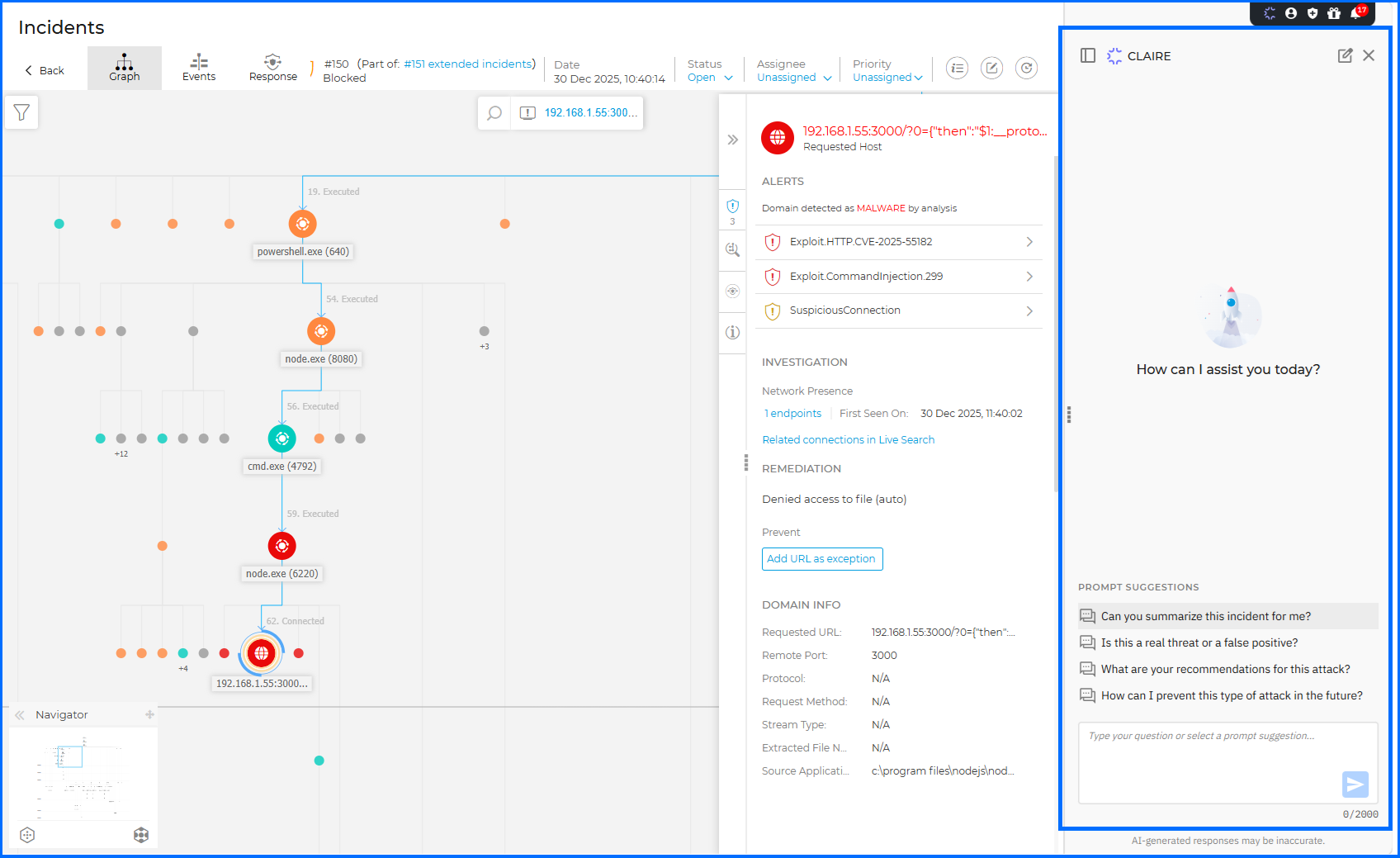
The chat window also adds a Stop button that cancels a prompt before the response is generated. A message now appears when you reach your usage limit, and all chats now follow a 30-day retention period.
Attack Path in GravityZone Exposure Management
Attackers rarely reach a critical asset in one step. They chain a misconfiguration on one asset to an exposed account or vulnerability on the next. Attack Path is now available as part of the new GravityZone Exposure Management license. It correlates endpoint risk findings, Cloud Security Posture Management (CSPM) data, and External Attack Surface Management (EASM) asset records to determine the most likely paths an attacker could take to compromise your assets.
Each attack path under Risk Management > Attack Path shows a graph and an asset list that mark potential entry points, exploitable vulnerabilities, and misconfigurations along the route. The graph can highlight the shortest path to the target asset, showing where a single remediation action breaks the largest portion of the chain. Risk factors such as Public exposure and Critical asset appear in both the graph and the asset table. When an asset also has a Risk Management entry, the asset details panel includes a button that opens the matching Risk Management > Resources or Risk Management > Accounts record.
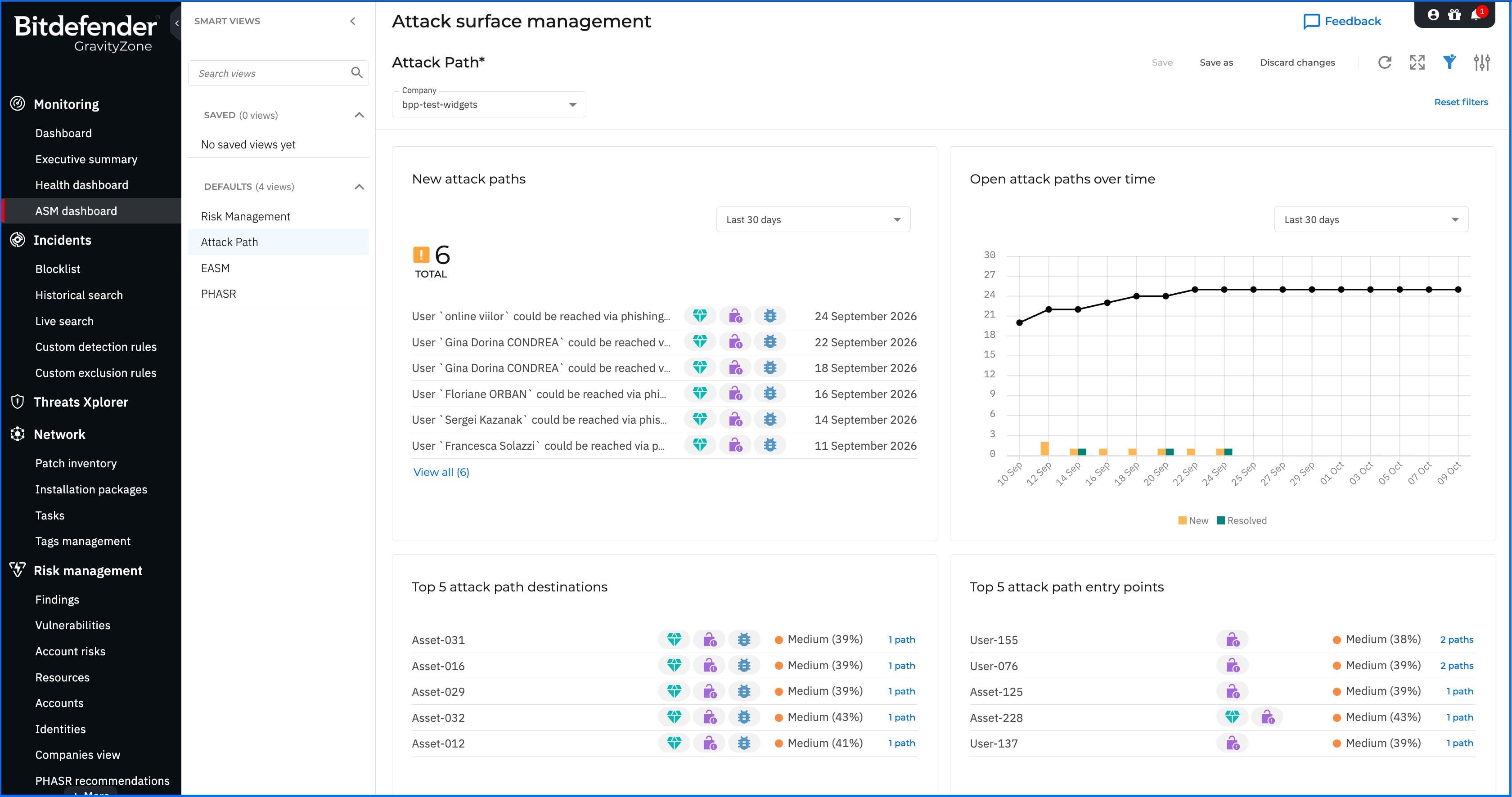
Four new widgets on Monitoring > ASM Dashboard track attack paths across the environment:
- New attack paths: lists newly created attack paths for Last 24 hours, Last 7 days, or Last 30 days.
- Open attack paths over time: charts New and Resolved attack paths, with a trend line, for Last 7 days, Last 30 days, or Last 90 days.
- Top 5 attack path destinations: lists the five assets that attack paths target most often.
- Top 5 attack path entry points: lists the five assets that most often serve as attack path entry points.
AI Visibility and Control Enhancements
Unmanaged AI tools on endpoints are now a routine part of an organization’s attack surface, and assessing that exposure requires seeing it alongside other risk data. AI Visibility and Control (AIVC), is a discovery and risk layer that reports which AI software is installed and running on managed endpoints and assigns a risk score to each finding. This release extends AIVC data to the ASM Dashboard, the AI Services page, and Risk Management > Resources.
Monitoring > ASM Dashboard now includes a dedicated AI Visibility and Control smart view with an overview of AI usage and risk exposure across the organization. Its widgets show the overall AI risk posture, compare risk across AI categories, list the affected users and endpoints, break findings down by AI category, and list the discovered AI services. AIVC widgets can also be added to custom dashboard smart views.
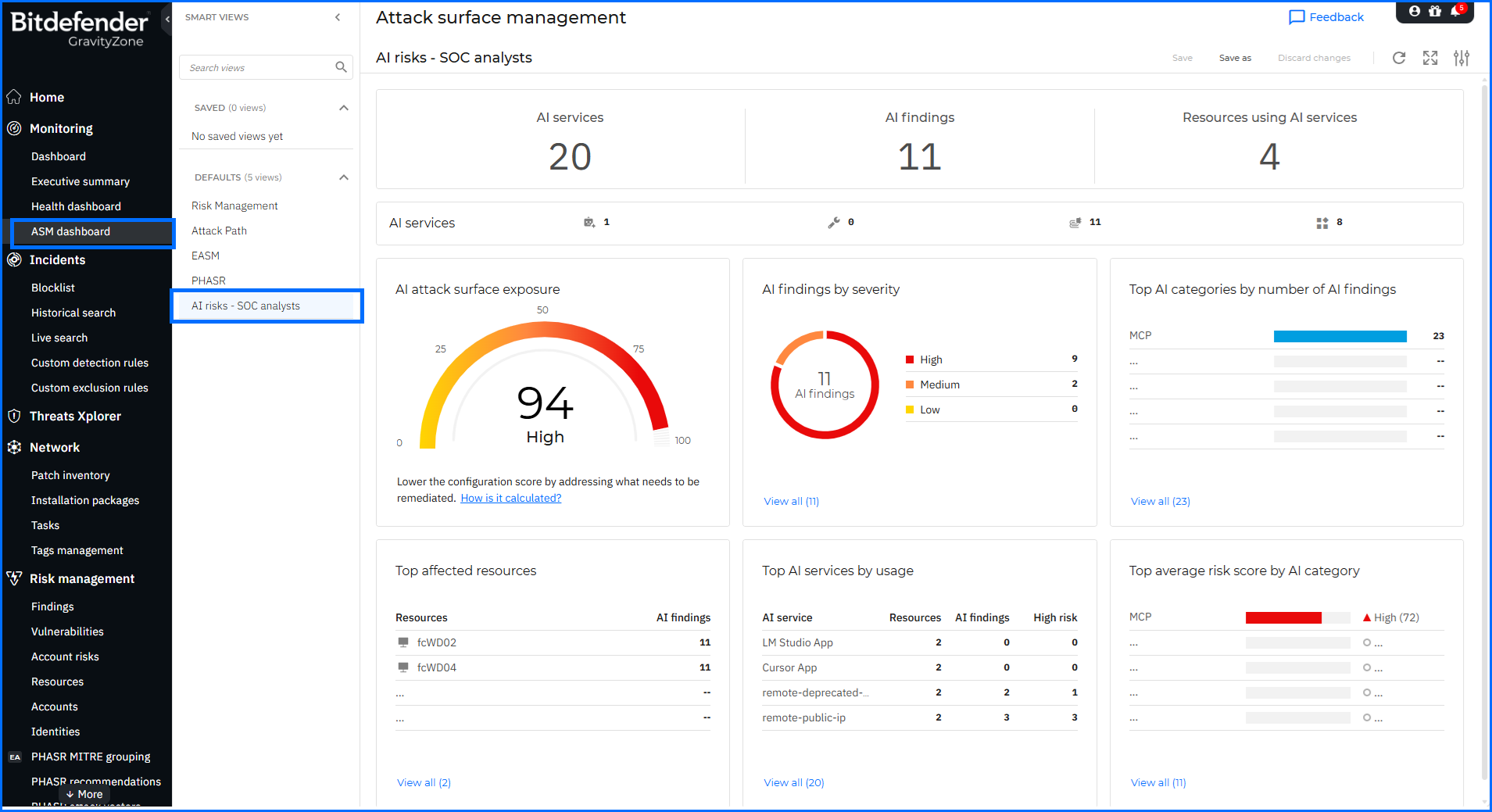
On AI Visibility and Control > AI Services, each discovered AI service now shows its associated finding or finding count, in both the grid and the service details. From there, analysts can open the AI Findings page to investigate. AI-related findings also appear in Risk Management > Resources, so an endpoint’s AI exposure sits alongside its other risk data. From there, analysts can move between the affected resource, its findings, and the associated AI services.
For comprehensive insights into AIVC, we invite you to watch our masterclasses here.
EASM Enhancements
External Attack Surface Management builds an attacker-centric view of an organization’s internet-facing exposure. This release adds classification detail to similar domain findings, and maps discovered public IP addresses back to the managed servers that use them.
Similar domains flagged as potential brand impersonation attempts now identify the typo squatting technique used to construct them — misspellings, alternative top-level domains, and substitutions involving visually similar or keyboard-adjacent characters. EASM also highlights public IP addresses used for external communication by servers managed by Bitdefender Endpoint Security Tools (BEST), with the managed servers using each address viewable alongside it. Analysts can identify which addresses to add to the EASM scan list, giving Attack Path additional context on potential entry points into the organization’s network.
For comprehensive insights into EASM, we invite you to watch our masterclasses here.
EDR and XDR Enhancements
GravityZone Endpoint Detection and Response (EDR) and Extended Detection and Response (XDR) give security analysts the tools to detect, investigate, and respond to threats across managed endpoints and connected sensors, with raw event telemetry that supports historical querying and incident investigation. This release changes how search is organized and shared and adds detail to incident and alert data.
Search and investigation
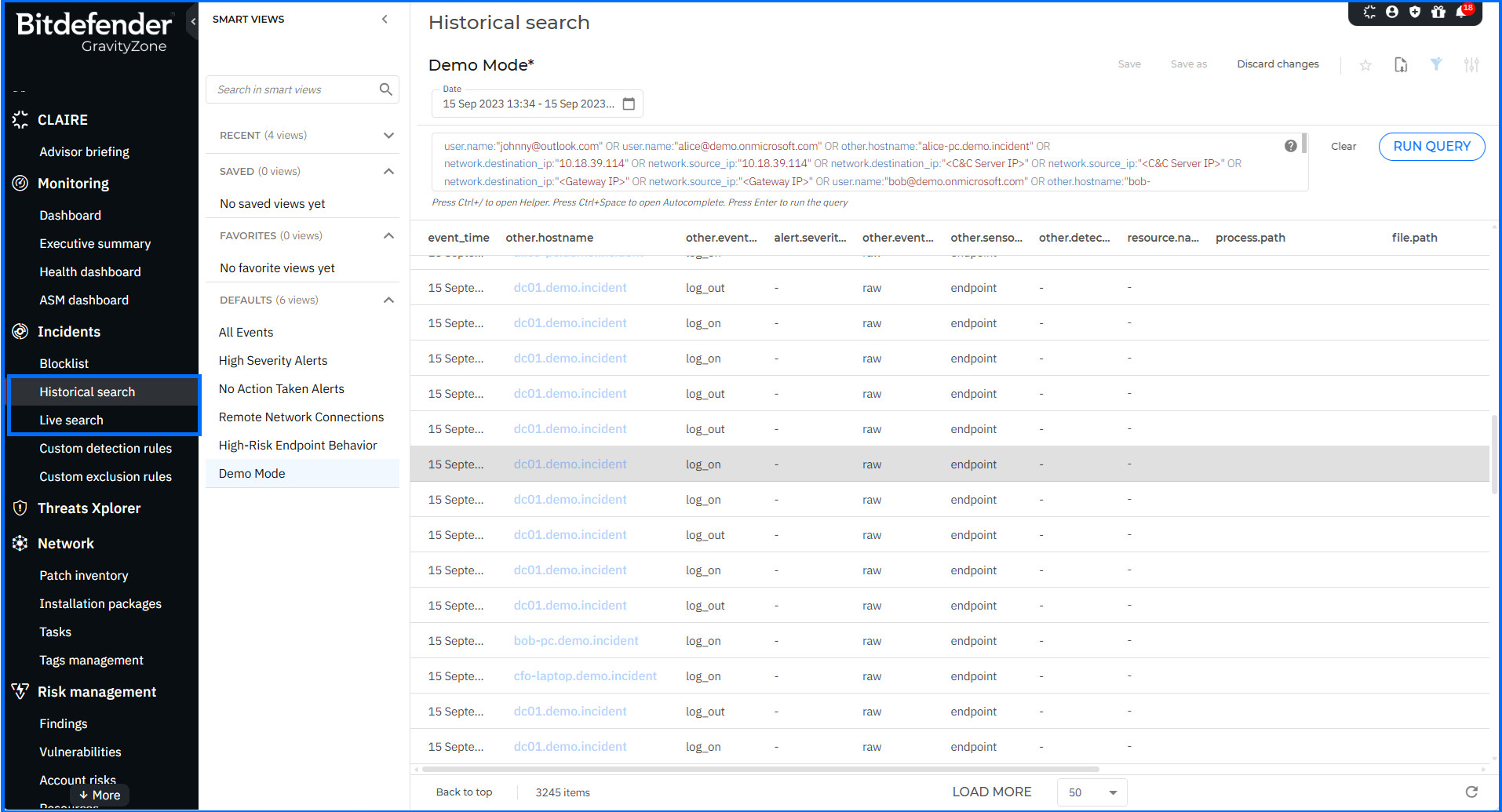
- Separate menu entries: Historical search and Live search now appear as separate entries in the left-side menu of GravityZone Control Center.
- Shared smart views: Smart views created on the Live search page can now be shared with other users in the company, with read-only or editable permissions. Company Administrators can edit, delete, rename, or make editable for any shared smart view, regardless of who created it or what permissions it has. Other users can delete, rename, or make editable only the views they created, and can edit only those they created or have edit permissions for. Shared smart views appear in a separate section of the Queries panel. Each one has a banner showing its access rights, creator, last update date and time, and the user who last modified it. Create, edit, and delete actions are logged on the User activity page, in the Live search area.
- FQDN search: Historical search now supports searching and filtering raw events and alerts by endpoint-submitted fully qualified domain name (FQDN) values. The fqdn field is available in the query editor helper under the Other category, and other.fqdn can be added as a column in the results table and viewed in the event details panel.
Incidents and alerts
- Entity type filter: A new Entity type filter under More filters on the Incidents page narrows incidents by the types of entities they contain. It supports multiple selections, and its options are populated from the entity types present in your incidents.
- Self Protect attribution: In alert details for Endpoint incidents, alerts generated by the Tamper Protection module now show Self Protect in the Detected By field.
- MITRE ATT&CK tactics: XDR and EDR incident and alert details now also support the Resource Development, Stealth, Defense Impairment, and Reconnaissance tactics. Activity previously classified as Defense Evasion may now be reported as Stealth or Defense Impairment, depending on the detection context.
- Timestamps with seconds: Timestamps throughout Incidents and Historical search now include seconds as well as hours and minutes.
For analysts reconstructing an intrusion, the new tactics and second-level timestamps work together. A sequence in which an attacker disables a security service and then clears event logs within the same minute can now be ordered precisely, with each step mapped to Defense Impairment or Stealth.
For comprehensive insights into detection and response with GravityZone EDR and XDR, we invite you to watch our masterclasses here.
What’s new for Administrators
With administrators constantly juggling numerous tasks and responsibilities, they appreciate tools that make their daily work easier. This section describes new functionality designed to simplify managing features responsible for prevention, protection, and detection in a defense-in-depth security architecture.
Extended Email Security Enhancements
Bitdefender Extended Email Security (EES) offers flexible deployment models (Gateway, API-based, and Unified) to provide a comprehensive defense against sophisticated spear-phishing, brand impersonation, and supply chain fraud. This release adds outbound data loss prevention rules, distributor-level console access, and a confirmation step for identity provider sign-in.
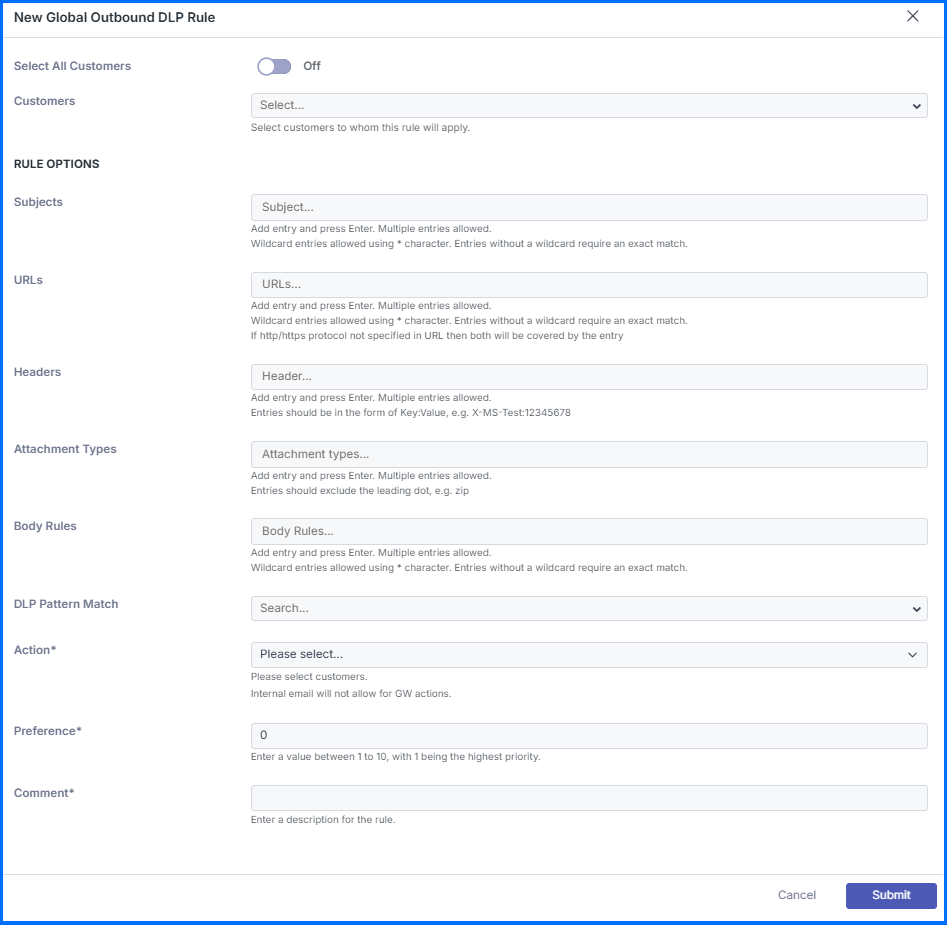
DLP rules in Extended Email Security now also cover outbound email for the Gateway and Unified deployment models, which require Outbound Smarthost. Rules inspect the subject, headers, body, attachment types, URLs, and sensitive data patterns, including credit card numbers, International Bank Account Numbers (IBANs), and Social Security Numbers (SSNs). Matching outgoing messages are sent to Quarantine or deleted with Delete. You can apply enforcement globally or target specific customers, domains, or users.
Distributors and higher-level partners can now access the Extended Email Security consoles of the downstream partners they manage directly from the Extended Email Security section, across nested partner hierarchies, without Extended Email Security being provisioned for their own company. Console visibility follows the existing Your Bitdefender partner can assist you with security management settings, and the available actions are determined by Extended Email Security permissions within each accessible company. For detailed information, see the dedicated TechZone article here.
In addition, users who sign in with GravityZone credentials and open the Extended Email Security console now see a confirmation prompt. The prompt asks them to approve the automatic switch to the GravityZone identity provider (IdP) before proceeding.
For comprehensive insights into Extended Email Security, we invite you to watch our masterclasses here.
Security Data Lake Single Sign-On
Security teams that use Security Data Lake alongside GravityZone can now sign in to both with the same corporate credentials. Bitdefender GravityZone Security Data Lake combines SIEM operations with scalable data lake storage and advanced analytics, collecting and correlating data from multiple organizational sources for proactive threat hunting.
Security Data Lake now supports single sign-on (SSO) through GravityZone IdP Proxy, so users authenticate with their organization’s identity provider. GravityZone IdP Proxy supports SSO using SAML 2.0 and System for Cross-domain Identity Management (SCIM) to manage and verify digital identities across the GravityZone ecosystem.
With Security Data Lake added, sign-in to it is now handled by the organization’s existing identity infrastructure, the same as for the other GravityZone services connected through IdP Proxy.
Network Enhancements
The GravityZone Network inventory gives administrators a consolidated view of all managed endpoints, containers, and network assets across their environment. This release adds two network identifiers to the Network page and refines one filter option:
- Public IP column and filter: Displays each endpoint’s public IP address, separately from the existing IP column and filter, which show the local IP address. The filter supports text matching with starts with or contains, so partial IP addresses also return results. Endpoints imported through integrations such as Active Directory, Microsoft Entra ID, VMware vCenter, or Amazon Web Services (AWS) do not display a public IP address.
- MAC addresses column and filter: Displays each endpoint’s MAC address information with the same text-matching options. Devices with multiple network interfaces show all their MAC addresses in a single cell, and the filter matches any of them.
- Golden Image role option: The Golden Image option in the Role filter now appears only when the feature is turned on for your company.
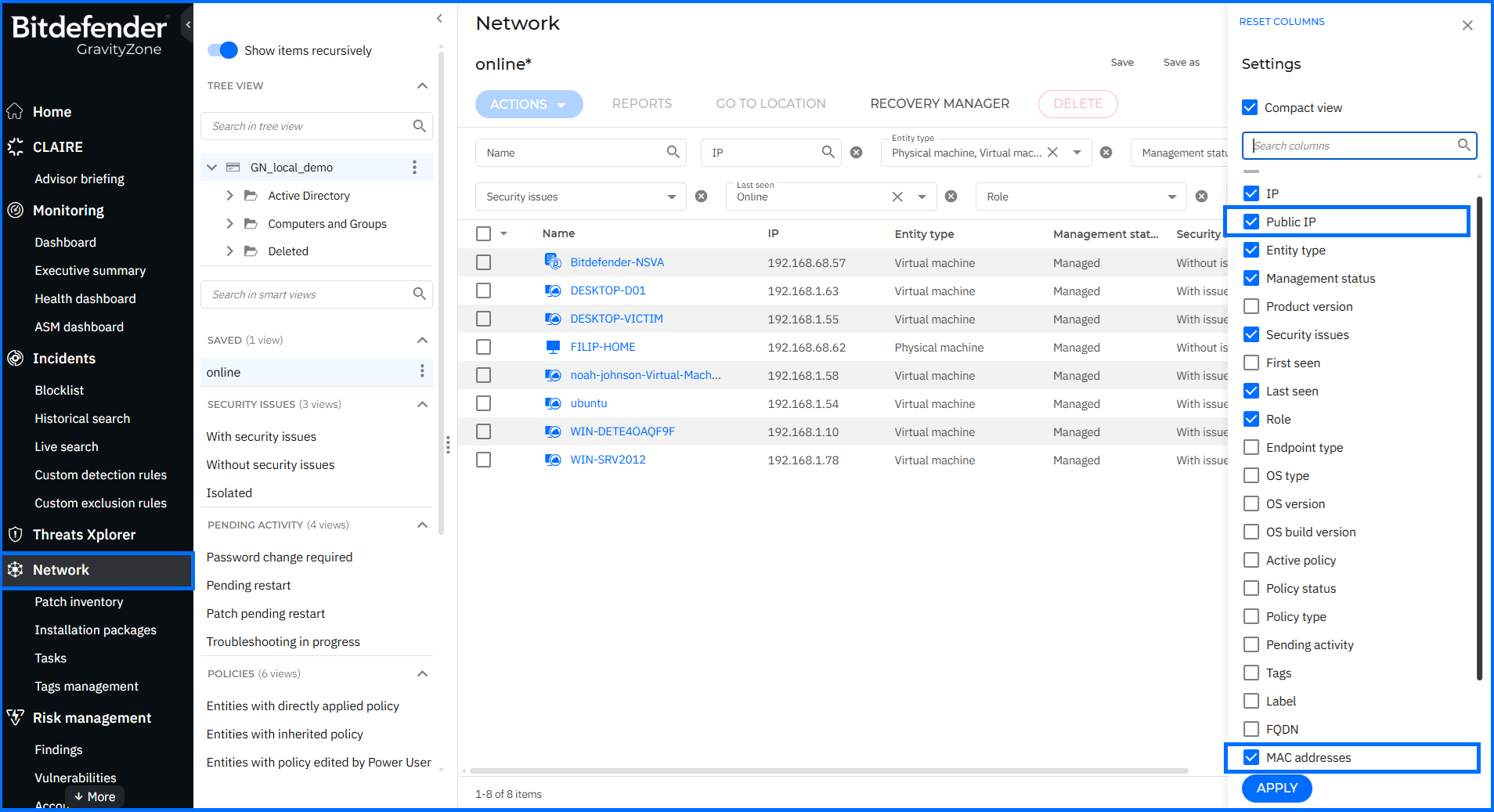
With public IP and MAC addresses searchable directly in the grid, administrators can locate an endpoint from a known address, match devices against data exported from external network or security tools, and narrow large endpoint inventories even when only part of an address is known.
Compliance Manager Enhancements
The Compliance Manager in GravityZone maps endpoint findings against regulatory and industry compliance standards, giving administrators a structured view of their organization’s compliance posture across managed assets.
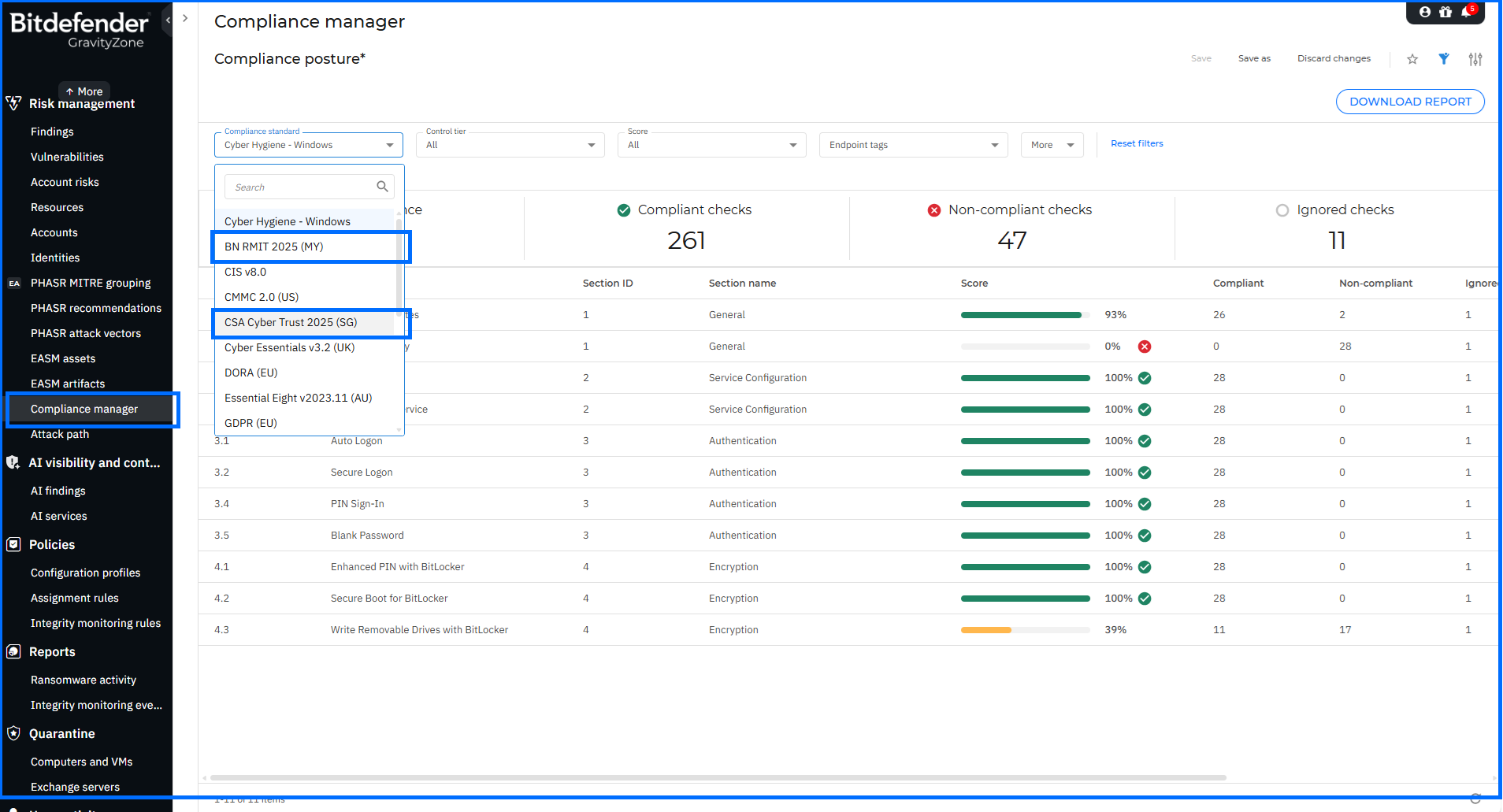
This update adds two new compliance standards, now available across the Findings, Identity risks, and Compliance manager pages:
- BNM RMIT 2025 (MY): Issued by Bank Negara Malaysia (BNM), the Risk Management in Technology (RMiT) policy document sets out requirements for financial institutions on technology risk management, covering technology governance, cybersecurity management, and operational resilience.
- CSA Cyber Trust 2025 (SG): Issued by the Cyber Security Agency of Singapore (CSA), Cyber Trust is a risk-based certification mark for organizations with extensive cybersecurity measures and practices. The 2025 edition extends coverage to cloud, operational technology (OT), and AI security.
In addition, a new Notes column and filter on the Compliance manager page let administrators add and view notes for individual controls, such as justifications, context, or links to external documentation. Control notes can also be included when exporting compliance reports in PDF or XLSX format.
For comprehensive insights into Compliance Manager, we invite you to watch our masterclasses here.
Security Telemetry Enhancements
Organizations that correlate endpoint activity in their own Security Information and Event Management (SIEM) platform depend on the range and naming of the events they receive. Security Telemetry forwards raw operating system events from endpoints running BEST to a third-party SIEM. Administrators configure it in the Policy under General > Security Telemetry, where they select the event types to send. This release groups all events by category, adds descriptions for every category and event, and extends coverage with additional event types.
The Security Telemetry page now lists event types under named categories. Each category and event has a description, so administrators can see what an event captures before turning it on. The following categories and event types are now available:
- Service: Added, Change status, Modify.
- Scheduled task: Create, Delete, Modify.
- Account management and authentication: Create local account, Delete local account, Logon failed, Settings changed.
- Shell and script activity: Command Prompt command, PowerShell command, PowerShell script block logging, Antimalware Scan Interface (AMSI) buffer.
- Background Intelligent Transfer Service (BITS) job activity: Add file, Create, Delete.
- Windows Management Instrumentation (WMI) activity: Execution method, New activity, New binding.
- Device and driver: Driver module load, Hardware mount, Hardware unmount.
- BEST agent: Agent uninstall request.
- Audit policy: Change Windows audit policy.
- Process: Injection.
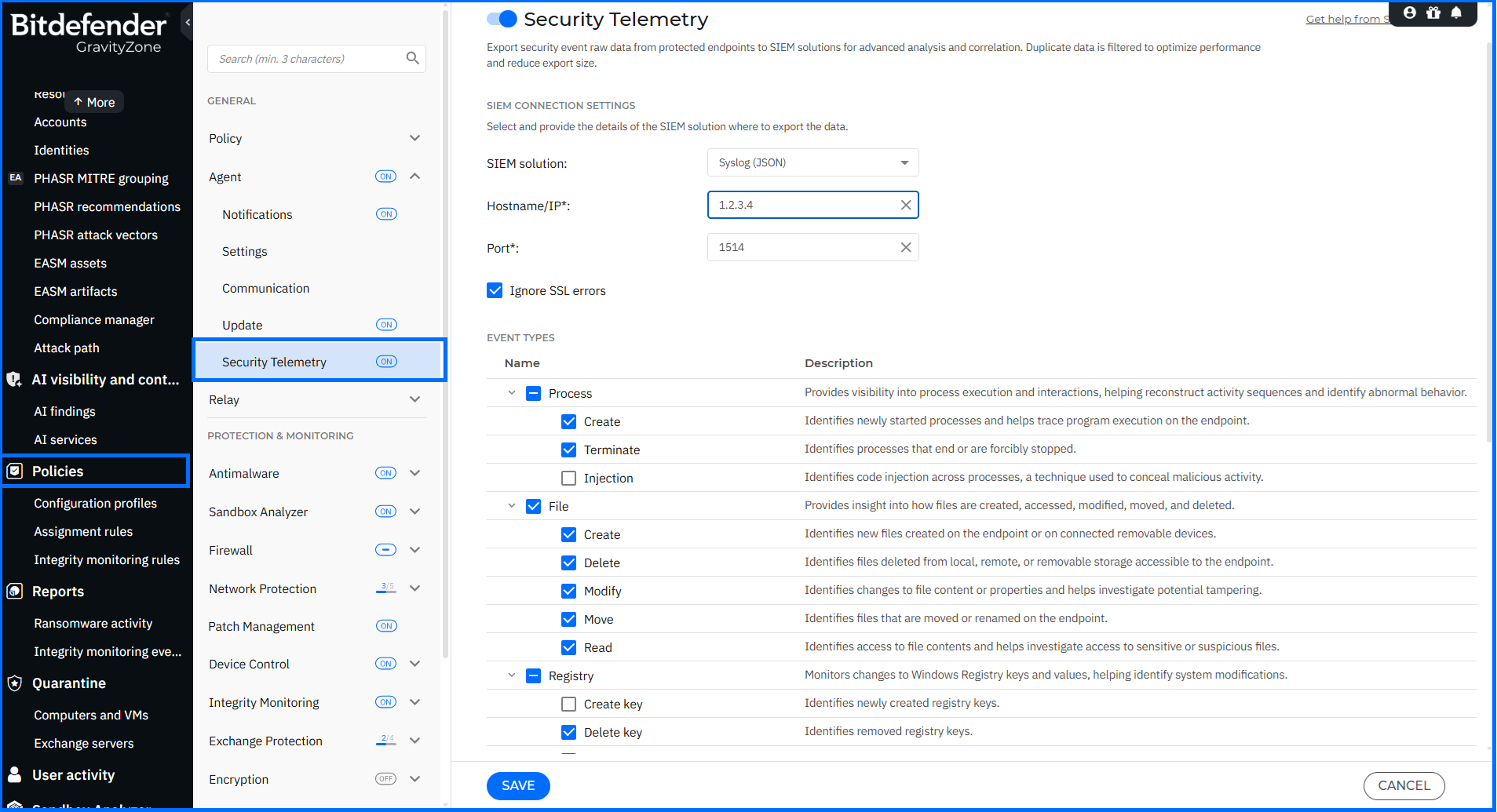
Existing event types now sit within the new categories under shorter names:
- Process: Create and Terminate, previously Process creation and Process deletion.
- File: Create, Delete, Modify, Move, and Read, previously File creation, File deletion, File modification, File move, and File read.
- Registry: Create key, Delete key, Modify value, and Delete value, previously Registry key creation, Registry key deletion, Registry value modification, and Registry value deletion.
- Account management and authentication: Logon, and Logout (renamed from Logoff).
- Network: Connection and DNS query.
Firewall for macOS
- Platform column: The Policies > Firewall > Rules table includes a new filterable Platform column that shows which operating system each rule applies to.
- Existing rules: All rules previously defined in a policy are automatically set to Windows as their default platform.
- Protocol support: The complete list of macOS-supported protocols is available on Bitdefender Support Center here.
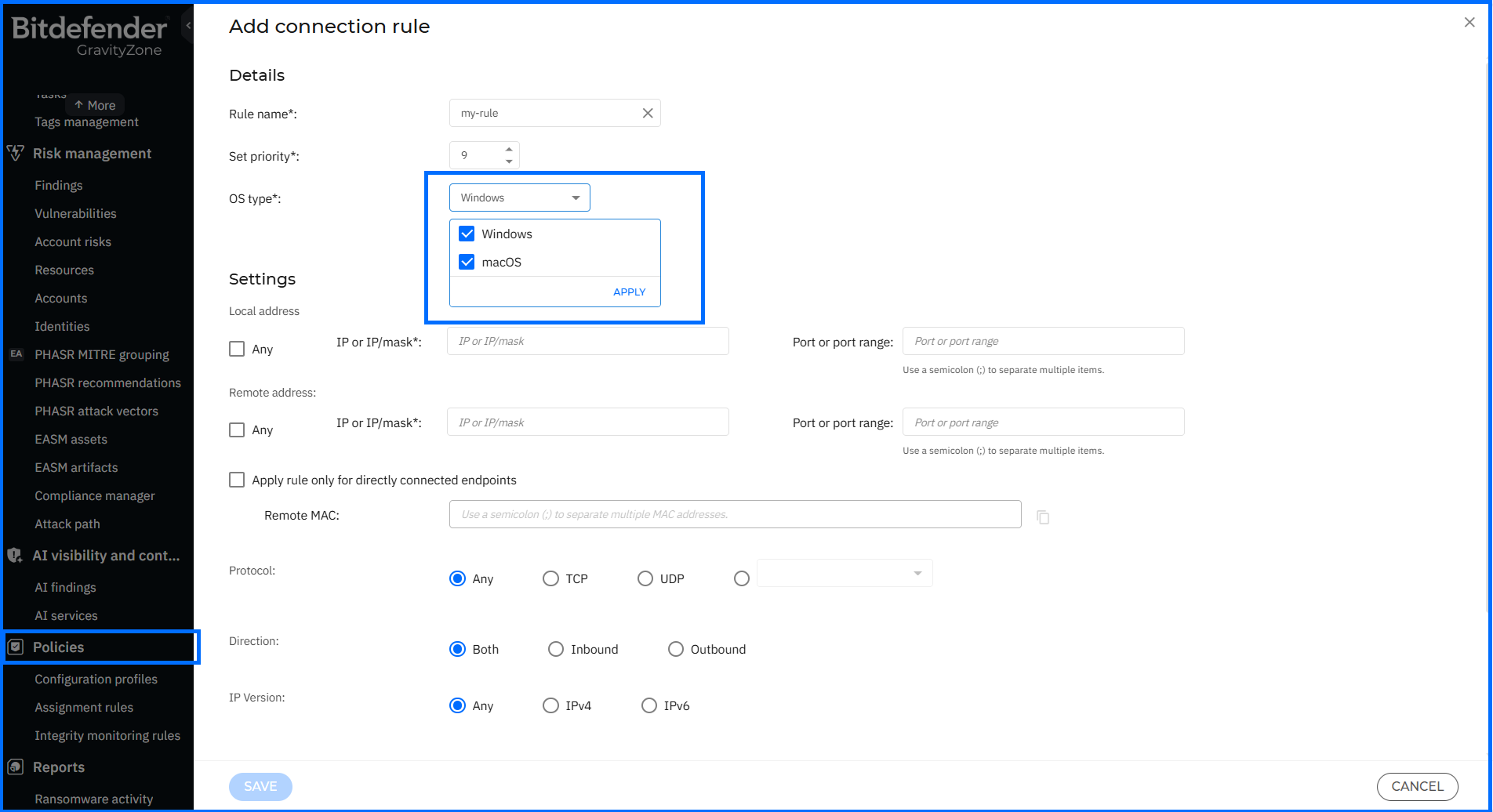
The rollout of the Firewall module on macOS endpoints will take place in phases, so availability in individual environments may follow the console update.
Service API Keys
Automated integrations such as SIEM connectors, ticketing systems, and orchestration scripts often run on API keys tied to an individual user account, so the integration’s access depends on that user’s account and permissions. GravityZone now introduces dedicated service API keys and associated service accounts that manage automated integrations and API access independently of user API keys.
Service API keys are managed from the new Accounts > Service API keys page, with options to create, edit, clone, suspend, activate, and delete keys. You can configure each key with specific API module permissions, a target company and folder scope, and an expiration period of 1 to 365 days. Access to the page is controlled by the new Manage service API keys permission, available in the user account settings under Accounts.
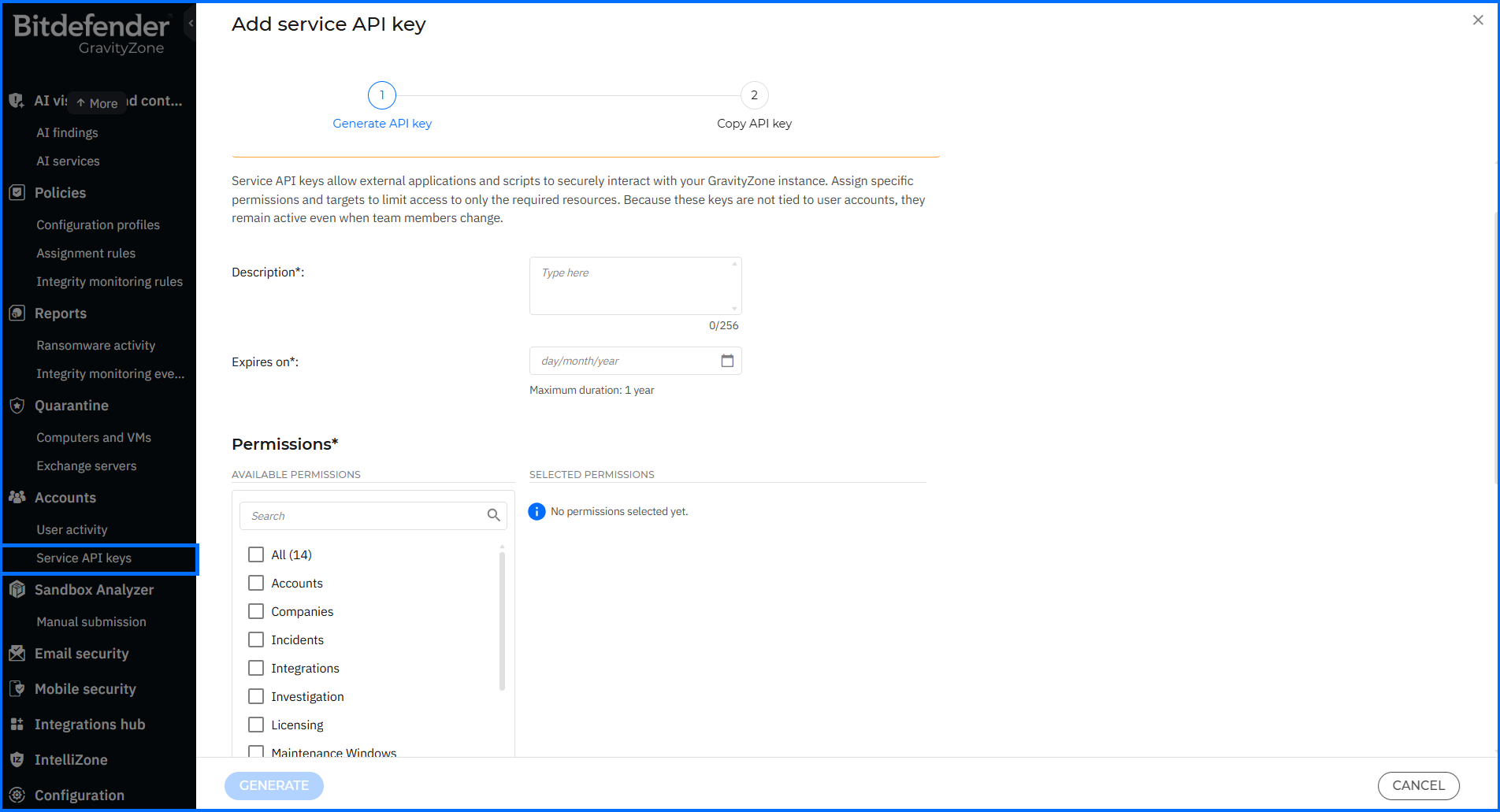
Key lifecycle events are recorded in the User activity log, and administrators can receive email and Control Center notifications before keys expire. This keeps integration access auditable and scoped to the companies and API modules each integration needs.
More information about service API keys can be found on the Bitdefender Support Center here.
API Enhancements
Bitdefender Control Center APIs enable developers to automate business workflows. These APIs are exposed via the JSON-RPC 2.0 protocol. You can find usage examples and documentation in our Support Center, located here.
This update introduces new methods, push events, and response parameters to support incident assignment and tracking, service API key permissions, scan task visibility, network inventory, and macOS package configuration.
- Incidents: The new assignIncident method assigns and reassigns Endpoint Detection and Response (EDR) and Extended Detection and Response (XDR) incidents to eligible GravityZone users in bulk, and also removes assignees. All assignment changes are recorded in the Incident history panel and on the User activity page in GravityZone Control Center. Actions performed by Managed Detection and Response (MDR) analysts are attributed to an MDR Service account.
- Event Push: Six new Event Push API events report EDR and XDR incident updates: incident-status-changed, incident-assignee-changed, incident-priority-changed, incident-note-created, incident-note-updated, and incident-note-deleted. They are turned on through the existing setPushEventSettings method. The Task Status push event payload now also includes the parentTaskId parameter for correlating parent tasks with their child subtasks.
- Companies: The getCompanyDetails method now returns the status of companies undergoing migration between partners instead of a generic error.
- Accounts: Accounts API methods now support the manageServiceAPIKeys permission, which corresponds to the Manage service API keys permission described in the Service API Keys section above. The createAccount, updateAccount, getAccountsList, and getAccountDetails methods now accept and return the updated role identifiers used with service API keys.
- Network: The getTaskStatus response now includes the subTaskId (unique child task identifier) and scanType parameters in the subtasks object for scan tasks (Type 1). This identifies the scan type: Quick Scan, Full Scan, Custom Scan, Network Scan, Memory Scan, or YARA Scan. The getEndpointsList and getNetworkInventoryItems methods now also return the endpoint’s public IP address in the publicIp parameter.
- Packages: The createPackage, updatePackage, and getPackageDetails methods now support configuring and installing the Firewall module on macOS endpoints.
For comprehensive insights into the GravityZone API, we invite you to watch our masterclasses here.
Where Can I Learn More About Bitdefender GravityZone?
To learn more about the Bitdefender GravityZone platform, contact us or a Bitdefender partner for more information. You can also start a free trial by requesting a demo here.
The Bitdefender GravityZone unified security platform offers a one-stop solution for all your organization's security needs. As the digital landscape evolves, Bitdefender stays ahead, providing prevention, protection, detection, and response capabilities to help keep organizations of all sizes worldwide safe.
tags
Author
Grzegorz Nocon is a graduate of the Faculty of Physics at the University of Silesia. With over 16 years of experience in the IT industry, he currently works as a Technical Marketing Engineer at Bitdefender. A strong supporter of a holistic approach to security and passionate about solving security problems in a comprehensive and integrated way. Outside of work, an avid CrossFit enthusiast and a lover of fantasy literature.
View all postsYou might also like
Bookmarks
