How Do You Manage Your Passwords? We Ask Netizens

December 18, 2025
Password management habits haven’t evolved as much as cybersecurity threats have. Despite growing awareness, many users still prioritize convenience over security when handling their credentials. Understanding how people manage passwords today reveals why so many accounts remain vulnerable.
Key Takeaways
- Convenience still outweighs security for most users. Many people reuse passwords, store them insecurely, or rely on memory despite knowing the risks.
- Password reuse remains a major vulnerability. A significant portion of users use the same password across multiple accounts, increasing the risk of widespread account compromise.
- Writing down passwords is still common practice. Over a third of users admit to storing passwords on paper or in unsecured notes.
- Password managers are underused despite being safer. Only a minority of users rely on dedicated password managers, even though they offer stronger protection and convenience.
How People Manage Passwords and Why It Still Puts Them at Risk
In the 2025 Bitdefender Consumer Cybersecurity Survey, we asked more than 7,000 consumers in seven countries a simple question: “How do you manage your passwords?”
The results reveal a familiar trend. Despite years of cybersecurity education and countless headlines about data breaches, many users still treat password management with haste and complacency.
Section 4 of our study, “Convenience Kills Security,” highlights what previous years already suggested: when forced to choose between speed and safety, convenience still wins.
Most people are complacent
According to our survey, 37% of consumers admit to writing down their passwords, while 17% use the same password for at least two accounts (mirroring the results of last year’s study). 15% use the same password across 3 or more accounts—a habit that essentially hands attackers a shortcut to personal and financial data. A single compromised login can quickly snowball into full-scale account takeover.
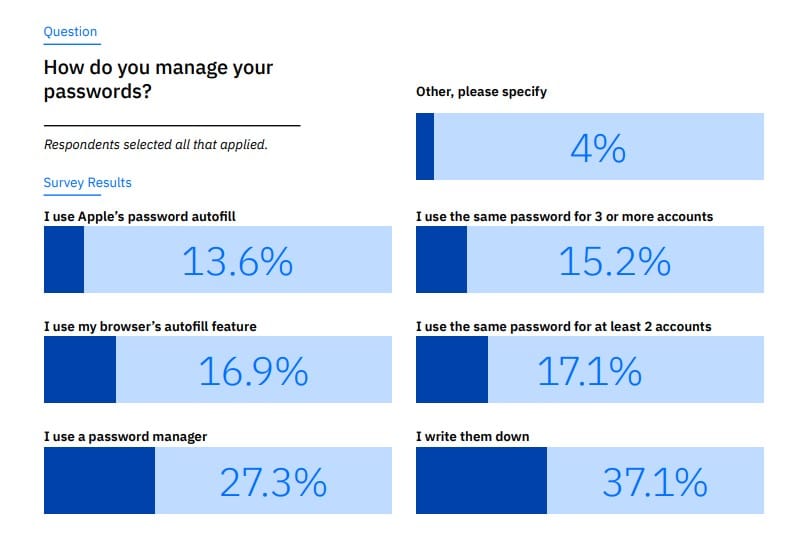
Source: Bitdefender 2025 Consumer Cybersecurity Survey
Many respondents rely on browser autofill tools, while just over a quarter say they use a dedicated password manager—one of the safer practices.
Unfortunately, most responses tilt toward convenience, with participants acknowledging they reuse simple passwords, store them in unencrypted notes or rely on memory.
Open answers
4% of participants chose answers outside the given options. The most common open responses were:
I remember them
I change passwords frequently
I write them down on paper notes
I use lengthy passwords with different openings (i.e. variations of the same password)
I use two passwords and rotate
I keep hints in text files
How consumers can improve their password hygiene
Protecting yourself doesn’t require deep technical knowledge. A few adjustments to daily habits can dramatically reduce your risk:
1. Use a password manager
Password managers generate strong, unique passwords and store them securely so you don’t have to memorize dozens of logins. They also autofill credentials safely—unlike storing passwords in plain-text notes or browsers.
2. Enable multifactor authentication (MFA)
Turn on MFA wherever available. Even if an attacker steals your password, they can’t access your account without the second authentication factor.
3. Avoid password reuse
Every account should have its own unique password. This prevents a single breach from becoming a chain reaction.
4. Update default credentials on all devices
Connected devices often ship with easy-to-guess factory passwords. Changing them reduces the risk of unauthorized access.
5. Reduce your digital footprint
Limit what personal information you share online and regularly audit (or delete) accounts you no longer use. Less exposed data means less risk.
6. Stay informed about security threats
Read the cybersecurity news, enable breach notifications, and monitor suspicious activity on your accounts. Awareness is a powerful form of defense.
The 2025 Bitdefender Consumer Cybersecurity Survey shows that while awareness of cyber threats is growing, daily habits still need improvement. Convenience may feel harmless, but attackers count on complacency. Use recommended password-management practices to protect yourself in the cyber world.
Frequently asked questions (FAQ)
What is the best way of managing passwords?
The best way to manage passwords is by using a trusted password manager. It generates strong, unique passwords for each account and stores them securely. Pair this with two-factor authentication (2FA) for added protection and avoid reusing passwords across multiple sites.
What do hackers do with your accounts?
Hackers use compromised accounts to send phishing messages, run scams, steal personal data, or access linked services like email and banking. They may also sell accounts on underground markets or use them to impersonate you and target your contacts.
How do most people keep track of their passwords?
Most people still rely on memory, reuse passwords, or store them in insecure places like notes apps or written lists. While convenient, these methods increase the risk of account compromise compared to using secure password managers.
What is the 8-4 rule for passwords?
The 8-4 rule suggests creating passwords with at least 8 characters and changing them every 4 months. However, modern security practices favor longer, unique passwords and using a password manager rather than frequent forced changes.
You may also want to read:
1 in 7 Consumers Got Scammed in the Past Year – Bitdefender Consumer Cybersecurity Survey 2025
What Scares You Most About AI? We Ask Netizens
FBI: Scammers Are Posing as Your Bank – Here’s How to Protect Your Account
tags
Author

Filip has 17 years of experience in technology journalism. In recent years, he has focused on cybersecurity in his role as a Security Analyst at Bitdefender.
View all postsYou might also like
Bookmarks
