Vendor bank detail verification template and BEC response kit

November 03, 2026
An unexpected change to a supplier's payment details can turn an ordinary invoice into a bank-transfer scam. This vendor bank detail verification template helps freelancers and small teams confirm requests before paying, while the BEC response kit explains what to do if money has already gone astray.
Key takeaways
- Criminals impersonate vendors or compromise real email accounts to divert legitimate payments
- A familiar email thread and convincing invoice do not authenticate new bank details
- Urgency, secrecy and unfamiliar account names are reasons to pause payment
- Verify through a trusted phone number; if a payment has already been made, contact your bank immediately
How does vendor bank-detail fraud work?
Business email compromise (BEC) involves impersonating a trusted contact, sometimes through a hacked mailbox. In invoice redirection fraud, criminals substitute their bank account for the supplier's. Both the FBI and Europol warn about this tactic, a form of financial scam targeting expected payments.
In an Iowa case described by US prosecutors in September 2026, a company paid invoices to an account supplied by a fraudster impersonating a vendor. The transfers happened in 2022, illustrating why familiar billing paperwork is insufficient proof.
Warning signs include a last-minute request, unfamiliar beneficiary, unusual destination bank, secrecy or pressure to skip checks. However, a compromised mailbox can produce perfectly ordinary-looking correspondence. That’s why it’s important you verify every change, not just the suspicious ones.
For additional warning signs, see our guide to supplier bank-detail change scams.
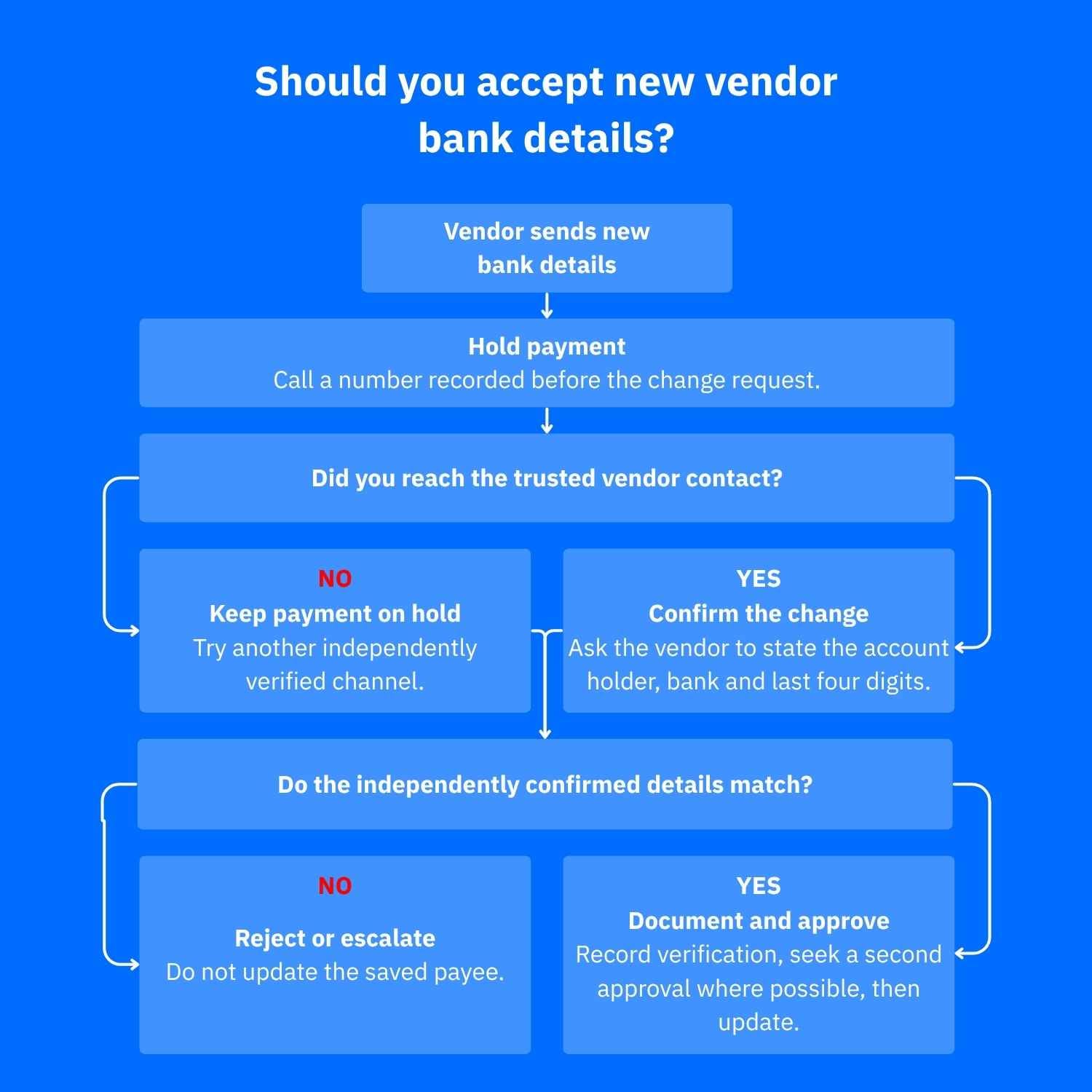
Vendor bank detail verification template to use before paying
Copy this into your invoicing workflow. You should also put payment on hold until verification is complete, even for long-standing suppliers.
- Request: Vendor legal name [ ]; invoice [ ]; date/channel received [ ]; effective date [ ].
- Trusted callback: Phone number [ ]; source (contract or established vendor record) [ ]. Never use any contact details supplied with the change.
- Confirmation: Call date/time [ ]; person's name and role [ ]; did they authorize the change? [ ]. Ask them to state the payee name, bank and last four account digits before you reveal them.
- Cross-check: Do their answers match instructions received securely? [ ]. Any beneficiary-name mismatch or unexplained change? [ ].
- Approval: HOLD / VERIFIED / REJECTED [ ]; verifier [ ]; separate approver if available [ ]; date [ ]. Update the payee only after approval.
For even better results, follow up with a phone call. Here’s a quick callback script to help you through the call: "We received new payment details for invoice [reference]. Did you authorize this? Please confirm the account holder, bank and last four digits."
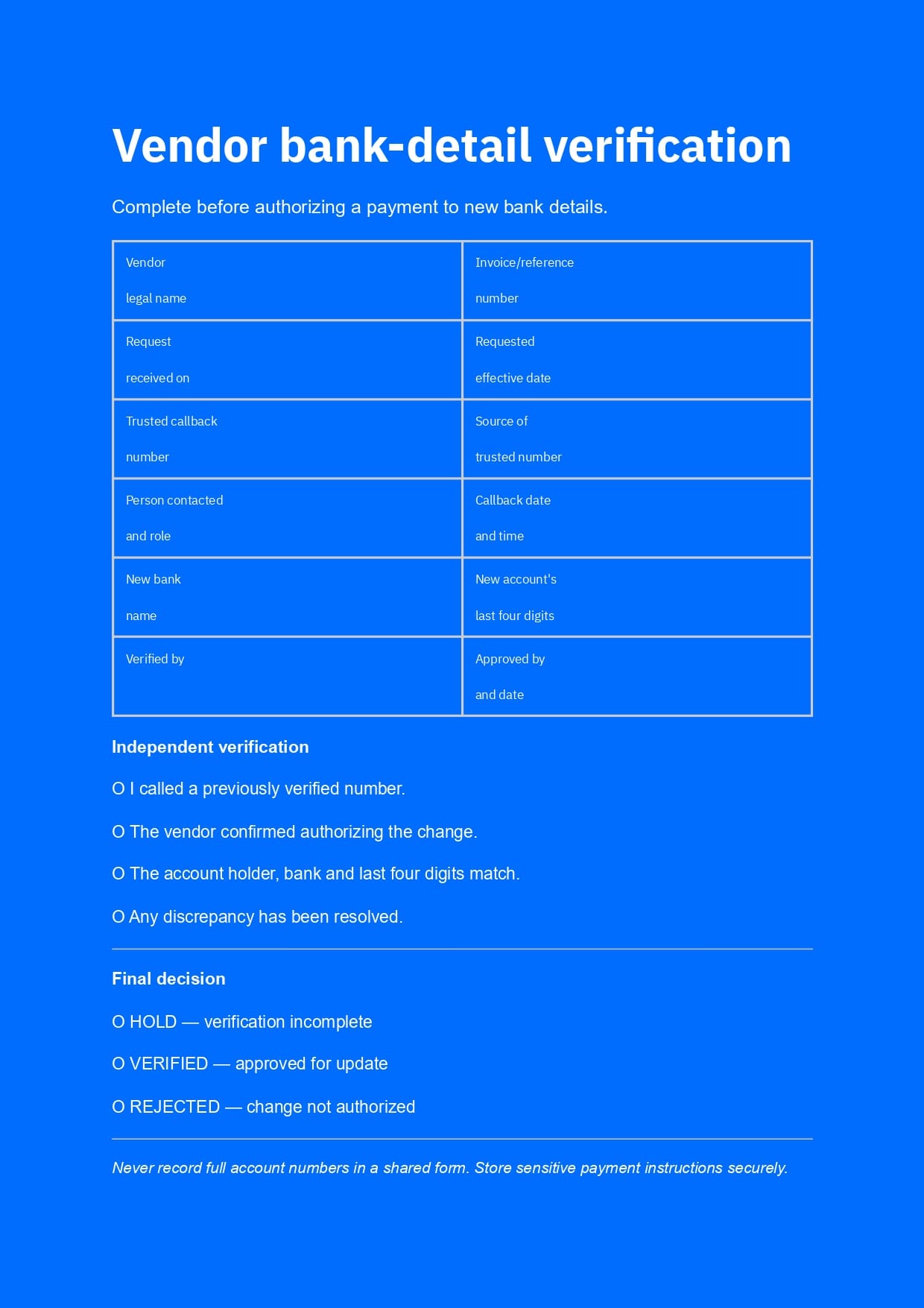
Keep complete account numbers in an access-controlled payment system, not a shared checklist. If you can’t reach the trusted contact, leave the change unapproved. A matching payee name alone does not mean the changes are legitimate.
BEC incident-response kit if you've already paid
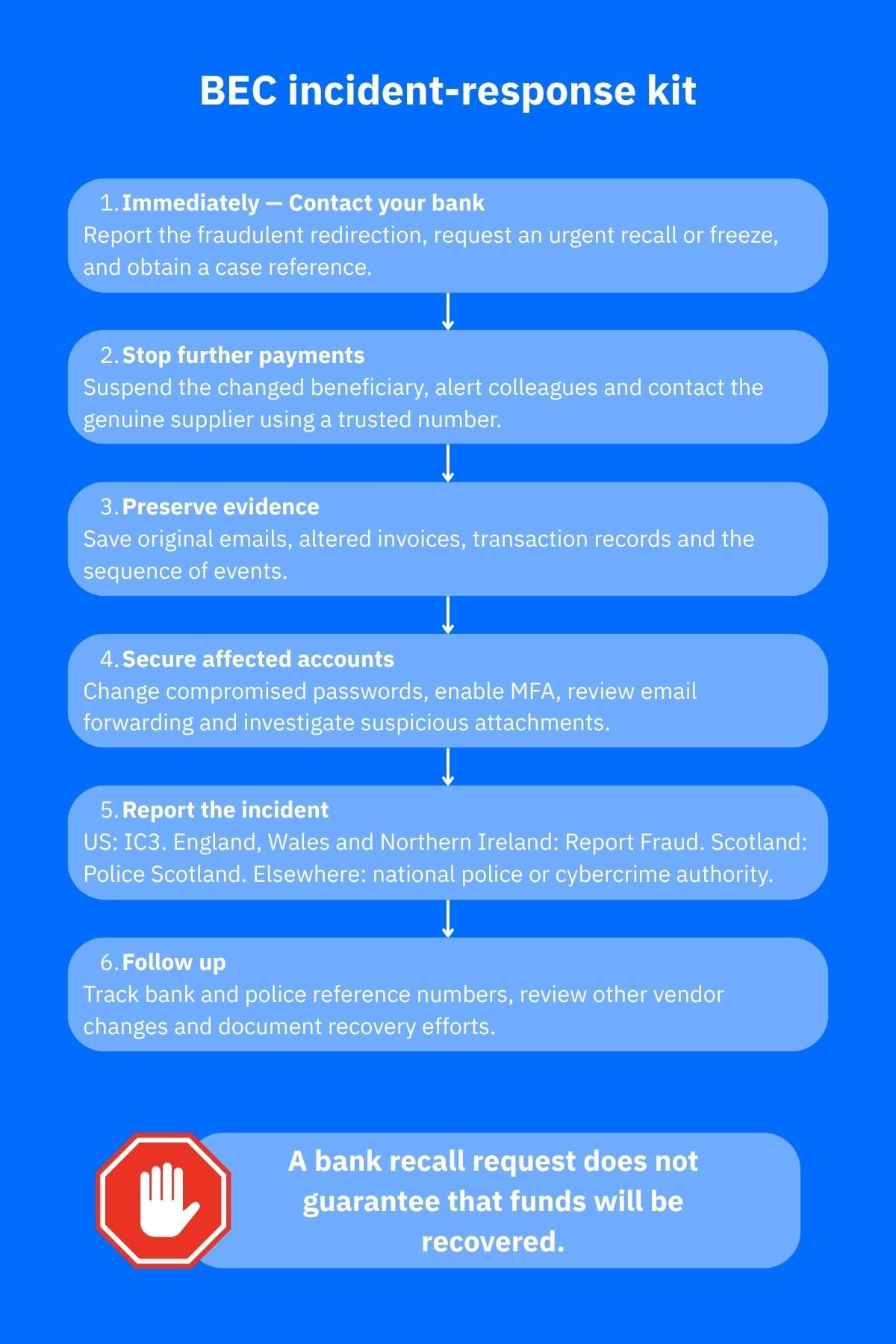
Act immediately and stop further transfers. You can recall money in some cases, but it’s never guaranteed.
- Call your bank now. Use an official number; report payment redirection, request an urgent recall, give the transaction reference and obtain a case number, according to FBI IC3 guidance
- Stop other payments. Flag the vendor record, alert anyone authorized to pay, contact the real supplier independently and check other recent invoices
- Save evidence. Keep original emails, altered invoices, screenshots, payment receipts and a dated log of calls and decisions
- Secure accounts. If a mailbox or device might be compromised, change passwords from a trusted device, enable multifactor authentication, check forwarding rules and seek help with suspected malware
- Report the fraud. US victims can use IC3. In England, Wales and Northern Ireland use Report Fraud; in Scotland, contact Police Scotland. Elsewhere, contact local police or the relevant national reporting authority
Use our comprehensive guides to respond after a bank-transfer scam and preserve evidence. Follow up with your bank and keep in mind that refund rules differ by jurisdiction.
How Bitdefender can help
Bitdefender Scamio can assess suspicious emails, messages, links and QR codes; don't submit confidential invoice details. Bitdefender Ultimate Security and Bitdefender Ultimate Small Business Security offer malware and scam protection, while Bitdefender SecurePass helps manage unique passwords. Note that none of these tools can replace a verification call, so use them to complement existing, proactive mitigation measures.
Bitdefender Digital Identity Protection monitors personal information exposed in data breaches, which may be useful if individual credentials are at risk. For creators dealing with sponsorships, Bitdefender Security for Creators monitors supported social accounts for takeover signs. However, note that it cannot authenticate a vendor's bank details.
Conclusion
Use this vendor bank detail verification template whenever payment instructions change. A recorded callback and payment hold offer stronger safeguards than trusting the appearance of an email.
Frequently asked questions (FAQs)
Can bank details be changed?
Yes. Suppliers legitimately switch banks, and customers can update saved payees. But a plausible reason doesn't verify the request. Independently confirm who authorized the change before replacing payment instructions or transferring funds. An emailed letter or signed PDF is no substitute for independent verification.
What are vendor bank details?
These are the account details used to pay a supplier or contractor. They typically include the account holder's name, bank, account number or IBAN, and any routing number, sort code or SWIFT/BIC required for the transfer. It is worth noting that these details do not authenticate an invoice.
How do I update my bank details?
As a supplier, submit changes through your customer's approved portal or documented secure procedure and expect a verification callback. As a payer, verify the request independently, record approval, then update the saved beneficiary in your bank or accounting system.
What should you do when a vendor requests updated payment information?
Pause payment, call a vendor number recorded before the change request arrived, and ask the contact to confirm the new account. Investigate mismatches and get separate approval if possible. Save the verification record. If you've already transferred funds to an account you suspect is fraudulent, contact your bank immediately.
tags
Author

Vlad's love for technology and writing created rich soil for his interest in cybersecurity to sprout into a full-on passion. Before becoming a Security Analyst, he covered tech and security topics.
View all postsYou might also like
Bookmarks
