Pegasus spyware infects iPhone of Serbian university rector who supported student protests

October 20, 2026
Researchers uncovered a zero-click infection affecting a supporter of Serbia’s student movement, alongside a spyware warning sent to an anti-corruption investigator.
The iPhone of Vladan Đokić, rector of the University of Belgrade and a prominent supporter of Serbia’s student-led pro-democracy movement, was infected with Pegasus spyware in 2026, according to an investigation by Citizen Lab and the SHARE Foundation.
Key takeaways
- Researchers confirmed a Pegasus infection that required no interaction from Đokić
- Anti-corruption investigator Rade Bajić received an Apple spyware warning, but forensic analysis remains ongoing
- Earlier investigations documented spyware targeting Serbian students, activists and opposition figures
- People at heightened risk should consider Lockdown Mode and seek expert help if warned
iPhone hacked without a click
Citizen Lab says it established the infection with high confidence based on forensic evidence from Đokić’s iPhone. The attack used a zero-click exploit: he did not need to open a file or tap a link to get infected.
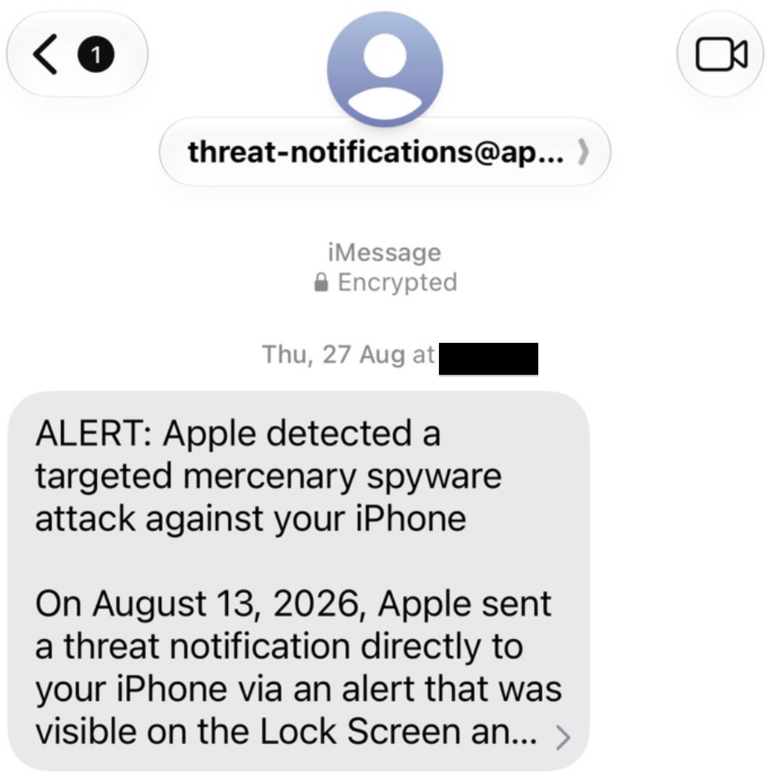
The Oct. 19 report also identifies Rade Bajić, who worked on an investigation into alleged corruption surrounding a proposed Trump Tower development in Belgrade. He received an Apple threat notification in August.
That warning indicates likely targeting by mercenary spyware.
Source: citizenlab.ca
“We judge the receipt of an Apple Threat Notification to be a high confidence indicator that his device was likely targeted with mercenary spyware, such as Pegasus,” Citizen Lab said, adding that the forensic analysis of the artifacts collected from his device is ongoing.
What Pegasus can expose
Pegasus, developed by NSO Group, can give an attacker extensive access to a compromised phone.
In an earlier investigation involving a Serbian student activist, Citizen Lab explained that the spyware could access private notes, photographs and encrypted messages, as well as secretly activate the microphone and camera. Researchers confirmed that the student’s iPhone had been infected through an iMessage zero-click exploit across December 2025 and January 2026.
For potential targets, that changes the security calculation. Avoiding suspicious messages remains useful, but it can’t prevent an infection that requires no interaction.
A broader pattern of surveillance
The findings follow a September report in which the SHARE Foundation documented at least 14 people targeted with advanced spyware in Serbia so far in 2026.
Those affected included members of the student movement, activists and opposition representatives. SHARE said the timing coincided with the March 29 local elections.
The investigations also uncovered Android spyware resembling NoviSpy on devices, including one belonging to a student movement member whose phone had been confiscated during police questioning. Those cases involved a different route to compromise: physical access to the device.
What to do if Apple warns you
Most people never face mercenary spyware attacks. These operations devote exceptional resources to a small number of individuals, often because of their work or public role.
However, a genuine threat notification deserves immediate attention. Apple describes these warnings as high-confidence alerts.
If you receive one:
- Verify it independently. Sign in directly at account.apple.com and check for a threat notification at the top of the page.
- Watch for impersonation. These warnings never ask you to install software, open files or provide passwords or verification codes.
- Seek specialist assistance. Apple recommends expert support, including Access Now’s Digital Security Helpline.
Consider Lockdown Mode if you face heightened risk
On Apple devices, Lockdown Mode reduces opportunities for sophisticated attacks by restricting certain message attachments, web technologies and incoming invitations.
To enable it on an iPhone:
1. Open Settings
2. Select Privacy & Security
3. Tap Lockdown Mode
4. Follow the prompts to turn it on and restart your device
Apple recommends updating devices before enabling the feature and activating it across supported devices.
For everyone else, practical everyday defenses include keeping software updated, using strong account protection and treating unexpected security messages carefully.
Use independent security software to help detect malicious links, downloads and other threats that may accompany an attack.
On topic:
An online ad was enough to deliver spyware—no click required
Apple patches zero-day behind ‘extremely sophisticated’ iPhone attacks
WhatsApp detects new spyware activity from Israel’s NSO Group despite court order
tags
Author

Filip has 17 years of experience in technology journalism. In recent years, he has focused on cybersecurity in his role as a Security Analyst at Bitdefender.
View all postsYou might also like
Bookmarks
