Card added to Apple Pay without permission? What happened and what to do

September 15, 2026
If your bank says a card was added to Apple Pay without permission, treat it as possible account compromise or digital-wallet provisioning fraud—even if the card is still in your hand.
This guide explains how criminals can enroll it elsewhere, the warning signs to check, and what to do immediately.
Key takeaways
- An unexpected Apple Pay or Google Wallet enrollment can mean someone obtained enough card and verification information to provision your card on another device
- The wallet itself doesn’t need to be “hacked”: criminals often target the enrollment step by stealing card details and manipulating verification
- Red flags include a wallet-registration code you didn’t request, an alert that your card was added to a new wallet, unfamiliar account changes, or purchases you didn’t make
- Freeze the card, call the issuer through a trusted channel, ask it to revoke unauthorized wallet tokens, dispute fraudulent transactions, and secure affected accounts
A card added to Apple Pay without permission usually points to provisioning fraud
Adding a payment card to a mobile wallet is called provisioning. Apple says the card issuer, or its authorized service provider, decides whether to approve a card for Apple Pay. The full card number is not stored on the device or Apple Pay servers; instead, the issuer creates a unique Device Account Number. Similarly, Google Wallet uses a device-specific token rather than exposing the physical card number during payments.
So, an unauthorized wallet entry does not automatically mean Apple Pay, Google Wallet or NFC was technically breached. The weak point can be the enrollment process: a criminal obtains the card details and defeats or manipulates the issuer's verification step. Apple allows cards to be entered manually using the card number, expiry date and CVV before issuer approval, while Google says verification can involve a bank-issued code, bank app or website, phone call, or another issuer-supported method.
How criminals can add your card to a wallet they control
Santander UK is warning that it has seen fraudulent Apple Pay and Google Pay setups. One documented pattern starts with a fake shopping site: the victim enters card and personal information, then receives a genuine one-time passcode. The victim thinks the code confirms the purchase, but it actually authorizes the criminal to register the card in their digital wallet.
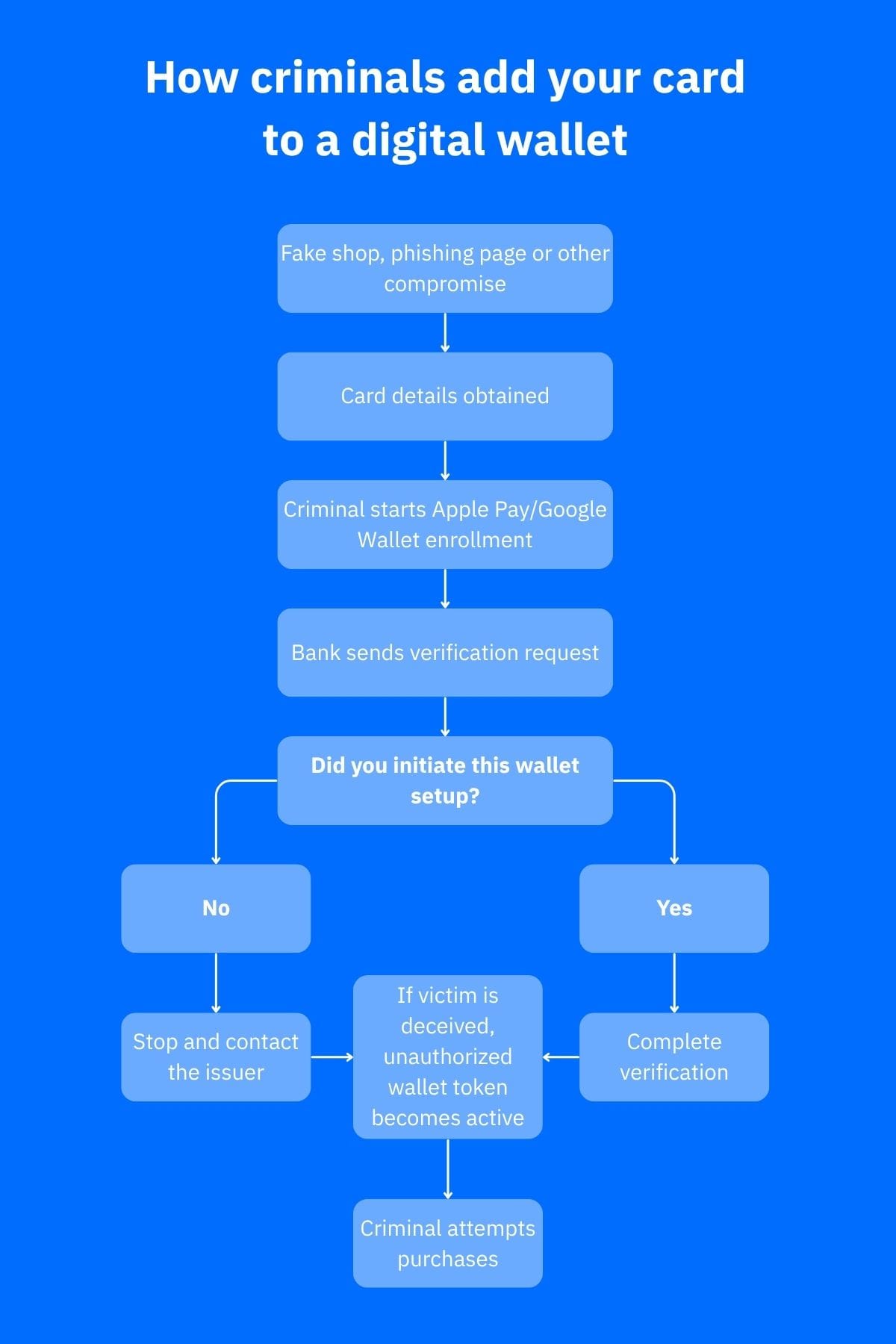
A typical sequence is:
- The criminal obtains card details through phishing, a fake checkout or another compromise
- They try to add the card to a wallet on their device
- The issuer requests extra verification, and the criminal tricks the cardholder into sharing, entering or approving it
- Once the wallet token is active, the criminal can attempt purchases from that device
Read the full wording of every verification message. A code for adding a card to a digital wallet is not a code for confirming an ordinary purchase.
Warning signs you should not ignore
Treat an unexpected “card added to wallet” alert as serious, but verify it independently. Scam texts can also make up such an alert to trick you into calling a fake fraud department. Santander advises consumers to verify unexpected communications through trusted contact details rather than relying on the readout in the message or caller ID.
Other red flags include a wallet-verification code you didn’t request, a new-device or password-change alert, unfamiliar transactions, or a caller claiming to be your bank who asks for an OTP or approval prompt. Contact the bank through its official app, website or the number printed on your physical card.
What to do if your card was added without permission
Take action even if no fraudulent purchase has appeared. An unauthorized wallet token indicates that something in the enrollment chain may have been compromised.
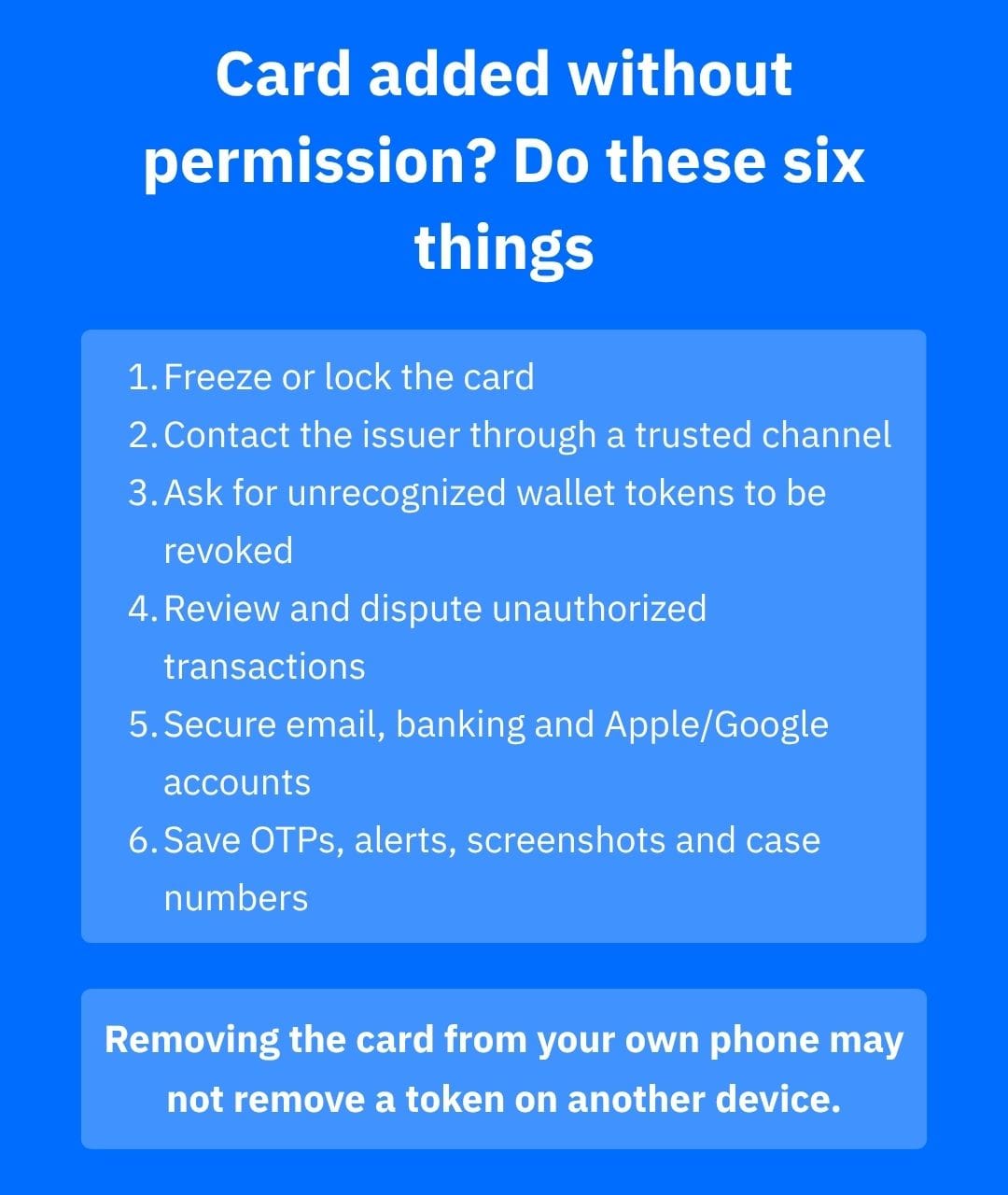
- Freeze or lock the card if your banking app allows it, then immediately contact the issuer.
- Say specifically that the card appears to have been provisioned to an unauthorized mobile wallet. Ask the issuer to revoke or suspend every wallet token you do not recognize, not merely to replace the physical card.
- Review recent transactions and dispute those you didn’t make. In the US, the CFPB advises consumers to report unauthorized transactions promptly; liability and reimbursement rules vary by payment type and jurisdiction.
- Check your banking profile for changed contact details, trusted devices or security settings. Secure your email, bank, Apple Account or Google Account if they may have been compromised.
- Change reused or exposed passwords, enable strong multifactor authentication where available, and remove unknown sessions or devices.
- Preserve the alert, OTP message, transaction records, screenshots and your bank case number. A structured scam evidence checklist can help if the claim later needs to be escalated.
Do not assume that deleting the card from your own phone solves a token provisioned on somebody else's device. Apple notes that removing a payment card from one device does not automatically remove it from other devices, while issuers can suspend wallet credentials. Contacting the issuer is therefore essential.
If the bank disputes whether the transactions were genuinely unauthorized, the distinction between authorized and unauthorized fraud may become important to the complaint and reimbursement process.
How to reduce the risk of digital-wallet provisioning fraud
Never share or approve a verification code simply because a caller or website says it is needed to “secure” your account. Read the whole message and make sure it describes an action you personally initiated. Santander specifically recommends reading the full OTP message instead of relying on autofill or entering the code without checking its purpose.
Use transaction and security alerts from your bank, protect email and financial accounts with unique passwords, and verify unfamiliar merchants independently before entering card details. EMV contactless technology generates a one-time security code for each transaction, so this fraud pattern is usually about misusing card information or the wallet-enrollment process, not simply cloning an EMV chip through somebody's wallet.
How Bitdefender can help
Bitdefender Scamio can analyze suspicious messages, links, screenshots and QR codes before you act on them, which is useful when a supposed bank or merchant asks you to verify a card or follow an unexpected link.
Bitdefender Ultimate Security includes device security and Scam Protection Pro features to detect phishing, suspicious messages, scam websites and other deceptive online interactions. These protections can reduce exposure to methods used to steal card or account information, but they can’t reverse an unauthorized transaction or guarantee that wallet provisioning will be blocked.
If the incident suggests personal data or credentials were exposed, Bitdefender Digital Identity Protection can monitor for compromised personal information and breaches, while Bitdefender SecurePass can generate and store unique passwords using end-to-end encryption.
Bitdefender Security for Creators is a narrower fit, but it can be relevant when a creator's email, Instagram, Facebook or YouTube presence was part of the compromise. Current plans include anti-scam email protection and monitoring for suspicious activity on supported social accounts.
Conclusion
If you discover a card added to Apple Pay without permission, focus first on the issuer: freeze the card, report the unauthorized provisioning, revoke unrecognized wallet tokens and review transactions. Then secure the accounts that could have enabled the enrollment.
This is one variation of the broader problem of financial scams. Fast reporting matters, but so does explaining precisely that an unauthorized digital-wallet token was created, not merely that your card details may have been stolen.
Frequently asked questions (FAQs)
Can a mobile wallet be hacked?
Yes, in the sense that a device, account or connected credential can be compromised, but an unauthorized card in Apple Pay or Google Wallet doesn’t necessarily mean the wallet platform itself was hacked. Many incidents instead involve stolen card information and manipulation of the issuer's card-enrollment verification process.
How did someone use my card without having it?
They may not need your physical card. Card details stolen through phishing, fake checkout pages, compromised accounts or other fraud can be used for online transactions or to attempt mobile-wallet enrollment. Apple confirms that a card can be entered manually, although the issuer still decides whether the provisioning request is approved.
Can you add someone else's card to your Apple Wallet without their permission?
A fraudster can try to enroll someone else's card if they have the necessary information, but the card issuer controls approval and may require additional verification. Apple documents manual card entry and issuer verification as part of the provisioning process. Using another person's card without authorization is not legitimate and may constitute fraud under applicable law.
Can someone scan your credit card in your wallet?
A contactless card can communicate with an NFC reader at close range, but a simple scan is not equivalent to cloning the card for future EMV transactions. EMV contactless payments generate a one-time security code for each transaction. Unauthorized wallet provisioning more commonly depends on obtaining usable card information and defeating or manipulating issuer verification.
tags
Author

Vlad's love for technology and writing created rich soil for his interest in cybersecurity to sprout into a full-on passion. Before becoming a Security Analyst, he covered tech and security topics.
View all postsYou might also like
Bookmarks
