What’s New in GravityZone February 2026 (v 6.70)

February 06, 2026
Bitdefender rolled out an extensive list of updates and new functionality in Bitdefender GravityZone, a unified cybersecurity platform that provides prevention, protection, detection, and response capabilities for organizations of all sizes. These features, consistent with our multi-layered security strategy, are intended to ease the workload of security analysts, administrators, and users.
What’s new for Security Analysts
In a dynamic cybersecurity landscape, security analysts are responsible for uncovering any signs of potential sophisticated attacks to make the invisible visible. This section describes new functionality designed to enhance analysts' capabilities, offering enhanced tools for threat detection, investigation, and response.
Breach Path (Controlled Availability)
We are excited to announce the introduction of Breach Path, a new function designed to help you proactively close security gaps and reduce your attack surface. Breach Path is currently available as a Controlled Availability feature. If you are interested in using this functionality, please reach out to Bitdefender Support to enable it in your environment.
Breach Path analyzes and correlates data from endpoint findings and Cloud Security Posture Management (CSPM) to build a visual representation of possible paths an attacker may take to compromise your assets. Future plans include expanding this data correlation to other technologies like External Attack Surface Management (EASM).
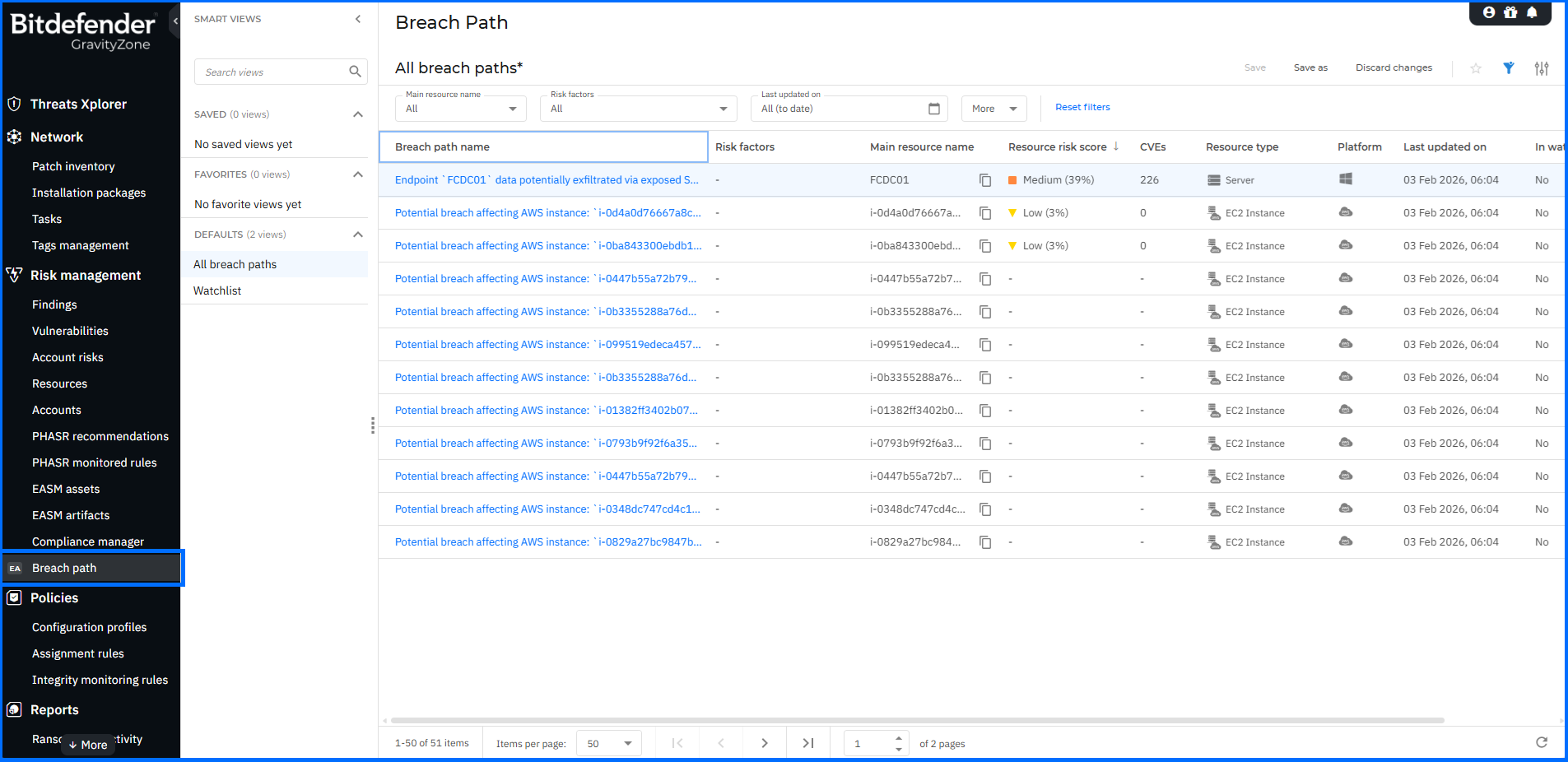
Breach Path is available in the Risk Management section of the main menu. You can view a graphical representation of each potential breach path along with a detailed list of all resources involved in that specific path. These actionable insights help you to identify potential entry points within your network. By addressing the most exploitable vulnerabilities and misconfigurations, you can take a proactive approach to security and significantly reduce your attack surface before an incident occurs.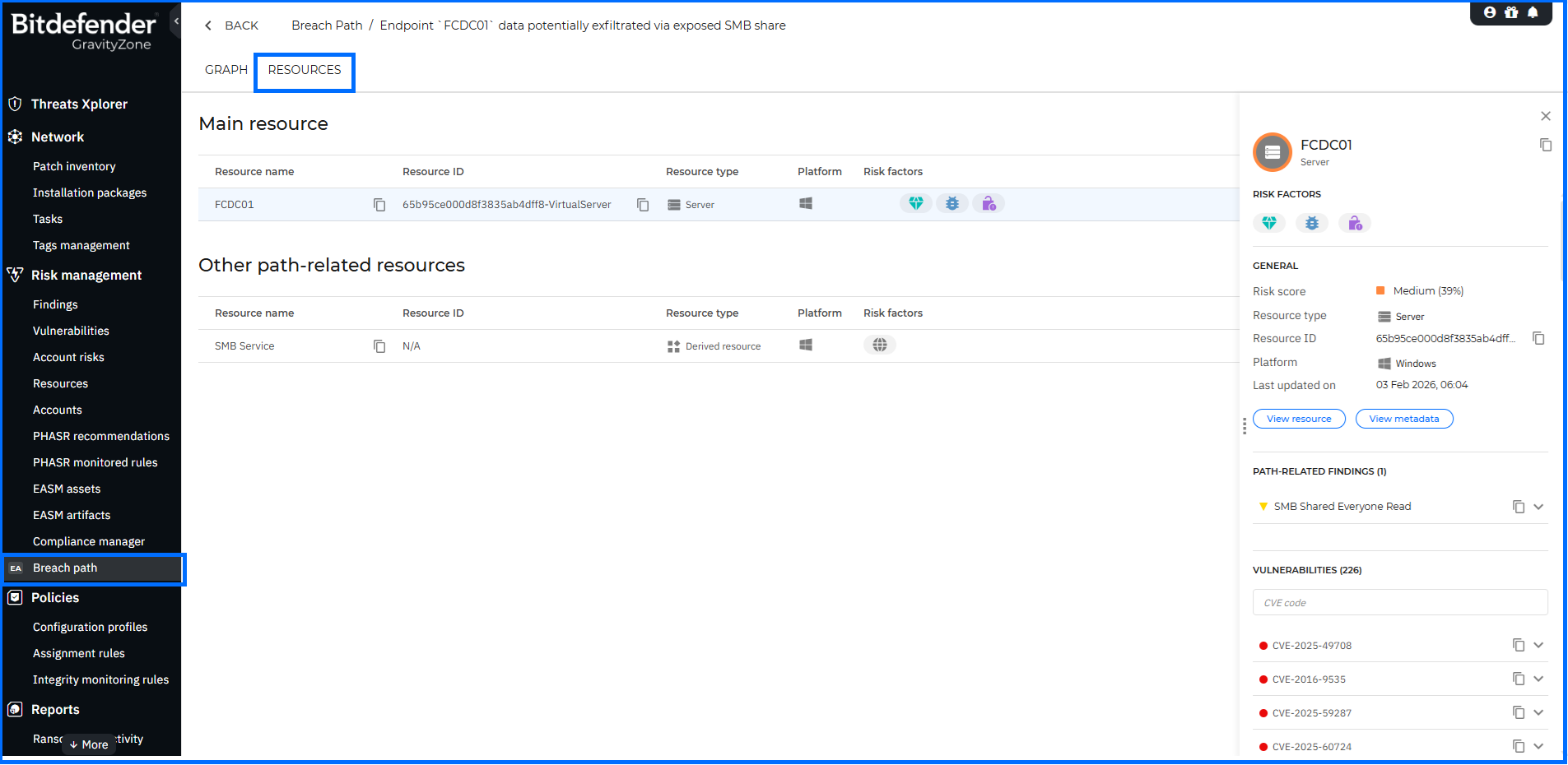
PHASR Dashboard and Management Enhancements
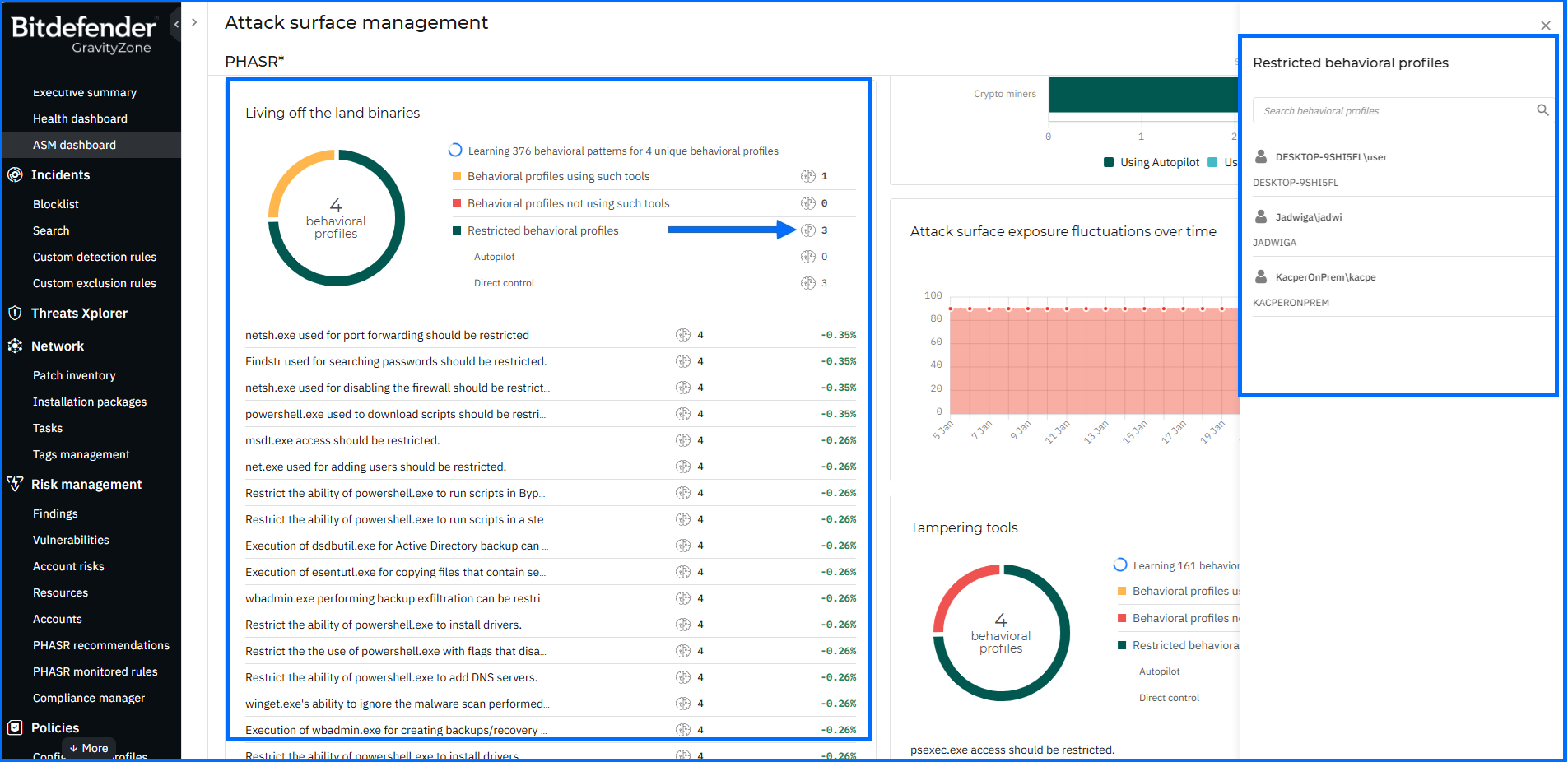
Proactive Hardening and Attack Surface Reduction (PHASR) proactively hardens your systems by analyzing user behavior to prevent Living off the Land (LOTL) attacks and targeted threats. It utilizes anomaly detection to enable tailored, application-level action blocking, which rapidly reduces your attack surface without disrupting operations.
To improve the user experience, the PHASR dashboard now features a dynamic UI where widgets progressively load additional list items during vertical resizing, allowing you to view more data without leaving the main screen. Behavioral side panels now dynamically reflect the selected category and restriction source, replacing the generic "Behavioral profiles" title with clear, context-specific names.
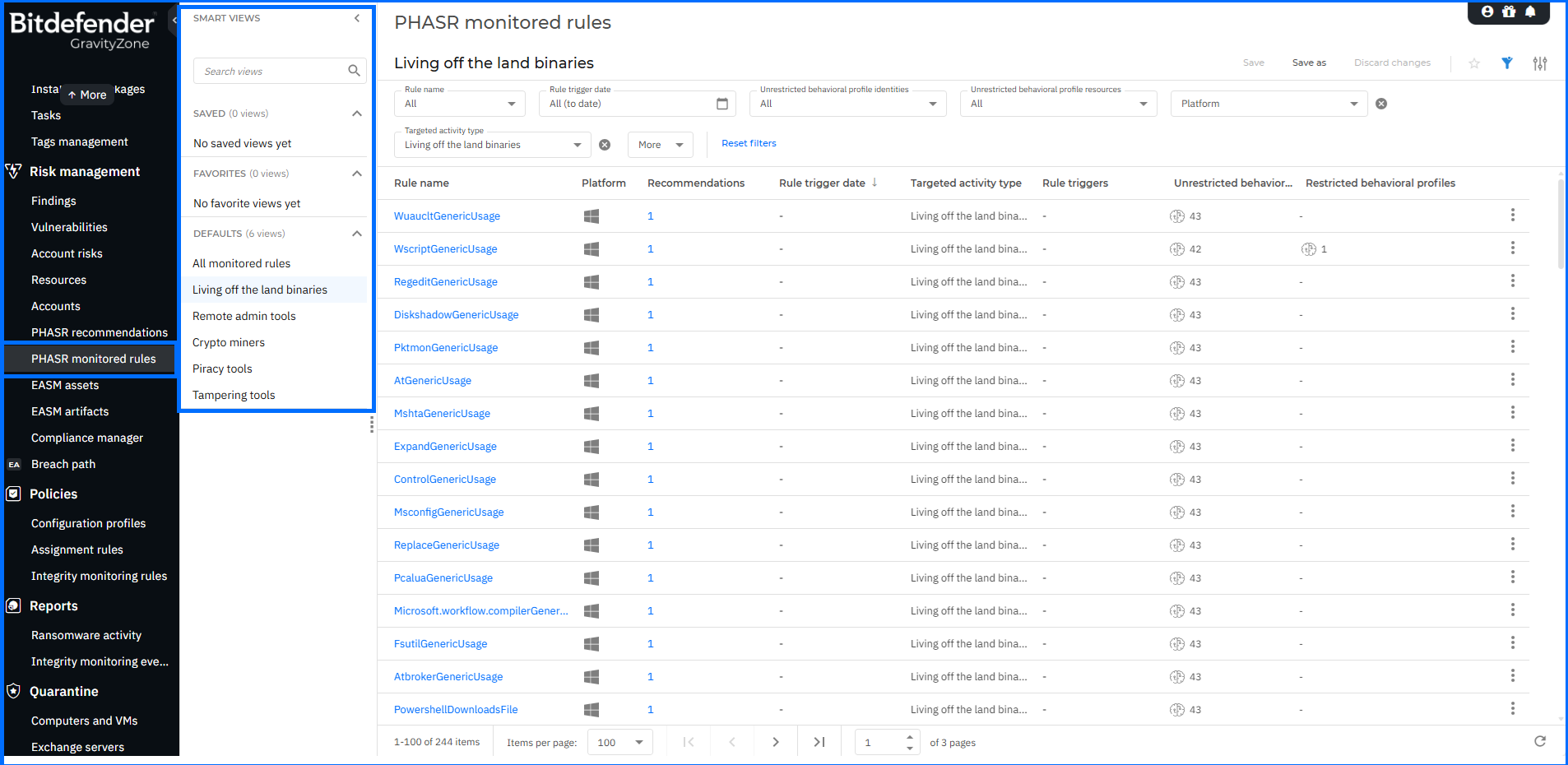
Furthermore, the PHASR monitored rules page has been enhanced with Smart Views functionality, enabling you to switch between predefined activity types. To ensure operational reliability, PHASR module issues are now reported in both the Health Dashboard and within endpoint details. This update ensures that the physical endpoint status accurately matches the PHASR state reported in the console, allowing for faster troubleshooting and improved visibility.
For comprehensive insights into PHASR, we invite you to watch our masterclasses here.
EASM Configuration Enhancements
External Attack Surface Management (EASM) helps you continuously discover and analyze internet-facing assets and their vulnerabilities, providing an attacker-centric view to proactively reduce your attack surface.
In this update, to provide deeper visibility and better attribution of discovered assets, we have introduced new configuration options within the EASM Assets settings. You can now add up to five primary domains as scan assets. Please note that only top-level domains can be set as primary. You can also add a specific Organization name to the Scan list. If this field is left blank, the GravityZone company name is used by default.
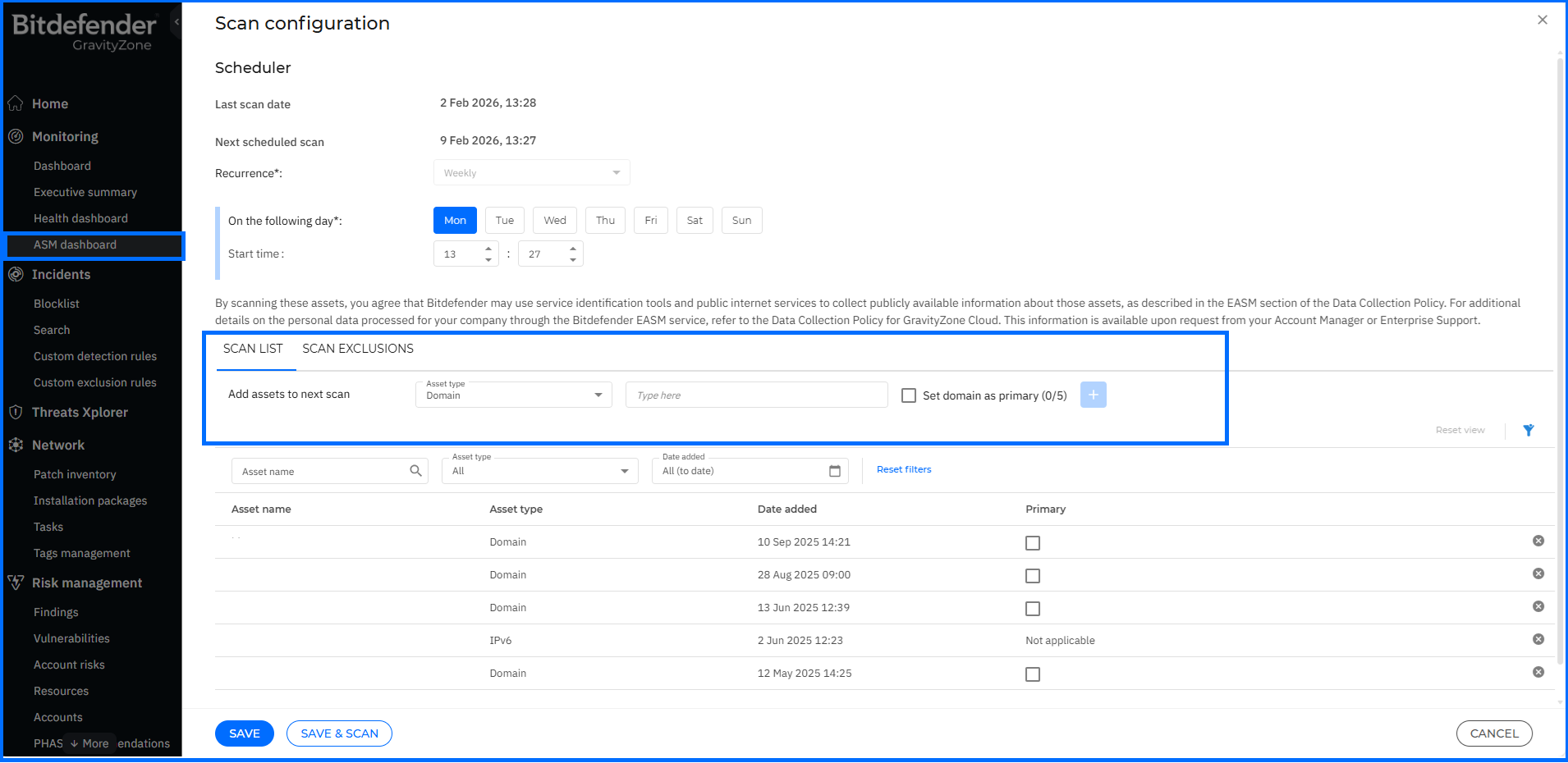
By providing this additional context, the EASM engine can more effectively correlate disparate assets back to your organization, reducing false positives and identifying hidden entry points before attackers do.
For comprehensive insights into EASM, we invite you to watch our masterclasses here.
Office 365 Sensor: New Remediation Capabilities
The Bitdefender GravityZone Office 365 Sensor integrates directly with Microsoft 365, utilizing Mail and Audit sensors to ingest data about email traffic, content, and all user/admin operations. It proactively identifies suspicious activity, empowering you to take immediate action via the GravityZone console.
To accelerate your incident response, we have introduced a new remediation capability: Delete similar emails. From the Incident > Graph (Extended Root Cause Analysis) details panel of a suspicious email alert, you can now select this option to remove all instances of a threat identified within the alert context. This action is also available directly within the Response > Action needed tab.
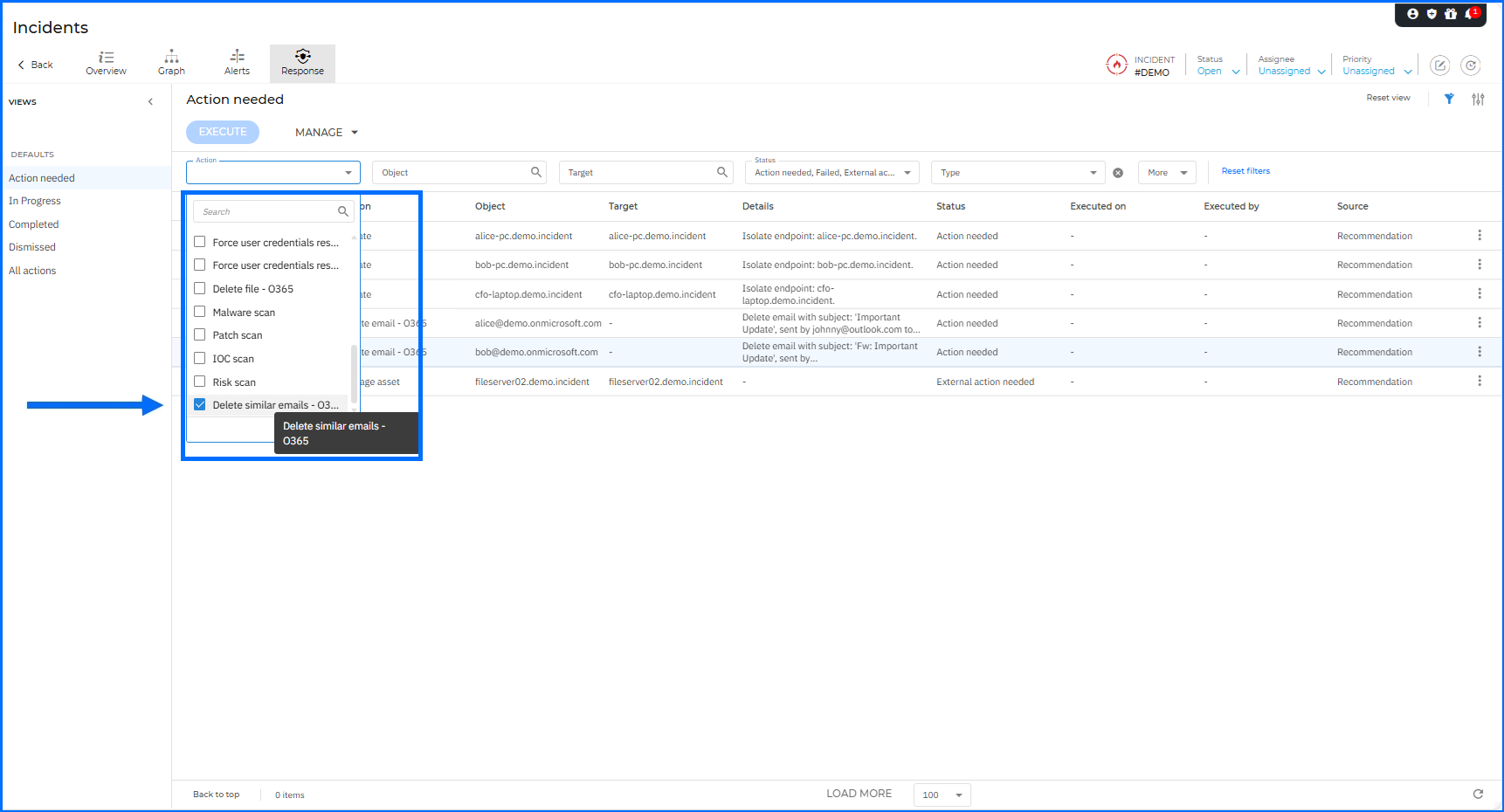
By allowing you to delete similar emails in bulk directly from the GravityZone console, we significantly reduce the Mean Time to Respond (MTTR). This prevents users from interacting with harmful content and eliminates the need to pivot to the Microsoft Defender portal to manually hunt for identical copies across multiple mailboxes.
Enhanced Incident Investigation: New Design and Contextual Actions
The GravityZone Organizational Incident Graph allows your security team to deeply investigate every incident through a rich, dynamic visual graph. This interactive timeline illustrates the sequence of correlated events across users, endpoints, cloud workloads, and files, empowering your analysts to understand the full attack chain. To further accelerate this process, we have completely redesigned the investigation experience and introduced new contextual actions.
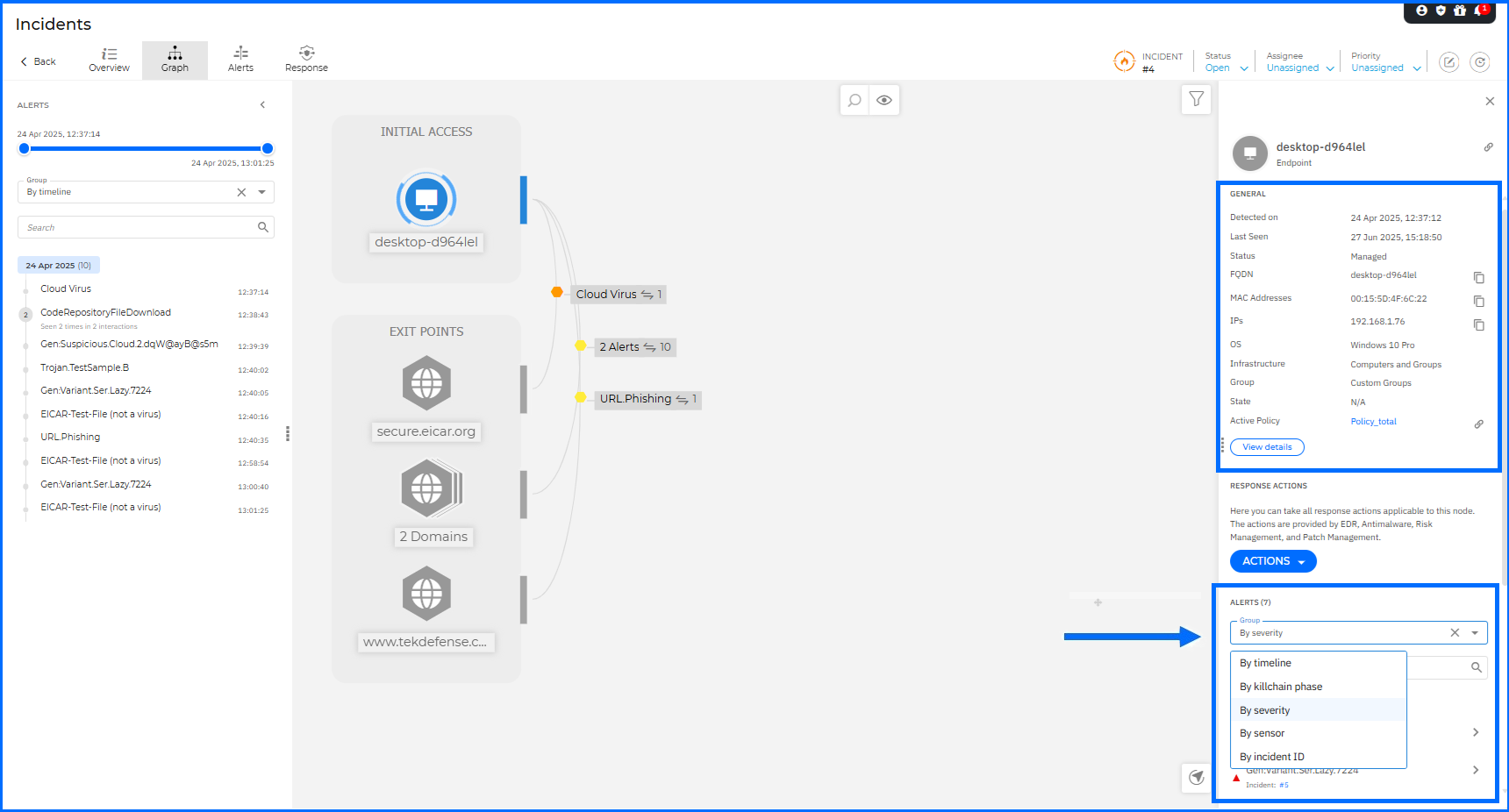
The node details panel now offers a clearer and more organized layout to help analysts find critical information faster. The Details section has been renamed to General and now includes a new Detected on field. Infrastructure details like IPs and MAC addresses are now aggregated for endpoint and server nodes. Alerts are grouped by severity, by default, to help you prioritize urgent threats. A new Group selector allows you to reorganize alerts by timeline, kill chain phase, sensor, or incident ID. You can also use a new search box to instantly filter alerts by name.
Navigating complex graphs is now more intuitive for the user. You can use the mouse wheel, touchpad, or new dedicated Zoom in/out buttons to explore the incident. A new zoom level indicator and a Reset zoom button ensure you always maintain your perspective. On the Organization and XDR incident level, security analysts can now copy a direct link to a specific node from the details panel. By using the new Copy icon next to the panel title, you can share these links with coworkers to facilitate a faster and more collaborative investigation.
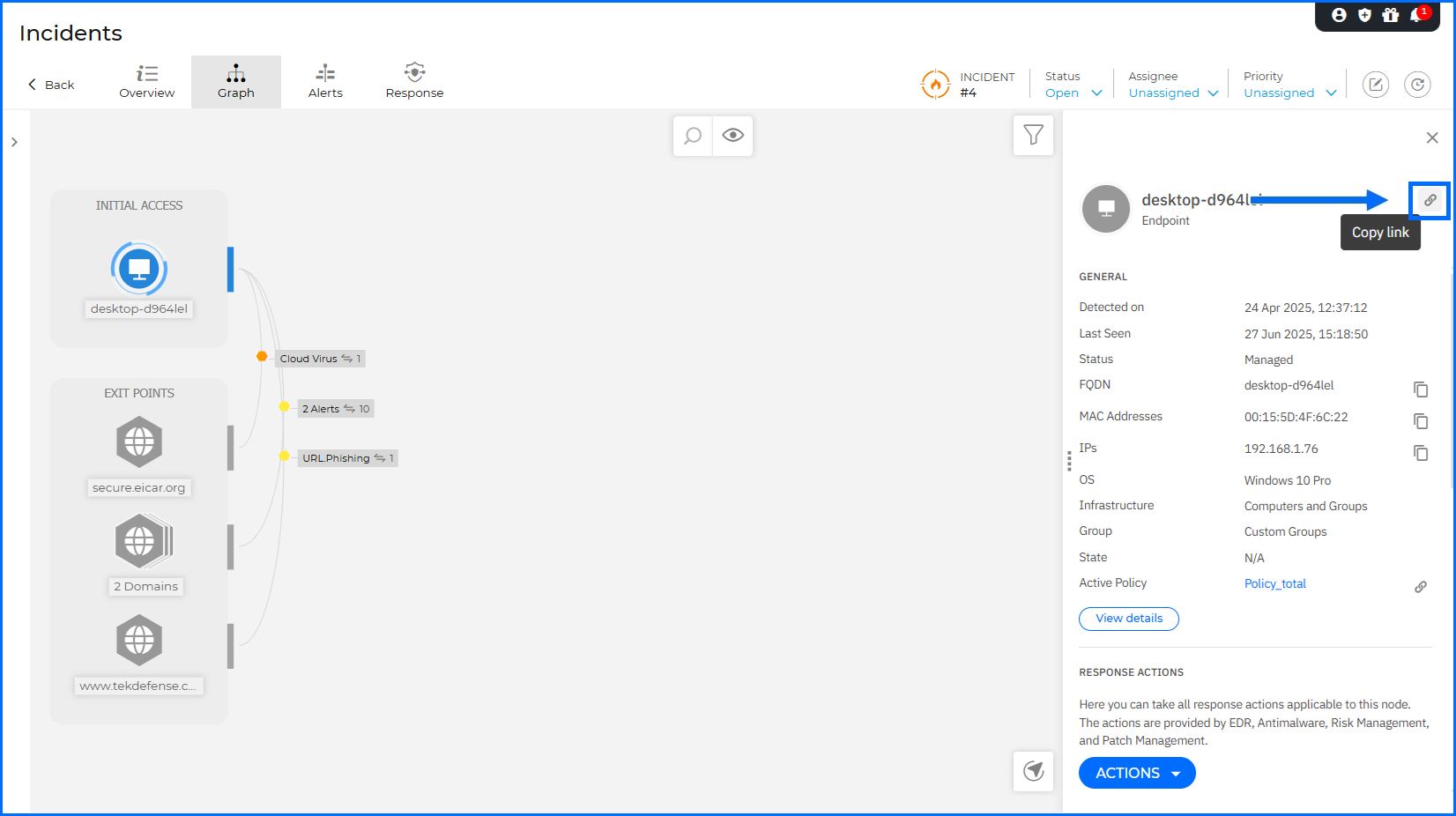
We have replaced the separate Investigation and Remediation sections with a unified Response actions menu. This menu is organized into three logical categories: Mitigation & Remediation, Investigation & Containment, and Hardening & Refinement. From this menu, you can now initiate a Risk scan, Patch scan, IOC scan, or Malware scan directly from the endpoint or server node details.
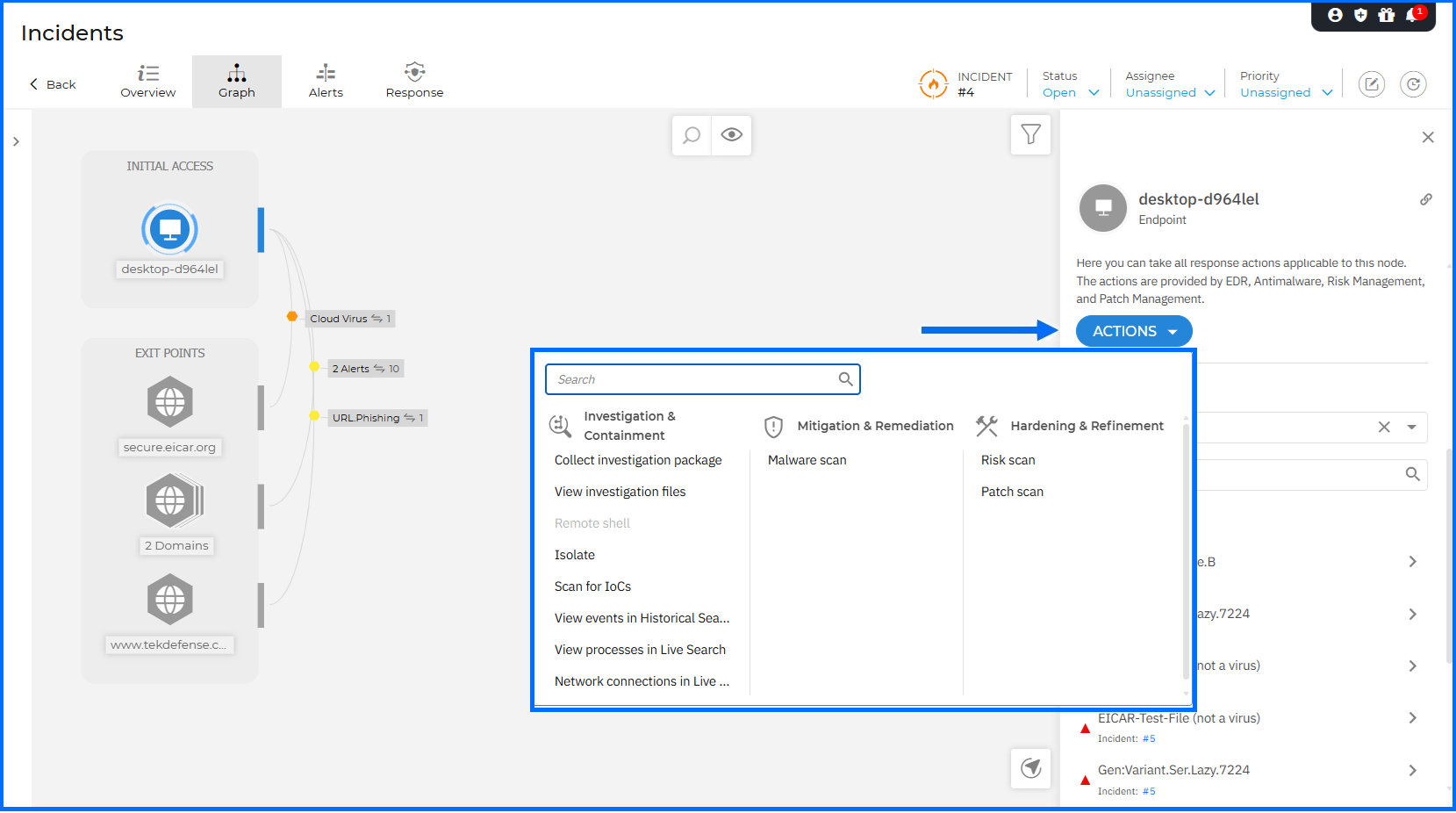
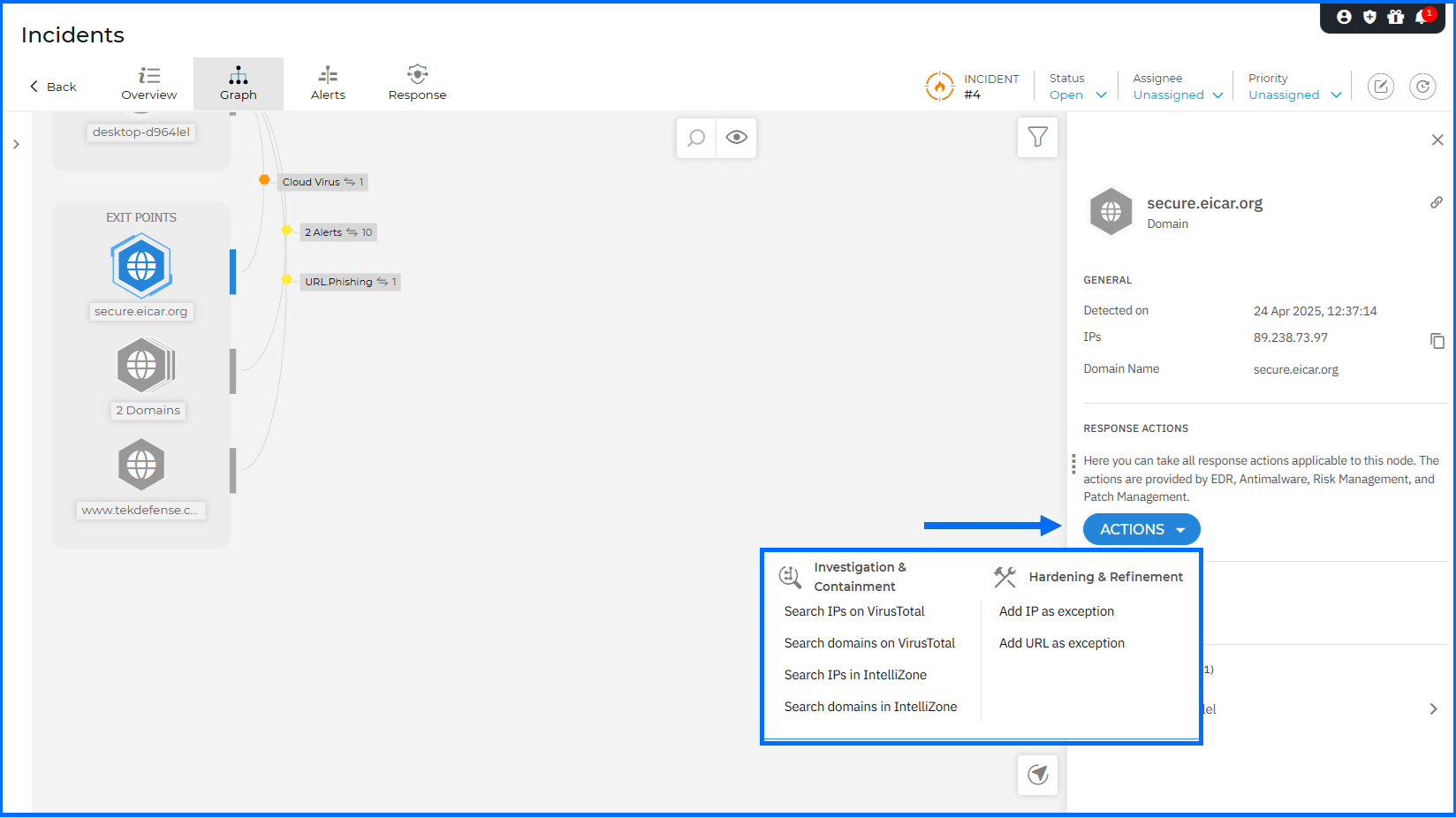
To accelerate threat investigation, we have introduced new contextual actions directly within the Incident Graph details panel. You can now pivot directly to VirusTotal or Bitdefender IntelliZone to verify suspicious IPs and domains using the new Search actions. The response workflow is further streamlined by allowing you to Add IP as exception or Add URL as exception directly to your Network Protection policies. Additionally, the View risks action redirects you to the Risk Management > Resources page to review all detected risks associated with the selected node.
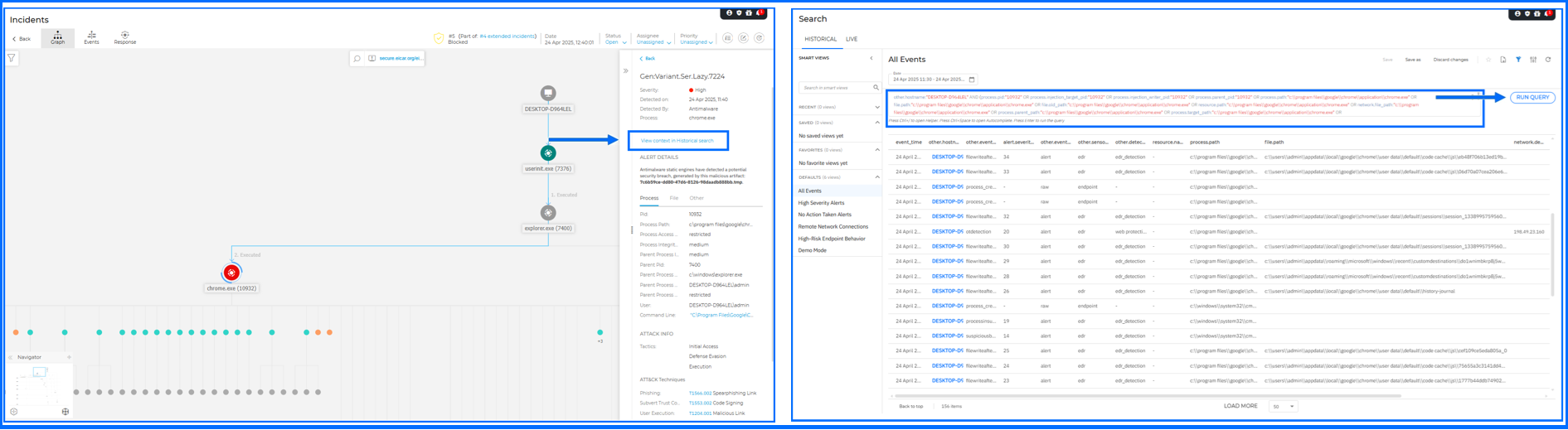
For Endpoint incidents, a new View context in Historical search action is available in the alert details panel. When selected, it opens Historical Search in a new tab and automatically executes a query built from the alert-specific context. This reduces the time required for your forensic deep dives. To provide even deeper context, new XDR search fields from the Alert, Network, Process, and Registry categories can now be added to the query results table. You can enable these via the Settings panel within the Historical search tab.
For comprehensive insights into incident analysis with GravityZone, we invite you to watch our masterclasses here.
KSPM Enhancements
Kubernetes Security Posture Management (KSPM) helps you identify and mitigate critical risks across your Kubernetes clusters. Integrated into the Risk Management dashboard, this feature provides visibility into misconfigurations and offers step-by-step remediation guidance to proactively harden your K8s environments.
The latest release provides a clearer picture of your cluster architecture within the console. You can now view specific details for individual Kubernetes nodes directly within the Network page. By selecting a cluster, you can see the total node count and the specific names of each node under the cluster details.
For comprehensive insights into Securing Kubernetes Environments with GravityZone, we invite you to watch our masterclasses here.
MDR Enrollment and Management Enhancements for Partners
Bitdefender Managed Detection and Response (MDR) services provide 24/7 continuous threat monitoring and expert-driven incident response, essentially acting as your outsourced security department. MDR significantly augments your existing security capabilities by offering specialized expertise, around-the-clock coverage, and access to advanced threat intelligence.
We have introduced updates to the MDR enrollment process to provide more flexibility for our partners. MSP partners are no longer required to have MDR enabled for resale to access and complete the Contact details for MDR form. They can now enroll in the service by completing this form regardless of their resale status. This allows them to manage customers with yearly MDR licenses directly from the MDR portal.
The management of monthly subscriptions has also been simplified. MSP partners still need to complete the contact form and enable MDR for resale to manage monthly customers; however, the order in which these steps are performed no longer matters. They can now update contact information at any time directly from the GravityZone Control Center.
The Contact details for MDR form for MSP partners has been redesigned to align with the non-MSP version. It now allows you to select an existing user account within the company to serve as the primary MDR emergency contact.
Distributors can now access and complete the contact form to enroll in the MDR service. Once enrolled, Distributors gain access to the MDR portal to manage all MDR customers within their specific management hierarchy.
For comprehensive insights into MDR, we invite you to watch our masterclasses here.
What’s New for Administrators
With administrators constantly juggling numerous tasks and responsibilities, tools that make their daily work easier are highly appreciated. This section describes new functionality designed to facilitate the management of features responsible for prevention, protection, and detection in a defense-in-depth security architecture.
Integrations Hub Enhancements
The Integrations hub page lets you manage both active (configured) and available integrations compatible with GravityZone.
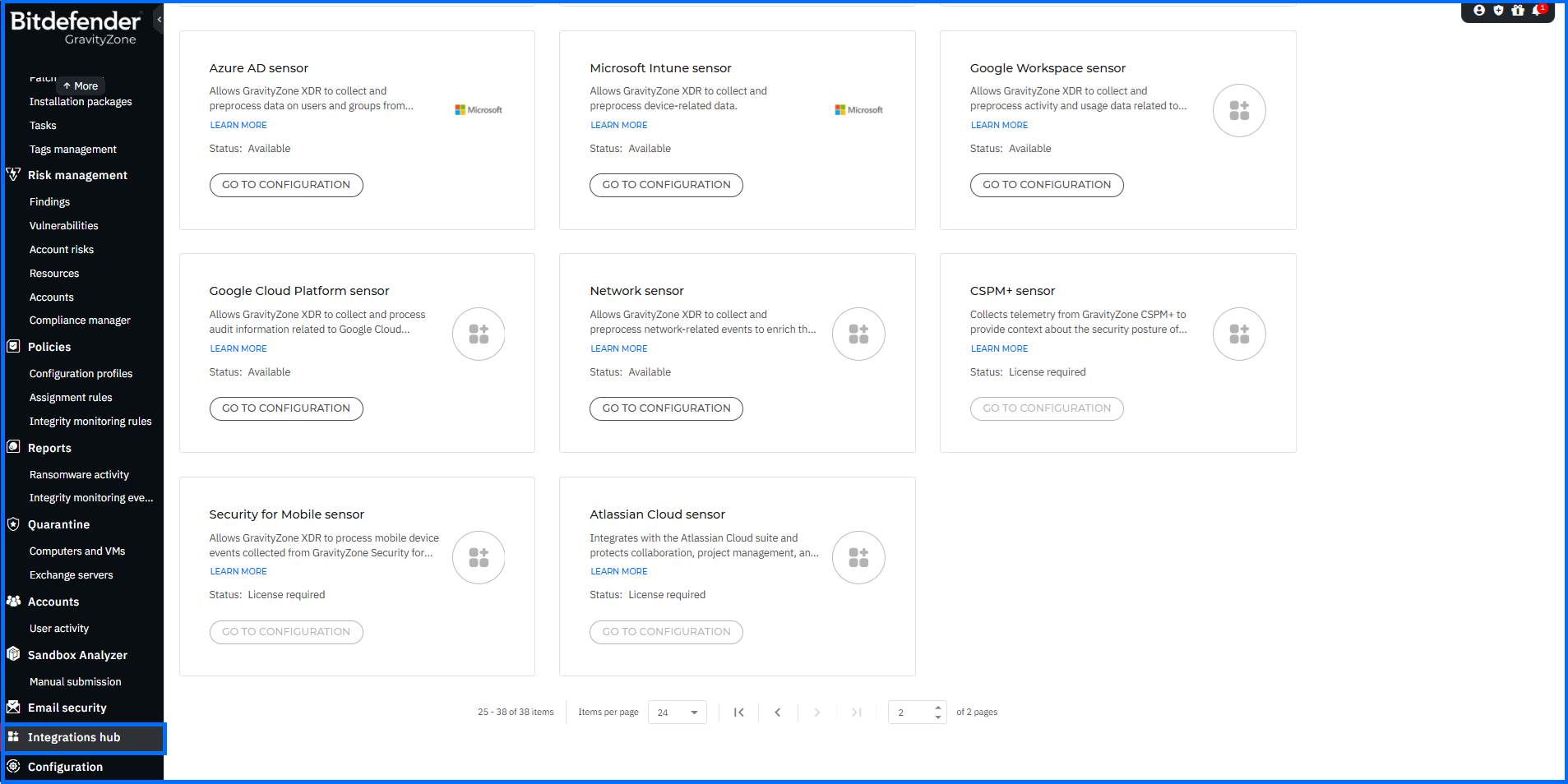
In this update, we have significantly expanded the Integrations catalog by adding 25 new cards, providing a dedicated launching point for every available integration path.
-
XDR Sensors: Individual cards have been added for each specific XDR sensor. You can now pivot directly from these cards to the Configuration > Sensors Management tab to begin deployment.
-
Mobile Security: We have introduced dedicated cards for a wide range of Mobile Security MDM integrations. These include solutions such as Microsoft Intune, Ivanti (MobileIron), VMware Workspace ONE, Jamf, IBM MaaS360, BlackBerry, Citrix, and SOTI MobiControl. Each card allows you to pivot directly to the Mobile Security grid to start your configuration.
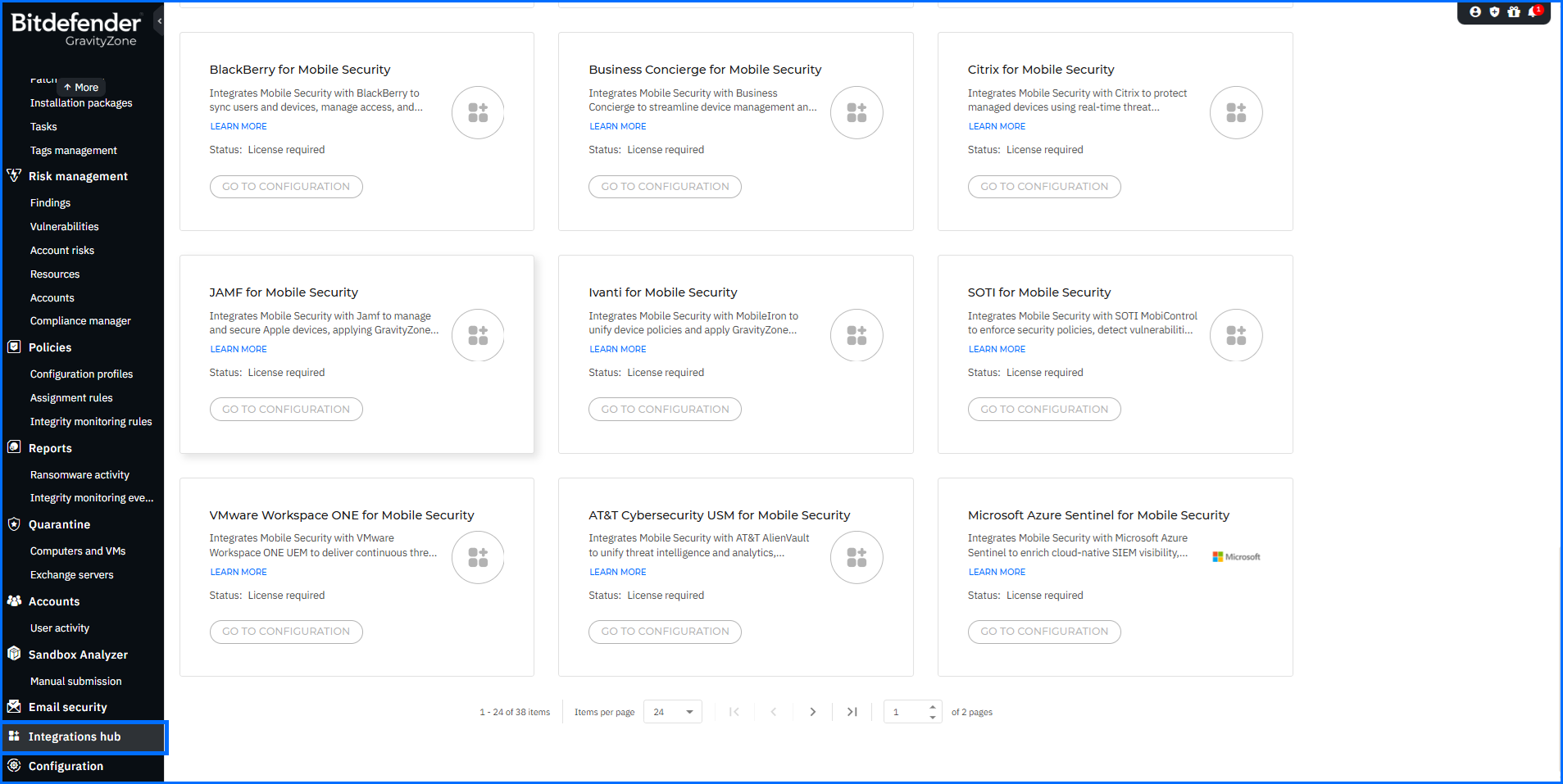
As the GravityZone ecosystem grows, the Integrations hub acts as your unified command center, reducing the time it takes to expand your detection capabilities and maintain security posture across all platforms.
API Enhancements
Bitdefender Control Center APIs enable developers to automate business workflows. These APIs are exposed via the JSON-RPC 2.0 protocol. You can find usage examples and documentation in our Support Center, located here.
With this release, the Incidents API has been enhanced with the following updates:
-
The createCustomRule method now includes a new targets parameter, allowing you to programmatically specify which companies a custom rule applies to.
-
The getCustomRulesList method has been extended to return the targets parameter for every listed rule, making it easier to audit rule distribution across your environment.
-
A new method is now available: updateCustomRule. You can use it to edit any existing custom exclusion or detection rule by referencing its Rule ID.
-
A new method, takeRequestAccessAction, is now available. This allows you to bulk allow or deny Request Access recommendations. The API returns a detailed status for each processed recommendation to ensure successful remediation at scale.
-
A new getSimilarEmails method is now available, allowing you to retrieve emails similar to a given email.
-
The createResponseAction method now supports the Delete similar emails action for Microsoft 365. A new actionType has been added, and a new targets parameter allows you to specify target emails by user and email ID or by similarity hash.
-
The getResponseActionStatus method has been updated to support the Delete similar emails action type. It now returns a new outcome attribute that provides detailed visibility into the results, indicating which emails were successfully deleted and providing error information for any failed attempts.
The Push Notifications services were also enhanced with the following update:
A new parameter, incident_number, has been added to the new-incident event. This value corresponds to the Incident ID displayed in the GravityZone Control Center (without the # prefix), allowing for easier correlation between external notifications and the console.
GravityZone Support for Windows Legacy Versions
Bitdefender is committed to helping organizations maintain security during infrastructure transitions. For legacy platforms such as Windows 7, Windows 8, Windows 8.1, Windows Server 2008 R2, and Windows Server 2012/2012 R2, Microsoft has discontinued official support in 2020 and 2023. To address this, we are introducing the GravityZone - Support for Windows legacy versions add-on.
This add-on enables continued core protection, limited maintenance, and essential management capabilities within GravityZone. It is designed to help you transition to supported operating systems without immediate disruption. The add-on is available as an optional paid extension for both GravityZone Cloud and On-premises customers who must continue using legacy Windows systems.
More information regarding the specific capabilities and requirements of this extension can be found on the Bitdefender Support Center here.
Summary
The Bitdefender GravityZone platform continues to set the standard for unified security, offering a one-stop solution for all your organization's security needs. As the digital landscape evolves, Bitdefender remains proactive, providing prevention, protection, detection, and response capabilities, ensuring the ongoing safety of organizations worldwide.
To learn more about the Bitdefender GravityZone unified security platform, contact us or a Bitdefender partner for more information. You can also start a free trial by requesting a demo here.
tags
Author
Grzegorz Nocon is a graduate of the Faculty of Physics at the University of Silesia. With over 16 years of experience in the IT industry, he currently works as a Technical Marketing Engineer at Bitdefender. A strong supporter of a holistic approach to security and passionate about solving security problems in a comprehensive and integrated way. Outside of work, an avid CrossFit enthusiast and a lover of fantasy literature.
View all postsYou might also like
Bookmarks
