Introducing GravityZone Exposure Management: Close Attack Paths Before They're Exploited

November 16, 2026
A sysadmin closes the maintenance window with every Critical and High vulnerability patched. One of the remaining mediums sits on a workstation. The workstation's user has administrative rights on a domain controller and signs into it interactively, so their credential material stays in its memory while the session lasts. On the same subnet, a web service still opens to the internet on a port opened during a migration two years ago. None of these findings is worth escalating on its own. Together they are a route to domain compromise, and automated attack tooling now performs the reconnaissance and chaining between steps faster than any ticket queue moves.
Bitdefender GravityZone Exposure Management is a prevention-first product built to remove those attack opportunities before they are used. It unifies visibility across critical exposures, prioritizes them by the attack routes they create, and reduces the attack surface through hardening.
What Does Exposure Management Bring Together?
Exposure Management shifts your strategy toward prevention without replacing what you run today. It works natively with the Bitdefender GravityZone platform and alongside third-party endpoint protection (EPP) and endpoint detection and response (EDR) products.
The product combines five capabilities, each answering a different question:
- Endpoint Risk Management: What is weak on your servers and workstations?
- User Risk Management (part of Risk Management): Which identities, and which user behaviors, put the environment at risk?
- External Attack Surface Management (EASM): What can an attacker see from the internet?
- Attack Path: Which weaknesses combine into a route to a critical asset?
- Proactive Hardening and Attack Surface Reduction (PHASR): Which risky tools and actions can be blocked without disrupting work?
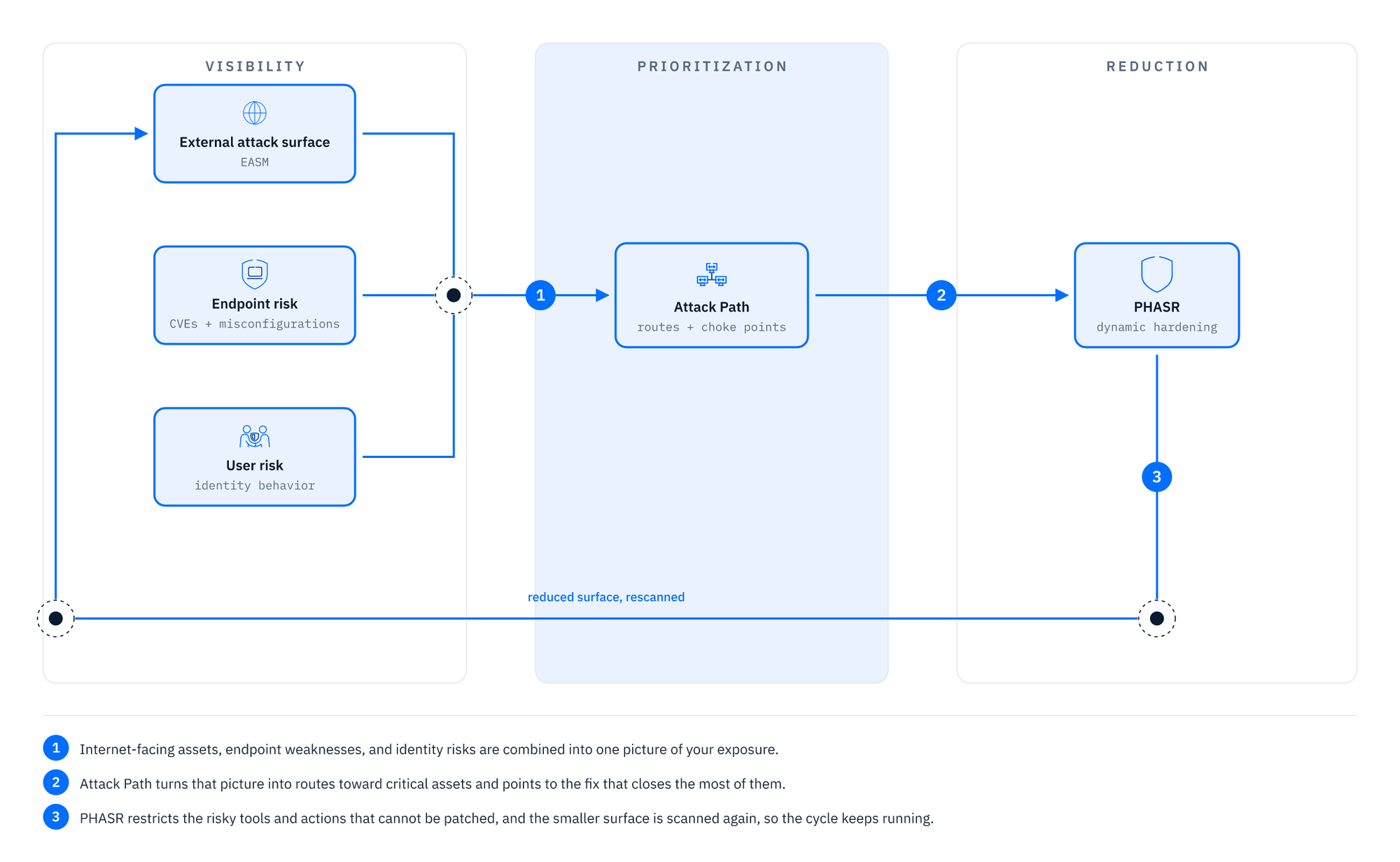
Fig1. Continuous Exposure Management loop.
Together, these capabilities form one continuous loop in three stages: visibility, prioritization, and reduction. The reduced surface is then scanned again, so the ranking always reflects the current environment.
How Does Exposure Management See Your Environment?
Exposure Management understands your environment by correlating two directions of visibility into a single inventory of findings.
Inside-out: Endpoint Risk Management continuously assesses Windows, macOS, and Linux endpoints for operating system misconfigurations, local and group policy weaknesses, and installed applications mapped to CVE identifiers. Each finding is assigned a risk score and a remediation option: automated mitigation task, manual remediation steps, or application patch. User Risk Management assesses identity-related behaviors such as password reuse and credential exposure.
Outside-in: EASM is agentless and runs from Bitdefender infrastructure. Starting from your domains, email addresses, and IPv4 and IPv6 ranges, it discovers internet-facing assets and artifacts (services, certificates, CIDR ranges, DNS records) and reports publicly exposed services, open ports, CVE-mapped services, name servers vulnerable to zone transfer, and certificates that expire within 30 days.
How Does Exposure Management Decide What to Fix First?
Visibility alone produces longer lists. Scanning produces findings; correlation produces routes. A medium-severity CVE on a privileged user's workstation outranks a critical CVE on an isolated test server. The first ends in domain compromise, the second in a rebuilt test server. Attack Path Analysis turns raw findings into an ordered workflow by asking from which starting points could an attacker reach a valuable asset, and through which steps?
Each answer is a directed graph that ends at a target asset. Nodes include user accounts, workstations, servers, cloud resources such as security groups and load balancers, and derived resources such as an SMB file-sharing service that depends on a specific server. Every edge is labeled with the mechanism that makes the hop possible, and selecting it shows the CVEs and findings behind that step. Four risk factors appear as badges: Public Exposure, Exploitable CVE, High-Severity CVE (a risk score of 70% or higher), and Critical Asset. The target carries a risk score from 0 to 100. The practical result is the choke point: a node that several routes depend on. Fixing a choke point closes every branch below it.
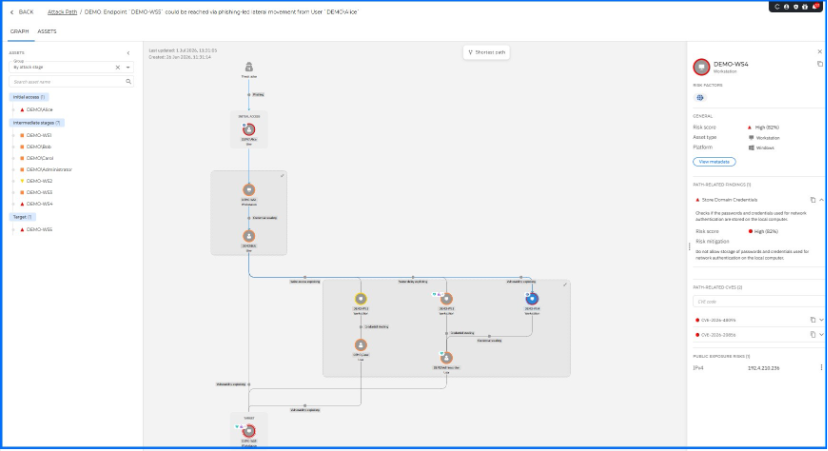
Fig. 2. The demo attack path in the Graph tab, with the Assets panel grouped by attack stage and the details of DEMO-WS4 open.
The Top 5 attack path entry points widget on the ASM Dashboard surfaces these quickly, because the same account appearing at the start of several paths is usually the fix with the widest effect. A Shortest Path control highlights the most direct route while keeping alternate branches visible, so you can confirm whether a fix actually puts the target out of reach.
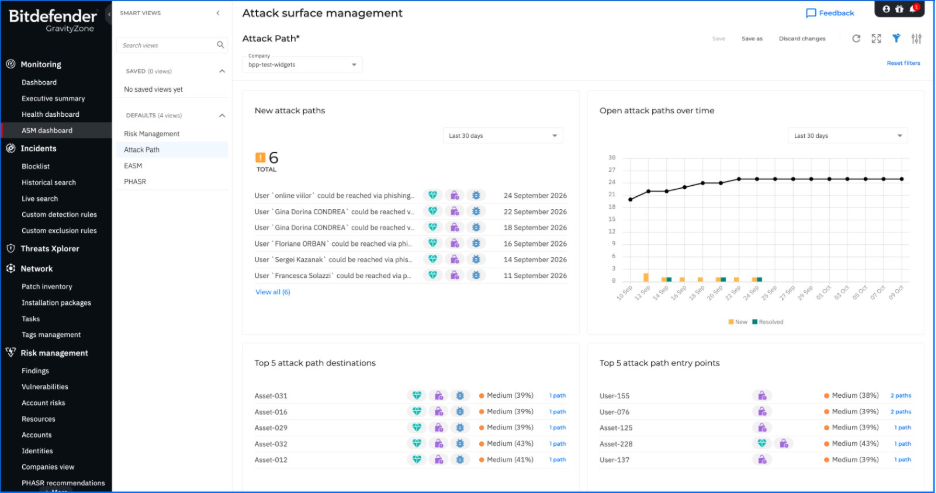
Fig. 3. The Attack Path view of the ASM dashboard.
How Does Exposure Management Shrink the Attack Surface?
Some attacker routes cannot be closed today: a patch waits for a maintenance window, or the hop relies on something working as designed, such as credentials held in memory or built-in tools like WMIC and PowerShell. Exposure you cannot remove is exposure you constrain. PHASR is the module where Exposure Management moves from reporting to enforcement.
PHASR builds a behavioral profile for each machine-user combination and compares it against more than 1,100 monitored rules covering Living off the Land binaries, tampering tools, remote administration tools, crypto miners, and piracy tools. When a profile never uses a capability attackers rely on, PHASR restricts that action or the entire tool. WMIC can remain available for system queries while remote process execution is blocked, and PowerShell can remain available while obfuscated or encoded actions are blocked.
The hardening is dynamic in both directions. After a learning phase, you approve recommendations in Direct Control or let Autopilot apply them. If a user's behavior changes, PHASR generates new access recommendations.
The same model extends to AI. On Windows, PHASR treats more than 50 local AI tools and each AI agent is treated as a behavioral profile of its own, an identity independent of the user operating the endpoint, with its own permissions and restrictions. The AI agent gains access to the tools required to perform its tasks, while user permissions remain strictly tied to the user's role. For instance, a user whose role never calls for PowerShell keeps that restriction on their own profile, even while the AI assistant running on their workstation is allowed to use it.
Exposure Management in Practice: A Hybrid Exchange Example
Consider a company that moved its mail to Exchange Online but still runs one Exchange 2019 server on-premises to manage hybrid recipients, with Outlook on the web published to the internet. EASM flags the exposed service, and Risk Management flags an exploitable vulnerability on the server. Attack Path Analysis shows why it matters: help desk administrators sign in to that server to manage recipients, so their credentials are cached there, just as they are on a phished user’s workstation where one of them fixed a problem last week.
Two entry points, one from the internet and one from the inbox, lead to the same account, and from that account several routes lead to the servers that run your domain. The fix with the widest effect is that one account, not the machine with the most CVEs. While the Exchange server waits for its migration, PHASR restricts what an attacker could do next: it blocks encoded PowerShell and PowerShell Remoting and WMIC remote execution on workstations that never need them, while your administrators keep the tools they use every day.
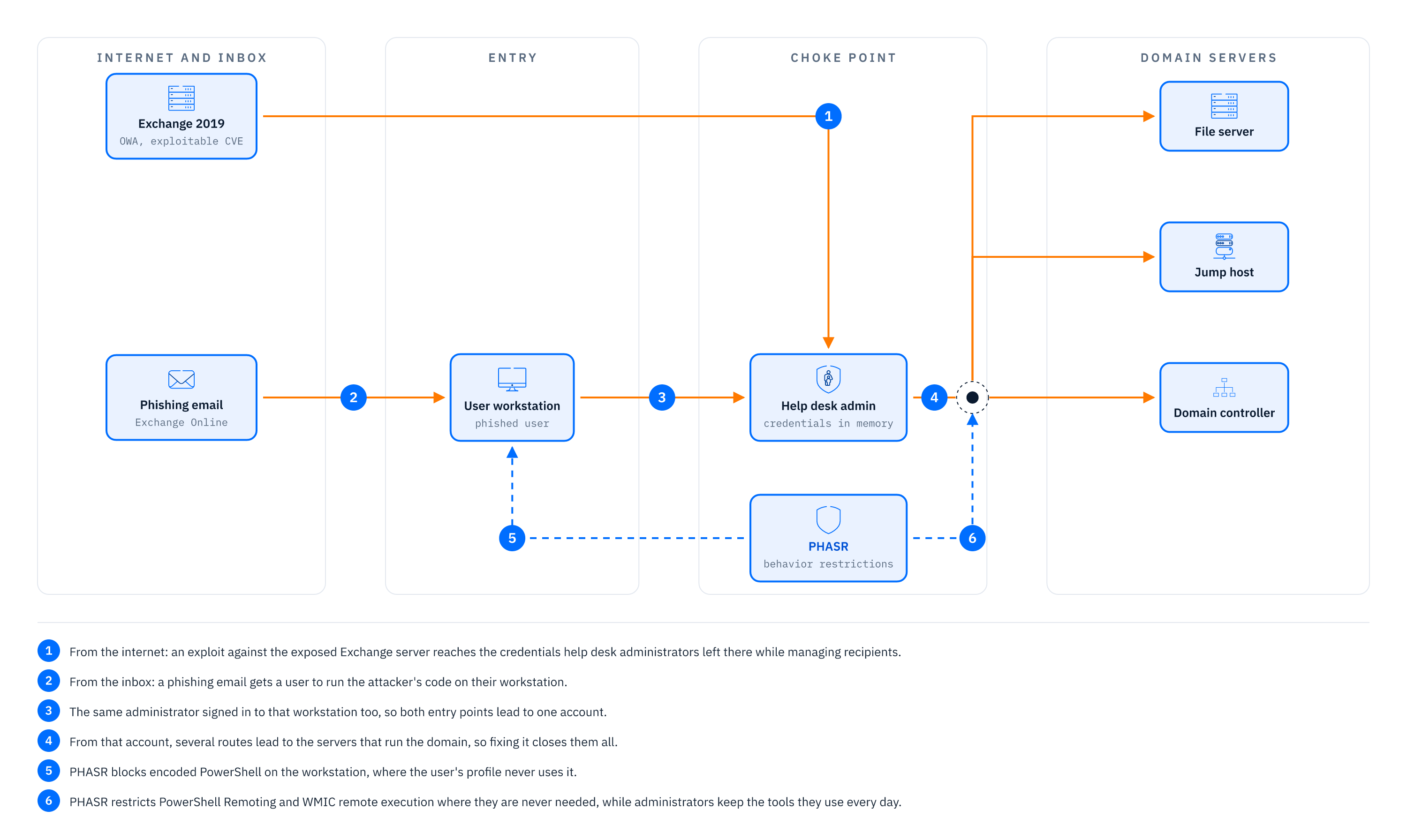
Fig. 4. Exposure Management in practice with hybrid Exchange example.
Summary
GravityZone Exposure Management moves risk reduction from periodic reporting to continuous prevention. Risk Management and EASM give you unified inside-out and outside-in visibility across CVEs, misconfigurations, identity risks, and internet-facing assets. Attack Path Analysis correlates those findings into routes that end at critical assets and identifies the choke points where one fix closes several routes. PHASR constrains what cannot be patched, removing unnecessary access to risky tools and actions at the level of individual behaviors, including AI agents.
Bitdefender Exposure Management works with the GravityZone platform alongside third-party EPP and EDR, allowing you to adopt a prevention-first strategy without rebuilding your stack.
Learn More About GravityZone Exposure Management
tags
Author
Grzegorz Nocon is a graduate of the Faculty of Physics at the University of Silesia. With over 16 years of experience in the IT industry, he currently works as a Technical Marketing Engineer at Bitdefender. A strong supporter of a holistic approach to security and passionate about solving security problems in a comprehensive and integrated way. Outside of work, an avid CrossFit enthusiast and a lover of fantasy literature.
View all postsYou might also like
Bookmarks
