Introducing AI Visibility and Control

September 28, 2026
A user opens a browser tab, pastes data into a chat assistant, and nothing is installed.
A developer adds a coding assistant as an editor extension, and nothing shows up in the installed programs list.
Someone downloads a local model runtime, a program that runs models directly on the machine instead of sending data to an external service, because they were told not to send company data outside.
None of this reaches your software inventory. Tasked with controlling AI, an administrator often resorts to blocking well-known AI websites and taking enforcement action without knowing what is actually running.
Bitdefender GravityZone AI Visibility and Control (AIVC) is the discovery and risk layer that answers the questions you have, first: Which AI software is present on your protected Windows endpoints, who is running it, and how much risk does each one carry.
What Your Software Inventory Was Never Built to Watch
AI Visibility and Control covers four classes of exposure, and each one sits outside a control you already own.
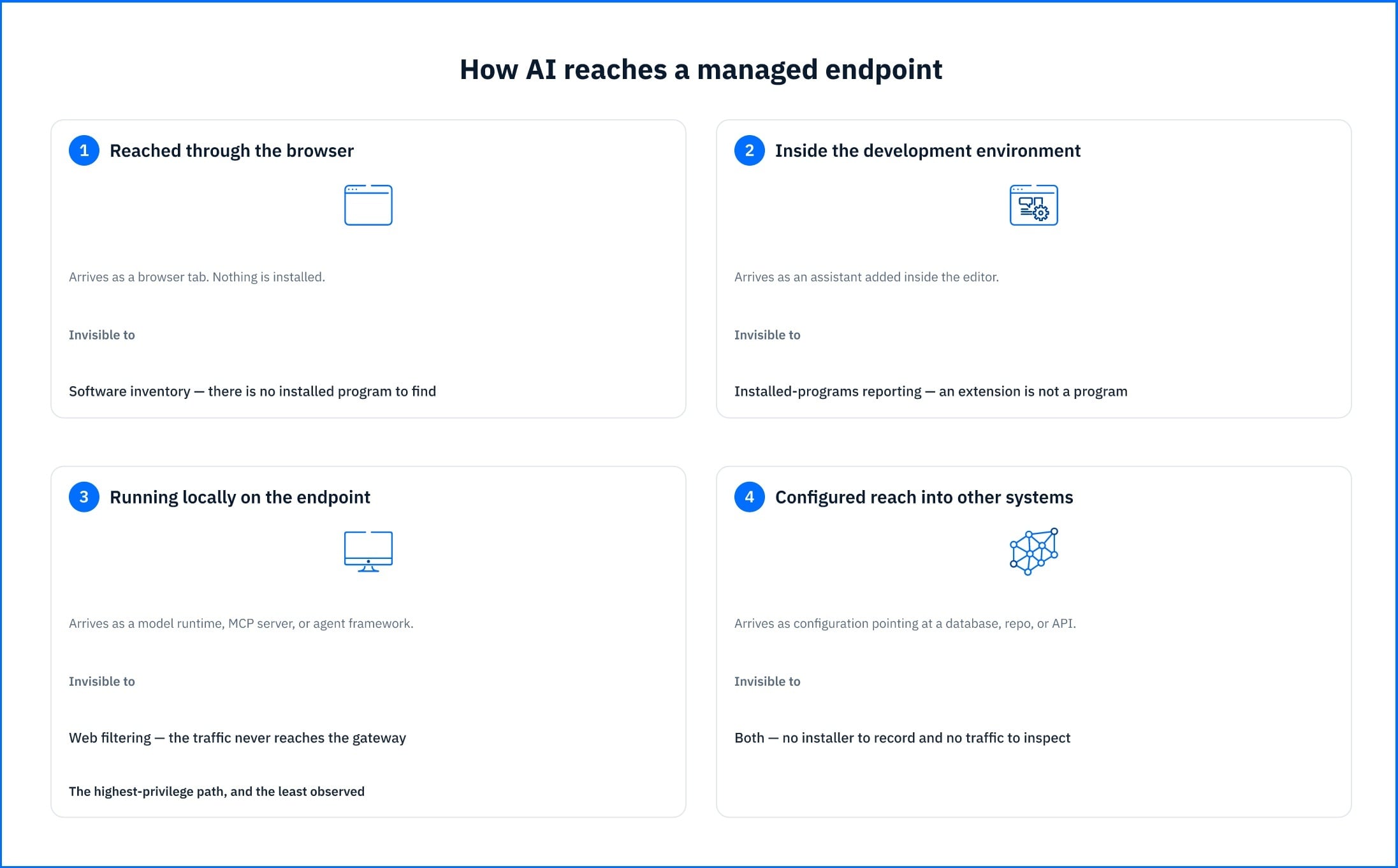
AI services reached through the browser. Hosted assistants are the path most organizations already worry about. The inventory identifies which services are running, on which machines, and whether you have marked them as approved. A service with no findings is not automatically approved; a clean result on a tool your organization never sanctioned is still shadow AI. This ensures filtering decisions are based on real user activity rather than hand-picked domain lists.
AI inside the development environment. Coding assistants run inside editors that already hold source repositories, and often credentials and configuration files in the same working directory. They are rarely covered by whatever you decided about chat assistants, because nobody classified them as the same kind of tool.
AI running locally on the endpoint. Local model runtimes, MCP servers, and agent frameworks execute on the machine itself. A control that governs which websites an endpoint may reach does not see them at all. The MCP server is the sharpest case: its entire purpose is to hand a model access to something else, and it usually arrives as a configuration entry rather than as an install.
AI with reach into other systems. Where a tool is configured to connect to a database, a code repository, an internal API, or a third-party model service, that connection is part of your attack surface. AI Visibility and Control records the configured scope of those connections, not the data moving across them.
How AIVC Finds and Categorizes What It Finds
GravityZone AI Visibility and Control discovery takes place during the risk scan. The GravityZone BEST agent collects metadata from each endpoint and keeps that collection minimized: it records what AI software is present and how it is configured, not what anyone does with it. AIVC does not inspect prompts, chat history, model weights, credentials, or full file content.
AI Visibility and Control recognizes more than 50 AI agents and more than 70,000 skills, the modular code packages that extend an agent's capabilities and that arrive from public registries. Because agents exercise permissions through these skills, considering only agents while ignoring skills would account for only a fraction of the total exposure.
Every discovered service is assigned to one of 17 functional categories based on its primary function (e.g., LLMs, coding, productivity, and others). The category makes the inventory actionable at the policy level because it maps to the question the reviewer arrived with. A security team investigating data-handling risk, filters to LLMs and chatbots plus Platforms and infrastructure. A development manager auditing what touches source code goes straight to Coding and Tools and skills. A governance review covering automation risk works from Agents, Automation, and MCP.
Two Views, and a Connector Nobody Installed
AI Visibility and Control appears in Bitdefender GravityZone Console as two views, each answering a different question.
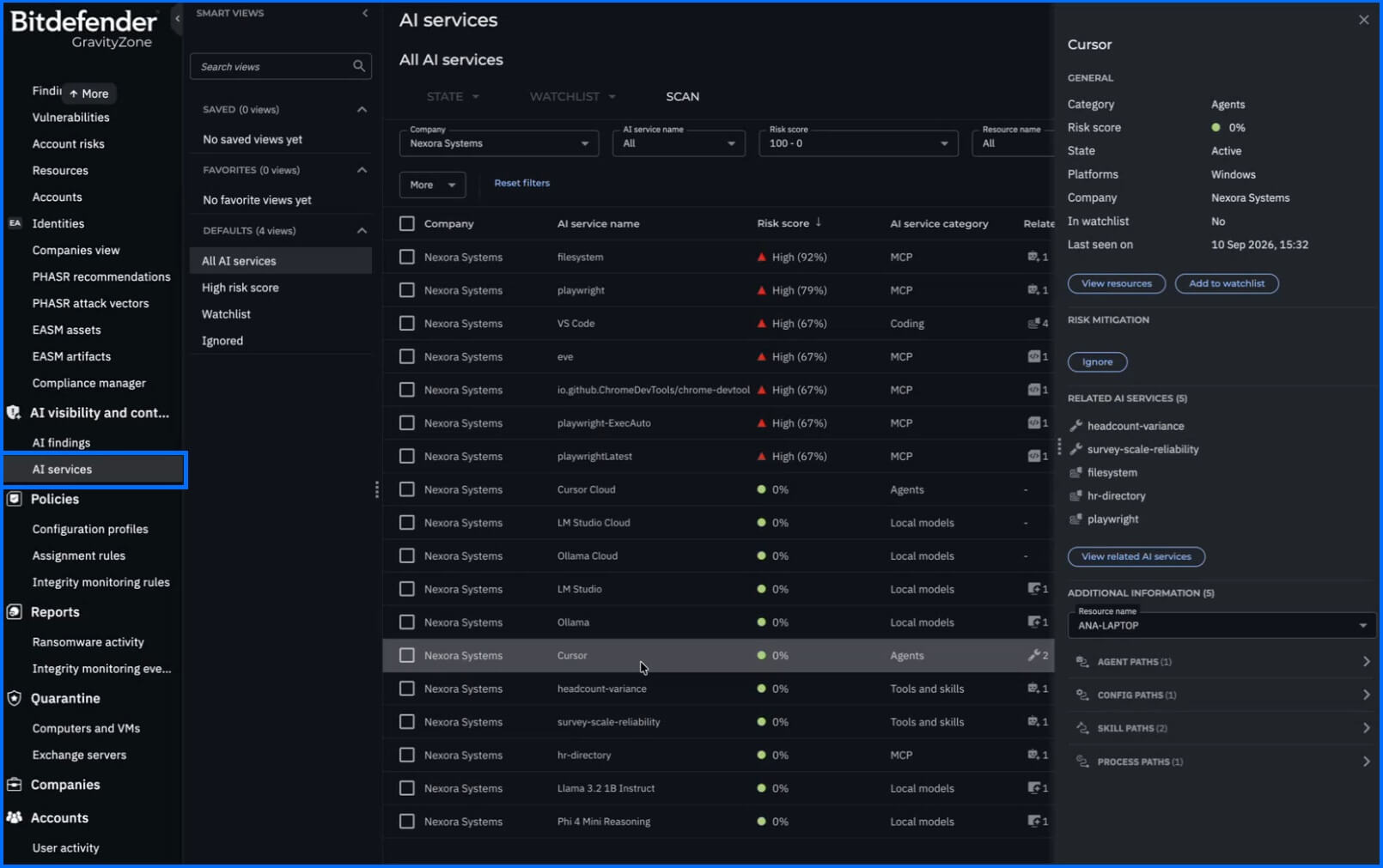
AI Services answers "what AI is running in my environment?" It is the inventory: every discovered service with its risk score. This includes the function category, the related AI assets it depends on or exposes, its count of open findings, the affected resources and endpoints it was found on, its state of Active or Ignored, and whether it sits on the watchlist. Opening a service shows its details alongside mitigation guidance.
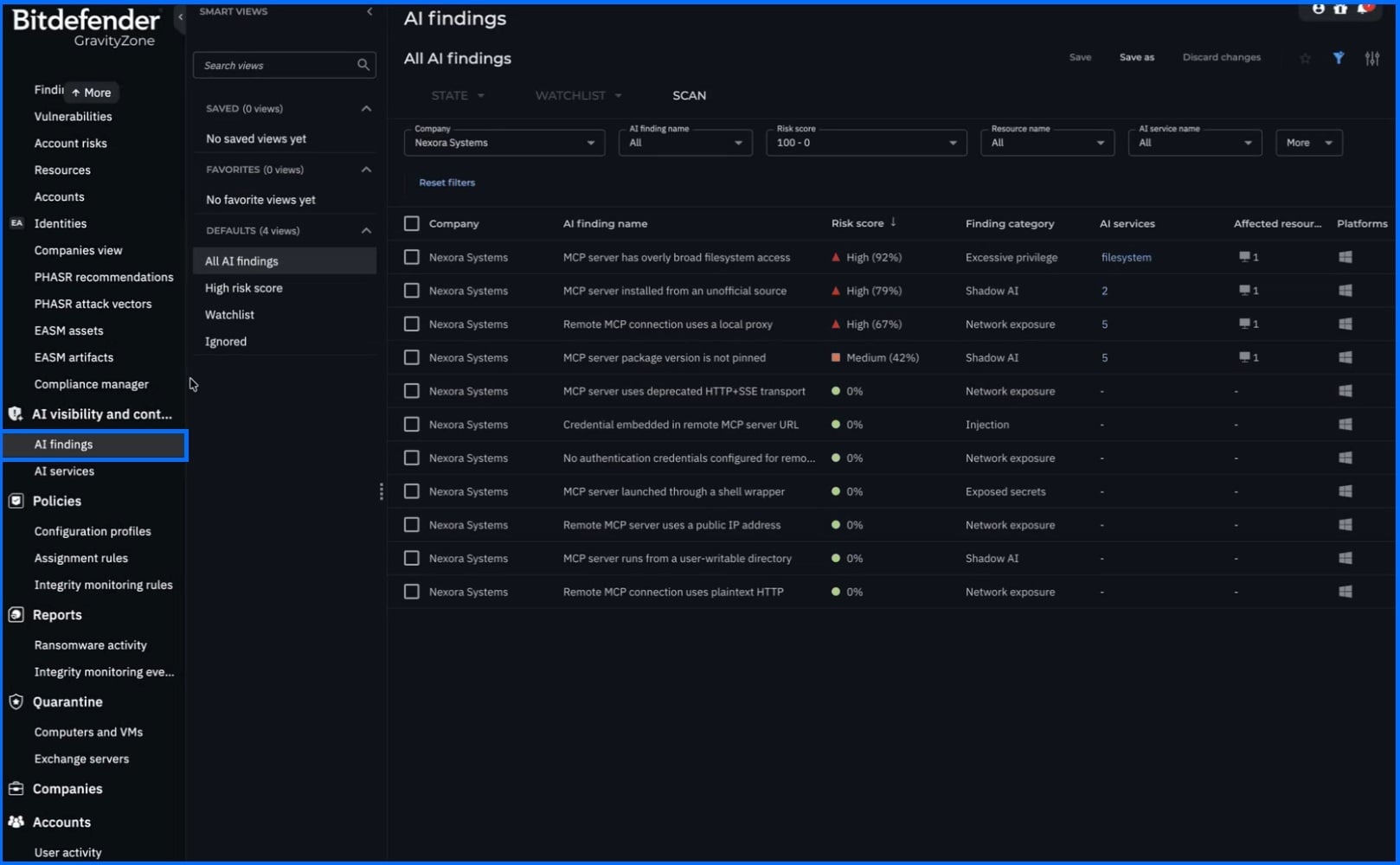
AI Findings answers "what should I look at first?" It is the prioritized risk view. Each finding includes a risk score, the service it relates to, the affected resources it was observed on, a link to mitigation guidance, and the endpoint-specific evidence behind it.
This enables you to see why a finding was raised on one machine and not another before deciding what to do. Most administrators work in AI Findings day to day and drop into AI Services for the full picture of a particular tool.
A score of 0 means AI Visibility and Control found nothing risky in how a tool is configured, not that your organization approved it. Review AI Services against your list of sanctioned tools, not just AI Findings.
Consider a developer who connects their AI assistant to the company ticketing system using a Model Context Protocol (MCP) server, which is a small connector that gives a model access to external tools. The setup requires only a few lines in a configuration file: there is no installer, no entry in the installed programs list, and no network traffic for controls to inspect. It simply surfaces in AI Services alongside the assets it exposes.
The finding answers not just whether the connector exists, but what it reaches. A connector tied to a read-only reporting view presents a vastly different risk from one holding write credentials to a production database. This distinction lives entirely in its configuration. Meanwhile, the affected-host list clarifies the broader scope: whether this is an isolated shortcut or a pattern copied across the entire team.
That endpoint-specific evidence is also what makes findings usable by a SOC analyst rather than only as a posture metric. A finding tied to a local model runtime or an MCP server identifies a process executing on a specific host outside the browser sandbox, and the affected-resources list gives the host set to pivot from, in Search and Incident Advisor.
From Inventory to Enforcement
GravityZone AI Visibility and Control establishes which AI is present and what about its configuration is risky. The score orders your queue; it does not decide the outcome. A high score is not an order to remove the tool, and a score of 0 is not an approval. It does not block access, remove software, or modify program permissions. Those actions are handled separately by existing controls within the GravityZone console.
Blocking access to a prohibited service is Web Content Filtering. Most AI services are accessed through the browser, so once AIVC identifies which ones are in use, you block the domains.
Blocking a specific tool wherever it turns up is what custom detection rules do: once AIVC has named the tool, you define a rule that matches it on process name, attach Kill process as an automatic action, and every later appearance is handled without an administrator in the loop, and is company-wide or scoped to endpoints carrying a given tag.
Reducing what an installed tool is permitted to do belongs to hardening policies and to PHASR. PHASR for AI agents evaluates the agent separately from the person using the machine: processes started by a known agent binary are attributed to that agent's own behavioral profile rather than to the user's session, so the agent gets the tools its tasks require while the user's restrictions stay tied to the user's role.
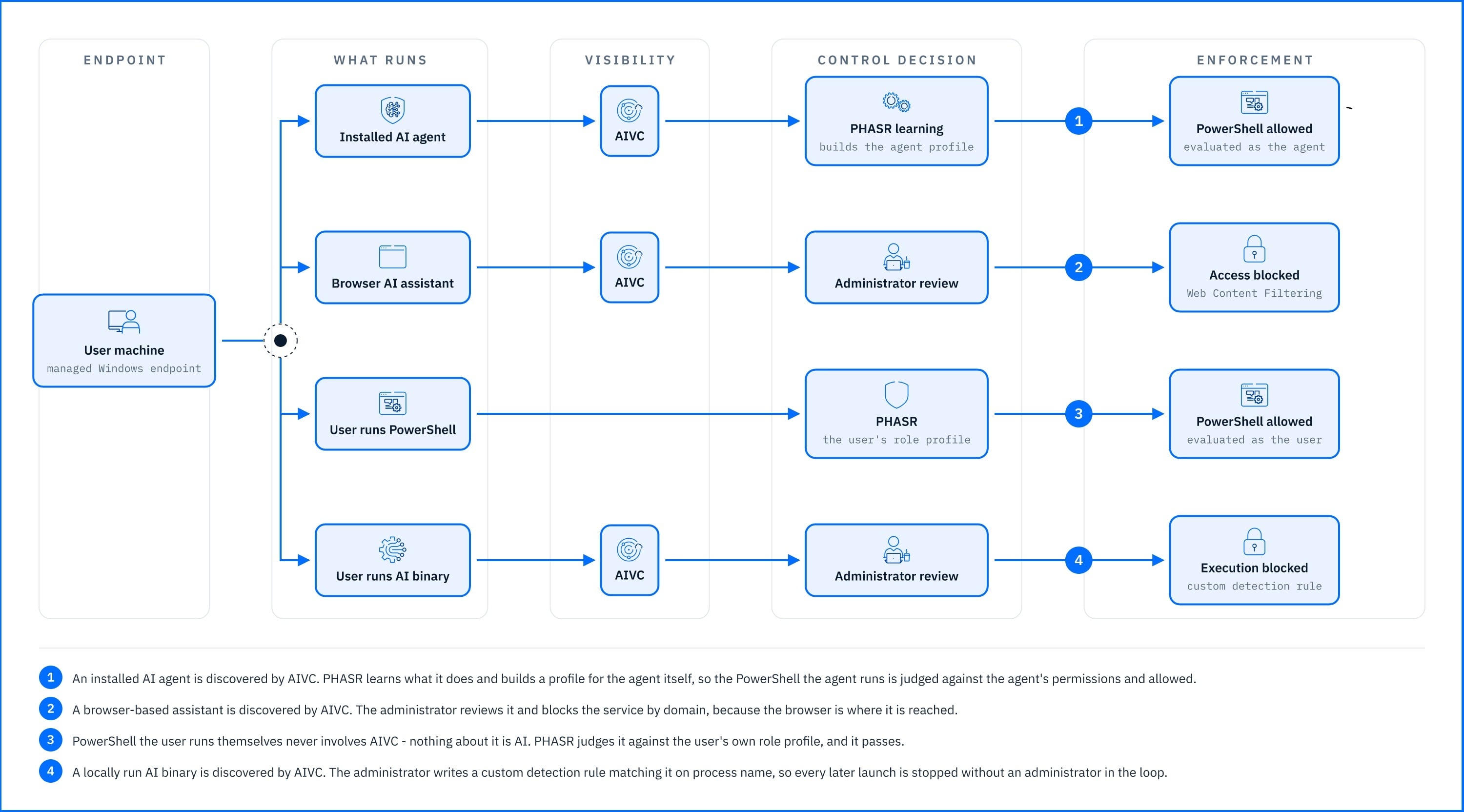
Turning on AI Visibility and Control does not require a rollout project. It runs on your existing Bitdefender Endpoint Security Tools agent and can be enabled by editing a current policy. The setting sits in the General section under Risk Management and applies to all endpoints targeted by that policy. Results will appear after the next risk scan.
Summary
Bitdefender GravityZone AI Visibility and Control provides the AI inventory your traditional software inventory cannot: browser-reached assistants, editor extensions, local runtimes, MCP servers, and agent frameworks; each with a risk score, one of 17 functional categories, and a list of impacted endpoints. It covers more 50 agents and 70,000 skills, and it records what is present and how it is configured, rather than user prompts.
The two console views align with your existing workflow: AI Findings highlight what to address first, while AI Services gives a complete picture of any specific tool. A risk score tells you how exposed a tool is, not whether it is sanctioned; that decision, and the enforcement that follows, stays with you. Enforcement remains where it already lives:Web Content Filtering, custom detection rules, and PHASR, so your policy decisions stop being guesses, and you can gain greater confidence in the control you have over AI use within your organization.
Read: Learn more about GravityZone AI Visibility and Control
Watch: Bitdefender Launches GravityZone AI Visibility and Control To Address AI Risks
tags
Author
Grzegorz Nocon is a graduate of the Faculty of Physics at the University of Silesia. With over 16 years of experience in the IT industry, he currently works as a Technical Marketing Engineer at Bitdefender. A strong supporter of a holistic approach to security and passionate about solving security problems in a comprehensive and integrated way. Outside of work, an avid CrossFit enthusiast and a lover of fantasy literature.
View all postsYou might also like
Bookmarks
