How to Get Rid of Scammers Calling and Texting You Every Day and Disrupting Your Business

September 09, 2025

You answered a spam call because it had your area code, and you assumed it was a client. Now you get up to a dozen scam calls and texts every day. You keep blocking them, but they always come from new numbers, and it’s driving you insane.
Here's why spam calls suddenly increase, and what you can do to stop them.
Key Takeaways
- Answering a scam call can mark your number as active and lead to more spam calls and texts.
- Phone scams caused the highest median financial loss per victim in FTC fraud reports.
- Blocking numbers manually isn't enough because scammers constantly spoof new numbers.
- Smart call blocking and scam text protection can reduce unwanted calls before they reach you.
- Good privacy habits help keep your business phone number out of scam databases.
Why am I suddenly getting so many spam calls
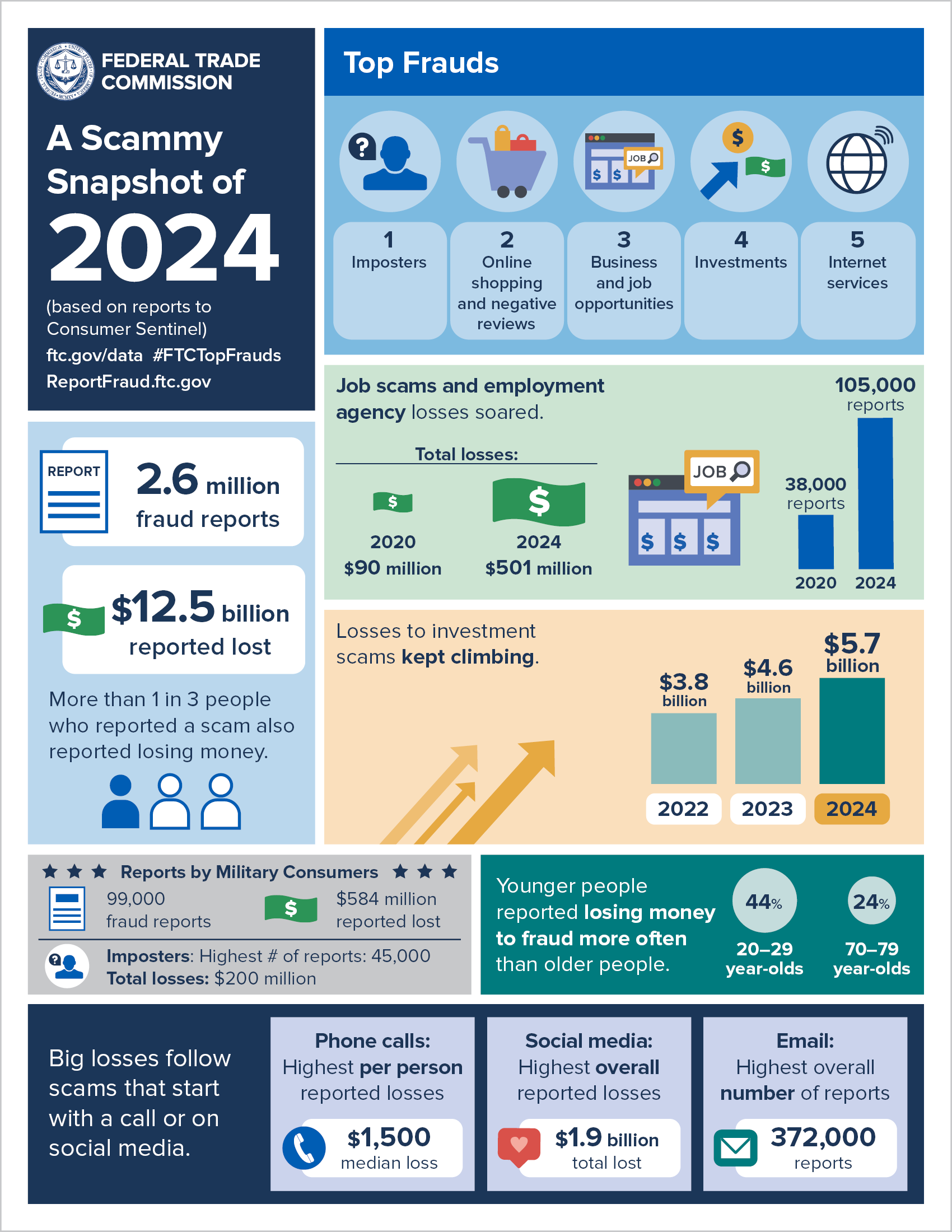
The Federal Trade Commission (FTC) ranks phone calls as the second-most-common contact method for fraud in 2024. Even worse, these scams had the highest per-person financial loss, with a median of $1,500 per victim.
Scammers buy, sell, and trade phone numbers like currency. All it takes is one answered call for your number to be marked as “active” and passed around. They target phone numbers they believe belong to real people, especially ones that are likely to answer.
There are several reasons your number may have ended up on their list:
- You answered a scam call. Even if you hung up immediately, answering can signal that your number is active. Some scam operations buy and sell lists of "live" numbers to other fraudsters.
- Your phone number was exposed in a data breach. If a website or service you use was compromised, your contact details may have been leaked and later sold online.
- You shared your number publicly. Business websites, social media profiles, online directories, or classified ads can all make your phone number easier for scammers to find.
- You entered your number into online forms. Giveaways, surveys, contests, or questionable websites sometimes collect phone numbers that later end up in marketing or scam databases.
- Scammers use automated dialers. Many fraudsters rely on software that calls thousands of numbers every day. Once someone answers, the number may be flagged for future campaigns.
How to stop spam calls and texts
Once scam calls and texts start, they can feel endless. Blocking them one by one often makes no difference because scammers constantly change numbers, spoof local area codes, and send texts from masked short codes.
So what does work?
Here’s a strategy that combines smart habits with real protection, including a tool specifically designed to address this growing problem.
1. Don't answer unknown numbers
If you’re a business owner, it’s tempting to pick up every call, just in case it’s a client, a lead, or a delivery driver. But that’s exactly what scammers rely on. Just answering once is enough to mark your number as active. After that, it gets shared or sold to others running similar scams.
If you’re not expecting a specific call, let it go to voicemail. Real clients and partners will leave a message. Over time, this helps reduce how often your number gets flagged or reused by scam networks.
Related: Call Spoofing: What It Is, How It Works, and How to Protect Yourself
2. Use call blocking to stop scam calls
When your phone is part of your business, scam calls aren’t just annoying, they’re disruptive.
Blocking each number manually rarely works, since scammers constantly rotate numbers or spoof ones that look familiar. You need a smarter system that filters them out before they reach you.
If you use an Android phone, Bitdefender Mobile Security includes a Call Blocking feature that does exactly that. It uses a real-time, community-powered database to block known scam numbers automatically. When another user flags a number, that info helps protect you, too.
It also uses AI to detect unusual patterns—like spoofed numbers or shady call behavior—and can alert you on the spot. You stay in control by customizing what gets blocked: individual numbers, whole area codes, or anything that feels off.
There’s also a simple call log showing how many scam calls have been stopped recently, so you can see the impact immediately. If you’ve been missing real calls because of scammers, this kind of tool can help restore trust in your phone again.
Related: Block the Scam: Bitdefender’s New Call Protection Feature for Android Puts You in Control
3. How to spot and block scam texts
Texts can be even riskier than calls because they often carry links designed to steal your data. Messages like “Your package is delayed” or “Confirm your account” are meant to trick you into tapping.
Never tap links in unexpected messages. Use your phone’s built-in filters (Filter Unknown Senders on iPhone, Spam protection on Android) to hide risky texts.
And to keep dangerous messages from reaching you in the first place, Bitdefender’s Scam Alert technology (Android 6 or later) scans links in texts, chats, and notifications in real time. Most scam texts are blocked before they even hit your screen, so you don’t have to worry about clicking the wrong link.
Related: What to Do If Scammers Have Your Phone Number
4. How to protect your phone number from scammers
- Avoid posting your phone number on your website, public forums, or social bios.
- Leave the phone number field blank when it’s optional in online forms.
- Don’t reply to suspicious texts—not even with “STOP.” That confirms your number is active.
- Be cautious with giveaways, surveys, or “business networking” platforms that request your number without a clear purpose.
- Keep an eye on data breaches. Many scams start weeks or months after your number leaks in a compromised platform.
Protect your business phone from scammers
The line between personal and professional is thin when you’re running a very small business. Your phone isn’t just a phone, it’s your office, your bank, your calendar, your connection to clients , and your personal files.. That’s why Bitdefender Ultimate Small Business Security includes Mobile Security as part of its complete protection package.
It’s not just about blocking scam calls or texts. It’s about protecting your business from the full range of digital threats—scams, phishing attempts, data breaches, malware, and even accidental clicks. Whether you work solo or have a small team, Bitdefender Ultimate Small Business Security gives you comprehensive security across every device, habit, and weak spot, down to the smallest detail.
Start your free trial now.
FAQS
Why am I suddenly getting so many spam calls?
Scammers often share or sell phone numbers they know are active. Your number may also have appeared in a data breach or been collected through online forms, marketing lists, or fake websites.
Does answering a spam call make the calls worse?
It can. Simply answering may confirm that your number belongs to a real person, increasing the chances that scammers will target it again or sell it to other fraud groups.
Why do spam calls keep coming from different numbers?
Scammers frequently use caller ID spoofing and rotate phone numbers automatically, making it difficult to block every number manually.
Can scammers do anything with just my phone number?
A phone number alone usually isn't enough to compromise your accounts, but it can be used for phishing, smishing, social engineering, identity fraud, or to make you a target for future scams.
How do I stop scam texts?
Don't click links or reply to suspicious messages. Enable spam filtering on your phone and use security tools that can identify malicious links before you open them.
Can Android block scam calls automatically?
Yes. Android offers built-in spam protection on many devices, and security apps such as Bitdefender Mobile Security provide additional real-time call blocking and scam detection.
tags
Author

Cristina Popov is a Denmark-based content creator and small business owner who has been writing for Bitdefender since 2017, making cybersecurity feel more human and less overwhelming.
View all postsYou might also like
Bookmarks
