Malicious links in Instagram comments are a bigger threat than they look

June 09, 2026
Instagram comments can feel harmless, especially when they’re under a viral Reels or a brand giveaway. However, malicious links in Instagram comments are often designed to steal logins, hijack accounts, push fake shops, or lure users into financial scams.
Key takeaways
- Malicious links in Instagram comments often lead to phishing pages, fake giveaways, counterfeit shops, adult-content traps, or fraudulent investment platforms.
- Instagram scam comments work because they abuse human nature and Instagram’s engagement-focused features.
- A suspicious Instagram link is not always disastrous, but entering your password, payment details, or two-factor authentication code should be treated as a security incident.
- The safest approach is to avoid links promoted in comments, verify offers through official profiles or websites, and report scam comments when you see them.
Why scammers use Instagram comments
Scammers go where people are paying attention. On Instagram, that often means the comment section under viral posts, celebrity updates, brand announcements, giveaways, crypto content, fitness transformations, travel reels, and product launches.
A malicious comment does not need to convince everyone. It only needs a few users to click. That’s why comment spam often appears in waves, with dozens of near-identical replies promising free prizes, secret videos, investment opportunities, exclusive discounts, or “urgent” account help.
Unlike direct messages, comments can borrow credibility from the post they appear under. For instance, a scam link dropped below a legitimate brand’s giveaway may appear to be connected to the campaign.
That context is what makes malicious links in Instagram comments so dangerous: they appear inside an environment people already trust.
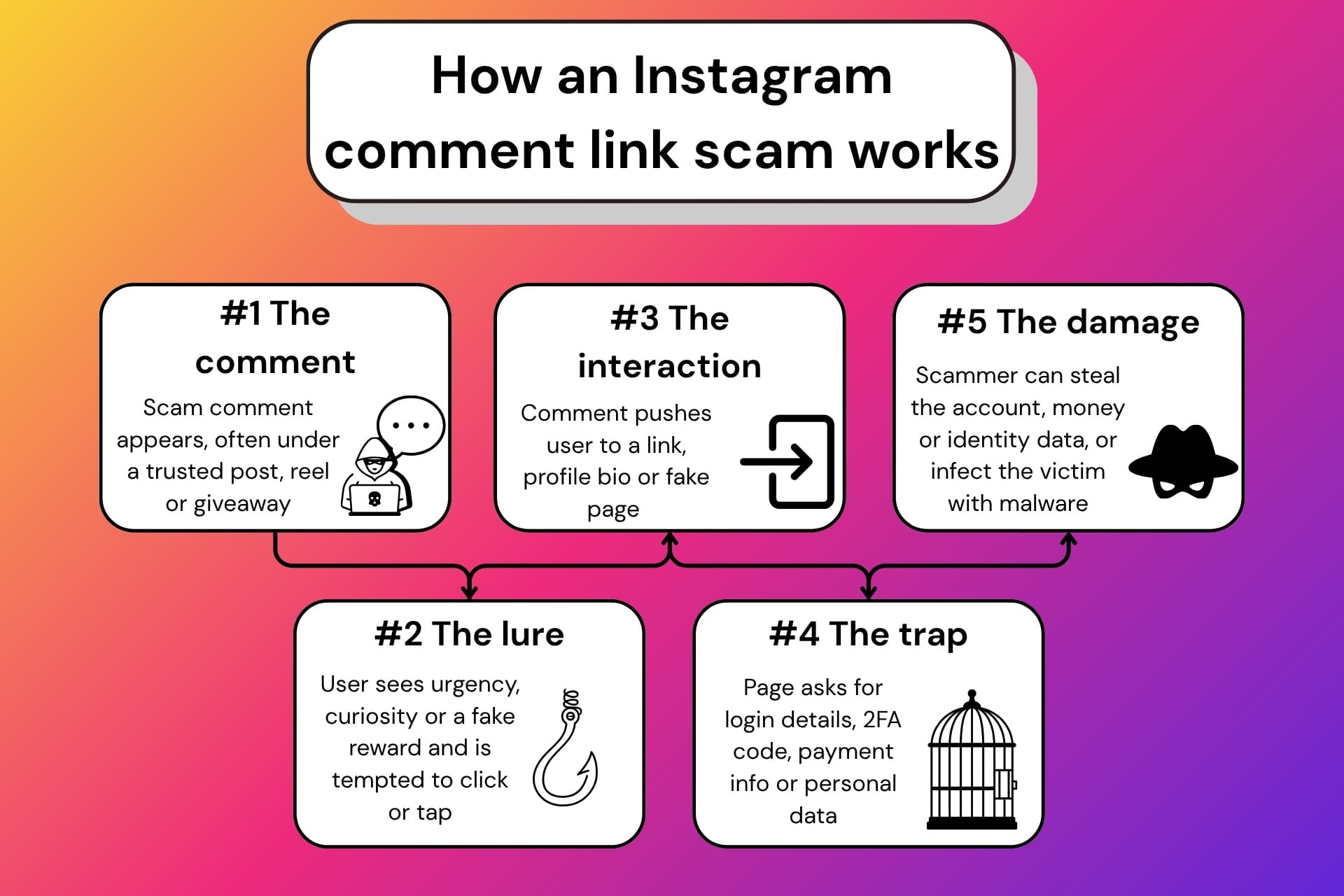
The most common malicious links in Instagram comments
Not every suspicious Instagram comment uses the same trick. Some are obvious spam, while others are carefully designed to look relevant to the post.
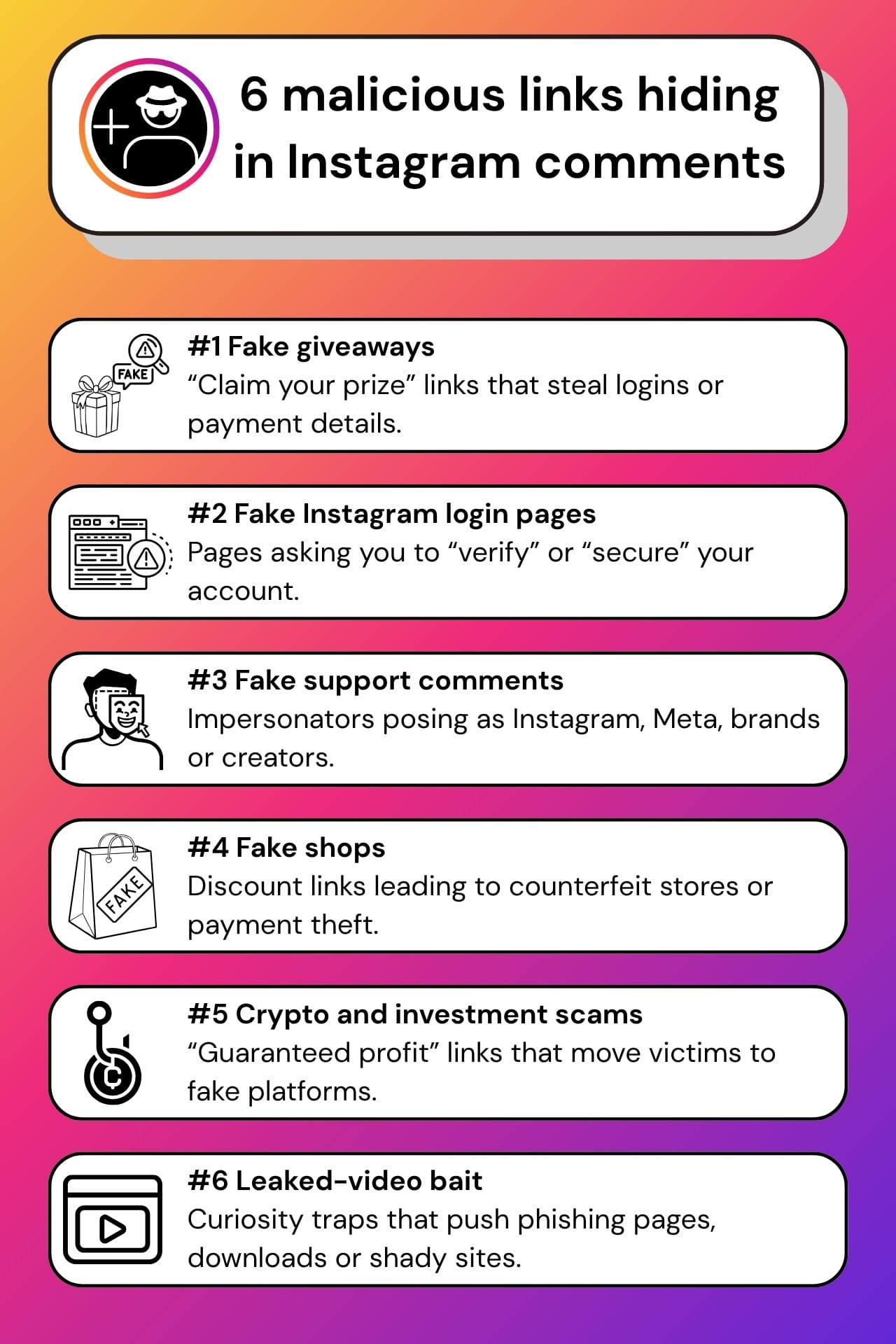
Fake giveaway and prize links
These comments usually claim that you have won something or that you can still enter a limited-time giveaway. They may use phrases such as “claim your prize,” “winner list here,” “final chance,” or “register now.”
The link may lead to a phishing page that asks for your Instagram login, email password, delivery address, phone number, or payment card details for a fake “shipping fee.” In some cases, the goal is not the prize money at all, but your account.
Instagram login phishing pages
Some malicious links open pages that mimic Instagram’s login screen. They may claim that you need to verify your age, appeal a copyright violation, confirm your identity, unlock a giveaway, or secure your account.
If you enter your username and password, the attacker may try to log in immediately. If the page also asks for your two-factor authentication code, the scammer may try for a full account takeover in real time.
Fake support or verification links
Scammers often impersonate Instagram support, Meta support, brand support teams, or creator management accounts. Their comments may say your account is at risk, your content violates policy, or you qualify for verification.
A real platform warning should not require you to follow a random comment link. Account notices should be checked directly in the official app, not via a URL from an unknown account.
Fake shopping links and counterfeit stores
Instagram is full of product discovery, which makes it attractive for fake shop scams. Malicious comments may advertise huge discounts, clearance sales, luxury dupes, limited drops, or “official” resellers.
The destination may be a fake store designed to steal payment details, sell counterfeit goods, harvest personal information, or take payment for products that never arrive.
Crypto, investment, and ‘money hack’ comments
Fraudulent investment comments may promote a mentor, a trading group, a crypto giveaway, a recovery expert, or a “guaranteed profit” platform.
These scams can be particularly damaging because they often move victims away from Instagram.
Adult-content, leaked-video, and curiosity bait
Some comments use embarrassment, shock, or curiosity to push clicks: “Is this you?”, “leaked video,” “watch before deleted,” or similar bait. These links may lead to harmful destinations such as phishing pages, malicious downloads or adult websites that aggressively collect data.
Why malicious Instagram comment links are so dangerous
In most of these scenarios, the danger lies in what happens after the click. A malicious link may:
- Steal your Instagram username and password through a fake login page
- Capture your two-factor authentication code
- Trick you into paying fake fees or buying from a fake shop
- Push you to install a malicious app or browser extension
- Collect your email, phone number, address, or card details
- Redirect you through several pages to hide the final destination
- Hijack your account and use it to scam your followers
Account takeover is one of the biggest risks. Once scammers control an Instagram account, they can inflict serious harm, including by messaging friends, posting fake investment stories, promoting fraudulent giveaways, impersonating the owner, or locking the real user out. A compromised account with a real history, real photos, and real followers is far more convincing than a brand-new scam profile.
For creators and small businesses, the risk is even bigger. A hijacked Instagram account can be used to spread the scam to an audience that already trusts the page. That’s where dedicated protection such as Bitdefender Security for Creators becomes relevant, because creator accounts are business assets and trusted communication channels.
Red flags in Instagram scam comments
Scam comments are not always perfectly written, but many follow familiar patterns. Be cautious when a comment:
- Pushes you to click a link in a bio, shortened URL, or unfamiliar domain
- Claims you won a giveaway you do not remember entering
- Uses urgent language: “today only,” “last chance,” “act now,” or “before it’s deleted”
- Poses as Instagram, Meta, a creator, or a brand support account
- Mentions easy money, guaranteed returns, or crypto profits
- Asks you to verify your account through a comment link
- Has repetitive wording posted by multiple accounts
- Comes from a profile with few posts, strange followers, copied branding, or recent activity
A useful rule: scammy comments often feed on panic, greed, curiosity, or embarrassment. If you notice these patterns, you may want to slow down before interacting.
Before clicking a suspicious link in an Instagram comment, pause and verify it. If the comment claims you won a giveaway, asks you to confirm your account, or links to a strange “support” page, you can copy the link, screenshot the comment, or describe the situation to Bitdefender Scamio for a second opinion before engaging.
What to do if you click a suspicious Instagram link
Clicking a link is not automatically the same as being hacked. The bigger problem is the interaction that follows, whether that means entering information, downloading something, approving a login, or making a payment.
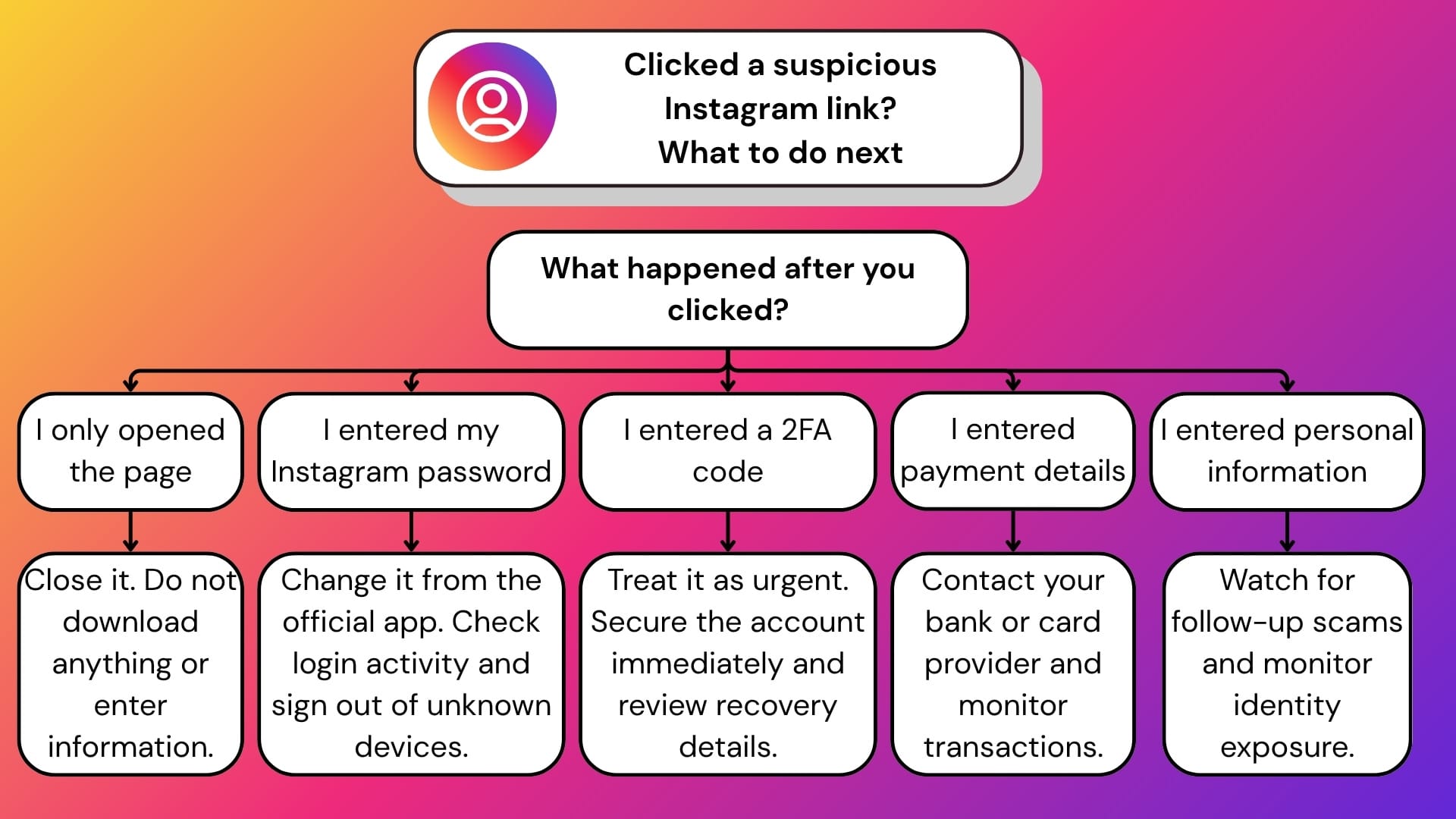
If you clicked but didn’t enter anything: close the page, do not download any files, and avoid further interaction. If you have entered your Instagram password, change it immediately in the official app or on the website. If you have used the same password elsewhere, change it there too. Use a password manager like Bitdefender SecurePass to avoid password fatigue.
If you have entered a two-factor authentication code, payment information, or email password, treat it as urgent. Review Instagram login activity, sign out of unknown devices, enable stronger authentication, and check your email account security. If payment details were involved, contact your bank or card provider.
You should also report the comment, account, or post to Instagram so the platform can review it.
If you entered personal information, the problem may not stop with Instagram. Your email address, phone number, name, or payment details could be used in later phishing attempts, impersonation scams, or account takeover attempts. Bitdefender Digital Identity Protection can help monitor whether your personal information is exposed online and alert you to risks connected to your digital footprint.
How to protect yourself from malicious links in Instagram comments
The best defense is to avoid trusting comment links, even when they appear under legitimate posts.
Go directly to the official profile, website, or app instead of clicking links from random comments. For giveaways, check whether the promotion has been announced by the verified brand or creator account. For shopping offers, search for the retailer independently and inspect the domain before buying. For account warnings, check Instagram’s in-app notifications and security settings rather than following a comment link.
Use a unique password for Instagram, turn on two-factor authentication, and keep your email account secure. Your email is often the recovery path for your social media accounts, so losing access to it can make an Instagram takeover much worse.
Security tools like Scamio and Security for Creators can also help by detecting phishing pages, malicious domains, scam links, and suspicious downloads before they cause damage. However, it’s important to acknowledge that no tool can completely replace good cybersecurity hygiene and a thoughtful pause before clicking.
Conclusion
Malicious links in Instagram comments are dangerous because they hide in plain sight. They appear under familiar posts, exploit trusted brands and creators, and use urgency or curiosity to push users toward malicious ends.
As covered in our broader guide to Instagram scams, it’s safest to treat unexpected offers, warnings, and “exclusive” links with skepticism. If a comment asks you to leave Instagram, log in again, claim a prize, verify your account, or act immediately, assume there may be a catch.
Frequently asked questions (FAQ)
Why am I getting spam comments on Instagram?
You may be getting spam comments because bots and scam accounts target public posts, popular hashtags, trending topics, giveaways, creator accounts, and business pages. Scammers use automated tools to post the same message across many accounts, hoping some users will click on malicious links or engage with fake profiles.
Should I worry if I click on a suspicious link?
You should be cautious, but clicking alone does not always mean your account is compromised. The risk increases if you enter your password, two-factor authentication code, payment details, email login, or download something. If that happens, change your passwords, review login activity, enable stronger authentication, and contact your bank if financial information is exposed.
How to tell if a link is malicious?
A link may be malicious if it uses a strange or misspelled domain, a URL shortener, urgent language, fake branding, or a page that asks you to log in again for no clear reason. Be especially careful with links on unofficial pages promising prizes, verification, crypto profits, adult content, copyright appeals, or account recovery.
How to spot fake comments on Instagram?
Fake Instagram comments often repeat the same wording, tag multiple users, promise giveaways or easy money, push users to “check my bio,” or impersonate brands, influencers, and support accounts. Check the commenter’s profile, username, posting history, follower quality, and whether the offer is confirmed by the official account.
tags
Author

Vlad's love for technology and writing created rich soil for his interest in cybersecurity to sprout into a full-on passion. Before becoming a Security Analyst, he covered tech and security topics.
View all postsYou might also like
Bookmarks
