Is that video real? How to spot a deepfake before it fools you

August 10, 2026
A familiar face appears in your feed. A celebrity promotes an unbeatable investment. A company executive announces an urgent change. A distressed relative calls asking for money. The person looks right and sounds convincing—but is it real?
Deepfakes are no longer easy to dismiss as clumsy edits. They can imitate a person's face, voice, expressions and mannerisms well enough to lend authenticity to a false message. That makes them useful not only for entertainment and satire, but also for fraud, impersonation and misinformation.
But you don’t have to be a digital forensics expert to spot the cues. A few visual, audio and behavioral checks—combined with independent verification and a dedicated detection tool—can help you decide whether a video deserves your trust.
Key takeaways
- No single visual or audio glitch proves that a video is fake
- Check who posted the clip, where it first appeared and whether trusted sources confirm it
- Look for mismatched lip movements, unstable facial details, inconsistent lighting and unnatural speech
- Treat urgency, secrecy, guaranteed returns and requests for money or credentials as major warning signs
- Verify surprising claims through a separate, trusted channel before you act or share
- Use a deepfake detector to analyze suspicious videos and assess both manipulation and deceptive intent
What is a deepfake?
A deepfake is synthetic or digitally manipulated media created with AI to make someone appear to say or do something they did not say or do. A fake may replace a face, clone a voice, alter the mouth to match fake dialogue, generate an entire scene or combine authentic footage with fabricated elements.
Not every AI-generated video is deceptive. Creators may use synthetic media for art, parody, education or accessibility. The risk comes when a video hides its origins or impersonates someone to influence what you believe, share, reveal or buy.
Why fake videos are becoming a problem
Scammers increasingly use AI voice cloning to target families in the United States. In San Francisco, fraudsters tricked parents with a fake bail call, but the parents called their son and avoided losing money.
In Hillsborough County, a mother lost $15,000 after scammers cloned her daughter's voice to fake a crash.
The incidents drew national attention, spotlighting the growing danger of AI-powered voice scams.
Our 2025 Consumer Cybersecurity Survey of more than 7,000 internet users in seven countries found that 37% of consumers named deepfake videos a top concern with AI's use in scams.
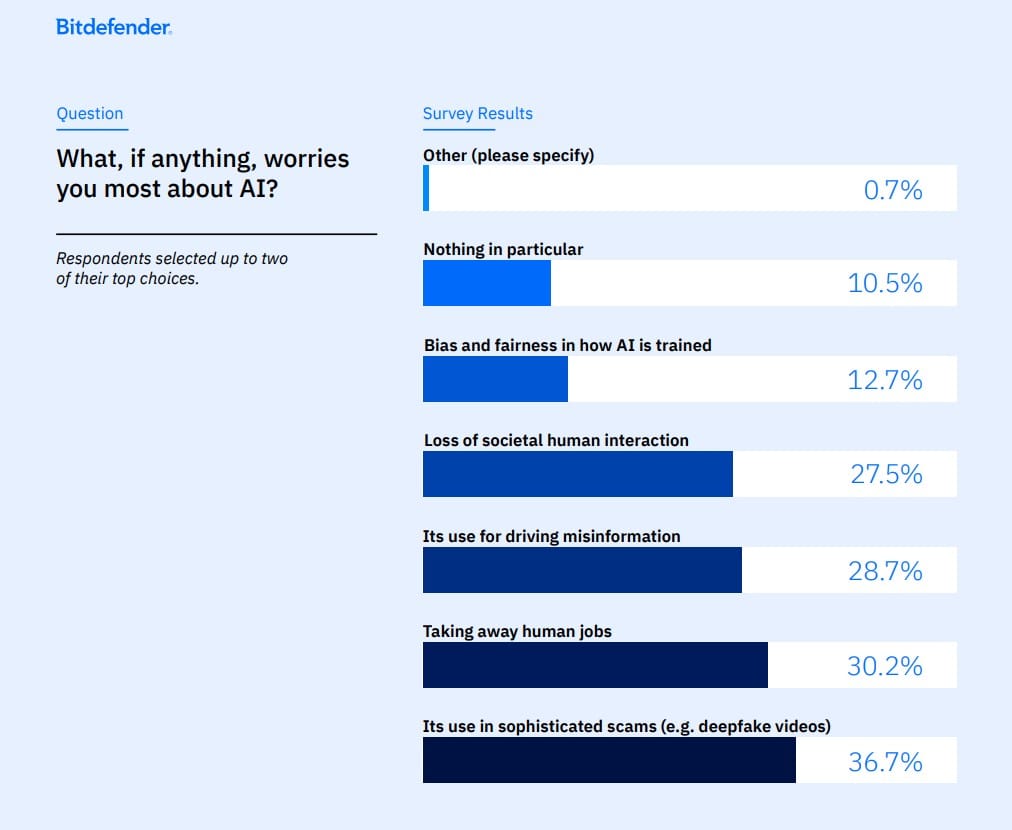
That concern is grounded in everyday exposure. More than seven in 10 respondents said they had encountered scams in the previous year, while one in seven said they had fallen victim.
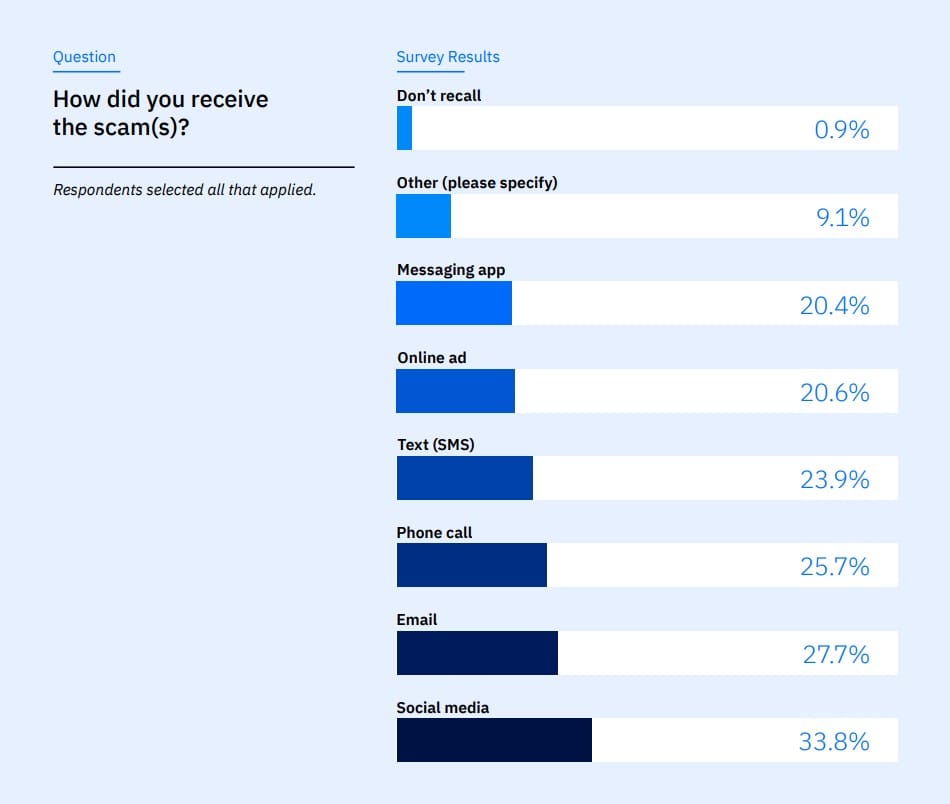
Social media was the leading scam-delivery channel, cited by 34% of respondents, ahead of email at 28% and phone calls at 25%.
Social platforms also give criminals raw material for impersonation. According to the survey, 66% of consumers post personal content such as photos, videos and milestones. A short clip can reveal enough detail about a person's appearance, voice, speech and relationships to help a scammer create a more believable fake or tailor the story around it.
As our survey warns, “common sense” is no longer enough to spot fraud.
How to tell if a video may be fake
1. Start with the source, not the face
Before studying individual frames, ask where the video came from. Is it posted on the person's verified account, an organization's official website or a reputable news outlet? Or does it come from an unfamiliar account, a cropped repost, a forwarded message or an ad with no clear sponsor?
Search for the central claim using a few distinctive words. If a public figure really announced a major resignation, investment or policy change, multiple credible sources will usually report it. Look for the earliest version of the clip and a longer, unedited recording. A missing source does not prove manipulation, but it removes an important reason to trust the content.
2. Watch the mouth and listen to the words
Replay a short section at a slower speed. Do the lips form the sounds you hear? Or does the audio seem to arrive slightly before or after the mouth moves? Pay particular attention to words containing sounds such as “b,” “p” and “m,” which normally require the lips to meet.
Look for changes around the mouth and jaw: blurred edges, teeth that merge or change shape, an oddly motionless tongue, or expressions that do not flow naturally into one another. Lip-sync manipulation can affect only a small part of an otherwise genuine video, so the rest of the face may look completely normal.
3. Look for details that change from frame to frame
AI-generated details can be convincing in a still image but become unstable during movement. Watch for:
- Facial contours that shimmer, blur or detach when the head turns
- Hair, ears, earrings or glasses that briefly change shape or disappear
- Skin texture that becomes unusually smooth or shifts between frames
- Teeth, fingers, clothing patterns, logos or background text that morph
- Objects that appear to pass through one another or move in physically implausible ways
Video compression, poor lighting and motion blur can create some of the same artifacts. Treat them as reasons to investigate further, not as proof on their own.
4. Check lighting, shadows and reflections
A generated face or inserted subject may not interact naturally with the scene. Compare the direction of light on the face with the light on the neck, clothing and background. Check whether shadows move consistently and whether reflections in glasses, windows or other shiny surfaces make sense.
Be cautious if the skin tone changes abruptly, the face seems too bright for the room or the head develops a halo outline. These inconsistencies can suggest compositing or generation—but, again, filters and aggressive compression can also be responsible.
5. Listen for voice-cloning clues
A cloned voice may sound nearly identical to the real one, so don’t rely on recognition alone. Listen for speech that is too even, strangely paced or emotionally disconnected from the message. Warning signs may include:
- Unnatural pauses, emphasis or pronunciation
- Missing breaths and mouth noises, or breaths in unlikely places
- A metallic, flat or overly polished quality
- Background noise that cuts in and out while the voice remains unnaturally clean
- Repeated phrases or an inability to respond naturally to an unexpected question
These clues are becoming less dependable as the technology improves. If a caller claims to be someone you know and asks for urgent help, the safest response is to hang up and call that person using a number you already trust. The US Federal Trade Commission recommends this independent check rather than trusting the familiar voice.
6. Ask what the video wants from you
Sometimes the scam itself is easier to detect than the deepfake. Pause if a video or caller tries to make you act before you can verify the story. Common pressure tactics include:
- A “guaranteed” investment or giveaway
- A limited-time opportunity requiring immediate payment
- A demand for secrecy
- A crisis involving a relative, executive or authority figure
- A request for passwords, verification codes, personal data or remote access
- Payment through cryptocurrency, gift cards, wire transfer or another hard-to-reverse method
Remember that emotion and a sense of urgency are meant to distract you from checking whether that borrowed trust is deserved.
How to verify a suspicious video
When a clip raises doubts, follow these steps:
1. Pause — Do not click a link, send money, disclose information or reshare the video
2. Check the original source — Visit the person or organization's official account or website directly
3. Look for corroboration — Search reputable news outlets, official statements and full-length footage
4. Verify out of band — Contact the supposed speaker through a phone number, email address or app you already know
5. Ask a private question — In a live interaction, ask something an impersonator would not likely know; families can also agree on a private verification phrase
6. Analyze the content — Use a dedicated deepfake detector to examine evidence that may be difficult to see or hear unaided
7. Report and warn others — Report fraudulent posts to the platform and share verified analysis with anyone who received the clip
Use a deepfake detector
Bitdefender RealCheck is a standalone deepfake-detection app for iOS and Android. Paste a link or upload a suspicious video, and the app performs a multi-layered analysis to help you evaluate whether the content may have been manipulated and whether it appears designed to deceive.
Instead of returning only a “real” or “fake” label, RealCheck provides a structured report covering the likelihood of manipulation, potential signs of deceptive intent, the spoken transcript, suspicious areas in the content and indications that the video may be trying to steal money, credentials or personal information. It can also recognize public figures being impersonated in active deepfake campaigns.
RealCheck reports can be shared, making it easier to show relatives and friends why a viral investment pitch or an alarming clip may not warrant trust.
Frequently asked questions (FAQ)
What is a deepfake video?
A deepfake video is synthetic or digitally manipulated media created with AI. It may replace a person’s face, clone their voice, alter their speech or generate a scene that makes them appear to say or do something that never happened.
How can you tell if a video is fake?
Check the original source and look for mismatched lip movements, unstable facial details, inconsistent lighting, unnatural speech or objects that change between frames. Because compression and editing can produce similar flaws, verify the video through trusted sources before drawing a conclusion.
What are the signs of a cloned voice?
Possible signs include unnatural pauses, unusual pronunciation, missing breaths, flat emotion, repeated phrases and background noise that changes abruptly. However, advanced voice clones may have no obvious audio flaws, so a familiar-sounding voice should not be treated as proof of identity.
Are all AI-generated videos deepfakes?
Not all AI-generated videos are deepfakes or intended to deceive. Synthetic media can be used for entertainment, art, education and accessibility. It becomes deceptive when it conceals its origins or impersonates someone to influence viewers, obtain information or facilitate fraud.
What should I do if I receive a suspicious video?
Do not send money, disclose information, click accompanying links or share the video. Find the original source, look for independent reporting and contact the supposed speaker through a phone number, email address or account you already trust.
Can a deepfake detector confirm that a video is fake?
A deepfake detector can analyze signs of manipulation and deceptive intent, but its result should not be treated as absolute proof. Detection tools are most useful when combined with source checks, independent reporting and direct verification through a trusted communication channel.
You may also like:
tags
Author

Filip has 17 years of experience in technology journalism. In recent years, he has focused on cybersecurity in his role as a Security Analyst at Bitdefender.
View all postsYou might also like
Bookmarks
