Looking for a free race stream on your Mac? Watch out for this fake security check

November 17, 2026

According to Bitdefender's macOS Threat Landscape Report 2026, 45.1% of Mac detection reports from August 2025 to July 2026 were classified as web and document content. For anyone searching for a free race stream, a routine-looking security check can be the first step toward data theft.
Imagine you’re ready to watch a motorsport race, but your usual streaming service is unavailable. You search for a free broadcast and land on a page asking you to confirm you’re human before the video starts.
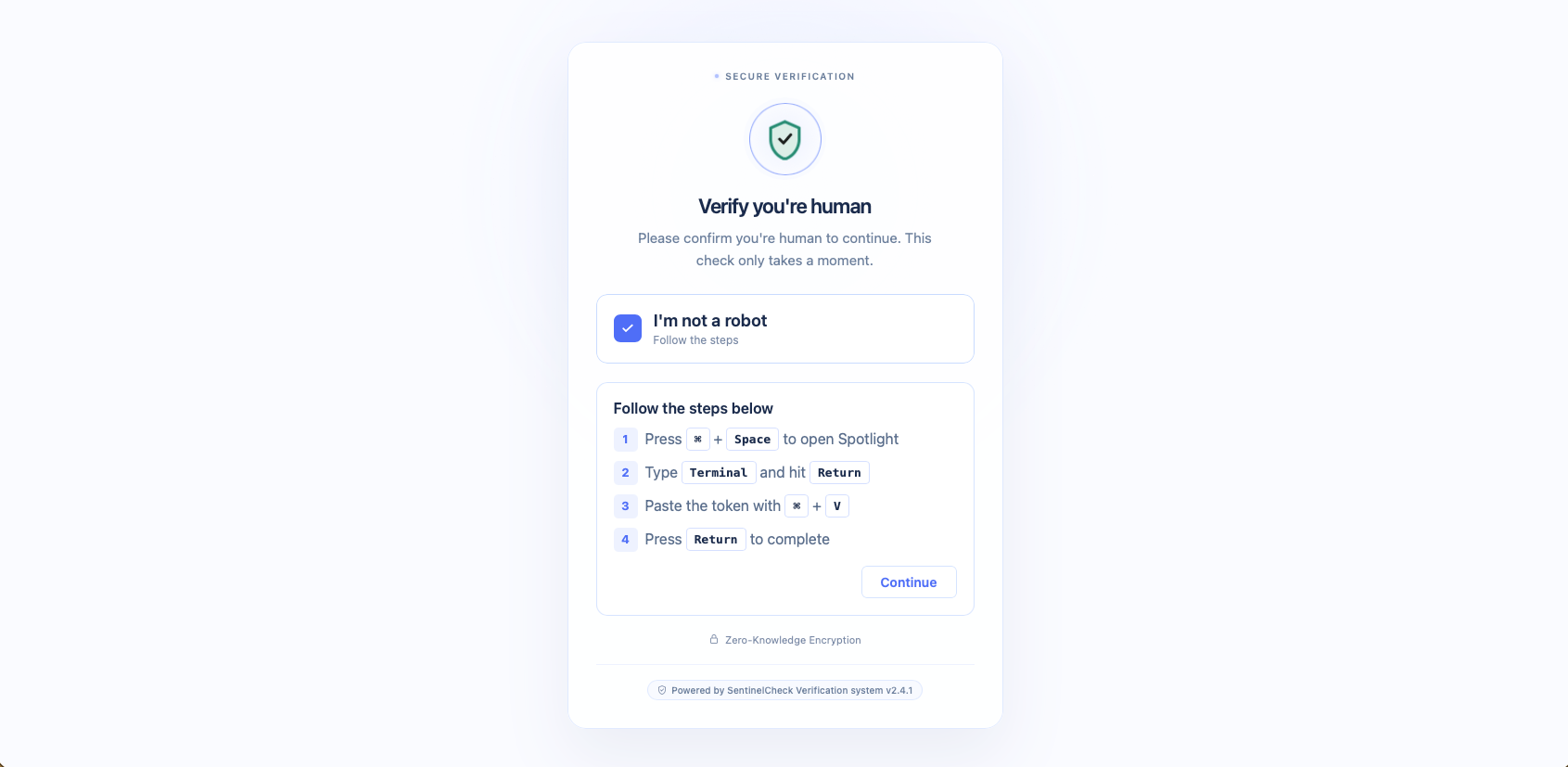
The page may ask you to copy a “verification token” into Terminal. That is not a normal security check. It could be ClickFix, a scam that tricks you into running malicious instructions on your Mac.
According to the Bitdefender macOS Threat Landscape Report 2026, based on more than 1.5 billion security events, 45.1% of Mac detection reports between August 2025 and July 2026 were classified as web and document content. Trojans accounted for 24.8%, adware for 18.9%, and potentially unwanted applications for 11.2%.
In this article, we’ll look at stream scams, fake verification tactics, and what to do if you followed the instructions.
Key findings
- Web and document content was the largest category at 45.1%, followed by Trojans at 24.8%, adware at 18.9%, and potentially unwanted applications at 11.2%.
- These percentages describe blocked detection events, not infected Macs or people under attack. They do not prove that every detection started in a browser.
- Stealer-class detections represented 1.8% of reports. This understates practical risk because generic labels or earlier blocking can hide the final stealer payload from telemetry.
- Bitdefender does not publish a ClickFix share because its telemetry cannot cleanly isolate these events. The research also does not identify motorsport fans as a separate group.
Why do free race streams appeal to scammers?
When a race is about to begin, you may be more inclined to try an unfamiliar website if it promises immediate access. Scammers design their pages around that sense of urgency, using familiar buttons, playback messages, and security checks to make the next step feel routine.
The Bitdefender Fan Threat Index documents websites offering free motorsport streams that redirect visitors to fake subscriptions, VPN upsells, aggressive advertising, adult content, Telegram channels, and Android APK downloads.
Together, the reports connect the deceptive prompts fans may encounter with the online content frequently classified in Mac detection reports. A free-stream search does not automatically lead to malware, but unexpected download, payment, or command requests are red flags.
How does a fake security check work?
ClickFix convinces you to run malicious instructions yourself. Bitdefender’s macOS report describes three steps:
- A deceptive page gives you a problem to solve. It may show a fake CAPTCHA, browser warning, or playback error, with pretexts such as “update codecs” or “enable streaming access”.
- The page asks you to copy a token. Your clipboard actually receives an encoded shell command. Encoding changes how text looks, not what it does.
- You are told to paste the text into Terminal and run it. The command retrieves another stage from a remote address and runs it using your account. No software exploit is required.
If you see this request, close the page before pressing Return. Do not try to judge whether an unexpected command looks safe.
What could an infostealer take?
The information targeted depends on the malicious payload and the access it gets. Bitdefender’s macOS telemetry identifies the following targets, in order of observed frequency among stealer-class detections:
- Browser credentials and session cookies
- Cryptocurrency wallet files and extensions
- macOS Keychain entries
- System information and hardware identifiers
- Apple Notes and messaging backups
- Developer, SSH, and cloud credentials
- Files in the Desktop and Documents folders
- Browser autofill information and password vaults
Session cookies deserve special attention. They help websites remember that you have already logged in. If scammers steal an active session, they may be able to reuse it without knowing your password and, in some scenarios, bypass multi-factor authentication.
The streaming account you were trying to access may not be the most valuable target. A stolen session could affect your email, finances, or work accounts, which is why recovery needs to cover more than one password.
How to protect yourself when looking for a stream
- Use authorised viewing options where available. Open the official app or type the provider’s address yourself instead of following an unfamiliar link.
- Treat Terminal instructions as a red flag. Do not paste or run a command to prove you’re human, fix buffering, install a codec, or access a stream.
- Update through trusted channels. Use macOS settings, the App Store, or the official provider rather than an update button on a streaming page.
- Add a security layer. A trusted product such as Bitdefender Ultimate Security Plus can help block malicious pages and activity, as well as add ID Theft Protection and ID Theft insurance on top of the blocking features (some features are only available on the US market).
FAQ
Does 45.1% mean that 45.1% of Macs were infected?
No. It is the share of deduplicated Mac detection reports classified as web and document content between August 2025 and July 2026. Each report represents a blocked event, not an infected device.
Is ClickFix only a Mac problem?
No. Microsoft’s Digital Defense Report put ClickFix at 47% of observed initial access during 2025, with the trend continuing into 2026. This external, cross-platform figure is not a measurement of Mac users or motorsport fans.
What if I copied the text but did not run the command?
Close the page and do not paste the text anywhere. If you pasted it into Terminal but have not pressed Return, close the Terminal window and do not run the command.
Can macOS and security software stop ClickFix?
Yes, but protection depends on where the attack is intercepted. While macOS includes built-in security mechanisms, ClickFix relies on tricking users into executing malicious commands themselves. Bitdefender adds another layer of protection by monitoring application behavior and identifying suspicious sequences of actions that may indicate an ongoing attack. This allows it to detect and block malicious activity before it causes harm.
What should I do if I already ran the command?
Start with your device. Use trusted security software or professional help to check and clean your Mac before changing passwords on that same device. Next, use a second, clean device to revoke active sessions and change passwords for important email, financial, work, and other sensitive accounts. Address any exposed payment or cryptocurrency credentials as well.
tags
Author

The meaning of Bitdefender’s mascot, the Dacian Draco, a symbol that depicts a mythical animal with a wolf’s head and a dragon’s body, is “to watch” and to “guard with a sharp eye.”
View all postsYou might also like
Bookmarks
