How to Tell If Someone Is Watching You Through Your Phone Camera

December 22, 2025

The idea that someone could be watching you through your phone camera is unsettling but in many cases, there are warning signs you shouldn’t ignore. Spyware and malicious apps can silently access your camera and microphone, putting your privacy at risk. Knowing how to detect unauthorized access early is key to protecting your device and your personal life.
Key Takeaways
Spyware is required for camera hacking. Attackers can’t access your phone camera directly—they rely on malicious apps, phishing links, physical access, or advanced exploits to install spyware first.
- Camera indicator lights and unknown apps are critical red flags. If your camera activates without reason or you find unfamiliar apps or profiles, your device may be compromised.
- Battery drain, overheating, and data spikes signal hidden activity. Spyware running in the background continuously records and transmits data, impacting performance and usage metrics.
- Removing spyware requires layered action. Audit app permissions, run a security scan, update your OS, and perform a factory reset if needed to fully eliminate threats.
Once you see the camera indicator light flash for a second, even with no open apps, or you hear strange sounds during phone calls, the fear that someone is watching you gets real. Rightfully so, you're probably wondering: how to tell if someone is watching you through your phone camera?
Sophisticated spyware can remotely access your phone's camera and microphone, recording you without your consent. Therefore, spyware apps can steal your data and destroy your online privacy. If you fear that this is your case, keep on reading, as our experts weighted in on how hackers get into your phone to watch and listen to your conversations, plus the right ways to combat them.
This guide will show you the definitive signs of phone camera spying. We will cover how to confirm the threat and the expert steps to remove spyware and secure your device. Let's get into it.
How hackers gain access to your phone's camera
A hacker cannot just turn on your phone camera. They first need to install spyware on your cell phone. These are the five most common ways they gain access to your device.
1. Malicious apps (trojans and spyware)
This is the most common method, especially on Android phones. Spyware apps can be disguised as harmless utilities, like a "video downloader," "file manager," or "cleaner" app. You might download apps from third party apps stores, or even the official Google Play store, that contain hidden malicious code designed to spy on you.
2. Phishing and "camfecting"
This is a targeted attack. The hacker sends you suspicious links via text messages, messaging apps, or email. The link often creates false urgency, like a "failed login attempt" or "shipping update". It leads to malicious websites that look real, tricking you into granting camera permissions or entering your password. This specific attack is often called "camfecting". This also includes "malvertising", which is a fake pop-ups on malicious websites that look like system alerts.
3.Poor network security from unsecured wi-fi
When you join a public, unsecured network at a cafe or airport, you are exposed. Attackers on the same network can perform a "Man-in-the-Middle" (MITM) attack to intercept your traffic. They can redirect you to malicious websites that look legitimate but are designed to install spyware.
4. Physical access (stalkerware)
This is the most direct method. If someone (like a stalker or thief) gets physical access to your unlocked phone, they can manually install spyware in minutes. These "stalkerware" apps are often sold commercially and are designed to be hidden from the user immediately after installation.
5. Zero-click exploits
This is the most advanced threat. Sophisticated spyware, like Pegasus, can use "zero-click" exploits. This means your phone can be compromised without you ever clicking a link. Simply receiving a specific, malicious message or video call can be enough to install spyware and gain access to your phone's camera.
9 signs someone is watching you through your phone camera
Spyware is designed to be invisible, but it leaves clues. Some signs are direct evidence, like your camera indicator light turning on. Others are secondary symptoms, like overheating or battery usage drain, caused by the spyware app running in the background.
Here is how to tell if someone is watching you through your phone camera.
Direct evidence (primary symptoms)
These signs are the most flagging indicators that your phone's camera is compromised.
1. The camera indicator light turns on randomly
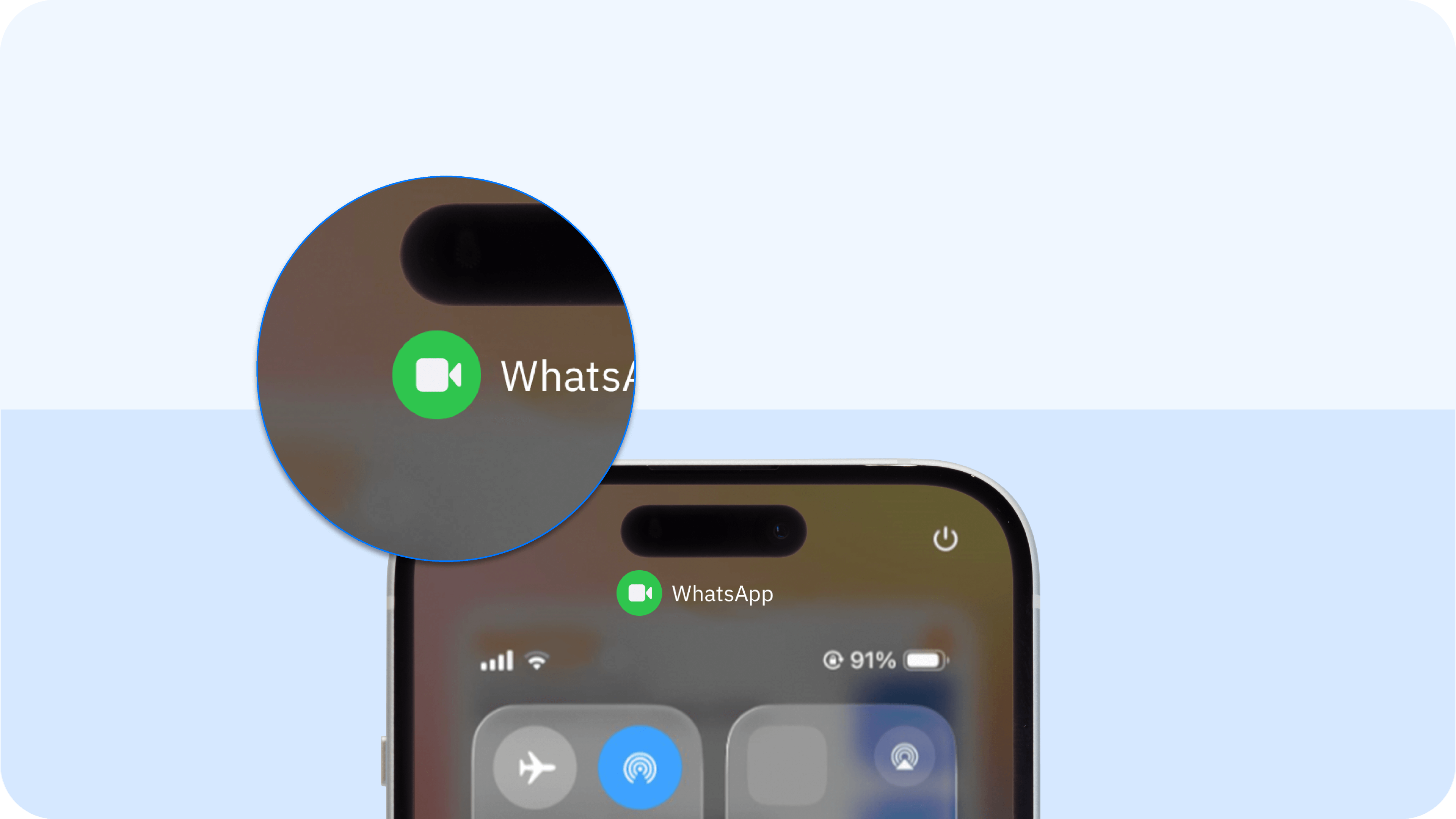
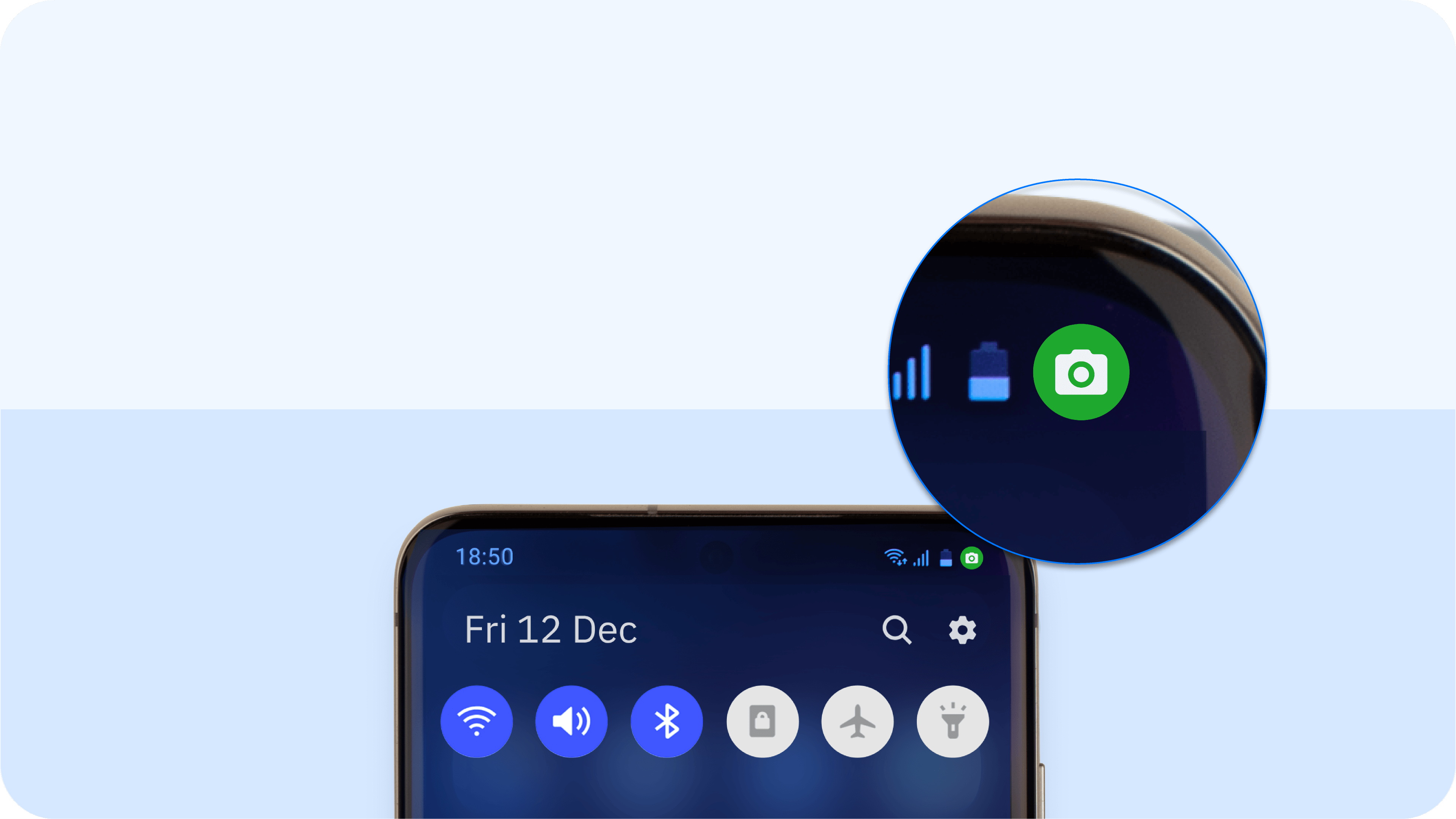
The indicator light (a green or orange dot on modern iOS and Android phones) is a hardware-level warning. It exists to tell you when an app has camera access. If this camera light appears when you have no open apps that use the camera, it is a critical sign. It means a hidden background app or spyware app is likely active.
How to check:
- On an iPhone (iOS 15+), swipe down to open the Control Center. The app using your camera will be listed at the top.
- On an Android device (12+), tap the green icon itself to see which app has camera access.
2. You find unfamiliar apps on your phone
This is a major red flag. Scan your app list for unfamiliar apps or unauthorized apps you did not download. Spyware apps like to use generic names like "Service," "Monitor," or "Device Health" to hide in your settings menu.
How to Check:
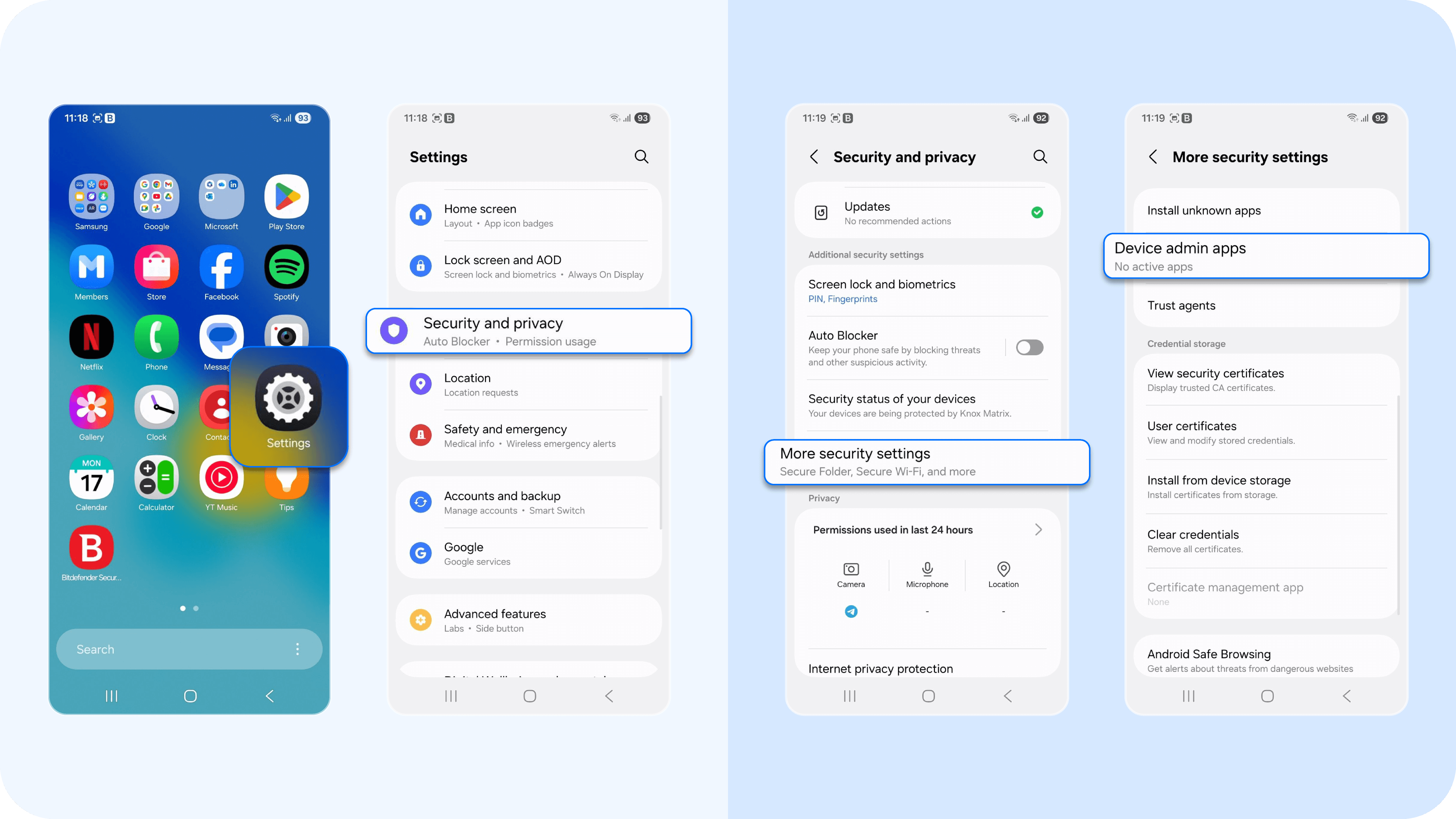
- On an Android phone, go to Settings > Security and Privacy > More security settings > Device admin apps to see if any unknown app has high-level privileges.
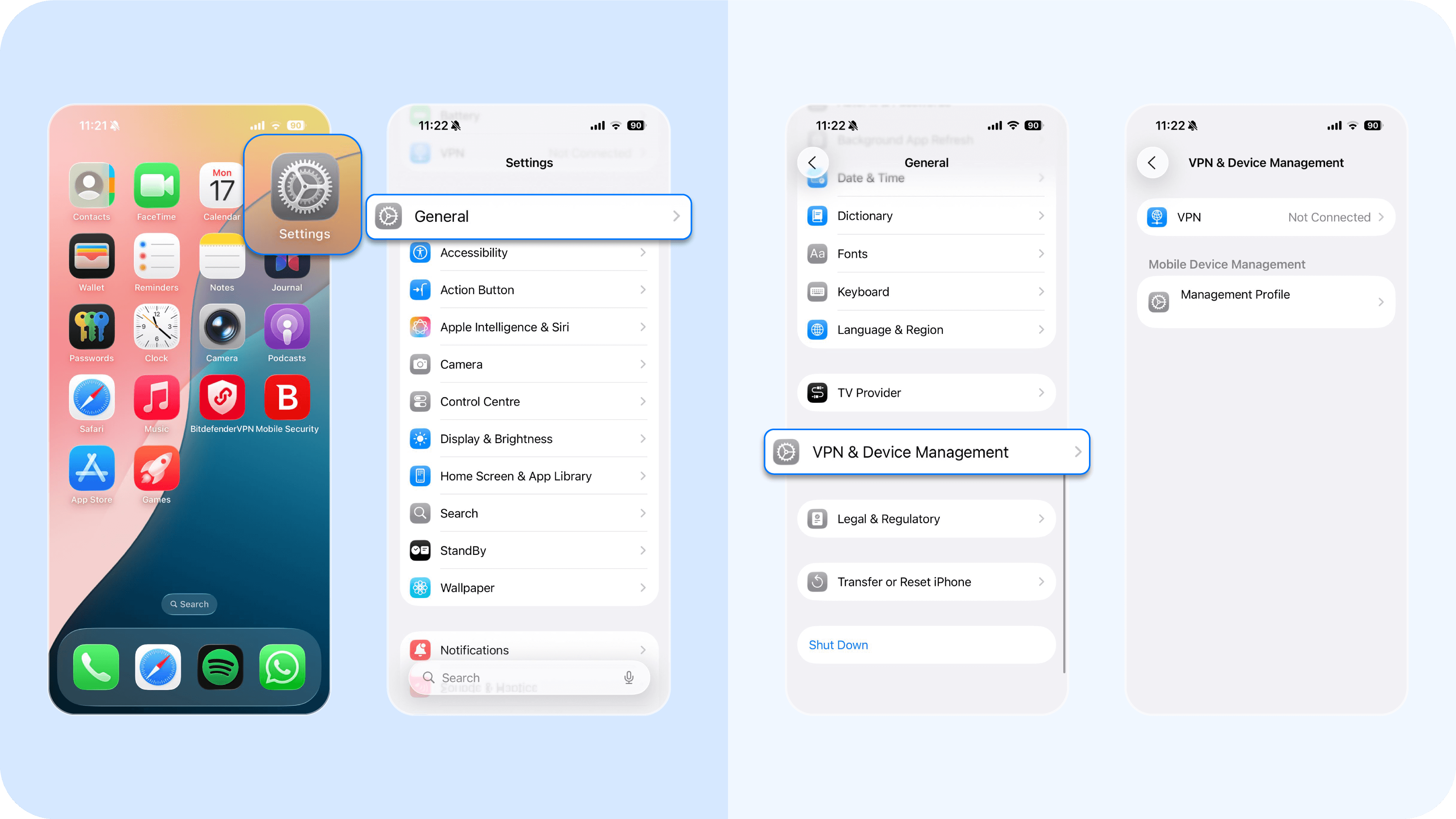
- On an iPhone, check Settings > General > VPN & Device Management for any strange configuration profiles you did not install.
3. You find photos or videos you did not take
If an attacker can record videos or take photos, they may forget to delete them from your gallery. Finding strange media you did not create is a clear sign your phone's camera was remotely controlled.
Secondary symptoms (the resource drains)
These signs are caused by the spyware app working 24/7, hijacking your phone's processor and network.
4. Your battery drains unusually fast
A phone's camera and processing power use a lot of energy. A spyware app that is constantly recording and uploading video will cause a severe, unexplained drain on your battery usage.
How to Check:
- Go to Settings > Battery.
- On both iOS and Android, this page lists apps by their power usage. If an unfamiliar app or an app you rarely use (like "Device Service") is at the top, you have a problem.
5. Your data usage spikes
Spyware apps must send the recorded data to the hacker over the internet. This causes a sudden, high spike in your data consumption.
How to check:
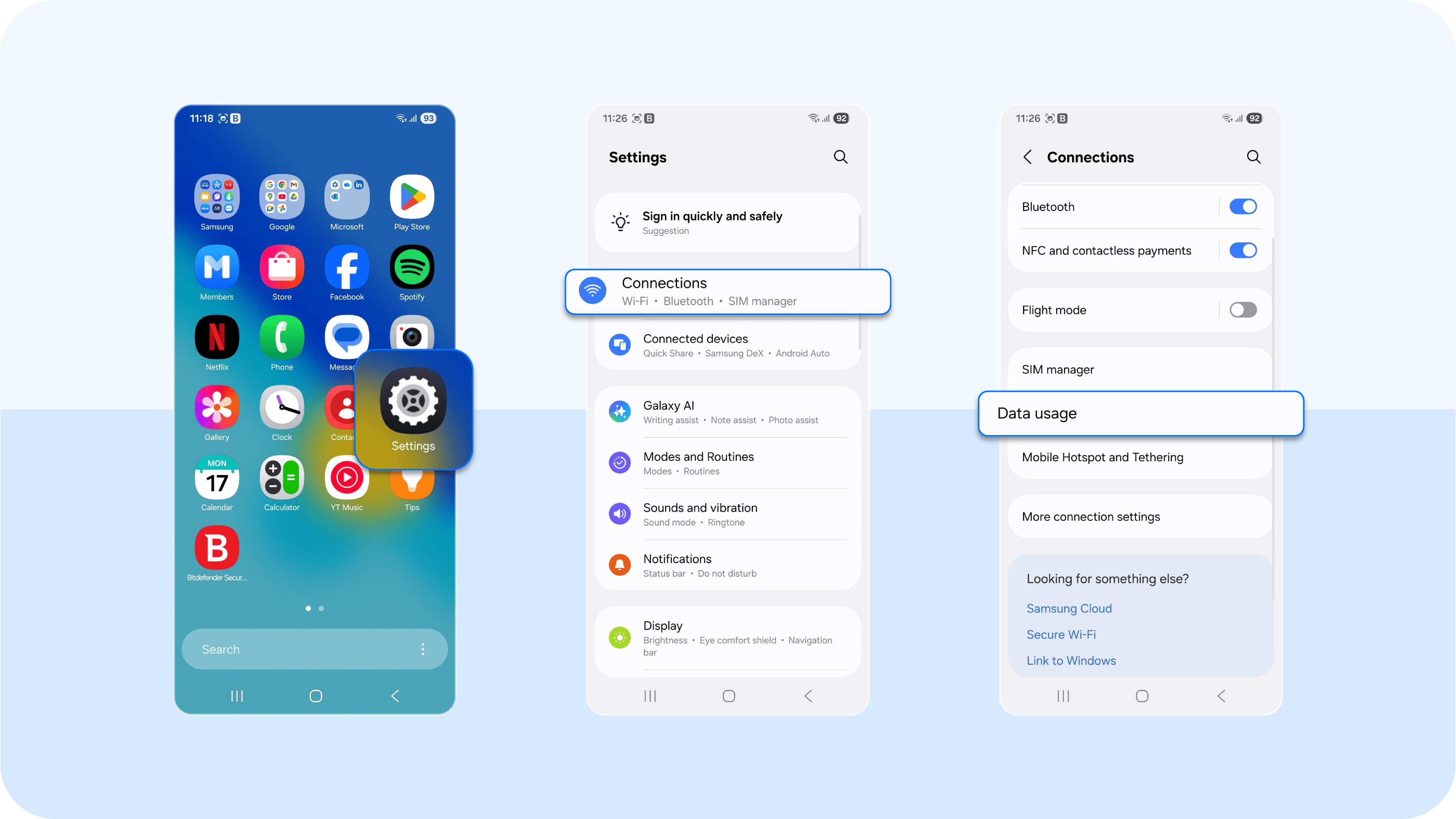
- Check how much data apps are using. On an Android device, go to Settings > Connections > tap data usage.
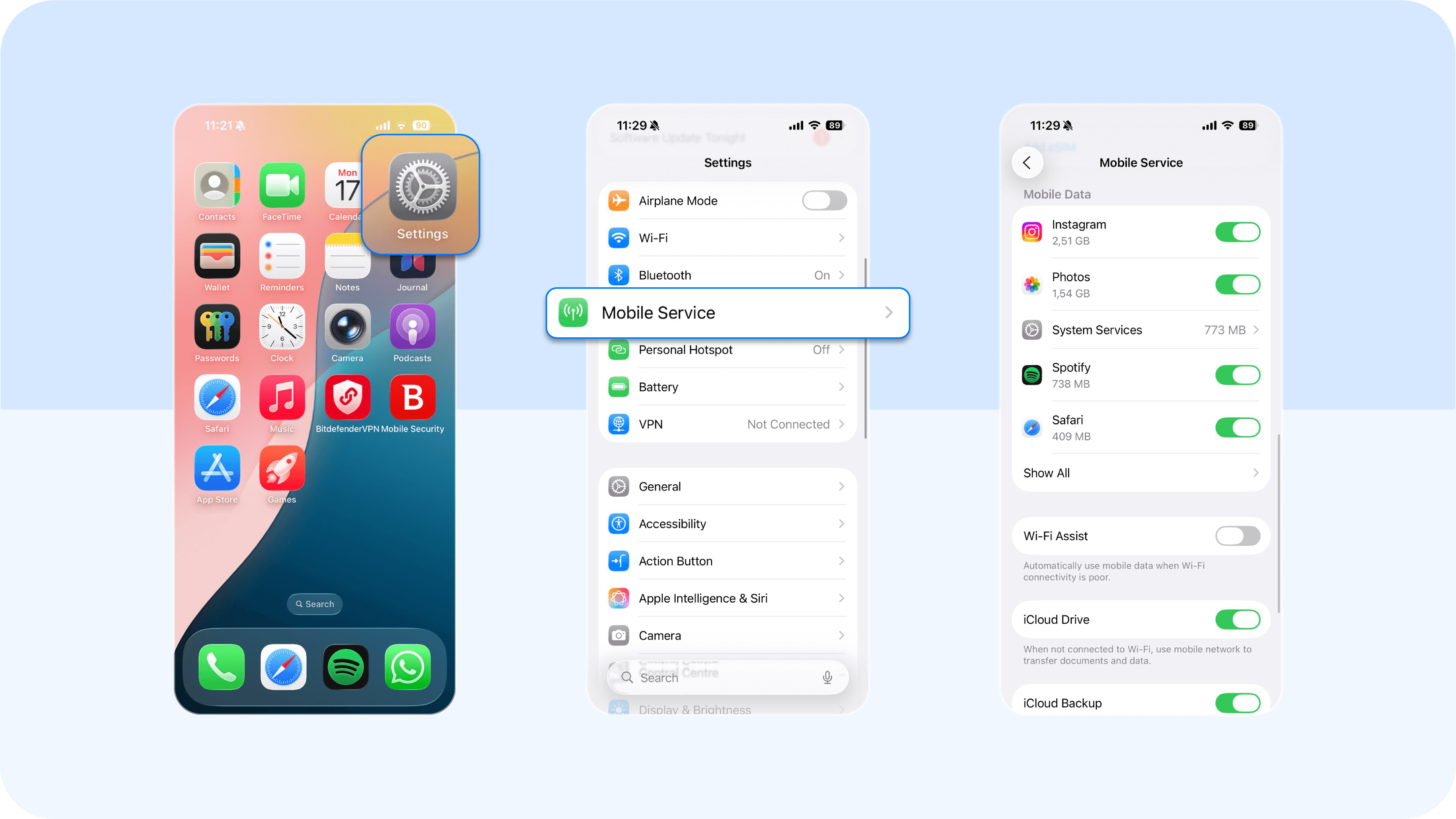
- On an iPhone, go to Settings > Mobile Service > Mobile Data > Show All. Look for an app with high data usage that you do not recognize.
6. Your phone is overheating
The spyware app is a hidden background process, and it forces your phone's processor to work 24/7. This constant load is what generates excessive heat. If your phone is hot even when it's idle, this is a direct result of the phone's processor being forced to work overtime.
This sign is strongest when combined with battery usage drain. How to check:
Go to Settings > Battery. On both iOS and Android phones, this page lists apps by their power consumption.
If an unfamiliar app (like "Device Service") or an app you rarely use is at the top of the list, you have found a likely culprit.
Performance and interference issues
These signs show the malware is actively interfering with your phone's normal functions.
7. Your phone is acting odd
Your phone may be acting strangely. This includes random reboots, apps crashing (especially security apps or browsers), or your screen lighting up on its own. While this can sometimes be faulty hardware, it is also a classic sign that malware is interfering with the operating system. It is actively preventing your phone from function properly.
8. You hear strange sounds during phone calls
Pay attention to your phone calls. If you consistently hear strange sounds like clicks, static, or distant echoes, it is a possibility your calls are being intercepted. While this can also be a simple network issue, it is a known sign of a spyware app recording your conversations.
9. Your video call performance is poor
If your video call performance on messaging apps like WhatsApp or FaceTime is suddenly terrible, be vigilant. A spyware app may be competing for camera access. It is even more likely that the spyware is using all your upload bandwidth to send your stolen data, leaving very little network capacity for your video call.
How to stop someone from spying on your phone
If you suspect your phone camera is compromised, take these expert steps immediately to find and remove spyware.
Step 1: Manually audit your app permissions
Go to your settings menu to see which legitimate apps or unfamiliar apps have camera access.
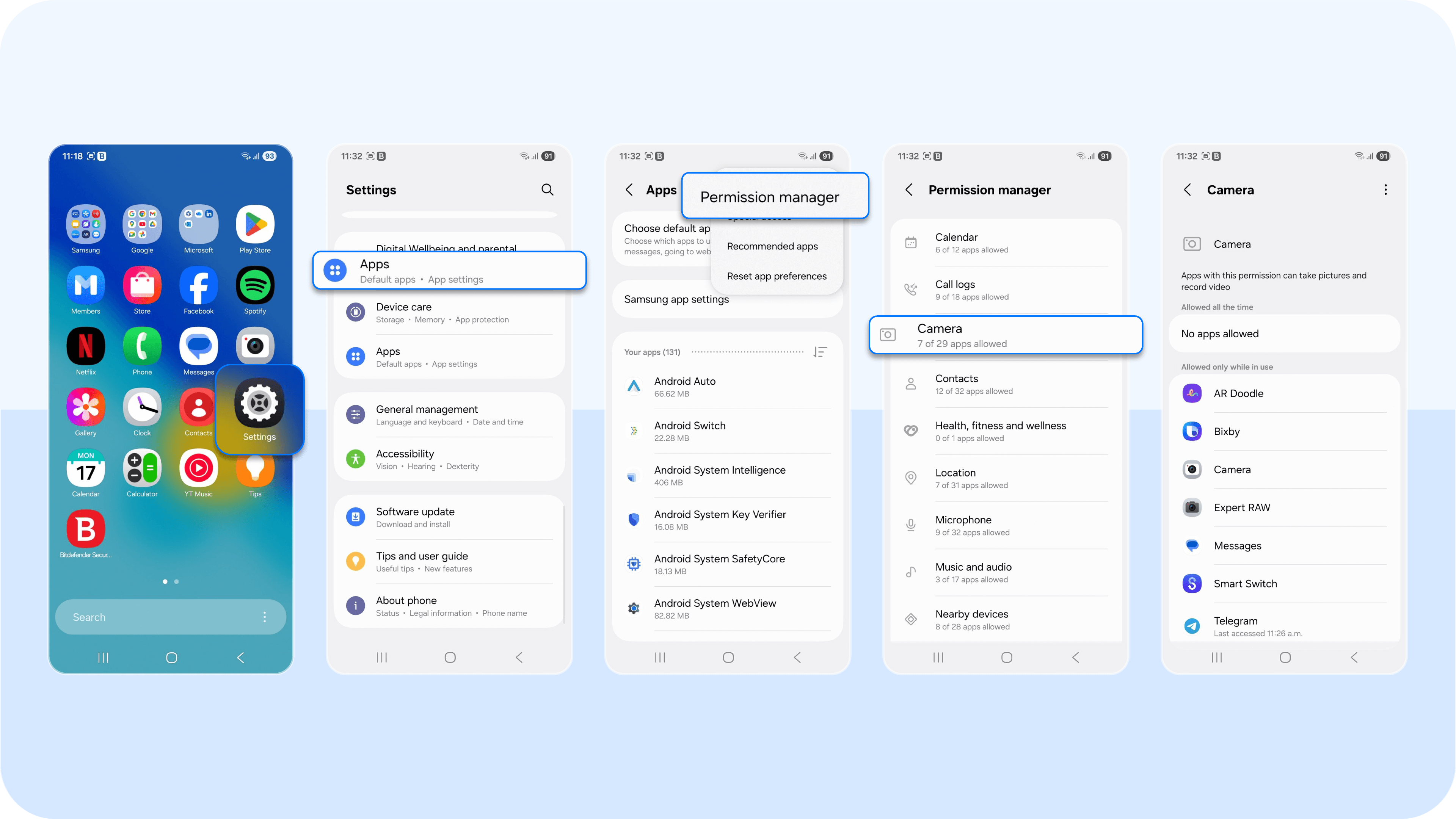
- On an Android device: Go to Settings > Apps > Permission manager. Review the list for camera permissions. A flashlight or calculator app should never be on this list.
You must also check Settings > Security > Device admin apps. Spyware apps often hide here to give themselves administrator rights, which prevents you from uninstalling them.
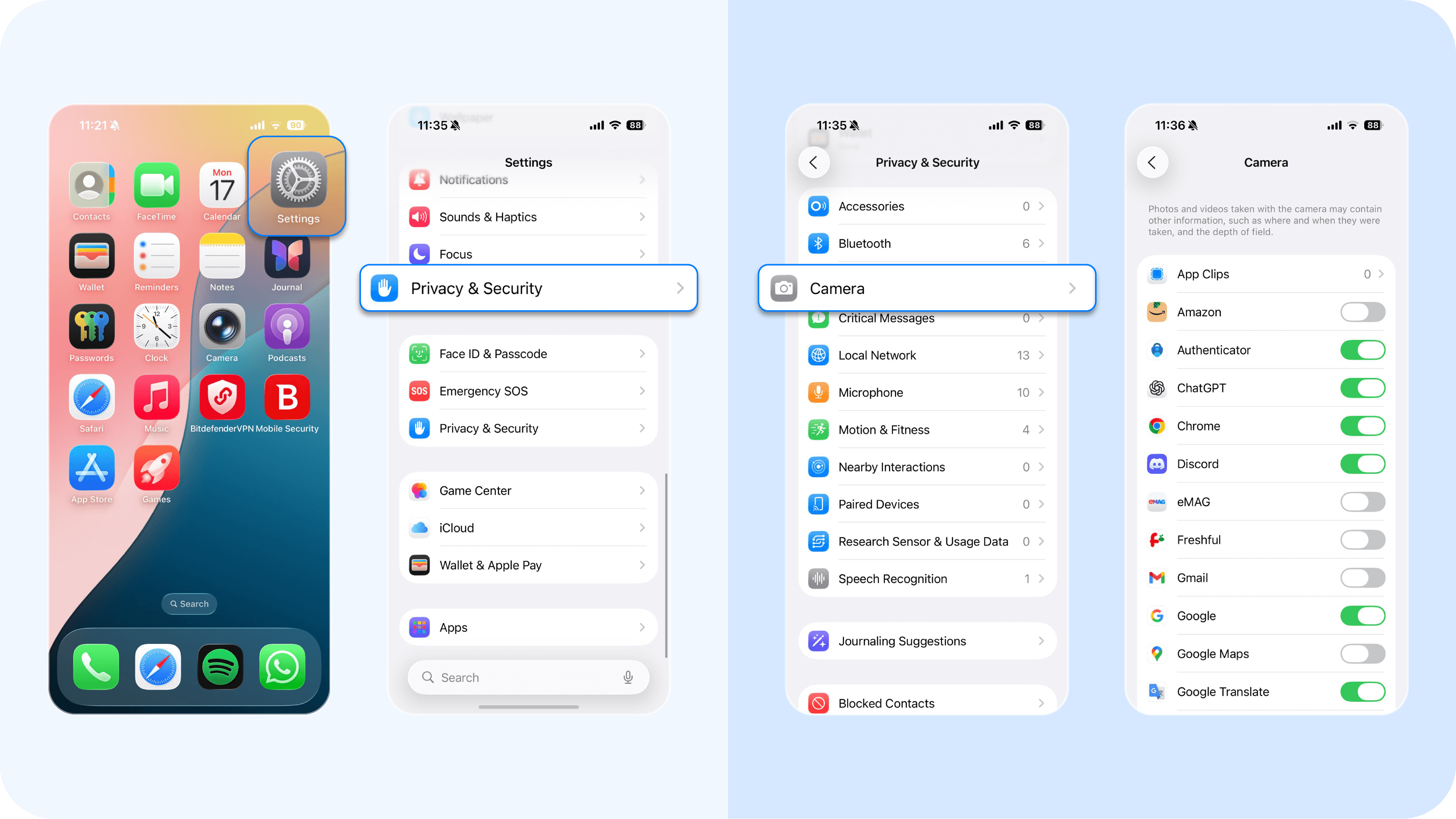
- On an iPhone: Go to Settings > Privacy & Security and tap "Camera" to review the list.
You must also check Settings > General > VPN & Device Management. Hackers can use suspicious links to install a malicious "Configuration Profile" here, which can grant them sweeping remote access to your phone activity.
Step 2: Run an advanced malware scan
Spyware is designed to hide. A manual check of app permissions might miss it. You need anti malware software to find the hidden malicious code.
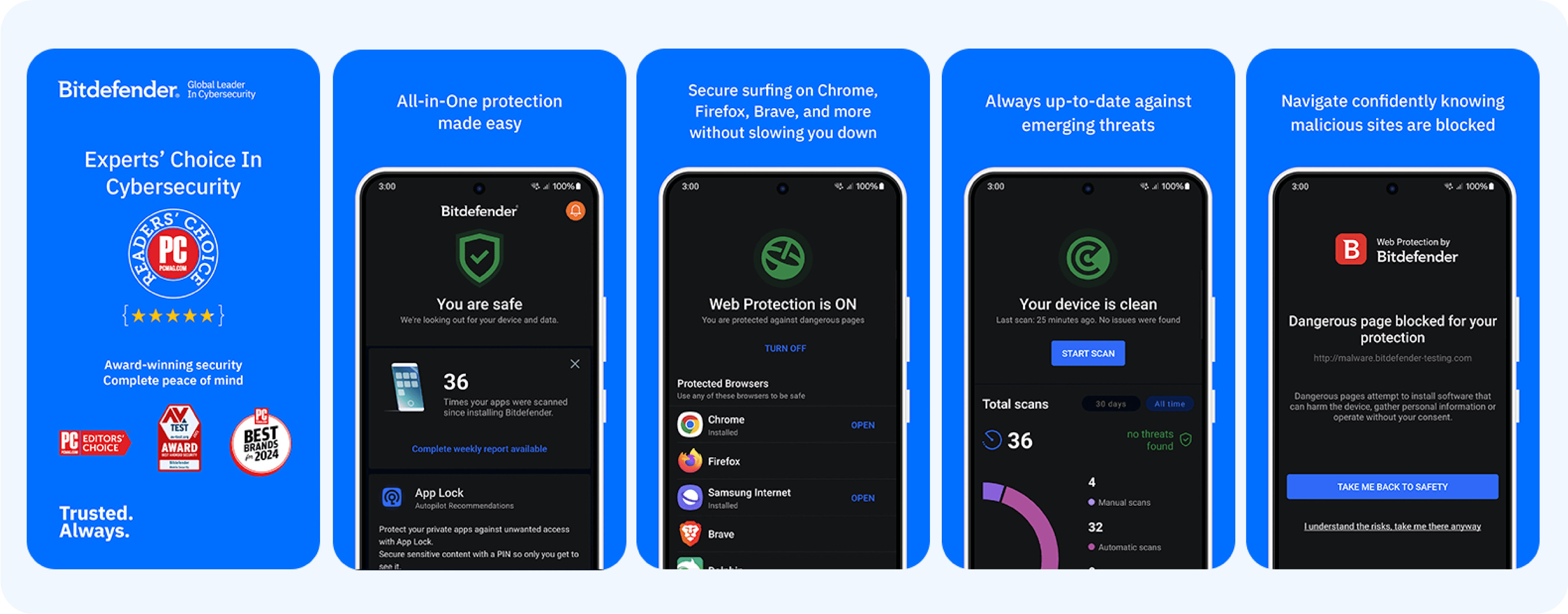
- On an Android device: You need a scanner that understands behavior. Bitdefender Mobile Security for Android uses its Malware Scanner to find the spyware app file. More importantly, its App Anomaly Detection feature continuously monitors your other apps. It can detect spyware that turns malicious after installation, catching unauthorized apps that are acting strangely (like a "cleaner" app that suddenly tries to access your camera or location permissions).
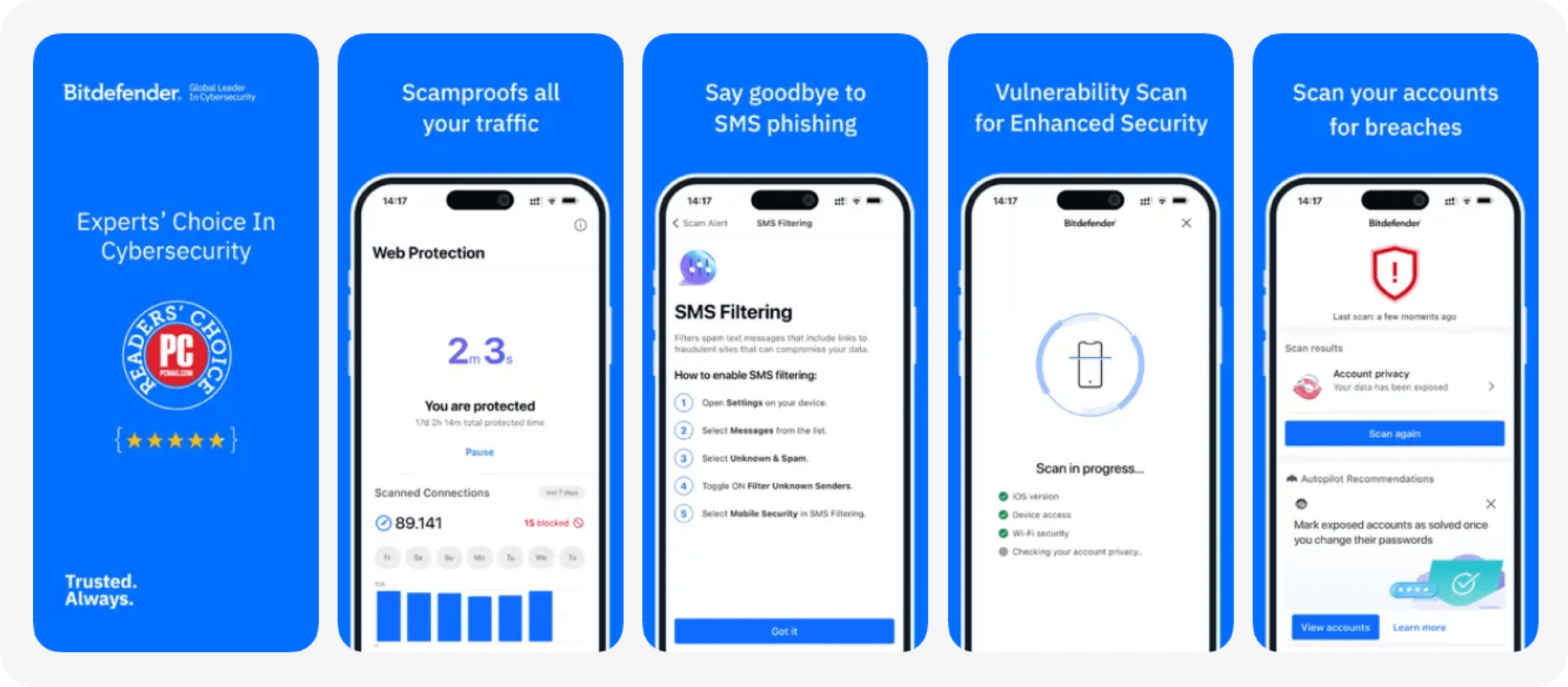
- On an iPhone: The threat is different. The operating system is locked down, so the danger comes from a suspicious app, odd links and malicious websites that trick you. Bitdefender Mobile Security for iOS provides Web Protection to block these phishing and malicious websites before they can load and steal your data. It also includes Scam Alert, which filters dangerous links from your text messages and Calendar invites, blocking the hacker's entry point.
Step 3: Update your operating system immediately
Hackers rely on you to ignore software updates. Sophisticated spyware (like Pegasus) and new 2025 exploits (like LANDFALL) use "zero-click" vulnerabilities in outdated software to gain access to your phone.
- Go to Settings > General > Software Update (on iPhone) or Settings > System > Software Update (on Android) and install all available patches. This is one of the most critical steps to fix the security holes hackers use.
Step 4: Factory reset your phone (the final option)
If you are still concerned, the only way to be 100% sure the spyware is gone is a factory reset. This erases everything from your phone.
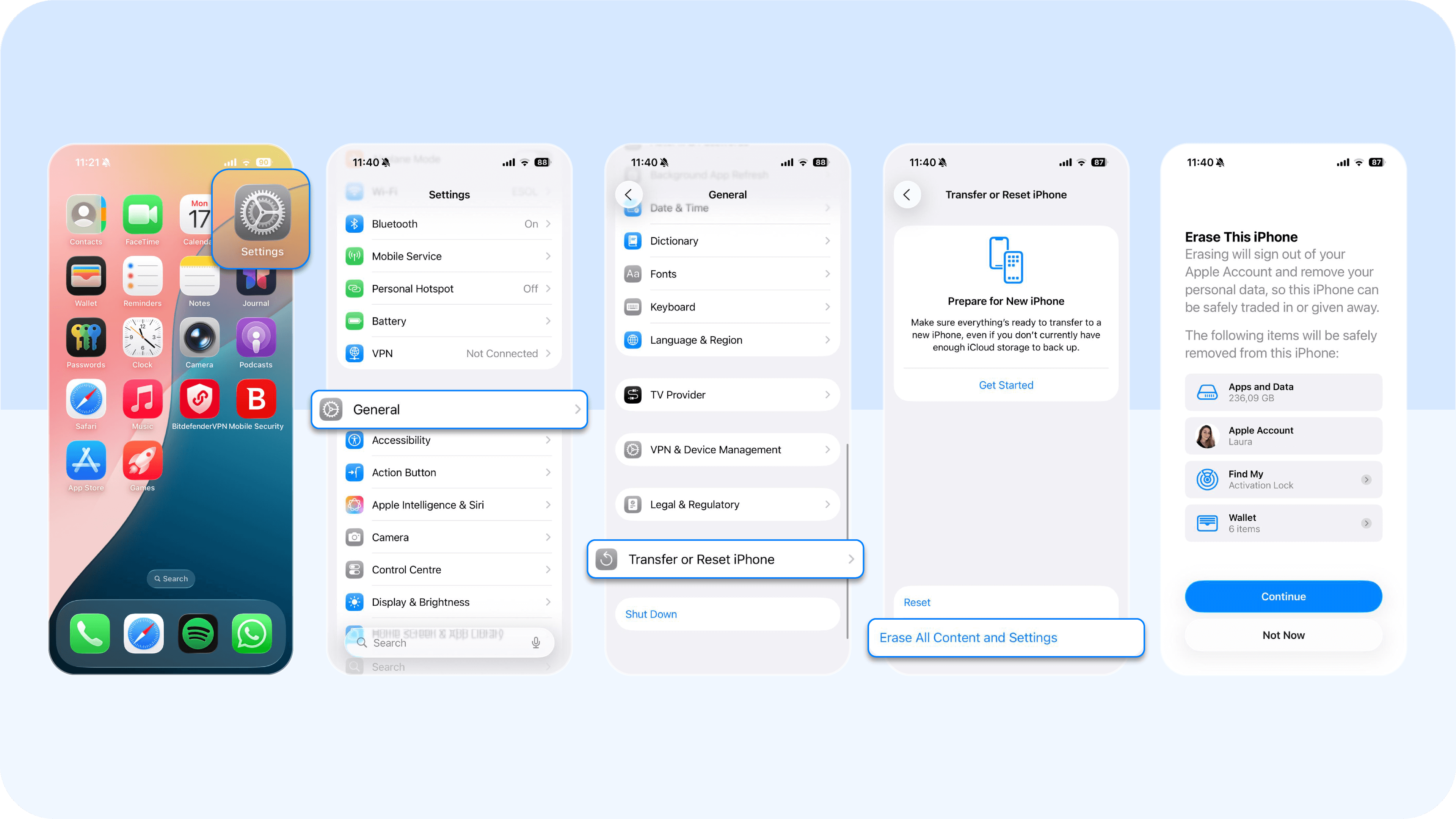
- iPhone: Go to Settings > General > Transfer or Reset iPhone > Erase All Content and Settings.
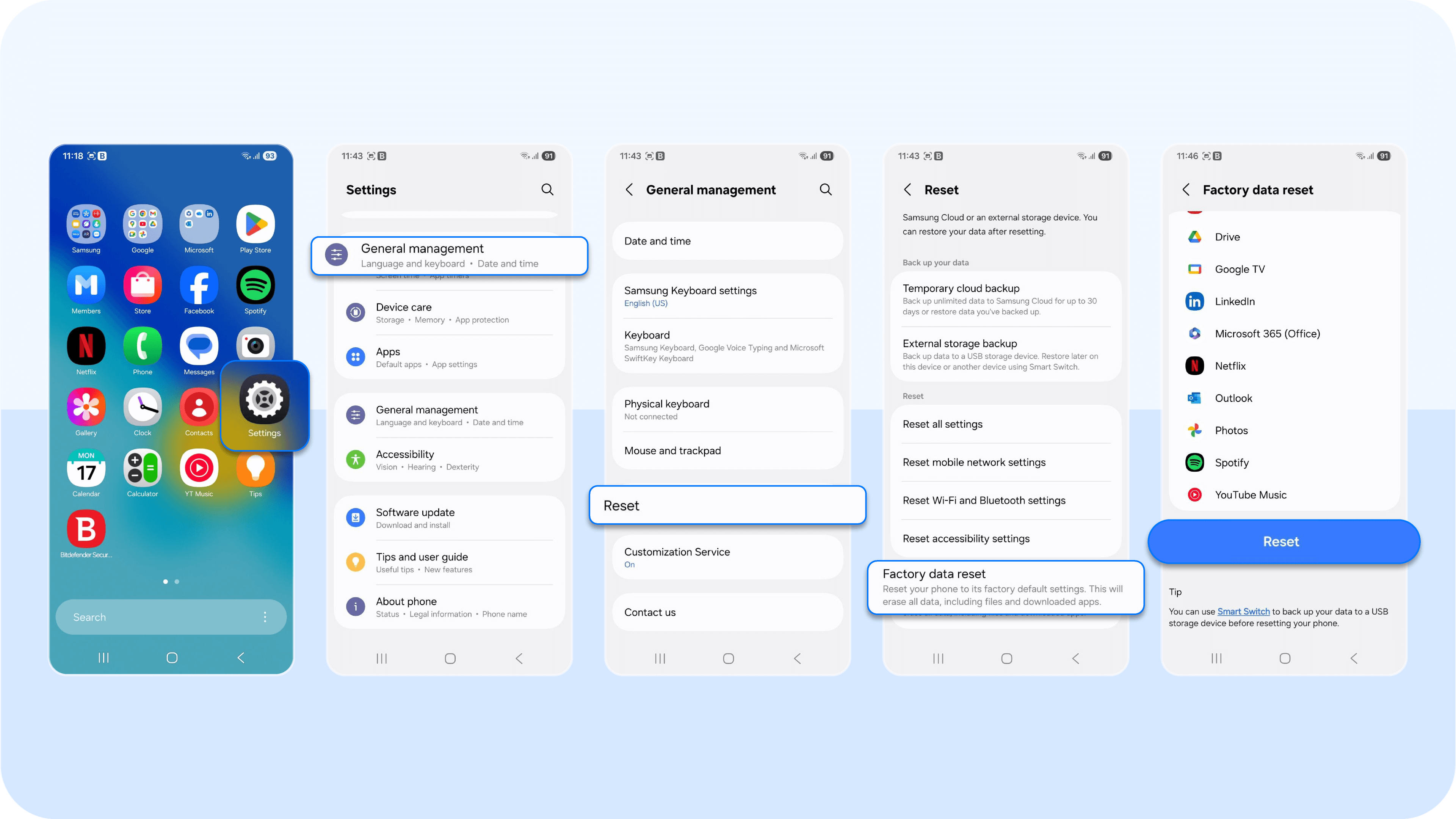
- Android: Go to Settings > General Management > Reset > Factory data reset.
PS: Do not restore from a recent backup. Potential spyware can hide in your cloud backup (iCloud or Google). If you restore the backup, you will re-infect your clean phone. You must set up your phone as new and manually download your trusted apps.
Why Bitdefender is the right fit for your mobile phone protection
On an Android phone, the threat is clear. A malicious app or suspicious app can hide, using your phone's camera without your knowledge. Bitdefender Mobile Security for Android gives you the power to fight back. Its Malware Scanner finds and removes existing spyware apps, while its App Anomaly Detection monitors all your other apps for strange behavior, stopping a threat as it emerges. Protect your Android device and take back your privacy.
Get Bitdefender Mobile Security for Android
For iOS, the danger lies in suspicious links and malicious websites. Bitdefender Mobile Security for iOS is your proactive defense. It blocks dangerous phishing sites with Web Protection and filters malicious links from your text messages and calendar with Scam Alert. Secure your online privacy and stop hackers before they gain access.
Get Bitdefender Mobile Security for iOS
How to keep your phone safe for good
You now have the expert signs for how to tell if someone is watching you through your phone camera. You know that the camera indicator light is a critical warning and that high data usage is a key symptom. Now, you must focus on long-term prevention to keep your phone safe.
1. Treat all links as suspicious
You must avoid suspicious links. Phishing attacks through text messages and emails are the number one way hackers gain access.
PS: Before clicking, verify the sender. If a link looks odd, use a free tool like Bitdefender Scamio to check if it's a known scam.
2. Update your operating system immediately
Hackers rely on you to ignore software updates. This is how sophisticated spyware like Pegasus infects phones. Patches released in 2024 and 2025 (like for CVE-2025-21042) were created specifically to fix zero-day flaws that allowed this. Updating your operating system is the single most important thing you can do to protect your phone's security.
3. Use a physical camera cover
A physical cover for your phone camera is a simple, 100% effective way to protect your online privacy. Even if your phone is compromised, this physical barrier ensures someone is watching nothing.
4. Install a proactive security shield
You cannot see most malicious apps or code. You need anti malware software to detect spyware for you. This is the only way to keep your phone safe 24/7. Bitdefender Mobile Security for iOS and Android runs as a proactive shield. How so?
It combines a real-time scanner that blocks malicious apps with Web Protection and Scam Alert. These tools work together to block the phishing sites and malicious links before they can ever remotely access your phone's camera.
Keep your phone secure, not just private
You now know the definitive signs for how to tell if someone is watching you through your phone camera, from the camera indicator light flashing to unexplained spikes in cellular data usage. You also have the expert steps to remove spyware and reclaim your online privacy.
Keeping your phone safe requires two things: vigilance and protection.
Vigilance means you actively check app permissions and read an app's privacy policy before installing it, even if it comes from social media apps. It means you look for suspicious signs, like randomly deleted messages, which can indicate an advanced spyware app.
Vigilance alone is difficult. You need proactive protection. While many other tools exist, a comprehensive security solution is essential. Bitdefender Mobile Security provides this complete shield.
It stops suspicious links before they load, scans malicious apps before they run, and alerts you to anomalous behavior, keeping your phone's camera and personal data secure. Install it today for Android or iPhone to secure your device.
Frequently asked questions (FAQ)
How do I know if someone can see me through my phone camera?
Signs someone may be watching you through your phone camera include the camera indicator light turning on unexpectedly, unfamiliar apps with camera permissions, and unexplained photos or videos on your device. Sudden battery drain or data usage spikes can also indicate spyware actively recording and transmitting footage.
How do you detect if a camera is watching you?
To detect unauthorized camera access, check your phone’s camera indicator (green/orange dot), review app permissions for camera access, and look for unknown apps or suspicious configuration profiles. Monitoring battery, data usage, and device behavior can also reveal hidden apps using your camera in the background.
Can you tell if your phone is being monitored?
Yes, common signs of phone monitoring include unusual battery drain, overheating, strange noises during calls, unexpected data usage, unknown apps with elevated permissions, and erratic device behavior. Running a mobile security scan and reviewing app permissions can help confirm if your phone is being monitored.
tags
Author

The meaning of Bitdefender’s mascot, the Dacian Draco, a symbol that depicts a mythical animal with a wolf’s head and a dragon’s body, is “to watch” and to “guard with a sharp eye.”
View all postsYou might also like
Bookmarks
