Instagram impersonation scams: Fake brands, businesses and support accounts

May 19, 2026
Instagram impersonation scams use familiar names, logos and support-style messages to make fraud feel legitimate. Fake brand pages and “customer support” profiles can trick users into sharing passwords, payment details or personal information.
Key takeaways
- Instagram impersonation scams often use fake brands, businesses and support accounts to steal money, login details or personal data
- Fake Instagram support accounts may claim your profile is at risk, your order has a problem or your prize is waiting
- Brand impersonation scams can lead to phishing, account takeover, fake payments, identity theft and malicious links
- Always verify accounts through official websites, avoid DM support links and report impersonation directly through Instagram or Meta tools
Why Instagram impersonation scams work
Instagram is a visual platform that users seek for its familiarity. A logo, profile photo, brand color, verified-looking bio or a polished grid can make a fake account seem genuine at a glance. Scammers exploit that feeling of trust by copying brands, small businesses, delivery companies, banks, creators, retailers or even Instagram and Meta support.
Despite not being novel, the tactic remains effective. A message from a random account asking for payment details looks suspicious. A message from a known store, airline, marketplace, bank or support team, however, would feel more plausible.
The FTC warned that business impersonation scams are among the most common fraud types reported by consumers, with hundreds of thousands of reports each year and combined losses of billions of dollars.
On Instagram, this problem is especially severe because threat actors can combine fake profiles, DMs, comments, ads, cloned websites and phishing pages into a single convincing chain.
Common Instagram impersonation scams
Fake customer support accounts
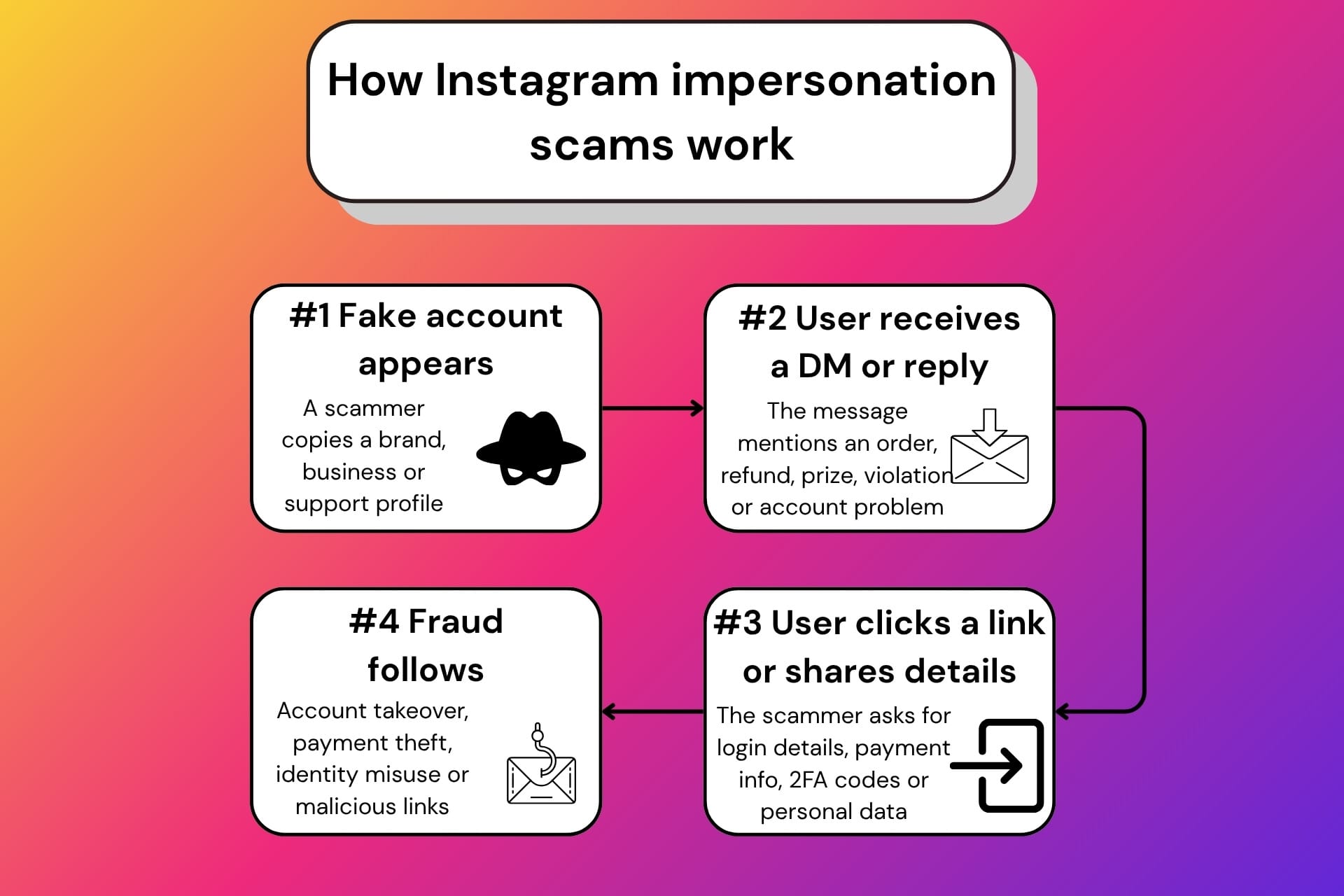
One of the most common scam tools is fake customer support. A scammer creates an account that looks like a brand’s help page and monitors public comments for frustrated customers. If you comment under a real company’s post, saying your order didn’t arrive, your account was locked or your refund is delayed, a fake “support” profile is likely to reply or DM you soon after.
The scammer may ask you to “verify” your identity, provide an order number, click a support link or pay a small fee to resolve the issue. In reality, the goal is to collect personal information, card details or login credentials.
Fake Instagram or Meta support
Some impersonators pose as staffers from Instagram, Meta, copyright enforcement, verification or account security. They may claim your account violated policy, your verification badge is expiring, your page will be deleted or suspicious activity has been detected.
This type of message is designed to instill panic. They typically include a link to a fake login page that steals your username, password and two-factor authentication (2FA) code. Meta’s own hacked-account guidance lists warning signs such as changed email addresses or passwords, messages sent without your knowledge and posts or ads you did not create.
Fake brand giveaways and promotions
Scammers also promote fake giveaways, coupons, discounts or sweepstakes. The offer may ask you to follow the page, tag friends, complete a form, pay a shipping fee or enter payment details to claim a prize.
The Better Business Bureau describes impersonation scams as schemes where fraudsters pose as trusted organizations or people to steal money or personal information. BBB also notes that fake rewards, surveys and order messages are common tactics used to push victims toward malicious links or data theft.
Fake small businesses and shops
Not every impersonation scam copies a major brand. Some copy small businesses, local shops, handmade sellers or creators. The fake account may use stolen photos, copied captions and a similar handle with an added underscore, extra letter or changed punctuation.
Victims may pay for products that never arrive, send deposits for fake services or share personal details through fake order forms. The smaller the real business, the harder it may be for consumers to tell which account is authentic.
Why impersonation scams are so dangerous
The immediate risk is financial loss, but Instagram impersonation scams can also compromise accounts and identities.
A fake support account can persuade someone to share a password, recovery code or 2FA code. A fake store can collect card details through a cloned checkout page. A fake brand giveaway can harvest names, phone numbers, addresses and emails for future scams. A fake Meta warning can lock a creator or small business owner out of an account they depend on for income.
The damage can spread beyond the first victim. If scammers take over your Instagram account, they can message your friends, impersonate you, promote crypto scams, run fake giveaways or use your profile to make the next scam look more believable.
For creators, influencers and small businesses, an Instagram account is more than a profile; it can be a storefront, portfolio, support channel and source of income. That makes account takeover especially damaging. Bitdefender Security for Creators is designed for this kind of risk. It combines protection for creators’ social channels, emails and devices, including 24/7 monitoring for suspicious takeover attempts on Instagram, Facebook and YouTube.
For businesses, reputational harm is significant, as customers may blame the real brand for the fake account, especially if they lost money after interacting with a convincing impersonator. Meta has expanded Brand Rights Protection tools to help businesses report issues such as impersonation, trademark misuse, counterfeits and suspected scam ads.
How to spot a fake brand or support account on Instagram
Fake accounts are not always immediately obvious, but you may see some dead giveaways. Before you reply to a support DM or a promotion link, slow down, and check the profile carefully.
Look for warning signs such as:
- A handle that is slightly different from the real brand name
- A new or low-activity account with few posts
- Disabled or limited comments
- Generic replies that push you into DMs
- Urgent warnings about deletion, refunds, prizes or account suspension
- Requests for passwords, 2FA codes, backup codes or payment details
- Links that don’t match the brand’s official website
- Poor grammar, recycled images or stolen brand assets
When a suspicious “support” account sends you a DM, don’t rely on instinct alone. A fake refund link, prize message, account-warning screenshot or QR code can be checked before you click, pay or share information. Bitdefender Scamio, for example, is an AI-powered scam detection tool that can analyze suspicious messages, links, images, QR codes and described scenarios. It gives people a practical way to pause before a fake brand account turns into payment fraud or account takeover.
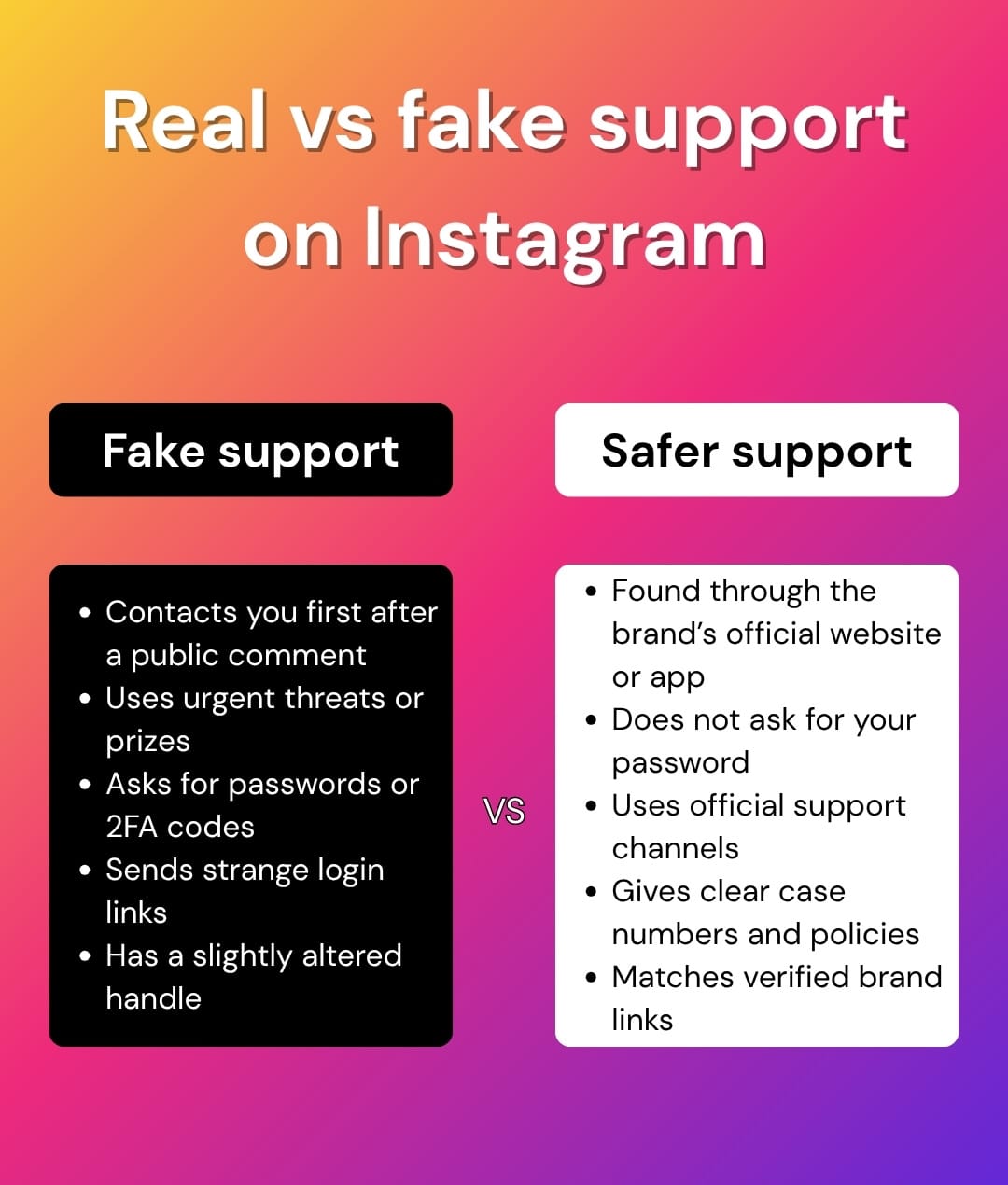
A legitimate company should never ask for your Instagram password, 2FA code or recovery code in a DM. If an account claims to be customer support, go to the brand’s official website or app and contact support from there instead of using the link sent on Instagram.
What to do if you have interacted with a fake account
If you have already clicked a link but did not enter information, close the page and avoid further contact. If you entered your Instagram password, change it immediately and enable 2FA. If you entered payment details, contact your bank or card provider and monitor transactions.
If your Instagram account shows signs of compromise, review the login activity, then remove suspicious connected apps and follow Instagram’s official recovery process. Meta advises hacking victims to secure their accounts by changing passwords and reviewing recent login activity.
After interacting with a fake business or support account, don’t stop at securing your Instagram account. If you have entered your email address, phone number, address or other personal details, check whether the data has been exposed elsewhere. Bitdefender Digital Identity Protection can help you monitor your digital footprint, check for exposed data, and alert you to breaches as it looks across the surface and Dark Web.
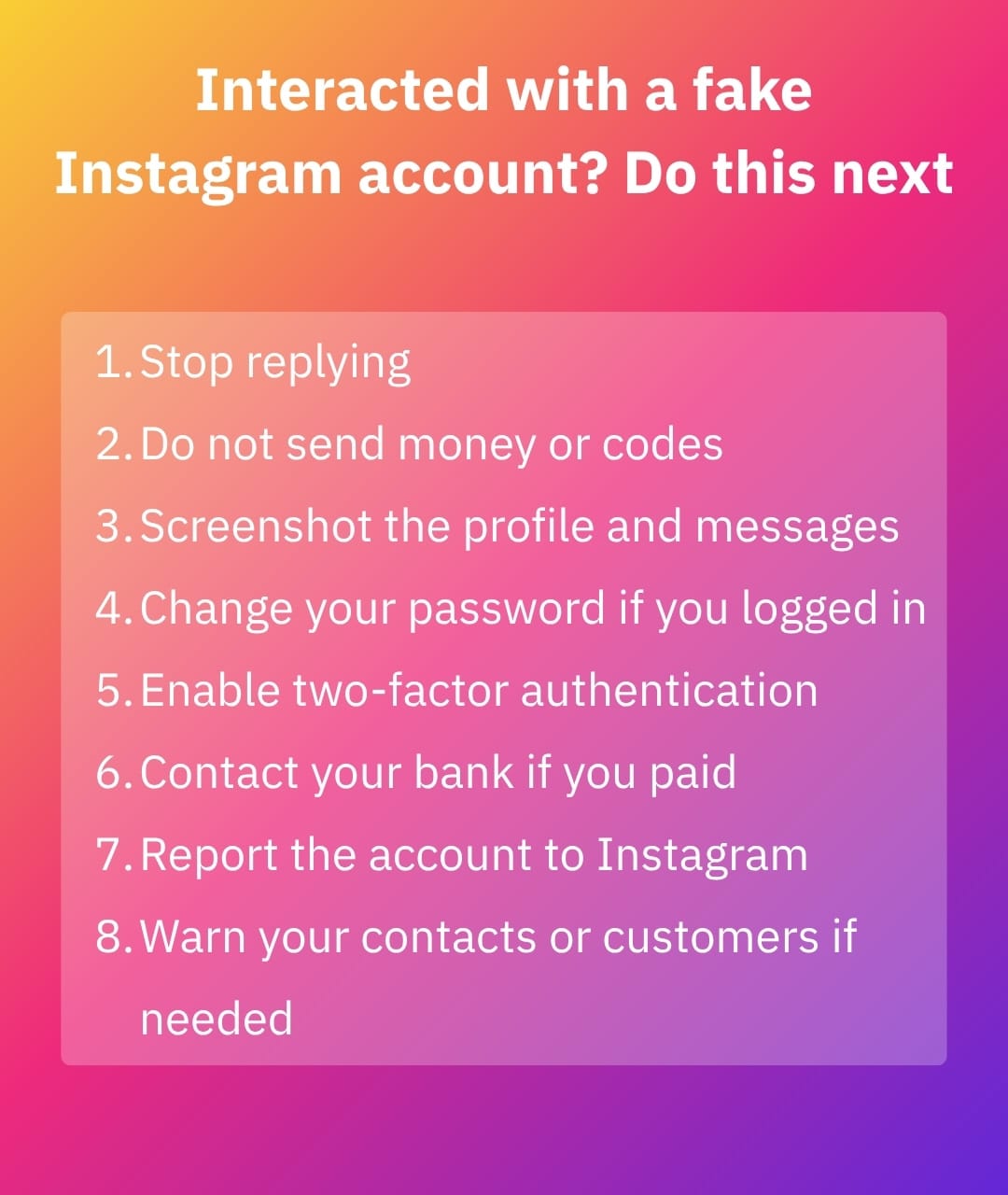
You should also report the impersonator on Instagram. If the fake account is copying your business, brand assets or trademark, document everything, from screenshots to profile URLs, handles, messages, payment requests and any cloned website links.
Conclusion
Instagram impersonation scams work by piggybacking on trust around names people recognize. A fake logo, familiar brand voice or urgent “support” message could prompt you to lower your guard, turning a seemingly normal Instagram interaction into phishing, payment fraud or account takeover.
The safest response is always to verify before you engage. Do not trust support accounts just because they use familiar logos. Do not click account-warning links sent by DM or otherwise. Do not share passwords, 2FA or recovery codes. Do not share payment details, especially with anyone who contacts you first.
Frequently asked questions (FAQ)
Is impersonation allowed on Instagram?
No. Instagram allows parody, fan and commentary accounts in some contexts, but deceptive impersonation is not allowed. Accounts that pose as another person, brand, business or support team in a way that misleads users can be reported for impersonation.
How do you report business impersonation on Instagram?
Open the fake profile, tap the three-dot menu, choose the report option and follow the prompts for impersonation or scam activity. If the account misuses a trademark, logo or copyrighted content, the business may also need to use Meta’s intellectual property or Brand Rights Protection reporting tools, where available.
What can I do if someone is impersonating my business?
Collect evidence before the account disappears or changes: screenshots, profile links, usernames, DMs, payment requests and examples of copied logos or content. Report the account to Instagram, warn others through your verified channels, monitor for copycat accounts and consider trademark or intellectual property reporting if your brand assets are being misused.
Is it illegal pose as someone else on Instagram?
It depends on the context and jurisdiction, but impersonation can be illegal when it is used to commit fraud, steal money, misuse personal data, misrepresent affiliation with a business or deceive consumers. In the US, the FTC’s Impersonation Rule makes it illegal to materially and falsely pose as a business or misrepresent affiliation with a business in commerce.
tags
Author

Vlad's love for technology and writing created rich soil for his interest in cybersecurity to sprout into a full-on passion. Before becoming a Security Analyst, he covered tech and security topics.
View all postsYou might also like
Bookmarks
