Apple Expands ‘DarkSword’ Patch to More iPhones and iPads — Update Today!

April 03, 2026
Apple has expanded the availability of iOS 18.7.7 to a wide range of iPhone and iPad models, delivering important security fixes for people resisting the jump to iOS 26.
Key takeaways:
- The patch targeting the DarkSword exploit is now available to a much broader range of iPhones and iPads — not just older models
- Tools once reserved for targeted surveillance are now trickling down into wider cybercriminal use
- Apple is actively backporting security fixes to iOS 18, acknowledging that many users haven’t moved to iOS 26
- If you’re on iOS 18, check for this update manually
- Apple is strengthening security beyond regular software updates
Last month, the Cupertino tech titan issued urgent security updates amid a wave of hacker attacks exploiting weaknesses in “out-of-date” versions of iOS.
Two exploit chains leveraging multiple software flaws in outdated software — dubbed Coruna and DarkSword — are being actively used to steal data. While initial attacks targeted high-profile individuals, more recent attacks seem focused on regular consumers.
In recent weeks, Apple addressed the vulnerabilities exploited in these hacking campaigns with a range of updates spanning iOS versions 13 through 18.
Read: ‘Update iOS to Protect Your Data’ — Apple Urges Users to Patch Against Coruna and DarkSword Exploits
iOS 18.7.7 now available to more iPhone and iPad models
iOS 18.7.7, specifically addressing the DarkSword exploit kit, was rolled out on March 24, initially only for iPhone XS, iPhone XS Max, iPhone XR, and iPad 7th generation.
While everyone running the latest iOS version (iOS 26) is protected, Apple knows many users resisted the upgrade to the liquid-glass OS, preferring the confines of the more traditional iOS 18. Hence the urgency to make sure everyone on older (unpatched) versions of iOS get the software amendments and stay protected.
As of yesterday, the availability of this patch has been extended to a much wider list of devices, including:
iPhone XR, iPhone XS, iPhone XS Max, iPhone 11 (all models), iPhone SE (2nd generation), iPhone 12 (all models), iPhone 13 (all models), iPhone SE (3rd generation), iPhone 14 (all models), iPhone 15 (all models), iPhone 16 (all models), iPhone 16e, iPad mini (5th generation - A17 Pro), iPad (7th generation - A16), iPad Air (3rd - 5th generation), iPad Air 11-inch (M2 - M3), iPad Air 13-inch (M2 - M3), iPad Pro 11-inch (1st generation - M4), iPad Pro 12.9-inch (3rd - 6th generation), and iPad Pro 13-inch (M4).
The tech giant explains the move in this short note appended to its March 24 security bulletin:
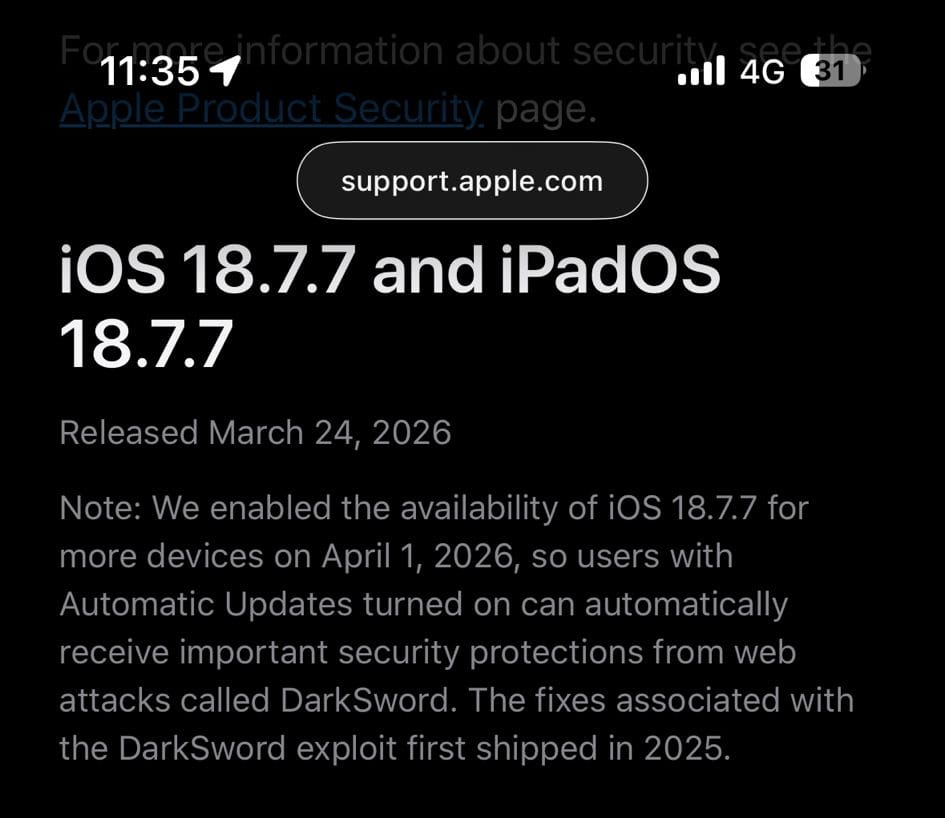
Note: We enabled the availability of iOS 18.7.7 for more devices on April 1, 2026, so users with Automatic Updates turned on can automatically receive important security protections from web attacks called DarkSword. The fixes associated with the DarkSword exploit first shipped in 2025.
How to install iOS 18.7.7
On your iPhone or iPad:
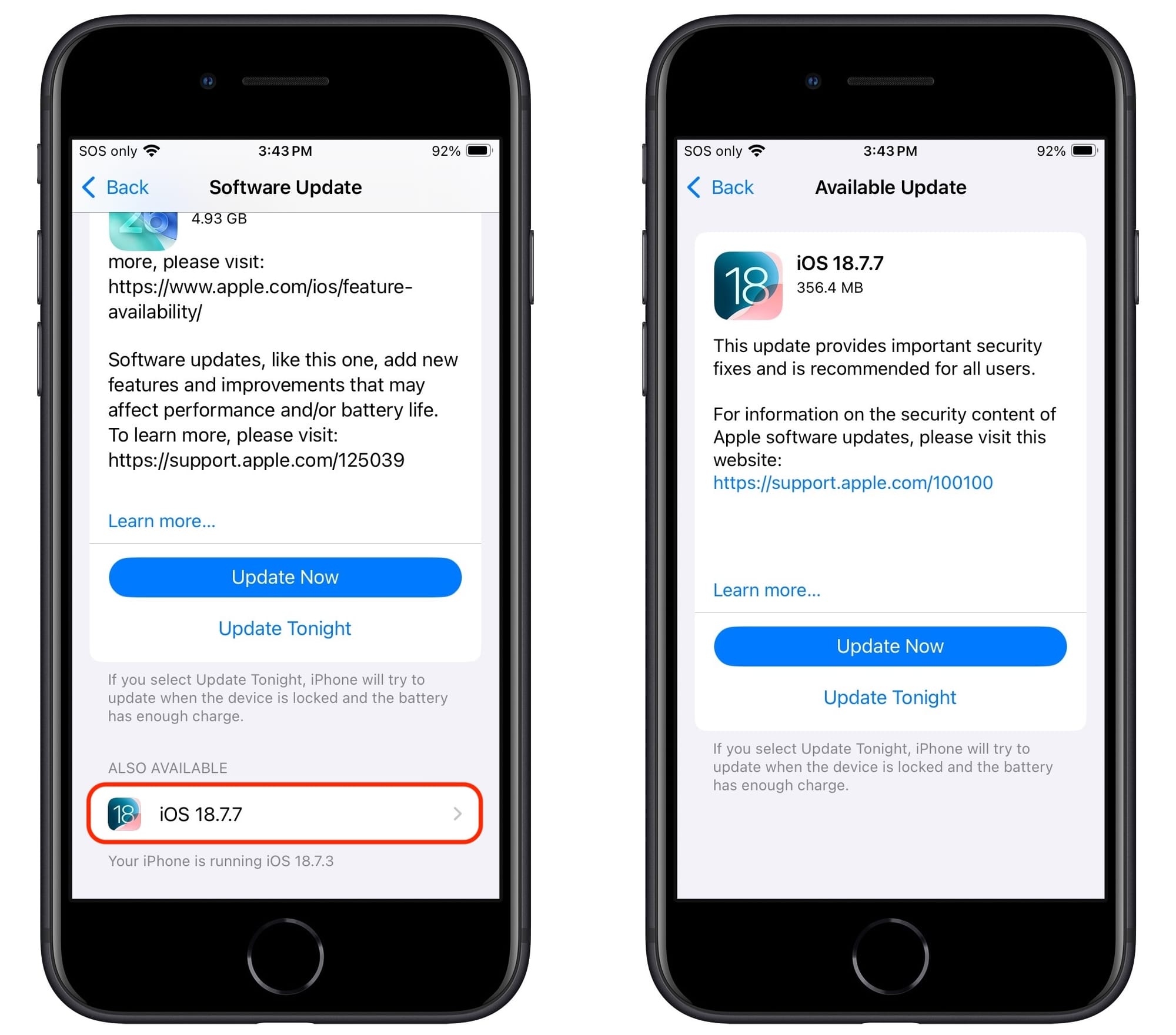
- Go to Settings > General > Software Update
- On older-generation iPhones and iPads capped at iOS 18, you’ll automatically be presented with iOS 18.7.7. Tap “Update Now” if you want to install the update immediately. Or choose “Update Tonight” so your device downloads and installs it overnight while charging and connected to Wi-Fi.
- On newer-generation models still running iOS 18 (with Automatic Updates enabled), Apple will tantalize you with the upgrade to iOS 26 but will also display the availably of the latest-available version of iOS 18 — in this case, iOS 18.7.7 — at the bottom of the screen under “Also Available.” When ready, tap iOS 18.7.7, the choose “Download and Install.”
Source: TidBITS
Take ‘exploitable’ security issues seriously!
Exploit kits like these have historically been used in spyware attacks targeting the devices of activists, dissidents, political figures, human rights advocates, investigative journalists and other high-profile individuals. Big-Tech players have been fighting spyware for years.
As we regularly warn, even if you’re not a high-risk individual, it’s a good idea to stay up to date with the latest security patches — you never know when you trip a wire and become a target.
In a recently published support document titled “Update iOS to protect your iPhone from web attacks,” Apple itself reinforces the notion, saying:
If you have kept your iPhone software up to date, then you are already protected. Keeping your software up to date is the single most important thing you can do to maintain the security of your Apple products, and devices with updated software were not at risk from these reported attacks.
[…]
Users who are unable to update their device can consider enabling Lockdown Mode (if available) to protect against malicious web content and other threats.
For peace of mind, run an independent security solution on all your personal devices. Keep the trusty Lockdown Mode toggle handy if you have reason to believe hackers might target you.
Apple beefs up security across the board
Apple has been making a visible push in recent months to tighten security for consumers across the iOS and macOS ecosystems.
In addition to aggressively combating the Coruna and DarkSword exploits with a wide range of patches and security alerts, the company recently debuted the new Background Security Improvements feature for iOS and macOS — an out-of-band mechanism destined for small, standalone security fixes that don’t require an entire OS update.
With macOS 26.4, the company also introduced a security prompt that warns people before they paste potentially dangerous commands into the Terminal app. The feature directly targets one of today’s most effective social engineering tactics: ClickFix attacks.
You may also want to read:
The Scam That Tricks You Into Infecting Your Own Mac
Apple Sends Urgent Security Alert to iPhone Lock Screens — Here’s Why You Shouldn’t Ignore It
tags
Author

Filip has 17 years of experience in technology journalism. In recent years, he has focused on cybersecurity in his role as a Security Analyst at Bitdefender.
View all postsYou might also like
Bookmarks
