WhatsApp rolls out new parental controls for teens. Here’s how to set them up

October 05, 2026

WhatsApp is rolling out new controls that let parents manage parts of their teenager’s experience without accessing their private conversations.
Key takeaways
- WhatsApp is rolling out optional parental controls for users aged 13 to 17
- Parents can manage privacy settings and some features using a six-digit PIN
- Teens need parental approval to make protected settings less restrictive
- Parents can receive alerts about activity such as new contacts and groups, but can’t read their teen’s messages
- Parents can restrict Channels, Status and their teen’s experience with Meta AI
- The controls require the parent and teen to agree to link their WhatsApp accounts
- The feature is rolling out gradually and may not yet be available everywhere
More oversight without reading their messages
WhatsApp is giving parents more say over how their teenagers use the messaging service, including who can see their information, how they interact with groups and Channels, and what content they can access through Meta AI.
The messaging service announced the new controls on Sept. 30, describing them as a way for parents to guide teenagers without looking over their shoulder.
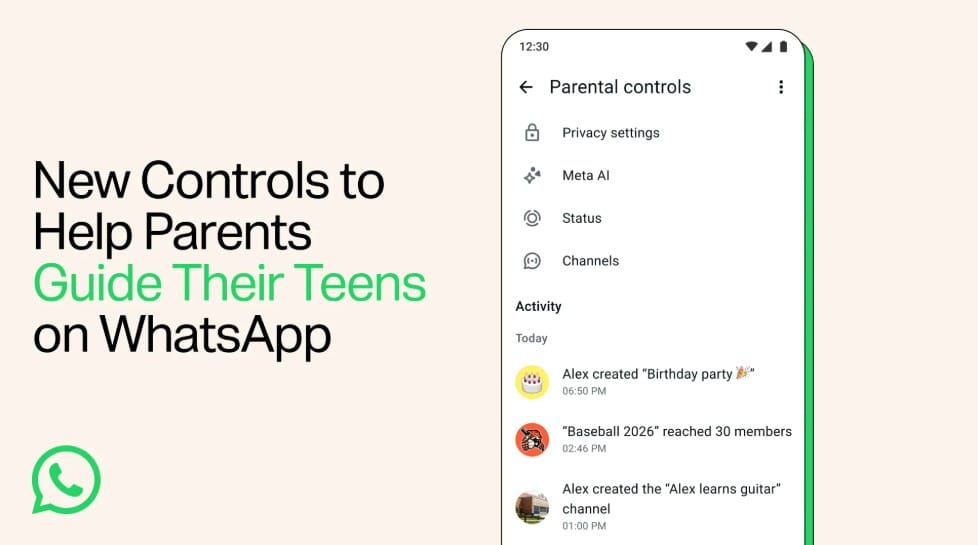
Once accounts are linked, parents can manage privacy settings such as who can see their teen’s profile information and who can add them to groups. A teen can still adjust their own privacy settings, but making a protected setting less restrictive requires approval using the parent's PIN.
Parents can also receive notifications about certain changes and activities. For example, WhatsApp can alert them when their teenager adds a contact, creates or joins a group, or changes their profile picture, or when a group they belong to grows significantly. Parents can choose which of these notifications to receive.
The system also gives parents some control over WhatsApp features that extend beyond one-to-one messaging.
For Status, parents can decide whose updates their teen can see and who can see their teen's updates.
For Channels, they can allow access to all Channels, limit their teen to parent-approved Channels, or block Channel access. They can also prevent their teen from creating a Channel.
Perhaps most notably, given the growing use of AI among young people, parents can choose between WhatsApp's standard 13+ Meta AI experience and a Limited setting designed to further restrict the topics their teenager can discuss with the chatbot.
What parents still can't see
Source: WhatsApp
The new controls don't turn WhatsApp into a surveillance tool.
Parents can’t read their teenager's personal messages or listen to their calls. WhatsApp says conversations remain end-to-end encrypted, meaning nobody outside a conversation – including a linked parent or WhatsApp itself – can access their contents.
That's an important distinction.
Parental controls can reduce exposure to strangers, inappropriate content and unwanted interactions. But they don't tell parents everything happening inside a conversation. A teenager could still encounter scams, manipulation, cyberbullying, inappropriate requests or malicious links from someone they're already communicating with.
The controls work best as guardrails rather than a substitute for conversations about online safety.
How to set up WhatsApp parental controls for your teen
WhatsApp says its new controls are designed for kids aged 13 to 17, while the parent or guardian linking the account must be at least 18. Both parent and teen must agree to link their accounts, and both devices need the latest version of WhatsApp.
To set up parental controls, you'll need both phones:
1. On your teen's phone, open WhatsApp and go to Settings > Parental controls > Continue
2. Enter your teen's birthday and confirm their age
3. Tap Continue to begin linking a parent's account
4. A QR code will appear on the teen's device
5. Using the parent's phone, scan the QR code with the phone's camera and follow the link into WhatsApp
6. Tap Continue and complete the adult-verification process
7. Create a six-digit parent PIN and confirm it. This PIN is required to access and change protected settings
8. Return to your teen's phone, enter the parent PIN and review the available privacy and feature settings
9. Tap Continue > Done to finish setup
Afterwards, parents can manage settings from the teen's device by opening WhatsApp > Settings > Parental controls and entering the parent PIN.
Parents can also review activity from their own device by opening WhatsApp > Settings > Parental controls and selecting their teenager's account.
The controls are optional and can be removed later. WhatsApp says the feature is rolling out gradually, so don't be surprised if it isn’t in your settings yet. Keeping WhatsApp updated will ensure the feature becomes available when it reaches your account or region.
What about younger children?
WhatsApp now makes an important distinction between teenagers and younger children.
Earlier this year, the company began rolling out parent-managed accounts for children under 13 – or an older minimum age where required by local rules. These accounts are much more restrictive and focus primarily on messaging and calling under parental supervision.
Parents can manage who contacts the child, review requests from unknown people, control privacy settings and receive alerts about certain account activity. Personal conversations still remain end-to-end encrypted and inaccessible to the parent.
Both parent-managed accounts and the newer controls for teens are being introduced gradually, so availability can vary by country and account.
Parental controls are only one layer of protection
Giving parents better controls inside WhatsApp is useful, particularly because messaging apps sit at the intersection of so many risks young people encounter online.
But no collection of privacy switches can prevent every scam, malicious link, compromised account or manipulation attempt.
Parents should teach children and teenagers to be suspicious of unexpected requests for money or personal information, to never share passwords or verification codes, and to be cautious when someone suddenly asks them to move a conversation, download a file or click a link.
Young people should also know that identities can be faked online. A message appearing to come from a friend or relative doesn't necessarily mean that person actually sent it – particularly if an account has been compromised.
And make sure children know that blocking and reporting someone is always an option if a conversation makes them uncomfortable.
Add another layer of protection for the whole family
WhatsApp's parental controls can help manage what happens inside WhatsApp, but a child's digital life doesn't stop at a single app.
That's where device-level security and broader parental controls can complement the safeguards built into individual platforms.
Bitdefender Family Plans provide security for up to five family members and 25 devices, with different roles and protections for parents, teenagers and children. Depending on the plan, families can combine real-time protection against online threats with parental controls, scam protection, privacy features and other security tools.
Bitdefender Parental Control lets parents set internet time limits, filter inappropriate content and get a clearer picture of children's online activity, while the wider security suite helps protect family devices against malicious websites, phishing attempts, risky downloads and other threats.
The goal isn't to watch everything children do online. It's to put sensible safeguards around them while they learn how to make safer decisions themselves.
On topic:
Safer messaging for kids: how to set up a parent-managed WhatsApp account for your child
WhatsApp makes account theft harder: how to turn on the new defenses
WhatsApp usernames explained: how to reserve yours and stay safe
tags
Author

Filip has 17 years of experience in technology journalism. In recent years, he has focused on cybersecurity in his role as a Security Analyst at Bitdefender.
View all postsYou might also like
Bookmarks
