Supplier bank details changed scam: how to verify before you pay

October 06, 2026
A message saying a supplier has changed bank details can be genuine, but it is also a classic payment-redirection tool. This guide explains how the supplier bank details changed scam works, how to verify a change independently, and what to do if money has already gone to the wrong account.
Key takeaways
- A supplier bank details changed scam redirects a legitimate invoice or expected payment to an account used by criminals
- Scammers may spoof an address, compromise a genuine mailbox or alter an invoice inside an existing conversation
- A changed account number, unusual urgency or pressure to bypass normal checks should trigger verification
- Verify every changed bank detail through a trusted separate channel before updating the payee or sending money
What is a supplier bank details changed scam?
It’s a payment-redirection scam in which a criminal impersonates a supplier, contractor or other trusted payee and asks you to change the bank details you normally use.
In business email compromise (BEC), attackers may use a lookalike email address or a compromised genuine account. That means the request can arrive inside a familiar conversation, attached to an invoice you were already expecting. Guidance from Scamwatch and the FBI specifically warns about criminals using new payee information to redirect legitimate payments.
This makes the scam part of the broader landscape of financial scams: the payment itself may be willingly authorized, but the person authorizing it has been deceived about where the money is really going.
How the payment-redirection scam usually works
A convincing attack often uses information the criminal already knows: who you pay, when an invoice is due or how the supplier communicates. The attacker introduces new account details, sometimes with a plausible explanation such as a change of bank or accounting system.
If the genuine mailbox has been compromised, replying to the same email thread may simply reach the scammer again. Scamwatch warns that fraudulent payment instructions can even appear in the same conversation as genuine correspondence, and the UK NCSC has documented attackers manipulating invoice-related emails and replacing legitimate payment details.
That is why an email saying, “Yes, those are our new details,” is not independent verification.
Supplier bank details changed? Use this verification protocol
Treat any change to saved bank details as high risk, even when the request looks routine.
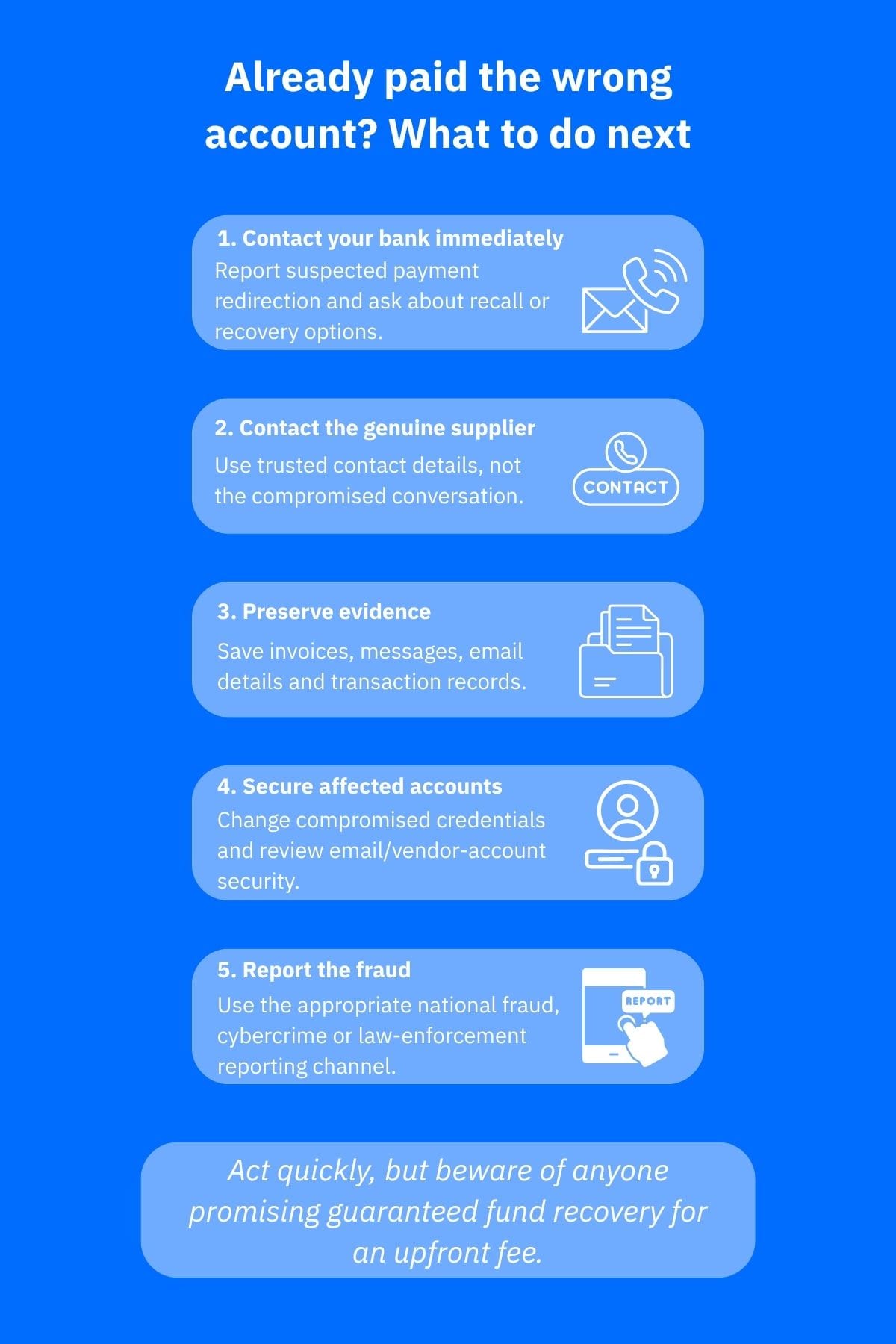
- Pause the payment and keep the original request. Do not update your saved supplier details yet.
- Contact the supplier through a channel you already trust. Call a known number from your records, a contract or the company’s official website and not a number supplied in the change message. Both the FBI and Scamwatch recommend using a separate or independently sourced channel.
- Make the supplier state the new details. Ask for the account holder name, relevant bank details and the reason for the change. Avoid simply reading the details from the suspicious message and asking for a “yes.”
- Use your bank’s payee-name check where available. UK Confirmation of Payee can identify matches, close matches or mismatches. In the euro area, Verification of Payee checks the intended recipient against the account identifier for euro credit transfers. These checks, though, are not substitutes for contacting the supplier.
- Add another check for unusual or high-value payments. A second approver or pre-established authentication method makes it harder for a single convincing message to redirect a payment.
- Document the verification. Keep the original request and make a record of who confirmed the change, when they confirmed it and which trusted channel you used.
A small “test payment” does not prove that the account belongs to the genuine supplier.
Current Australian Signals Directorate guidance also warns against relying on voice or video alone when authenticating banking changes because synthetic voice and images can be used for impersonation. A pre-established authentication method or independent trusted channel provides stronger verification.
Warning signs that should stop the payment
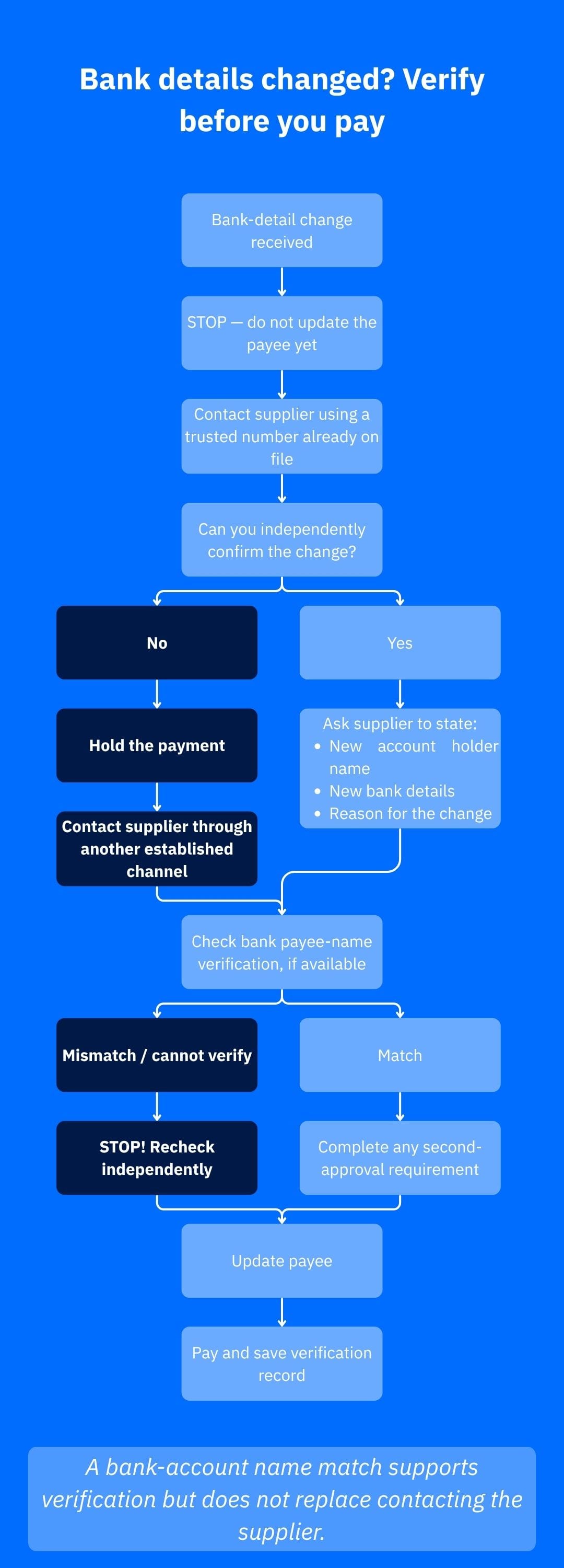
The changed bank account itself is the main warning sign. Extra concern is warranted when the request also involves a sense of urgency, secrecy, an unfamiliar email domain, pressure to bypass your normal process, an unexpected payment instruction or difficulty independently reaching the supplier.
These are consistent with current government BEC guidance, which flags unexpected banking-detail changes, urgent payment requests and suspicious sender addresses.
A payee-name mismatch or a message saying the details “cannot be verified” is also a reason to stop. There can be innocent explanations, for example, a trading name may differ from the registered account name, or the verification service may be unavailable, but you should not simply ignore the warning.
What to do if you already paid the changed account
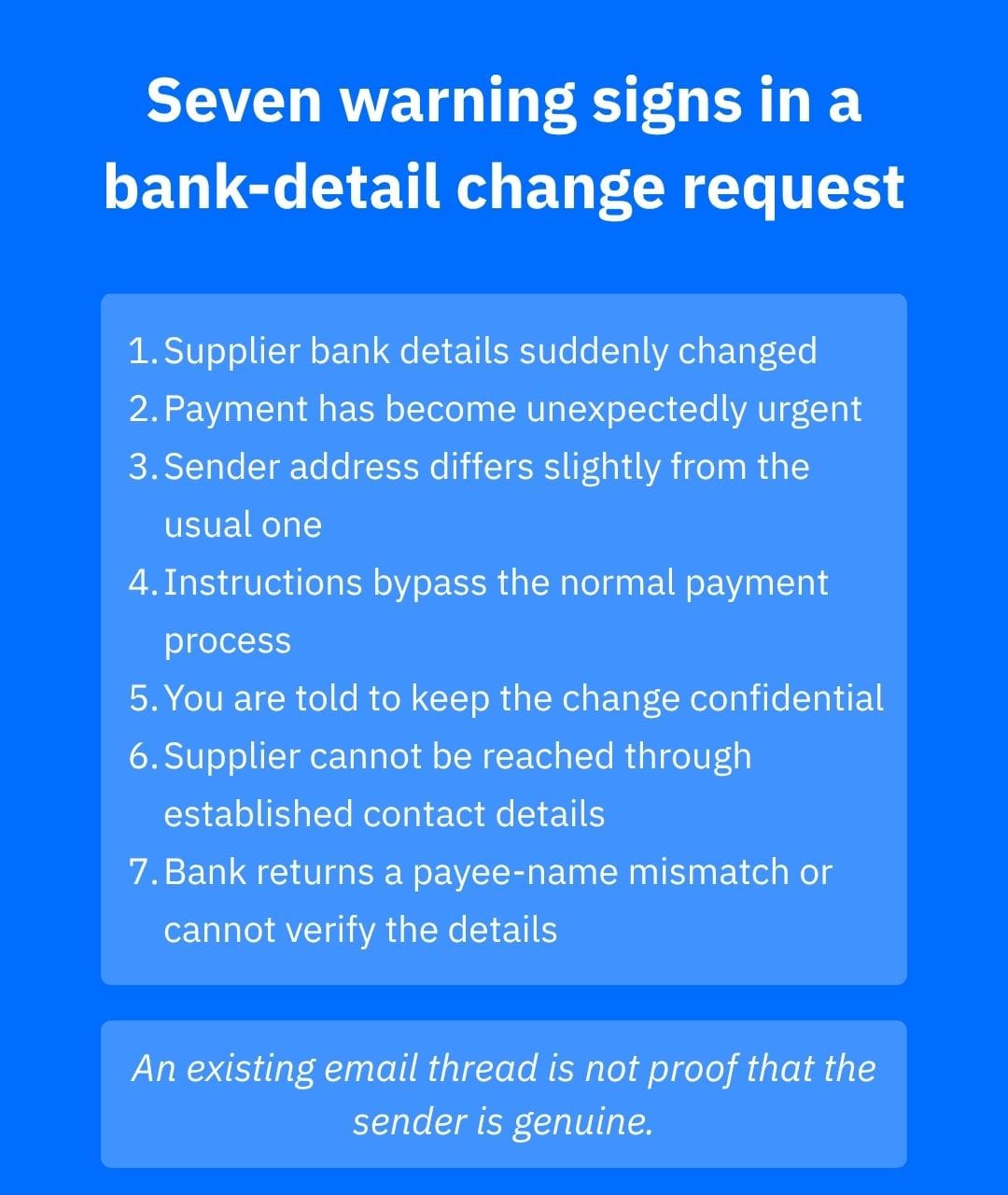
Contact your bank or payment provider immediately and explain that the transfer may have been redirected by fraud. Ask what recovery options are available and whether the payment can be recalled or reversed. The FBI advises contacting the originating financial institution as soon as BEC fraud is recognized.
Next, contact the genuine supplier through trusted details, preserve the invoice, messages and payment records, secure any email or vendor accounts that may have been compromised, and report the incident through the appropriate national fraud or cybercrime channel.
See our guides on what to do after sending money to a scammer by bank transfer, the scam evidence checklist and the scam recovery timeline for the next steps.
How Bitdefender can help
Bitdefender Scamio can analyze suspicious texts, emails, links, screenshots and QR codes and provide a second opinion on a suspicious change request. It cannot verify who owns a bank account, so supplier verification still needs to happen independently.
Bitdefender Ultimate Security includes device, email and scam-protection capabilities, while Bitdefender SecurePass can generate and store unique passwords and can function as a two-factor authenticator for supported accounts. Those controls are relevant when email or online supplier accounts form part of the payment workflow.
If an incident exposes personal information or account credentials, Bitdefender Digital Identity Protection monitors for compromised accounts, exposed passwords and other information associated with your digital footprint.
Bitdefender Security for Creators is a narrower fit, but creators who pay editors, agencies or production suppliers can use its monitoring for connected YouTube, Instagram and Facebook accounts alongside its device and phishing protections. It does not validate banking instructions or recover fraudulent transfers.
Conclusion
The safest response to a supplier bank details changed scam is procedural: stop the payment, independently verify the change, and use bank name-checking tools where available. Only then do you update the payee. Familiar emails, invoices and conversations should never replace that verification step.
Frequently asked questions (FAQs)
Why is it saying my payment details cannot be verified?
It usually means your bank could not confirm that the payee name and account identifier match, or could not complete the verification check. Recheck the registered account name and bank details, then contact the payee independently. Do not treat an unverifiable result as permission to proceed.
What is the best way to confirm a payment change request from a vendor?
Use an out-of-band channel you already trust. Call a known number or speak to an established contact rather than replying to the change email or using contact details inside it. Confirm both the new bank details and the reason for the change before updating your records.
How to authenticate proof of payment?
Verify it through the banking system rather than relying on a screenshot or forwarded receipt. For an outgoing payment, check the transaction in your own bank account. For an incoming payment, confirm that the funds actually appear in your account before treating the payment as completed.
What are the steps involved in the vendor payment process?
A sound process is to validate the invoice and supplier, compare bank details with your trusted vendor record, independently verify any change, use any available payee-name check, obtain required approval, make the payment, reconcile it against the invoice, and retain the verification and payment records.
tags
Author

Vlad's love for technology and writing created rich soil for his interest in cybersecurity to sprout into a full-on passion. Before becoming a Security Analyst, he covered tech and security topics.
View all postsYou might also like
Bookmarks
