Your Cybersecurity Checklist for October

October 28, 2026

As Cybersecurity Awareness Month comes to a close, it’s a good time for a simple annual digital checkup. You don’t need to do it all in one evening. Pick one or two things, involve the people in your household, and come back to the rest when you can.
Key takeaways
- A quick digital checkup can help you spot weak passwords, old apps, and forgotten accounts before they become a problem.
- The best protection is often simple: updates, unique passwords, two-factor authentication and a moment to verify unexpected messages.
- Children, teens, parents and grandparents may face different online risks, but everyone benefits from knowing who they can ask for help.
- You don’t need to be an expert to make your digital life safer.
Start with the accounts you would hate to lose
Think about the email account you use most. It may hold password-reset links for your social media, shopping, banking and work accounts. If someone gets into it, they may be able to reset passwords elsewhere too.
Start there, then move on to banking, social media, messaging apps and online shopping accounts.
Ask yourself:
- Do I use a strong, unique password for this account?
- Is two-factor authentication switched on?
- Is the recovery email address and phone number still correct?
- Do I recognize the devices currently signed in?
- Are there old apps or connected services I no longer use?
A password manager can make this much easier. It helps you create and store strong, unique passwords so you don't have to memorize them all. If remembering passwords feels like a family struggle, this may be the one change with the biggest day-to-day benefit.
Update the devices that quietly run your life
Phones, tablets, laptops, smart TVs, routers and game consoles all receive updates for a reason. Some fix bugs, while others close security issues that attackers could exploit.
Set aside a few minutes to check that your household’s devices are up to date. This is especially important for devices used by children or older relatives, who may put off updates for various reasons. If possible, turn on automatic updates. It’s one less thing to remember later.
While you’re there, remove apps nobody uses anymore. Fewer apps mean fewer permissions, fewer notifications, and fewer places where personal information can sit forgotten.
Take a look at your privacy settings
Social media accounts can reveal more than we realize: a child’s school, a workplace, a holiday location, an email address, a phone number or the answer to a common security question.
You don’t have to disappear from the internet. Just check what strangers can see.
Review who can see your posts, contact you, tag you or view your friends list. Check whether your profile shows your birthday, email address, phone number, location or details about your children’s school and routine.
For parents, this can be a useful conversation rather than a lecture. Ask your child what they share, who can see it and whether they would be comfortable if a stranger saw it too.
Have one family conversation about online scams
You don't need to make it frightening. A calm conversation can make a real difference, especially when people know they will not be judged for asking for help.
Talk about a few simple rules:
- Don’t share one-time verification codes, even with someone claiming to be from a bank, delivery company or family member.
- Be cautious when a message creates urgency: “Act now,” “Your account will be closed,” or “I need help immediately.”
- Don’t trust a message simply because it comes from someone you know. Their account may have been taken over.
- Stop and verify unexpected payment requests, job offers, giveaways, delivery notices and customer-support messages using a contact method you find independently.
- When in doubt, ask someone. A second opinion can prevent a rushed decision.
- Create a family safe word to be used in case of urgent requests and messages that ask for sensitive information and money.
Check what your apps can access
Many apps ask for access to your camera, microphone, contacts, location or photos. Some need those permissions to work, while others don’t.
Take a couple of minutes to review permissions on your phone and remove access that no longer makes sense. A weather app doesn’t need access to your contacts and a simple game doesn’t need access to your microphone or photos.
This is also a good time to check location sharing. Make sure you know which apps, friends or family members can see your location, and whether that sharing still feels right.
Look for signs of account trouble
A quick check can uncover something you may have missed months ago.
Start with the accounts that would cause the biggest problem if someone accessed them: your main email address, bank and payment apps, mobile provider, social media and shopping accounts with saved card details. Then gradually work through the rest—subscriptions, gaming, travel and older profiles. There is no need to do it all in one sitting.
Look for password-reset requests you didn’t make, unfamiliar login alerts, receipts or payments you don’t recognize, and unexpected changes to your profile. Check bank and card transactions too, including small charges that could indicate someone is testing a card.
If something looks wrong, change your password, sign out of other sessions, turn on two-factor authentication and contact the provider through its official support channels.
Make sure everyone has protection where they need it
Cybersecurity is no longer just about having antivirus software installed on your computer. Much of everyday life happens on a phone: banking, messaging, shopping, school, work and social media.
Protect the devices your family relies on, including mobile phones. Bitdefender Mobile Security for Android and iOS can help identify suspicious links and scam attempts, while Scamio and Bitdefender Link Checker can offer a quick second opinion on a message, image, QR code or website that does not feel right.
The goal is not to live in fear of every notification. It is to have a simple way to check before a small doubt becomes a bigger problem.
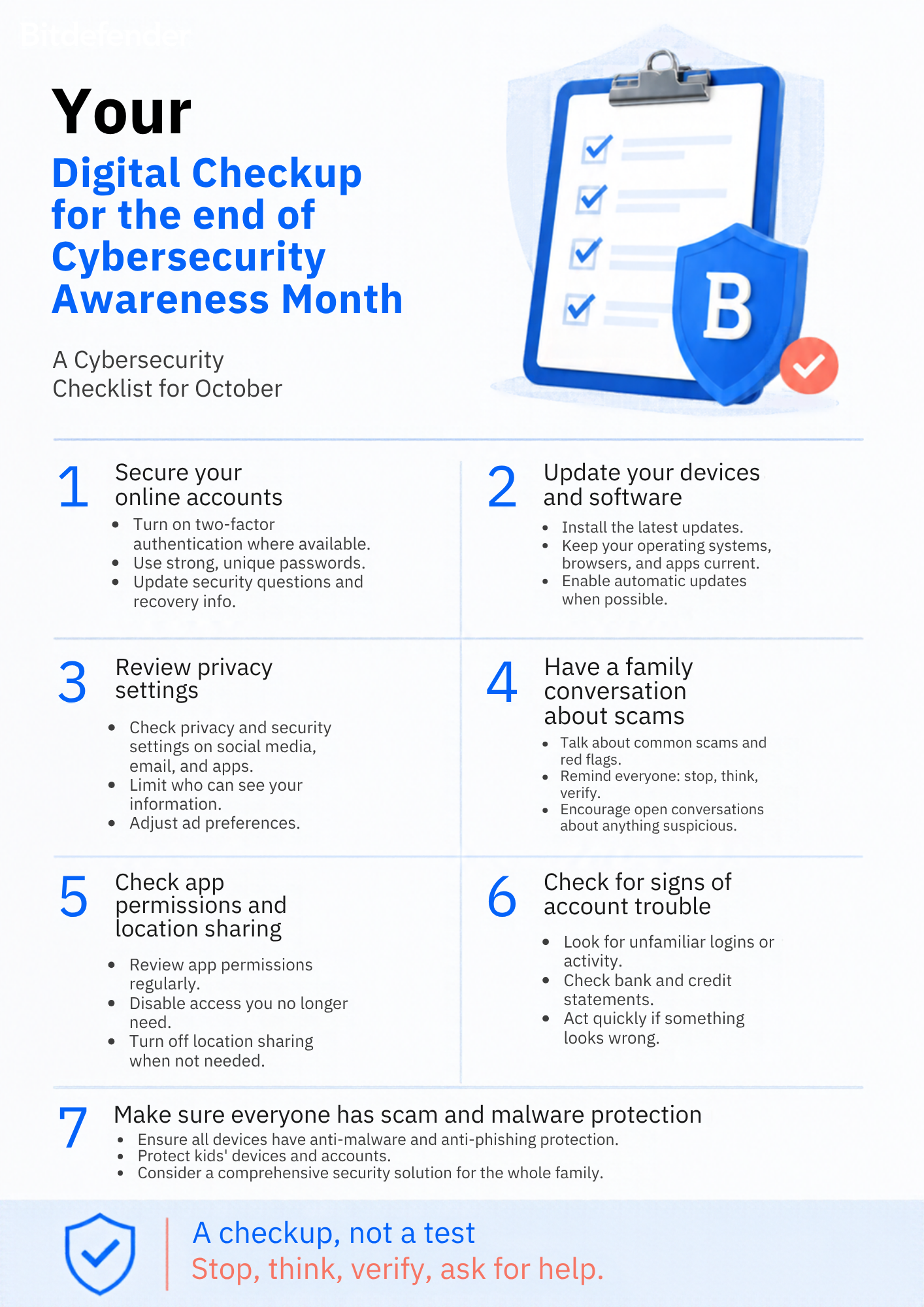
Your Cybersecurity Awareness Month checkup
Nobody gets every digital decision right. People are busy, messages can look convincing, and technology changes quickly.
That’s why an annual digital checkup matters. It gives your family a chance to tidy up the small things, learn a little together and make it easier to stop, think and ask for help next time something doesn’t quite feel right.
Cybersecurity Awareness Month may be ending, but digital safety shouldn't. Alongside the habits you build as a family, Bitdefender Family Plans can help protect up to five family members and 25 devices, including smartphones, tablets and computers.
Depending on the plan you choose, your family can benefit from real-time protection against malware, phishing, risky links, and online scams, plus a password manager, privacy tools, and scam protection for email, chat, SMS, and the web. Parents can also use Parental Control to set internet time limits, filter inappropriate content, view activity reports and, where appropriate, use location tracking to help children build safer, healthier online habits.
Explore Bitdefender Family Plans and find the protection that fits your family.
tags
Author

Alina is a history buff passionate about cybersecurity and anything sci-fi, advocating Bitdefender technologies and solutions. She spends most of her time between her two feline friends and traveling.
View all postsYou might also like
Bookmarks
