Geek Squad scams. All you need to know about them to stay safe

May 07, 2024
Geek Squad scams exploit the trust associated with Best Buy’s tech support brand to trick victims into revealing sensitive information or installing malware. From fake renewal notices to bogus tech support calls, scammers use urgency and fear to pressure people into acting quickly. Knowing how Geek Squad scams work can help you avoid financial loss and identity theft.
Key takeaways
- Most Geek Squad scams start with fake renewal or invoice emails. Fraudsters send phishing messages claiming you owe money or need to cancel an auto-renewing subscription.
- Tech support impersonation is a major threat. Scammers call victims pretending to be Geek Squad agents and request remote access or payment for fake virus infections.
- Phishing links and fake login pages steal credentials. Password reset emails and invoice links often redirect to spoofed Best Buy websites designed to capture login and financial information.
- Verification is your strongest defense. Never click unsolicited links, avoid giving remote access, and confirm any billing issue directly through Geek Squad’s official website or customer service channels.
How Geek Squad scams work and how to avoid them
For many people, Geek Squad is a trusted name for tech support and repairs on electronics bought from Best Buy. However, some cybercriminals are taking advantage of this trusted name by sending fake phishing emails pretending to be from Geek Squad.
These phishing emails are designed to look completely legitimate and like they are sent from Geek Squad representatives. They include made-up order numbers, fake billing information, and bogus renewal notices to make the emails seem real and official. However, the true goal of these criminals is to trick people into either clicking on malicious links that install malware on their devices, downloading malware disguised as software, or providing sensitive personal and financial information like passwords and credit card numbers.
If someone falls victim to these scam emails and takes the actions the scammers want, like clicking links or entering credentials, the cybercriminals can then access and steal that person's private data, like banking details.
Here’s an overview of the six most common Geek Squad Scams
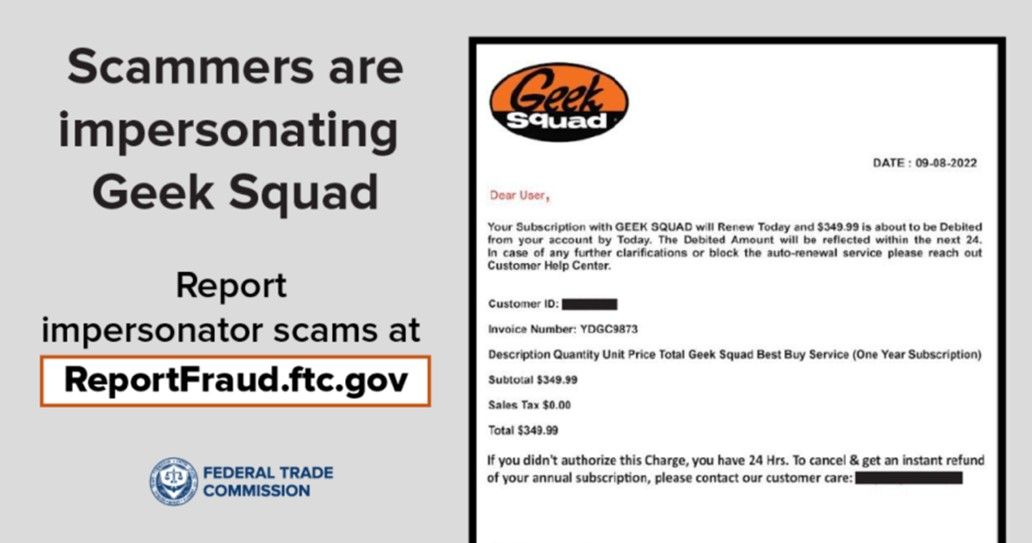
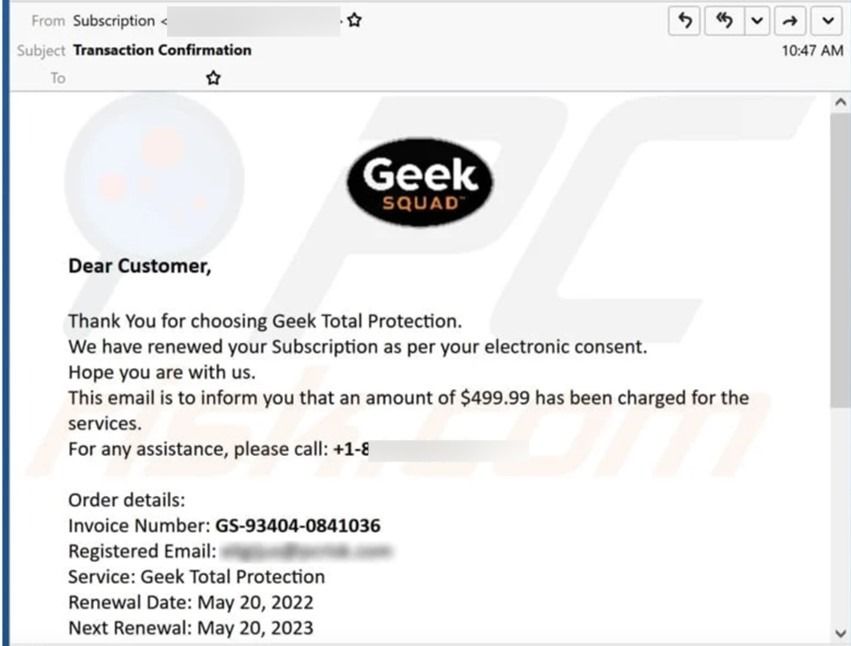
The 'renewal' scam
Scammers send emails claiming you have an auto-renewing Geek Squad or Best Buy subscription that needs to be cancelled. The email urges you to click a link to cancel and avoid charges. However, this link goes to a fake website designed to steal your credit card details and other sensitive information like your social security number when you try to "cancel" the nonexistent subscription.
The 'fake antivirus software' scam
Geek Squad scammers email you to warn you about malware infections and offer free antivirus software to download for protection. But the downloadable file is actually malware itself, designed to infect your device and potentially give scammers remote access, steal data, and target your financial accounts.
The 'Geek Squad tech support' scam
Scammers call you pretending to be Geek Squad technicians, claiming your device has a malware infection, or you owe money. They pressure you to allow remote access, download software (actually malware) onto your devices, or make payments for fake services. Sometimes, scammers create fake websites that provide fraudulent phone numbers for the Geek Squad. When you call, they route the calls to their phones and start running their scams.
Related: How To Spot and Avoid Tech Support Scams
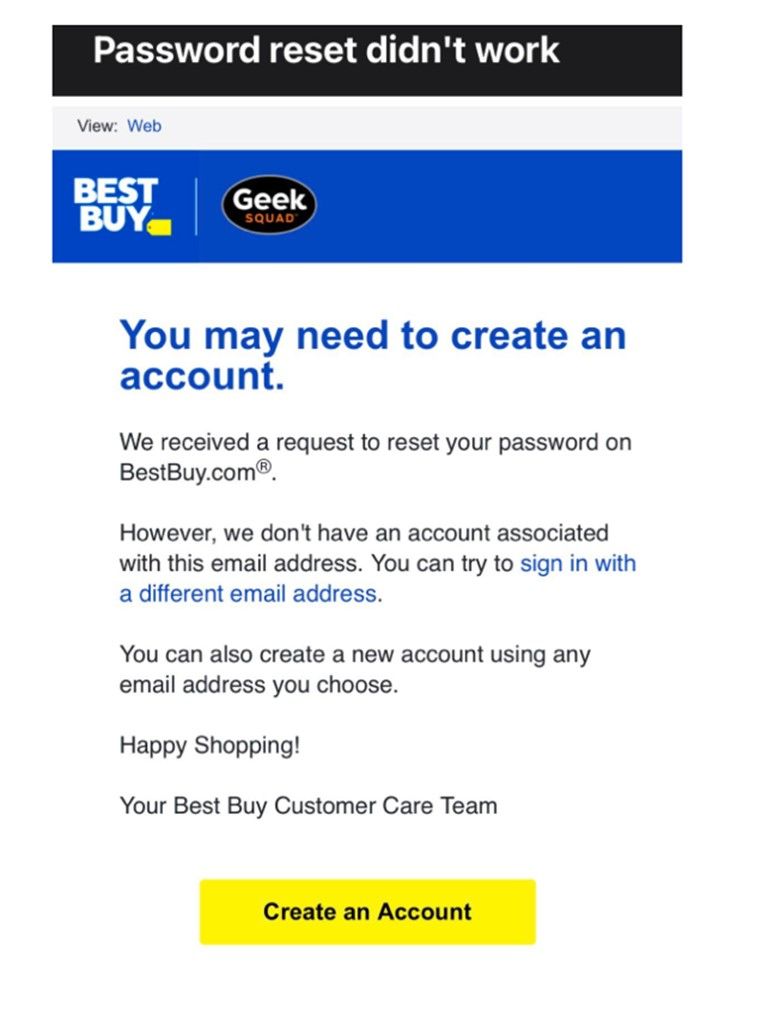
The 'password reset' scam
In this phishing attack, you may receive an email that prompts you to reset your password, citing suspicious activity on your account. However, if you click the password reset link in the email, it will take you to a fake website that looks like the official "BestBuy.com" login page. This phishing site is designed to trick you into providing your personal information. When you enter your username and password on this fake website, the scammers will receive and use them to obtain your financial information and make purchases in your name.
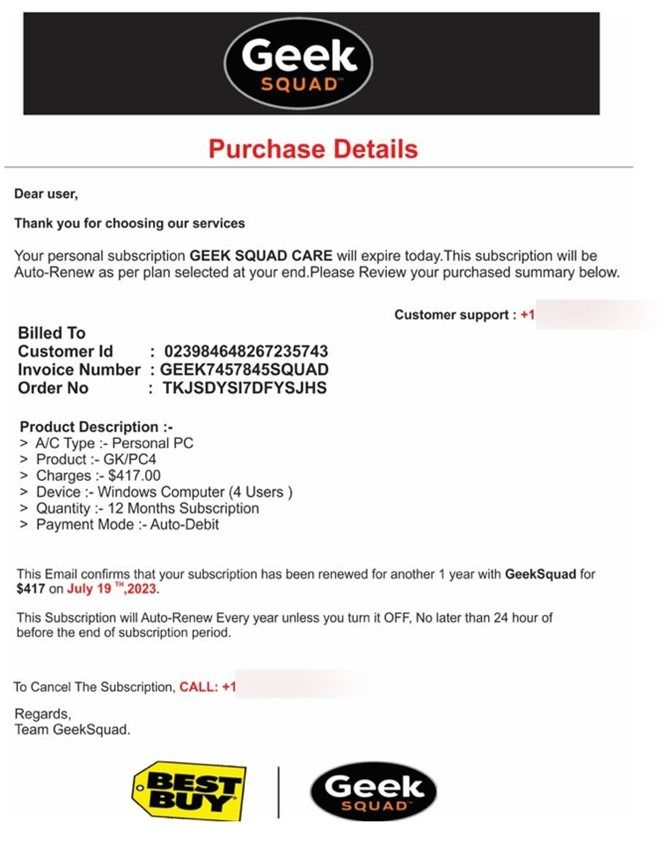
The 'invoice' scam
This scam aims to lure users into paying invoices to scammers' accounts. The scammers can either send phishing emails or hijack Geek Squad employee emails to gain access to all clients, their email accounts, previous transactions, banking information, and invoices and send them fake invoices.
Source: Office of Information Technology
The 'protection plan' scam
Scammers impersonate Geek Squad technicians to sell you worthless antivirus or protection plans that either do nothing, install malware, or give them access to your devices.
Signs you've been targeted by a Geek Squad scam
- You receive an invoice or renewal notice for Geek Squad services that you never requested.
- Emails from Geek Squad emails come from an address slightly different than the official one.
- You get an unexpected email or phone call claiming your device is infected with a virus. Legitimate companies cannot detect viruses on your devices without prior access.
- The scammers ask for remote access to your device to "fix" the supposed problem. Be cautious about allowing anyone to remotely access your computer or download software, especially if unsolicited.
- You receive an unsolicited phone call claiming to be from Geek Squad or another tech support company. These businesses rarely initiate direct contact.
- You get a password reset email for an account you do not actually have.
- Any links in the suspicious emails take you to websites that do not appear secure or are not on the proper company's official domain.
How to protect yourself from Geek Squad scams
The best defense against Geek Squad email scams is taking preventive measures:
- Verify the email address is from Geek Squad's official support team before responding. Scammers often use lookalike addresses.
- Never click on links or attachments from unfamiliar senders. You can scan the links/files with free online analysis tools if uncertain.
- Protect your devices with reliable antivirus software with real-time monitoring and malware removal capabilities.
- If scammers persist in sending suspicious emails, block the senders.
- When in doubt, contact Geek Squad directly through their official website or published customer service channels.
- Never send personal or financial information via unsecured channels like email.
- Check the communication you receive with Scamio.
Scamio is our AI-powered tool dedicated to helping you identify and avoid potential scams. When unsure about an email, you can check it with Scamio on WhatsApp, Facebook Messenger, or a web browser. It's free and easy to use. Copy/ paste a text or link, describe the situation, and upload the image or the QR code you want to verify. Scamio will analyze the data and tell you if anyone is trying to scam you. You can also help others stay safe by sharing Scamio with them.
Frequently asked questions (FAQ)
How do I cancel my Geek Squad subscription?
To cancel a Geek Squad or Best Buy subscription, log in to your official BestBuy.com account and manage your plan under “Subscriptions” or “Protection Plans.” You can also contact Geek Squad directly through Best Buy’s official customer service number or website. Avoid clicking cancellation links in unsolicited emails, as many Geek Squad scams use fake renewal notices to steal payment details.
What are 5 of the most current scams?
Five of the most common Geek Squad scams include:
- Fake auto-renewal or subscription billing emails
- Fraudulent tech support phone calls requesting remote access
- Phishing password reset emails
- Fake invoice payment requests
- Bogus antivirus or protection plan offers
Most Geek Squad scams aim to steal credit card information, login credentials, or install malware.
How do I report a fake Geek Squad email?
If you receive a fake Geek Squad email, do not click any links or download attachments. Report the message as phishing through your email provider and forward it to Best Buy’s official fraud reporting channel listed on their website. You can also report the scam to the FTC at ReportFraud.ftc.gov to help authorities track phishing campaigns.
tags
Author

Cristina Popov is a Denmark-based content creator and small business owner who has been writing for Bitdefender since 2017, making cybersecurity feel more human and less overwhelming.
View all postsYou might also like
Bookmarks
