Just because you use a Mac doesn't mean you're safe from ClickFix attacks

August 07, 2026
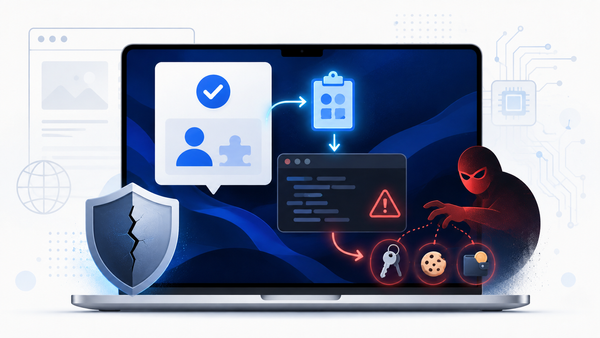
Mac users are encountering fake CAPTCHA checks, download prompts and troubleshooting pages that tell them to open Terminal and paste a command, just like on a Windows PC. That “verification,” however, can install an information stealer instead.
Just a few days ago, Microsoft tracked campaigns that use this ClickFix tactic to deliver MacSync and Atomic Stealer (AMOS), but it has been happening for a while. The message is simple: while macOS security features help, they won’t protect users if they run the attacker’s command themselves.
Key takeaways
- ClickFix is a social-engineering attack, not a conventional app download. It tries to trick you into copying and running a command.
- Mac-focused lures impersonate CAPTCHAs, software downloads and fixes for common problems such as low disk space.
- The resulting malware can target browser data, Keychain entries, iCloud-related data and cryptocurrency wallets.
- A real CAPTCHA never needs you to open Terminal, paste a command or run a script.
- If you have followed one of these prompts, disconnect the Mac from the internet, change passwords from a clean device and get the system checked promptly.
What is a Mac ClickFix attack?
ClickFix is a type of scam that turns a victim into the person who launches the malware. Instead of tricking the user into downloading a suspicious app, a website will display a fake error, a CAPTCHA prompt, or an installation step. It then instructs the victim to copy a command, open Terminal, paste it and press Enter.
Are Macs safe from ClickFix attacks?
No. ClickFix attacks target Mac users with fake CAPTCHAs, download pages and troubleshooting guides that tell them to paste a command into Terminal. This simple action can download the infostealer malware, which may steal browser data, Keychain entries, iCloud-related data and cryptocurrency wallet information.
A legitimate CAPTCHA never asks you to open Terminal or paste a command.
Why macOS protections don't stop all ClickFix scams
Apple’s security layers, including Gatekeeper, code-signing checks and notarization, offer users protection against many malicious applications.
When a user launches a downloaded app through Finder, macOS can apply its normal application-trust checks. When that same user runs a command in Terminal, the command can retrieve scripts or payloads remotely.
That does not mean macOS is insecure. It means the attacker has shifted from defeating a technical barrier to defeating the user. Dedicated security software and platform defenses can still detect parts of the chain, but no product can make “paste this unknown command into Terminal” a safe decision.
What attackers can steal
The malware behind Mac ClickFix attacks usually aims to steal information, not display ads or slow down a computer. Attackers may use stolen browser sessions, saved passwords and authentication data to take over accounts after the initial infection. That makes a successful ClickFix attack potentially wider than a single compromised Mac.
For example, Bitdefender researchers documented the same deception in a March 2026 campaign that abused Google Ads to impersonate Claude Code. A sponsored result led people to a fake documentation page hosted on a Squarespace subdomain; Mac visitors received an obfuscated command that decoded content and fetched a Mach-O backdoor.
How to spot and stop a fake CAPTCHA
Follow this rule: a website must never require Terminal to prove that you are human. Close the page if it asks you to:
- Press Command + Space to open Spotlight, then open Terminal
- Paste a “verification code,” “token” or command
- Run text that starts with curl, bash, zsh, osascript, python, base64 or a long unreadable string
- Bypass macOS warnings, disable security settings or enter an administrator password to continue a download
For families and small businesses, explain the rule in plain language: don’t paste website text into Terminal unless you understand exactly what it does and you trust the source. That one habit breaks the ClickFix chain before it starts.
What to do if you ran the command
Disconnect from Wi-Fi or Ethernet first. Then, from a known-clean device, change the passwords for your email, Apple Account, password manager, financial accounts and any account that was signed in on the Mac. Revoke any active sessions for online services.
FAQ
Can a fake CAPTCHA infect a Mac?
Answer: A CAPTCHA page alone does not infect the Mac. The danger starts when the page tricks you into copying and running a malicious Terminal command, which can download malware.
Does macOS protect me from ClickFix attacks?
Answer: macOS provides important protection, but ClickFix tries to bypass normal app-download checks by persuading you to execute a command yourself. Don’t run commands that a website gives you unless you fully understand and trust them.
What is the biggest red flag in a ClickFix scam?
Answer: Any “verification,” update or download page that tells you to open Terminal and paste text is a major red flag. Legitimate CAPTCHAs do not require that step.
What should I do if I pasted a command into Terminal?
Answer: Disconnect from the internet, change important passwords from another clean device, revoke active sessions and have the Mac scanned or reviewed. If cryptocurrency wallets were present, treat wallet credentials as exposed.
tags
Author

Silviu is a seasoned writer who followed the technology world for almost two decades, covering topics ranging from software to hardware and everything in between.
View all postsYou might also like
Bookmarks
