WhatsApp makes account theft harder: how to turn on the new defenses

August 26, 2026
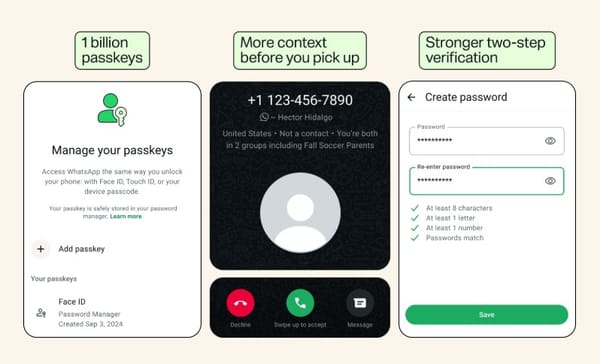
WhatsApp is strengthening account protection with full passwords for two-step verification, support for multiple passkeys and more information about calls from unknown numbers.
New account-security upgrades are meant to make account takeovers more difficult and help users think twice before answering suspicious calls.
The biggest change replaces the familiar six-digit two-step verification PIN with a longer password that can contain letters, numbers and special characters. WhatsApp is also letting people register multiple passkeys and giving Android users more context about callers who aren’t in their contact list.
Key takeaways
- WhatsApp is upgrading two-step verification from a six-digit PIN to a full password
- The stronger password can include letters, numbers and special characters
- Users can now add more than one passkey if they use both Android and iOS devices
- Android users will see more context before answering calls from unknown numbers
- Caller information may show whether the number is from another country or if the caller shares groups with the recipient
- The new warnings provide useful clues, but users should still independently verify unexpected requests
A full password replaces the six-digit PIN
Two-step verification gives WhatsApp users an additional layer of protection when registering their phone number on another device.
Criminals often try to hijack WhatsApp accounts by tricking people into disclosing the one-time registration code they receive by SMS or through the app. A scammer might pose as a friend, a support representative or even someone who claims to have entered the victim’s number by mistake.
Until now, users could protect the registration process with an additional six-digit PIN. Under the new system announced by Meta, that PIN becomes a full password that can be longer and contain a mixture of letters, numbers and special characters.
This isn’t a password users must enter every time they open WhatsApp. It acts as a second secret during account verification, helping block an intruder even if they manage to obtain the one-time registration code.
A longer password allows much more complexity than a six-digit PIN—but only if users choose it carefully. A short, predictable or reused password can still undermine the protection.
Unknown callers come with more context
WhatsApp is also adding information to incoming calls from numbers that aren’t saved in the recipient’s contact list.
On Android, the call screen may now indicate whether the number comes from a different country and whether the caller and recipient share any WhatsApp groups.
These details can give users a moment to assess an unexpected call instead of answering immediately. That pause matters because scammers often rely on surprise, authority and a sense of urgency to pressure people into acting before they have time to think.
However, the added context is not proof that a caller is trustworthy. Sharing a group with someone does not mean you know them, while a number with a familiar country code can still belong to a scammer.
Users who would rather not be interrupted by unsolicited calls can also activate WhatsApp’s Silence Unknown Callers feature. Silenced calls remain visible in the call list in case a legitimate caller needs to be contacted later.
Expanded passkey support
Passkeys let people verify access to WhatsApp using the authentication method already protecting their device, such as a fingerprint, facial recognition or screen-lock code.
Unlike passwords and one-time codes, passkeys can’t simply be read aloud or forwarded to someone posing as a support agent. This makes them particularly useful against phishing and social engineering.
WhatsApp parent company Meta says more than 1 billion people have already configured a WhatsApp passkey. Users can now add more than one passkey to the same account—useful for people accessing WhatsApp across Android and iOS devices.
How to activate the new WhatsApp protections
Start by updating WhatsApp through the official Google Play Store or Apple App Store. Features may roll out gradually, and some menu labels could differ slightly during the rollout.
Set up stronger two-step verification:
1. Open WhatsApp
2. Go to Settings
3. Select Account
4. Tap Two-step verification
5. Follow the instructions to activate the feature or replace your PIN with a password
6. Create a long, unique password containing a mixture of characters
7. Save it in a trusted password manager instead of reusing a password from another account
8. Add a recovery email address if WhatsApp offers the option
Create a passkey
1. Open WhatsApp
2. Go to Settings
3. Select Account
4. Tap Passkeys
5. Choose the option to create a passkey
6. Confirm the request using your fingerprint, face or device screen lock
If you use WhatsApp on both Android and iOS, follow the prompts to register an additional passkey when the option becomes available.
Silence unknown callers:
1. Open WhatsApp
2. Go to Settings
3. Select Privacy
4. Tap Calls
5. Enable Silence Unknown Callers
Security features don’t replace a cautious user
The upgrades make certain account-takeover tactics harder, but they cannot prevent all scams. A legitimate-looking WhatsApp account may already have been hijacked, and criminals can use convincing stories to persuade victims to transfer money, disclose information or link an unauthorized device.
WhatsApp users should also:
- Never share registration codes, passwords or device-linking codes with anyone
- Never scan an unexpected QR code to “verify” or “secure” an account
- Be suspicious of urgent requests involving money, gift cards, cryptocurrency or credentials
- Verify unusual messages from friends or relatives through a separate channel
- Review Linked devices regularly and remove anything unfamiliar
- Block and report suspicious accounts
- Keep WhatsApp, the phone’s operating system and security software up to date
Remember that end-to-end encryption protects WhatsApp conversations from being intercepted in transit. It can’t protect messages if a criminal takes control of the account or persuades the user to hand over information voluntarily.
The new password, passkey and caller-context features add useful barriers at several points in that process. However, users still need to treat unexpected calls and requests with caution—especially when the person on the other end wants an immediate decision.
On topic:
WhatsApp usernames explained: how to reserve yours and stay safe
WhatsApp detects new spyware activity from Israel’s NSO Group despite court order
iPhone-to-Android texts are finally encrypted – here’s what that means for you
tags
Author

Filip has 17 years of experience in technology journalism. In recent years, he has focused on cybersecurity in his role as a Security Analyst at Bitdefender.
View all postsYou might also like
Bookmarks
