Russian hackers are hijacking internet-connected cameras to spy on NATO and Ukraine

July 21, 2026
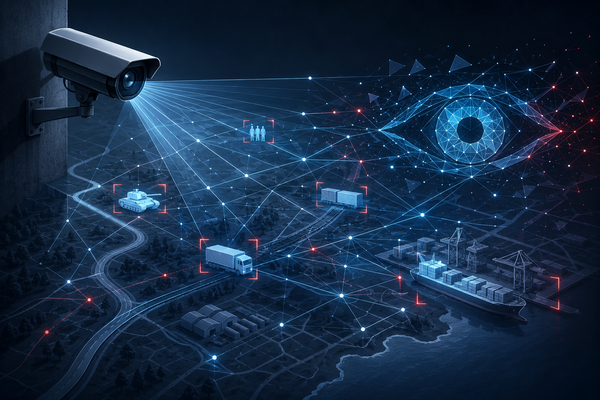
Russian intelligence services are actively compromising internet-connected security cameras across Europe to gather military intelligence, according to a new advisory from the Dutch General Intelligence and Security Service (AIVD) and Military Intelligence and Security Service (MIVD).
Hacked IP cameras have been used to track NATO military movements, monitor weapons shipments to Ukraine, and, inside Ukraine, help identify targets for military strikes, the agencies warn.
The warning is not about some new sophisticated malware family or some unknown zero-day vulnerability. The reality is much worse. Many IP cameras are still exposed directly to the internet with weak passwords, outdated firmware, or insecure default settings, and Russian state actors are taking advantage of that to gain access to live camera feeds across Europe.
Key takeaways
- Dutch intelligence says Russian state actors are systematically hacking internet-connected IP cameras across Europe.
- Compromised cameras are being used to monitor military logistics and NATO transportation routes.
- In Ukraine, stolen camera feeds have reportedly helped identify military targets for attacks.
- Many attacks succeed because cameras are exposed to the internet with weak security.
- Home users and businesses should restrict remote access, update firmware, enable MFA, and replace default passwords.
Ordinary security cameras have become intelligence sensors
Internet-connected cameras are now common in houses, offices, warehouses, factories, parking lots, ports, and transportation hubs.
When enough cameras are compromised, an intelligence service gains a point of view from the ground and can observe military convoys, shipping activity, border crossings, railway stations, airports, highways and industrial facilities
The Dutch Intelligence services say Russian operators automate much of this process by using image recognition software to search specifically for military vehicles and the equipment they transport.
Cameras inside Ukraine are reportedly being used for military targeting
Dutch intelligence also says compromised cameras have been used to pinpoint Ukrainian military personnel. According to the agencies, that intelligence has also been used in attempts to neutralize personnel and destroy military equipment.
While the advisory notes that similar intelligence gathered from cameras elsewhere in Europe has not been used for military attacks outside Ukraine, it warns that Russia has demonstrated the capability to collect this type of intelligence across EU and NATO countries.
“The Dutch services assess that there has been a systematic increase in the number of digital espionage operations by Russian state actors to support military operations since the start of the war in Ukraine,” reads the advisory.
Why are IP cameras so easy to compromise?
The advisory says attackers typically don't need sophisticated exploits. Instead, they first scan the internet for exposed devices. Once identified, attackers frequently gain access because cameras still use:
- Default usernames and passwords
- Weak credentials
- Outdated firmware
- Factory-default configurations
- Internet-exposed management interfaces
In many cases, these weaknesses have existed for years but remain widespread because cameras are often installed once and then forgotten.
The Dutch agencies says that the IP camera operations represent only one component of Russia's broader cyber campaign supporting military operations in Ukraine.
The advisory also references earlier warnings about Russian activity targeting Western logistics networks and transportation infrastructure.
How to secure your IP cameras
The advisory includes practical recommendations for both organizations and home users.
Keep cameras off the public internet
- Avoid exposing live streams directly to the internet.
- Don't use router port forwarding unless absolutely necessary.
- Disable Universal Plug and Play (UPnP).
- Access cameras remotely through a VPN instead.
- Disable unnecessary services such as Telnet, FTP, SSH, Bonjour, and UPnP.
- Prefer secure protocols such as HTTPS and RTSPS.
Limit what the camera can see
Even if a camera is compromised, reducing its field of view limits the intelligence it can provide.
- Point cameras only where necessary.
- Avoid covering logistics routes, loading docks, or public infrastructure when possible.
- Blur sensitive areas using built-in privacy masking.
- Hide GPS coordinates or other metadata visible in video streams.
Strengthen authentication
The Dutch services also recommend changing default passwords immediately, using strong and unique credentials and enabling multi-factor authentication whenever available.
Cameras should also have user accounts instead of using administrator accounts for daily viewing, and cameras should be on their own wireless network.
The origin of the device also matters
Interestingly, the Dutch advisory also recommends organizations consider where their cameras are manufactured. Countries including China, Russia, and Iran conduct offensive cyber programs targeting Dutch interests, suggesting that procurement decisions should include security considerations alongside price and features, it says.
FAQ
Can hackers really access home security cameras?
Yes. If cameras are exposed to the internet with weak passwords, outdated firmware, or insecure settings, attackers may be able to access them.
Were cameras used in military attacks?
According to Dutch intelligence, compromised cameras inside Ukraine have been used to identify military personnel and equipment that were later targeted. The advisory says this has not been observed outside Ukraine.
How do attackers find vulnerable cameras?
They scan the internet for exposed devices and attempt to log in using default credentials or exploit outdated software.
Should I disable remote access?
If you don't need internet access to your camera, yes. If remote viewing is necessary, using a VPN is considerably safer than exposing the camera directly to the internet.
What's the most important thing I should do today?
Change default passwords, update the firmware, enable multi-factor authentication if available, and remove unnecessary internet exposure.
tags
Author

Silviu is a seasoned writer who followed the technology world for almost two decades, covering topics ranging from software to hardware and everything in between.
View all postsYou might also like
Bookmarks
