Master XDR Investigations: A Deep Dive into the GravityZone XDR Demo Incident

February 18, 2026

An attacker’s initial access, whether through phishing, unmanaged devices, exploited vulnerabilities, or a compromised supply chain, marks the beginning of a dangerous chain of events.
The window between an attacker gaining a foothold and the moment they successfully exfiltrate data or deploy ransomware is the most critical time for your security team. This reality raises a vital question: How do you train your team to recognize and stop a complex, multi-stage attack before it occurs?
Whether you are an experienced GravityZone administrator, a new customer evaluating the platform, or a Bitdefender partner, the XDR Demo Incident is your "unbreakable" training tool. Designed for both internal education and customer demo sessions, this pre-configured scenario enables you to explore the full attack lifecycle in a safe, repeatable environment.
Anatomy of an Attack: The Demo Scenario
The XDR Demo Incident follows a complete attack lifecycle, showing the transition from a simple phishing email to a full-scale ransomware deployment and data exfiltration. While a standard GravityZone deployment would automatically block this attack at several stages, this scenario runs in report-only mode. This provides a unique opportunity to see how the platform correlates telemetry and generates detection alerts without terminating the malicious processes.
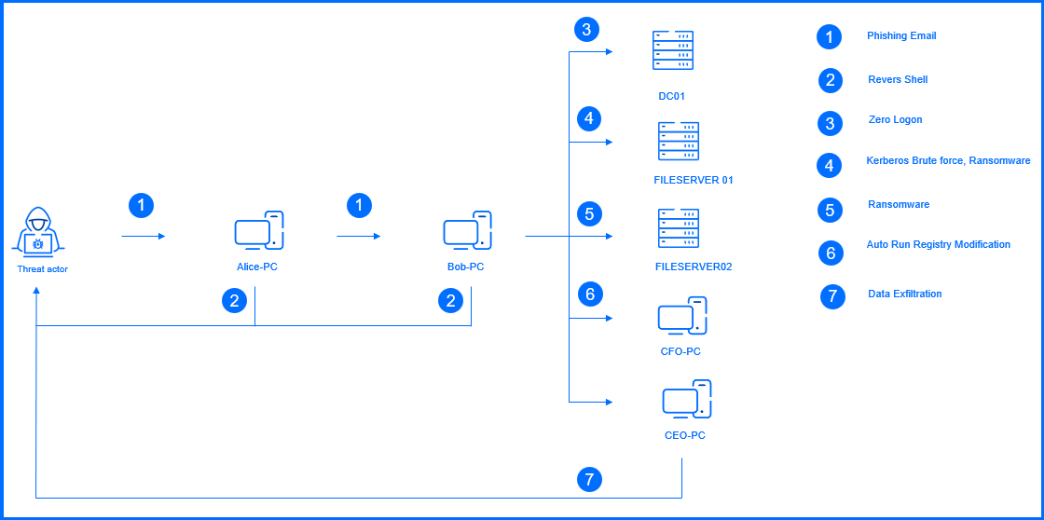
As you navigate through the demo incident, you have access to the same tools available in a real-world investigation within the GravityZone unified security console:
-
Incident Advisor: This serves as your default landing page, providing a comprehensive, intuitive, and visually organized overview of the event. It summarizes the "who, what, and where" of the attack, identifies the root cause, and assesses the potential impact on the organization.
-
Graph: Offers an interactive visual representation of the incident. It allows you to trace the attack's progression directly through the nodes (entities) and interaction paths, highlighting the exact sequence of elements—from the initial malicious attachment to the final exfiltration.
-
Response: In this section, you can review the specific actions requiring immediate attention, such as isolating endpoints or deleting malicious emails. While these actions are deactivated for the demo, they provide a clear roadmap of the remediation capabilities unlocked by various XDR sensors.
-
Historical Search: For those looking to dive deeper into the data, the Search section provides access to raw telemetry and forensic artifacts. You can use the XDR query language to apply complex search criteria—such as filtering specific IP addresses, process paths, or file hashes—to see the granular footprint left by the attacker.
Take the Next Step: Experience a Full Technical Walkthrough
To help you master your Incident Investigation skills through the GravityZone Console, we have published a comprehensive, step-by-step guide to this specific scenario.
Read the XDR Demo Incident walkthrough.
This guide is hosted on Bitdefender TechZone, our dedicated platform for technical security enthusiasts. Whether you are a Security Architect, SOC Engineer, or IT Manager, TechZone offers in-depth articles that explain Bitdefender technology and our defense-in-depth security approach.
tags
Author
Grzegorz Nocon is a graduate of the Faculty of Physics at the University of Silesia. With over 16 years of experience in the IT industry, he currently works as a Technical Marketing Engineer at Bitdefender. A strong supporter of a holistic approach to security and passionate about solving security problems in a comprehensive and integrated way. Outside of work, an avid CrossFit enthusiast and a lover of fantasy literature.
View all postsYou might also like
Bookmarks
