Safe Mode is a diagnostic operating mode, used mainly to troubleshoot problems affecting the normal operation of Windows. Such problems range from conflicting drivers to viruses preventing Windows from starting normally. In Safe Mode, only a few applications work and Windows loads just the basic drivers and a minimum of operating system components. This is why most viruses are inactive when using Windows in Safe Mode, and they can be easily removed.
Select one of the following to learn more:
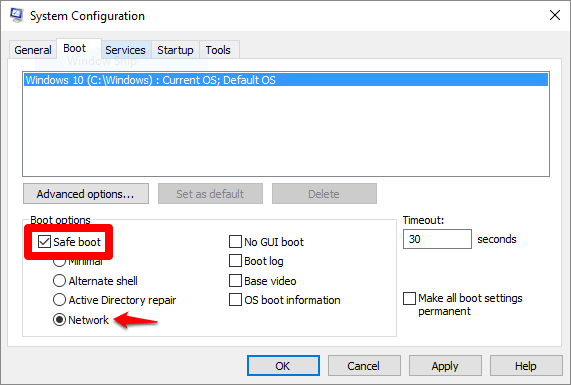
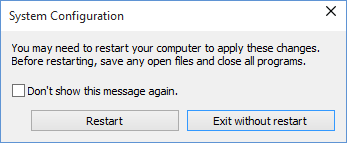
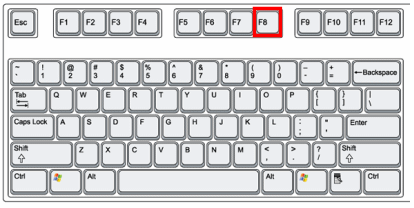
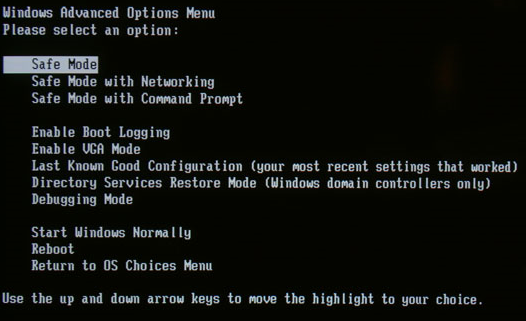
Before you choose one of the methods described here, make sure you know the password you’ve set up on your account (if you’re using a PIN). You cannot use a PIN to log in to your account in Safe Mode. You will have to use the full password. From Settings 1. Press the Windows logo key 2. Select Update & security 3. Under Advanced startup, select Restart now. 4. After your PC restarts to the Choose an option screen, go to Troubleshoot > Advanced options > Startup Settings > Restart. 5. After your PC restarts, you’ll see a list of options. Press 4 or F4 to start your PC in Safe Mode. Or if you’ll need to use the Internet, select 5 or F5 for Safe Mode with Networking. From the sign-in screen 1. Restart your PC. When you get to the Windows sign-in (login) screen, hold the Shift key down while you click the Power 2. After your PC restarts to the Choose an option screen, go to Troubleshoot > Advanced options > Startup Settings > Restart. 3. After your PC restarts, you’ll see a list of options. Press 4 or F4 to start your PC in Safe Mode. Or if you’ll need to use the Internet, select 5 or F5 for Safe Mode with Networking. From System Configuration 1. Launch System Configuration in Windows by simultaneously pressing the Windows 2. Switch to Boot tab and, in the Boot options section, select the Safe Boot with Network. Then click OK. NOTE: After you finished your work in Safe Mode, please open System Configuration again (step 1) and uncheck the Safe Boot option (step 2). Click OK and restart your machine. Your computer will now boot normally. 3. Windows will tell you that you need to reboot your computer in order for the new setting to take effect. After the reboot, your computer will automatically boot into Safe Mode. From a black or blank screen If you experience a black or blank screen error that prevents you from reaching the sign-in screen, follow the steps below. Alternatively, you can check this article. Enter a Windows key sequence to wake the screen If you have a keyboard connected, press the Windows logo key If Windows is responsive, a short beep will sound and the screen will blink or dim while Windows attempts to refresh the screen. Check your connections There might be a connection problem with your PC or display. Here are some things to try: • Here are some things to try if you’re using a desktop PC: 1. See if your display is plugged in and turned on. 2. If you have a TV connected to your PC, make sure it’s turned on and set to the input for your PC. 3. Try connecting to different video outputs on your PC. Sometimes a change in a driver can cause the video to be sent to a different display adapter or output. 4. If you have your own display adapter installed and connected to your display, try connecting your display to the built-in video on the motherboard. • If you’re using a laptop or tablet: 1. If it’s in a docking station, temporarily remove it. 2. Check that the external monitor is turned on and plugged in. 3. Check for damaged cables (DVI, VGA, HDMI, Thunderbolt, DisplayPort), loose connections, or faulty adapters (such as DVI-to-VGA). 4. If you’re using multiple displays, try projecting video to a different monitor. Press the Windows logo key Using F8 1. Restart the computer. 2. Tap the F8 key several times before Windows start in order to access the boot menu. 3. Select Safe Mode in the boot menu or Safe Mode with Networking if you want to have Internet access. 4. Press Enter and wait while Windows loads in Safe Mode. 5. This process ends with a confirmation message. Click OK to acknowledge. 6. To start Windows normally, simply reboot the system. From System Configuration 1. Launch System Configuration in Windows by simultaneously pressing the Windows 2. Switch to Boot tab and, in the Boot options section, select the Safe Boot with Network. Then click OK. NOTE: After you finished your work in Safe Mode, please open System Configuration again (step 1) and uncheck the Safe Boot option (step 2). Click OK and restart your machine. Your computer will now boot normally. 3. Windows will tell you that you need to reboot your computer in order for the new setting to take effect. After the reboot, your computer will automatically boot into Safe Mode.How to restart Windows 11, Windows 10, Windows 8.1 in Safe Mode
 + I on your keyboard to open Settings. If that doesn’t work, click the Start button in the lower-left corner of your screen, then select Settings
  .
.  , then click on Recovery
  .
. icon in the lower-right corner of the screen then select Restart. + R keys on your keyboard. Then write msconfig in the text field and press OK.
 + Ctrl + Shift + B. If you’re in tablet mode, simultaneously press the volume-up and volume-down buttons three times within 2 seconds. + P, select a display, and then press Enter.
How to restart Windows 7 & older versions in Safe Mode
 + R keys on your keyboard. Then write msconfig in the text field and press OK.